We’ve covered Contextual Feature Recommender (CFR) system in Firefox, to show extension recommendations based on sites you visit and we never thought Mozilla use the recommendation program to promote VPN service they’ve partnered with ProtonVPN and these can be disabled by toggling a preference in about:config, Mozilla now has added a UI option for CFR to about:preferences in Firefox 64 to let users opt-out of receiving extension recommendations, the option is enabled by default.
Block Extension/Contextual Feature Recommendations in Firefox 64
For the uninitiated, Mozilla has stared an experiment showing Extension recommendations to Nightly users since some time for now. Next time, browser to recommend Firefox features, so recommendations aren’t limited to extensions, Firefox features and Mozilla may use it to promote something that gives them profit as we learnt from ProtonVPN recommendation.
But currently, Firefox Nightly is recommending some extensions which are handpicked by Mozilla’s editorial team, the company neither receive any money for this nor extension developers cannot pay for their extension placement in recommendation program.
Like Mozilla now rolling Search shortcuts to Firefox users, the company has plans to ship Firefox 64 with extension recommendations to users in US first and offer an option in preferences to control them, the option is already available in beta here: options > General, Browsing > Recommend Extensions as you browse.

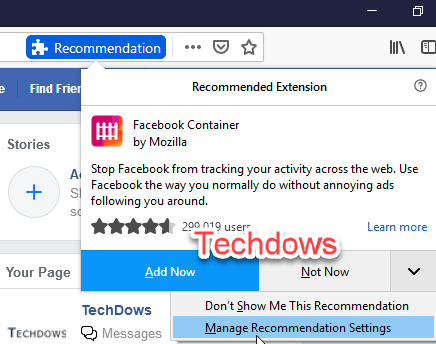
Meanwhile, the extension recommendation pop up has also been updated to include ‘Manage recommendation Settings” which takes the user to above setting in preferences.
. 
If you don’t know, here is how extension recommendations work:
Firefox recommeds user an extension only when it thinks user will find it useful. For instance, if you visit Facebook, you’ll be informed about Facebook Container extension in a non-annoying way. If you’re interested, you can install it by clicking ‘Add now’ or you can click’ not now’ or arrow next to it and choose ‘Don’t show this recommendation’.
We can say, the company has added UI for this about:config preference browser.newtabpage.activity-streamasrouterExperimentEnabled.
So, to block or disable Contextual relevant recommendations Firefox is showing, you need to turn off setting mentioned above.
Are you in favor of extension or any other recommendations in Firefox? Let us know in the comments below.





