Starting from Firefox 51 the browser shows Zoom indicator in the URL bar for sites if zoom level is not 100%, if you don’t want to set zoom level to default for a site (sites) Firefox is showing and don’t want to see the indicator in location bar, you can disable or hide it. Unfortunately, there is no hidden preference present in about:config for this as you need to rely on Classic theme restorer add-on.
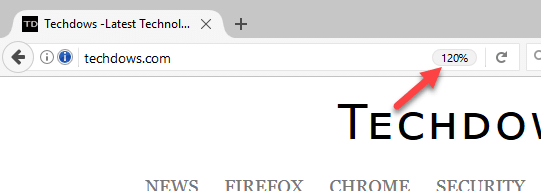
Disabling Zoom indicator in the URL bar in Firefox 51+
1. Once you’ve installed the latest version of CTR from AMO,
Visit add-ons manager >Extensions > Classic Theme Restorer > Options > Location bar
2. Check ‘Hide zoom button (if present)’.
3. Click OK.
READ: Mozilla removes Unified Complete Preference from Firefox
How to Restore Firefox’s Old Search UI and Preferences Window
Please share this article





