Most Spotify app login issues are fixed by resetting your Spotify password with the email on your account and logging in with that email, because Spotify stopped accepting usernames after September 1, 2026 and the Facebook, Apple and Google buttons can fail on their own.
This guide covers the password reset route, social login problems, offline mode, reinstalling the app on each platform, disabled or hacked accounts, and how to check whether Spotify itself is having issues.
Fastest fix when Spotify won't let you log in
Setting a Spotify password gives you an email-and-password login that works even when a social login button does not.
- Open Spotify's password reset page in a browser from the app's login screen or Spotify's support site.
- Enter the email address linked to your Spotify account. If you used Facebook, Apple or Google to sign up, enter that account's email address.
- Open the reset email from Spotify and follow the link. If the link says it is invalid, request a new one and open it in a private or incognito window.
- Set a new password you have not used before.
- Open the Spotify app, choose to log in with your email address, and enter the email and the new password.
If no reset email arrives, check spam, junk and other filtered folders. If Spotify says no account uses that address, try every other email you own, and your phone number, Apple or Google login.
Why can't I log in to Spotify? Match the cause to the fix
| What happens | Likely cause | Fix |
|---|---|---|
| Your username is refused | Spotify ended username login after September 1, 2026 | Log in with the email address on the account |
| Password rejected | Forgotten or changed password | Reset the password from the reset page |
| Continue with Facebook, Apple or Google fails | Social login broken or unavailable | Create a Spotify password with that account's email |
| Google login opens an empty new account | Google email differs from your Spotify email | Log in with email and password, then add Google as a login method |
| App says you are offline | Offline mode on, or no connection to Spotify | Turn off Offline mode and check the network |
| "Account disabled" message or email | Suspected fraud or a terms violation | Contact Spotify with proof of ownership |
| Email or password changed without you | Account taken over | Reset the password, then Sign out everywhere |
| Many people report the same problem | A Spotify-side outage | Check Spotify's Ongoing Issues board and @SpotifyStatus |
Spotify username login not working after September 2026
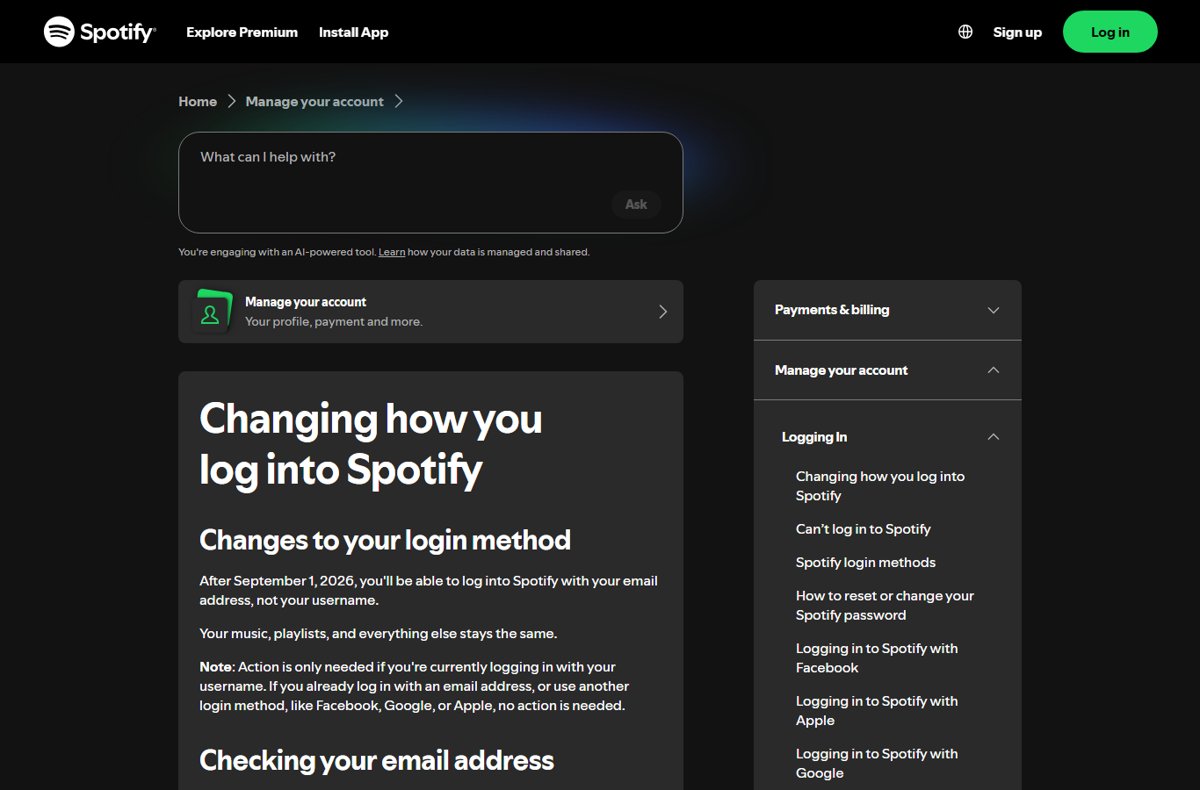
Spotify moved to email-based login: after September 1, 2026 you log in with your email address, not your username. Your music and playlists stay the same. Accounts that already log in with email, Facebook, Google or Apple need no change.
- If you can still reach your account page in a browser, log in and select Edit personal info under Account.
- Check that the email address is correct; if not, change it and select Save profile.
- If the account has no email address, open Edit login methods and select Add next to the method you want.
- Confirm the login details until the method appears under Current login methods.
- Log in to the app with that email address and your password, using password reset if you do not know the password.
- If the account has no correct email or other login method and you are locked out, contact Spotify support.
Can't log in to Spotify with Facebook, Apple or Google
When a social login button fails, the fix is the same for all three: create a Spotify password tied to that account's email, then log in with email and password instead.
| Login button | What to know | Workaround |
|---|---|---|
| Continue with Facebook | Facebook can no longer be added as a new login method; it only works if it is still on your Login methods page | Reset the password using your Facebook email, then log in with that email and the new password |
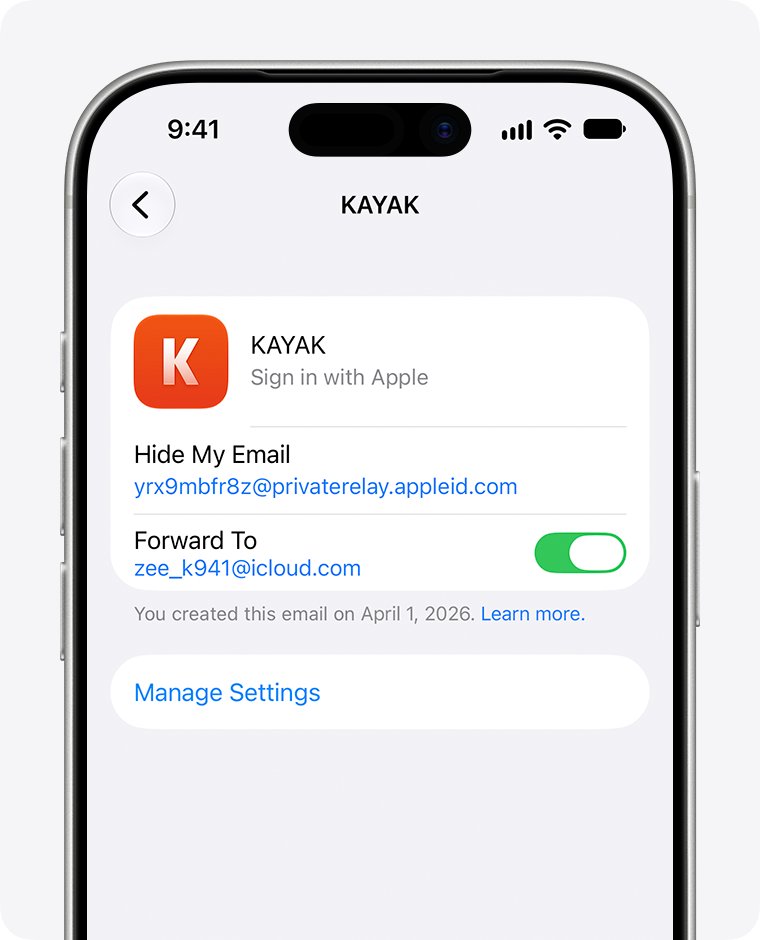
| Continue with Apple | Needs iOS 14 or later, an Apple ID with two-factor authentication, and iCloud sign-in | Reset the password with your email; if you hid your email, use the address Apple generated for Spotify |
| Continue with Google | Creates a new Spotify account if your Google and Spotify emails differ | Reset the password with your Google email, or log in with email and add Google under Edit login methods |
| Any of them in offline mode | Facebook and Apple logins do not work while the app is in offline mode | Use email and password, or turn off Offline mode first |
To find the hidden Apple email used for Spotify, open Settings on the iPhone, tap your name, select Password & Security, tap Apps Using Your Apple ID and check the address shared with Spotify.
Turn off Spotify offline mode and check the connection
A Spotify app that cannot reach the internet cannot log you in. Offline mode, a blocked network or a firewall rule are the usual reasons.
- On a phone or tablet, tap your profile picture, then Settings and privacy > Data-saving and offline, and switch Offline mode off.
- On Windows, click the three-dot menu, select File and turn off Offline mode; on a Mac, open the Spotify menu in the Apple menu bar and turn it off.
- Open another app or web page to confirm the device is online.
- Turn Wi-Fi off for 30 seconds and back on, or restart the home router.
- On a school, office or public network, try mobile data or another Wi-Fi, because some networks restrict Spotify.
- If you use a firewall, check that Spotify is set as an exception.
Update or reinstall the Spotify app to fix login errors
An outdated or damaged app can fail at the login screen. Update first, then reinstall. A reinstall removes downloaded music and podcasts, so you will need to download them again.
| Device | Update | Reinstall |
|---|---|---|
| iPhone or iPad | Open the App Store, tap your Apple ID image and tap Update next to Spotify | Touch and hold the Spotify icon, tap Remove App > Delete App, then install it again from the App Store |
| Android | Open Google Play Store, search for Spotify and tap Update | Settings > Apps > Spotify > Uninstall, then install from Google Play |
| Windows | Click your profile picture and select Update Spotify now when a blue dot appears | Start > Settings > Apps > Installed apps, select More next to Spotify > Uninstall, then reinstall from the Microsoft Store or Spotify |
| Mac | Click your profile picture and select Update Spotify now | Drag Spotify from Applications to the Trash, empty it, then download Spotify again |
If a quick reinstall does not help on Android, clear the app's storage and cache before uninstalling, and delete any com.spotify.music folder under Internal Storage > Android > data before reinstalling. You can download Spotify for Windows and Mac from the official sources when you reinstall on a computer.
Log in on the Spotify web player to test your account
The web player at open.spotify.com tells you whether the problem is your account or the app. If you can log in there, the account is fine and the app needs fixing.
- Open open.spotify.com in an up-to-date Chrome, Firefox, Edge, Opera or Safari.
- Select Log in and enter your email and password.
- If the page fails to load or log in, open it in a private or incognito window.
- If it works in the browser, update or reinstall the app.
- If it fails in the browser too, reset the password or check the account status sections below.
How to check your Spotify login works on every device
- Log in to your Spotify account page in a browser and open Edit login methods.
- Confirm Current login methods lists at least one method you can use, such as your email address.
- Check that the email shown under Edit personal info is one you can still open.
- Log out of the app and log back in with that method to prove it works.
- Play a track to confirm the app is online and not in offline mode.
Spotify login still not working: fixes by symptom
No password reset email arrives
The email went to a filtered folder, or the address is not the one on the account.
- Check spam, junk and any filtered folders.
- Request the reset again with each email address you own; Spotify only sends it to a registered address.
- If you have tried many times in a short period, wait and try later, or use a different device or browser.
- If you no longer have access to the email, try to regain it, or create a new Spotify account and start fresh.
The password reset link says it is invalid
The link expired or was opened in a browser session that blocked it.
- Request a new reset email.
- Copy the link and open it in a private or incognito browser window.
- Set the new password and log in to the app.
Spotify says the account is disabled
Spotify disables accounts it suspects of fraudulent activity or terms violations.
- Read the email or message Spotify sent for the reason.
- Gather proof of ownership, purchase or payment details, such as a receipt or bank statement.
- Contact Spotify support and ask for a review.
Your password stopped working and the email or playlists changed
Someone else logged in, usually with a password leaked from another service.
- Reset your Spotify password and open the reset link in a private window.
- Log in to your account page and select Sign out everywhere; it can take up to an hour to apply.
- Open Manage apps and remove access for third-party apps you do not recognize.
- Change the password for the email, Facebook or Apple account linked to Spotify.
- If you cannot get in at all, contact Spotify to secure the account.
Is Spotify having issues right now?
A service-side problem stops logins for many users at once.
- Open Spotify's Ongoing Issues board from support.spotify.com and search for your problem.
- Check @SpotifyStatus for outage posts.
- If the issue is listed as under investigation, wait for Spotify's status update before reinstalling anything.
Spotify app login FAQ
Why can't I log in to Spotify?
The usual reasons are a forgotten password, logging in with a username after Spotify switched to email-only login on September 1, 2026, a failing Facebook, Apple or Google button, offline mode, or an outdated app. Resetting the password and logging in with email fixes most cases.
How do I log in to the Spotify app?
Open the app and choose the login method on your account: email and password, phone number, or Continue with Apple, Google or Facebook. If one method fails, reset your password with that account's email and log in with email instead.
Why won't Spotify let me log in with my username?
Spotify stopped username login after September 1, 2026. Log in with the email address on your account instead. If the account has no email, add one under Edit login methods, or contact Spotify if you are already locked out.
Why is the Spotify app not working?
Check offline mode, your internet connection and any firewall first, then update the app. If it still fails, reinstall Spotify, and check the Ongoing Issues board and @SpotifyStatus to see whether Spotify has a wider problem.
Is Spotify having issues right now?
Check Spotify's Ongoing Issues board on its Community site and the @SpotifyStatus account. Both list current app and service problems. If your issue is not listed, the problem is more likely on your device, network or account.
What do I do if I can't log into my Spotify account with Facebook?
Use the password reset form with the email address on your Facebook account, then log in with that email and the new password. Facebook can no longer be added as a new login method on Spotify.
How do I see where I'm logged in to Spotify?
Use Sign out everywhere on your account page to log your account out of every device at once. It can take up to an hour to apply everywhere, and you then log back in only on your own devices.
Can I recover a Spotify account without access to the email?
You need access to the account's email to open the reset link. Try to regain that mailbox, check whether you signed up with a phone number, Apple or Google instead, or contact Spotify support. Otherwise you can create a new account.
Bottom line on fixing Spotify login issues
Reset your Spotify password with the email on the account and log in with email and password, then add a second login method you control. Email login works when usernames and social buttons fail, and keeping a verified email plus a backup method on the account prevents the next lockout.