If the App Store says your account has been disabled when you try to update apps, read the exact wording of the alert: a security lock needs an Apple Account password reset, while a disabled Media & Purchases account needs a reactivation request that starts from the Continue button in the alert.
This guide matches each disabled, locked and billing message to its fix on iPhone, iPad and Mac, shows how to pay an unpaid balance, and covers what to do when updates still fail afterwards.
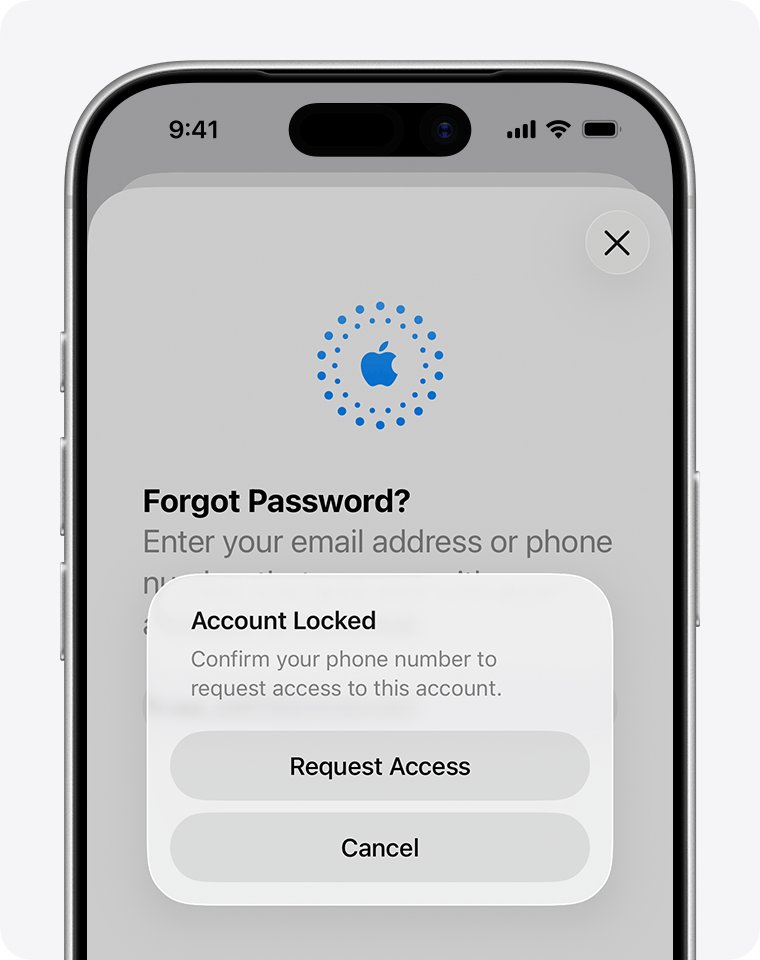
Fix “your account has been disabled” in the App Store on iPhone
Most App Store update failures with this alert come from an Apple Account that locked itself after too many wrong password attempts. Apple's fix is a password reset, which you can do from the iPhone that is already signed in.
- Read the alert. If it says Your Media & Purchases account has been disabled, tap Continue in the alert and follow the reactivation request instead.
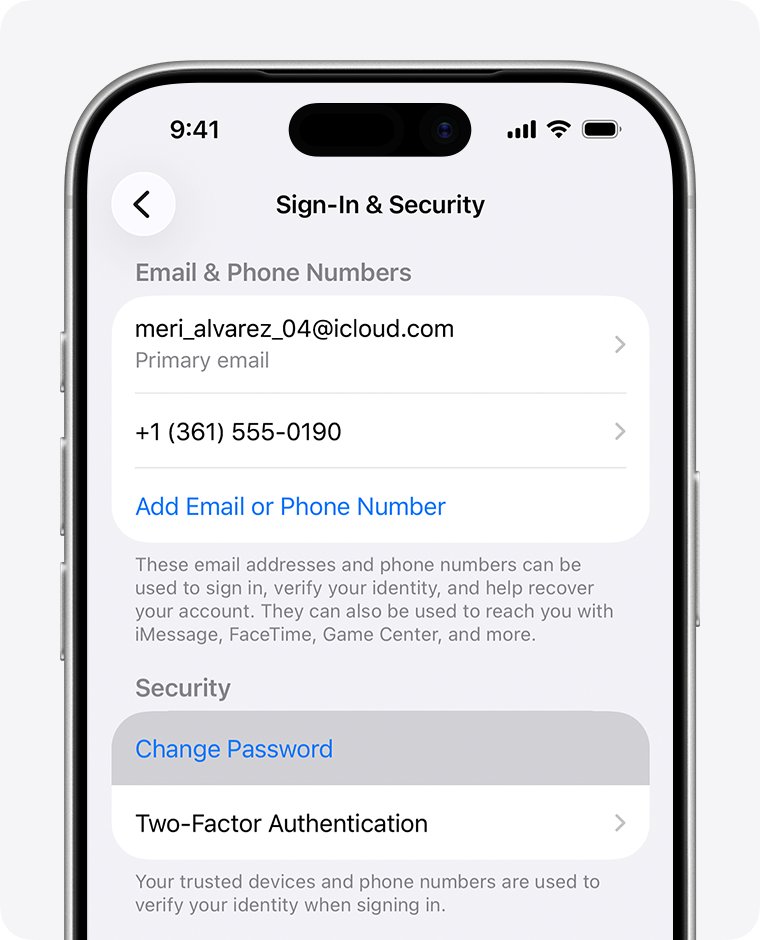
- If it says the Apple Account has been disabled for security reasons or has been locked for security reasons, open the Settings app.
- Tap your name at the top of Settings.
- Tap Sign-In & Security, then tap Change Password.
- Follow the onscreen instructions to set a new Apple Account password.
- Open the App Store, tap your photo at the top of the screen, then tap Update All.
If you cannot change the password on this iPhone, use Forgot password? on the sign-in screen or start at iforgot.apple.com, covered in the reset section below.
Apple Account disabled messages and what each one means
Apple uses several similar alerts, and each one has a different fix. Match the words on your screen to a row.
| Message you see | What it means | Fix |
|---|---|---|
| This Apple Account has been disabled for security reasons | The account locked automatically after the password or other details were entered wrongly too many times | Reset your Apple Account password |
| You can’t sign in because your account was disabled for security reasons | Same automatic security lock | Reset your Apple Account password |
| This Apple Account has been locked for security reasons | Same automatic security lock | Reset your Apple Account password |
| Your Apple Account is locked or not active | Access to the account has been suspended | Tap Request Access in the alert, or request access at iforgot.apple.com/unlock |
| Your Media & Purchases account has been disabled | Only App Store and media purchases are blocked | Tap Continue in the alert to request reactivation |
| Billing problem with a previous purchase, or Verification required | Apple could not charge your payment method for an earlier purchase | Pay the unpaid balance or change the payment method |
| Purchases on your Apple Account have been limited | Apple detected suspicious activity and limited new purchases | Past purchases can still be downloaded and updated |
Reset your Apple Account password when it was disabled for security reasons
A security lock lifts once you reset the password. A trusted device is the fastest route: an iPhone, iPad, Apple Watch, Apple Vision Pro or Mac already signed in with two-factor authentication.
- On the device showing the alert, tap Forgot password? or Forgot password or don’t have an Apple Account? on the sign-in screen.
- Follow the onscreen instructions. They send you to a trusted device or ask for a recovery factor.
- Have your recovery factors ready: your trusted phone number, your Apple Account email address, or the CVV of the card on the account.
- If you set up a recovery contact, ask that person for the 6-digit code when prompted.
- Enter a new password when asked, then sign in to the App Store with it.
To change the Apple Account password on a Mac, choose Apple menu > System Settings, click your name, click Sign-In & Security, then click Change Password. Apple might ask you to wait one hour before the change when Stolen Device Protection applies.
Apple Account recovery when you can’t reset the password
Account recovery is for readers with no trusted device and no recovery factors, for example after trading in the old iPhone and changing phone numbers. Apple says it can take several days or more.
- On a device running iOS 17 or later, open Safari and go to iforgot.apple.com.
- Follow the instructions. The site redirects you to a trusted device when it can.
- On a borrowed device or one at an Apple Store, open the Support app instead, scroll to Support Tools, tap Reset Password, then tap Help Someone Else.
- If you started recovery on the web, turn off all your Apple devices while you wait.
- When Apple contacts you, follow the link to set a new password and sign in again.
Signing in on an old device with the right password cancels the recovery request, so do not keep trying the password during the wait.
Request access to a locked or not active Apple Account
When the alert says the account is locked or not active, Apple may restore access after a request.
- Tap Request Access in the alert if it appears on your screen.
- If the alert has gone, go to iforgot.apple.com/unlock in a browser.
- Enter your Apple Account email address or phone number and follow the prompts.
- Wait for Apple's response to the request before you try the App Store again.
If Apple denies the request or shows This Apple Account is locked and can’t be used, the account cannot be recovered. You can create a new Apple Account, and if Activation Lock blocks a device you own, start an Activation Lock support request with proof of purchase.
Reactivate a disabled Media & Purchases account
This message blocks App Store downloads and updates while iCloud and other services keep working.
- Try to update an app again so the Your Media & Purchases account has been disabled alert appears.
- Tap Continue in the alert.
- Complete the reactivation request that opens.
- If the alert does not offer Continue, use the request reactivation form on getsupport.apple.com.
- After Apple reactivates the account, open the App Store and run the update again.
Pay an unpaid App Store balance to update apps again
A “billing problem with a previous purchase” or “verification required” message means Apple could not charge your payment method. Until the balance is paid, you might not be able to make purchases, download free apps or use subscriptions.
- Open the Settings app and tap your name.
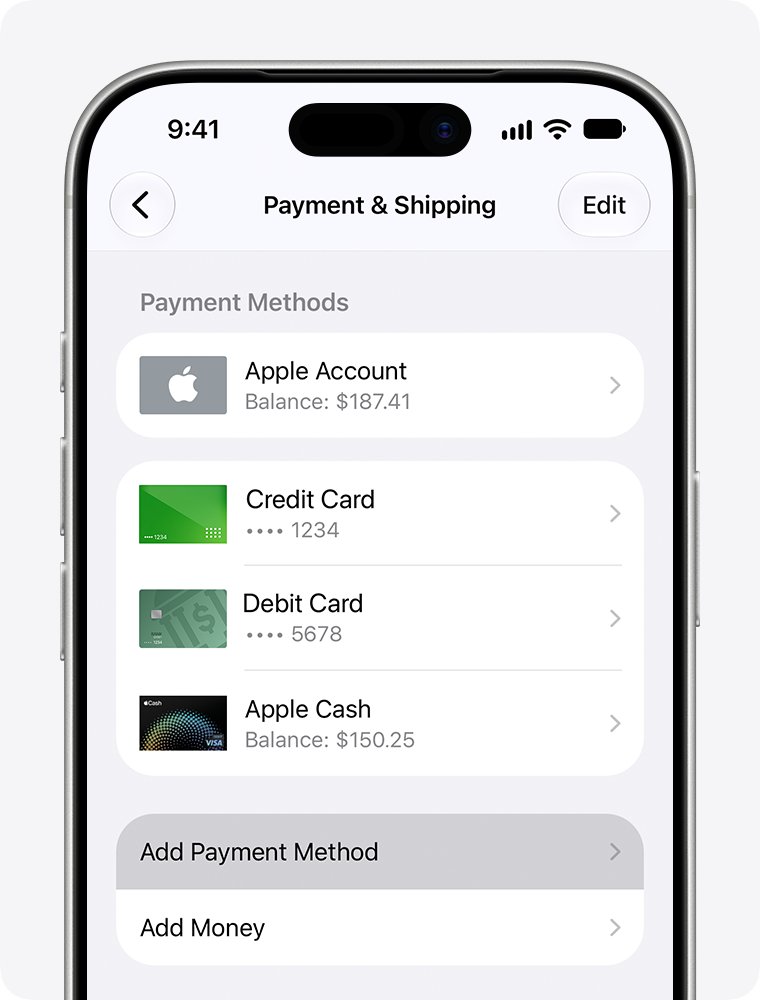
- Tap Payment & Shipping. Sign in with your Apple Account if asked.
- Tap Fix Payment Information.
- Tap Try Again to retry the charge on your current payment method.
- If the charge fails again, add a new valid payment method and remove the old one. The new method is charged automatically.
You can also redeem an Apple Gift Card or App Store Card, then go to Settings > your name > Media & Purchases > View Account > Purchase History and tap the order marked Amount You Owe to pay it.
Change the Apple Account payment method on iPhone, Mac or Windows
Apple may need a valid payment method on file even for free apps, so an expired card can block updates.
- On iPhone or iPad, open Settings, tap your name, then tap Payment & Shipping.
- Tap Add Payment Method, enter the new card or method, then tap Done.
- Tap Edit, tap the red delete button next to the old payment method, then tap Remove.
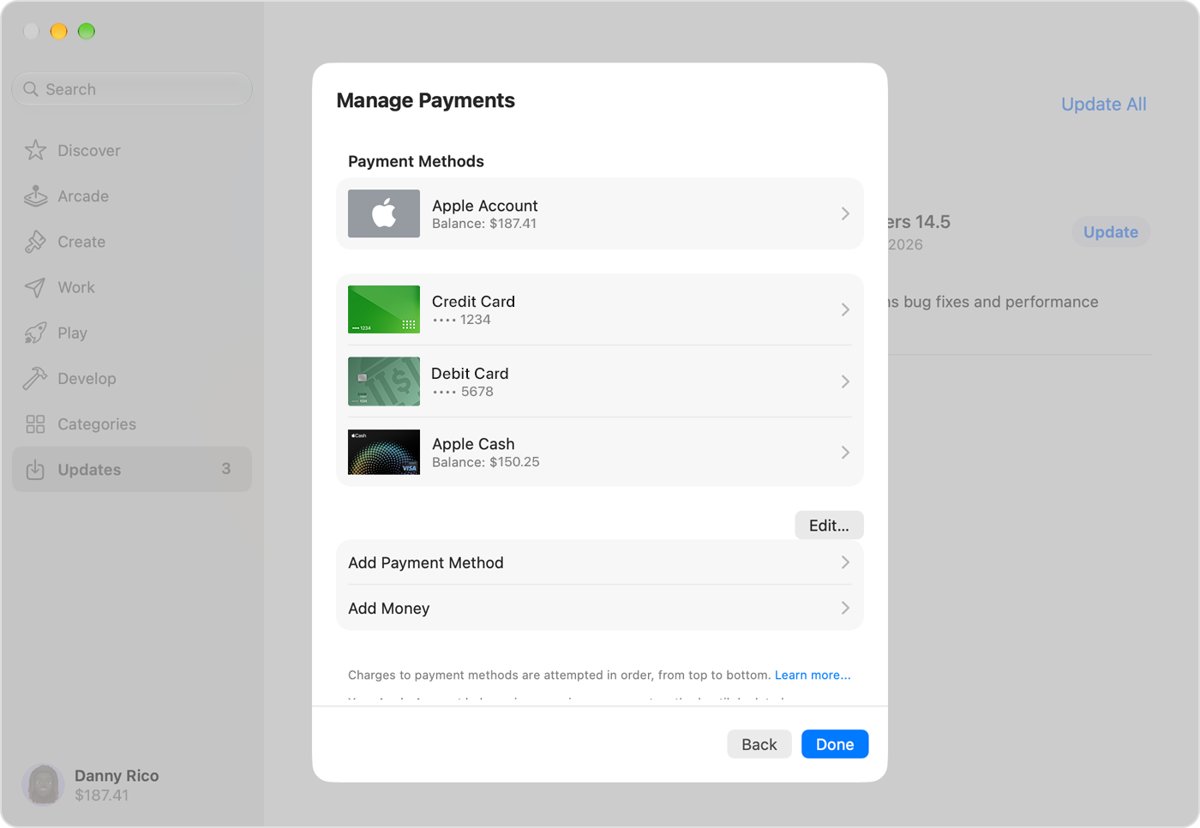
- On a Mac, open the App Store, click your name at the bottom of the sidebar, click your name again, then click Payment Methods.
- On a Windows PC, open the Apple Music or Apple TV app, click your name, click View My Account, then click Manage Payments next to Payment Information.
Confirm the App Store updates your apps again
- Open the App Store on your iPhone or iPad.
- Tap the My Account button or your photo at the top of the screen.
- Check that your name and email appear without a disabled or billing alert.
- Tap App Updates, then tap Update All.
- Check that the app drops off the App Updates list once its update finishes.
On a Mac, open the App Store, click Updates in the sidebar, then click Update All.
Purchases limited on Apple Account: can you still update apps?
A purchase limit is not the same as a disabled account. Apple applies it when it detects suspicious activity.
| What you try | Works while purchases are limited? |
|---|---|
| Update or redownload apps you bought before the limit | Yes |
| Buy new apps or start free trials | Possibly not |
| Redeem gift cards and codes | Possibly not |
| Keep existing subscriptions | Yes, with a valid payment method on file |
| Receive unreleased pre-orders | No, they are not processed or charged |
Why can’t I update apps on iPhone after fixing my account?
Why won't it let you update even after the password reset
The App Store may still be signed in with the old session or an old payment problem remains.
- Restart your iPhone or iPad.
- Open Settings, tap your name, then tap Payment & Shipping and check for Fix Payment Information.
- Open the App Store, tap your photo, then tap App Updates and try Update on one app.
Why is my update taking so long or stuck on Waiting
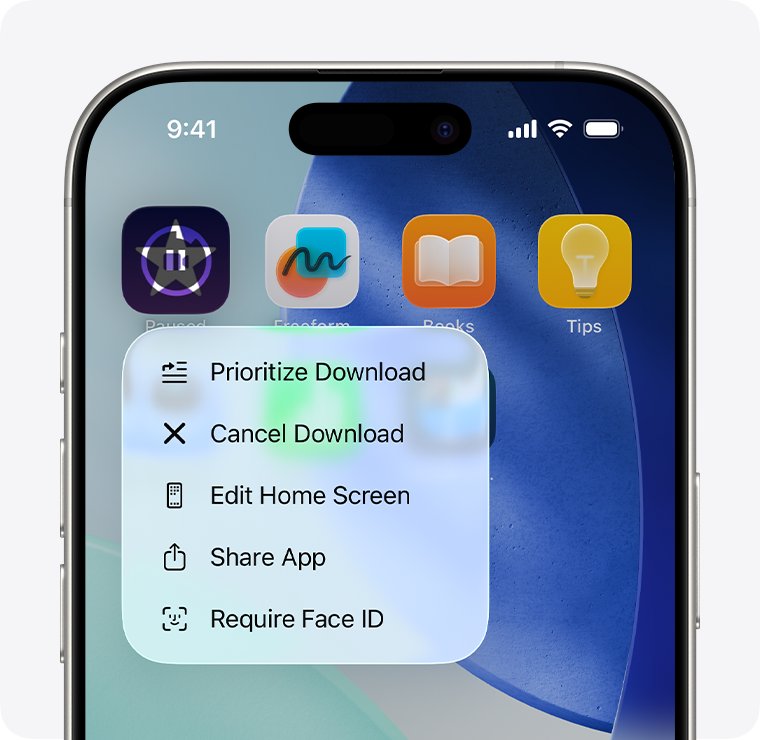
Other downloads are queued ahead of the app.
- On the Home Screen, touch and hold the app.
- Choose Prioritize Download from the menu.
- Restart the device if the download still does not move.
Why isn't my update working for free apps
Apple can require a valid payment method on file even for free apps.
- Open Settings, tap your name, then tap Payment & Shipping.
- Tap Add Payment Method and add a valid method.
- Try the update again.
Why can't I update apps with an age restriction
In some countries or regions, Apple asks you to confirm that you are an adult before certain downloads.
- Try the update again and look for an age confirmation prompt.
- Follow the onscreen steps to confirm your age.
- Return to App Updates and tap Update.
Why is my update failing with account recovery in progress
A recovery request blocks sign-in until Apple finishes it, and device activity can cancel it.
- Leave the recovery request running and avoid signing in on other devices.
- Wait for Apple's message with the link to set a new password.
- Sign in to the App Store with the new password and update your apps.
If none of these clear the alert, contact Apple Support from the Support app or getsupport.apple.com.
App Store account disabled FAQ
Why can't I update my apps when my account has been disabled?
App updates come through your Apple Account, so a disabled account blocks them. A security lock needs a password reset, a disabled Media & Purchases account needs a reactivation request, and a billing message needs the unpaid balance paid.
Why won't it let you update apps on iPhone?
The most common causes are a locked or disabled Apple Account, an unpaid balance from a previous purchase, or no valid payment method on file. Read the alert wording, then fix the matching cause in Settings under your name.
Why is my update failing with a billing problem message?
A billing problem with a previous purchase means Apple could not charge your payment method. Open Settings, tap your name, tap Payment & Shipping, tap Fix Payment Information, then tap Try Again or add a new payment method.
How long does it take to unlock a disabled Apple Account?
A password reset on a trusted device unlocks the account straight away, though Apple might ask you to wait one hour under Stolen Device Protection. Account recovery without a trusted device or recovery factors can take several days or more.
Where do I find app updates on iPhone?
Open the App Store, tap the My Account button or your photo at the top of the screen, then tap App Updates. Tap Update next to one app, or tap Update All to install every pending update.
How do I check if I have any app updates?
Open the App Store and tap your photo at the top of the screen. The App Updates list shows every app with a pending update. If the list is empty, all your apps are current.
Can I still update apps if purchases are limited on my Apple Account?
Yes. When Apple limits purchases for security or fraud prevention, you can still access, download and update content you bought before the limit. New purchases, trials and gift card redemptions may be blocked.
What if Apple denies my request to unlock the account?
If the request is denied or you see “This Apple Account is locked and can’t be used,” Apple will not restore it. Create a new Apple Account, and start an Activation Lock support request if a device you own is locked.
Fastest fix for a disabled App Store account
Read the exact alert, then reset the Apple Account password from a trusted device for any security lock, or tap Continue for a disabled Media & Purchases account. Each message has its own fix, and the password reset or reactivation request clears the block faster than account recovery, which can take several days.