To sign into Fitbit with your Google Account, open the Google Health app (the Fitbit app's name since May 19, 2026), tap Sign in with Google and pick your Google Account.
Google Accounts are no longer optional: old Fitbit logins stopped working after May 19, 2026. This guide covers signing in on Android, iPhone and the web, moving an old Fitbit account or family to Google, and fixing sign-in failures.
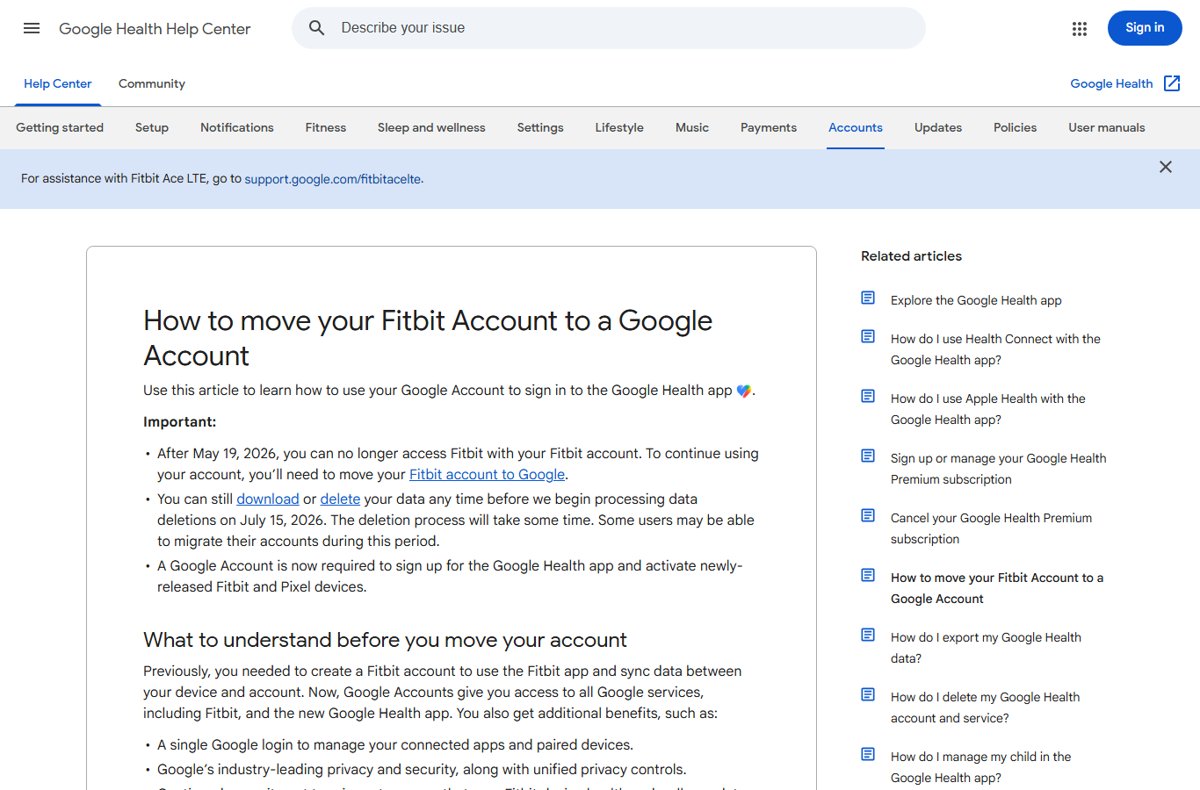
Sign into Fitbit with Google in the Google Health app
These steps work for anyone who already signs in with a Google Account, and for new users. If you still have an original Fitbit email-and-password login, move it to Google first with the steps further down.
- Install or update the Google Health app from the Google Play Store or the App Store.
- Open the Google Health app.
- Tap Sign in with Google.
- Choose the Google Account that holds your Fitbit data from the list.
- If you have no Google Account, tap Sign in, then Create account, and follow the prompts.
- Follow the on-screen prompts to connect your Fitbit device so it can sync.
Google Workspace accounts from an employer or school cannot be linked to Google Health. Use a personal Google Account.
What's changing with Fitbit sign-in?
Google moved Fitbit from its own account system to Google Accounts and renamed the app at the same time. The table lists the dates Google has published.
| Change | What Google says | What it means for you |
|---|---|---|
| Fitbit app renamed | The Fitbit app became the Google Health app starting May 19, 2026, with updates rolling out between May 19 and May 26 | Look for Google Health, not Fitbit, on your phone and in the app stores |
| Fitbit accounts retired | After May 19, 2026, you can no longer access Fitbit with a Fitbit account | Sign-in now needs a Google Account |
| Data deletion | Google began processing data deletions for unmoved accounts on July 15, 2026; the process takes time and some users may still be able to migrate during it | Move or export your data as soon as possible if you have not already |
| New devices and sign-ups | A Google Account is required to sign up for the Google Health app and to activate newly released Fitbit and Pixel devices | New users create or choose a Google Account during setup |
| Fitbit Premium renamed | Fitbit Premium became Google Health Premium on May 19, 2026 | Your subscription carries the new name; the Google Health Coach needs Premium |
Fitbit Google Account sign-in prerequisites and requirements
Check these before you start, because an unsupported phone or account type is the most common reason the sign-in screen fails.
| Requirement | Details | How to check |
|---|---|---|
| A personal Google Account | Required for all Google Health products; Workspace accounts cannot be linked | Visit the Google Accounts page while signed in, or create an account during setup |
| Android phone | Android 11 or later | Open your phone's Settings and look at the Android version |
| iPhone | iOS 16.4 or later | Check the iOS version in the iPhone's settings |
| Google Health app version | Version 5.0 or later; older versions may have issues | In the app, tap the Today tab > your profile picture > Help; the version is at the bottom |
| Correct phone clock (Android) | The time must be within two minutes of the correct time | Turn on Automatic date and time in your phone's settings |
| Children under 13 | Need a supervised Google child account managed through Family Link | The family manager creates it from the Google Health app |
Google lists the Huawei P8 Lite, Huawei P9 Lite, Xiaomi Mi 6 and Huawei P20 Lite as phones that may have compatibility issues even when they meet the requirements.
How to sign into Fitbit with your Google Account (Android)
On Android, the Google Health app replaces the Fitbit app. Keep the phone on a current Android release, because Google says you cannot reinstall the app on an outdated version once you delete it.
- Open the Play Store and search for Google Health.
- Install it, or update it if the Fitbit app is already on the phone.
- Open the Google Health app.
- Tap Sign in with Google.
- Select the Google Account that holds your Fitbit data, or tap Sign in > Create account to make one.
- Allow the permissions the app asks for, then follow the prompts to pair or sync your Fitbit device.
How to sign into Fitbit with your Google Account (iPhone and iPad)
The iPhone and iPad version of the Google Health app uses the same Sign in with Google screen. The phone needs iOS 16.4 or later.
- Open the App Store and search for Google Health.
- Install it, or update it if the Fitbit app is already on the iPhone or iPad.
- Open the Google Health app.
- Tap Sign in with Google.
- Choose your Google Account, or tap Sign in > Create account if you do not have one.
- Follow the on-screen prompts to connect your Fitbit device.
To switch between your own profile and a child's profile on iPhone, tap your profile picture at the top right and select Switch account.
How to sign into Fitbit with your Google Account (web)
Daily tracking, device setup and the account move all happen in the Google Health app. On the web, your Google Account is where you export or delete Fitbit data after the move, so sign in to your Google Account in Chrome or another browser first.
- Open a browser and sign in to the same Google Account you use in the Google Health app.
- To download your data, go to takeout.google.com and make sure Google Health is selected before you create the export.
- To manage your account, go to myaccount.google.com, where Google Health appears among your Google services.
- If you still have an unmoved Fitbit login, go to fitbit.com/settings/profile and sign in with your Fitbit email and password to reach Data Export or Delete account.
The fitbit.com settings page accepts only original Fitbit logins. It is the place to export your archive if you never moved to Google.
Move your Fitbit account to a Google Account
Use this if you used to sign in with a Fitbit email and password. Google says the move takes a few minutes and you can cancel until the final step, but it cannot be undone once finished.
- Create a Google Account first if you do not have one.
- Open the Google Health app and log in with your Fitbit account email and password.
- Wait for the notification asking you to move your account to Google.
- Follow the on-screen instructions and choose the Google Account to link.
- Review the Fitbit data and settings shown, and choose what to move.
- Confirm the final step, then sign in with Google from now on.
If your Fitbit login already used a Gmail address, log in to the Google Health app with that address, tap Settings at the top right, then tap the move notification if one appears.
Move Fitbit family and child accounts to Google Accounts
A Fitbit family moves separately. Move your own account first, and make sure you are a primary or secondary guardian of the Fitbit family and the family manager of your Google family group.
- Open the Google Health app signed in with your moved Google Account.
- On the Move your family to Google screen, tap Get started.
- Review the family members listed and continue.
- Create a Google child account for each child under 13 (or your country's minimum age).
- Ask teenagers and adults in the family to move their own accounts from their own sign-in.
Fitbit families of more than six people must remove some child accounts before the move, and removing a child account deletes its data.
Fitbit sign-in scenarios if you used a different login before
Find the row that matches how you signed in before, then use the matching action.
| Your situation | What to do | Why |
|---|---|---|
| You signed in with a Fitbit email and password | Log in to the Google Health app with that login and follow the move prompt | Fitbit logins no longer give access after May 19, 2026 |
| Your Fitbit login used a Gmail address | Log in with the Gmail address, tap Settings and follow the move notification | Google offers this account type a move from Settings |
| You already used Google sign-in on a different phone | Install the Google Health app and tap Sign in with Google with the same account | Your data is tied to the Google Account, not the phone |
| Your old Fitbit email and Google Account email do not match | Move the Fitbit account to whichever Google Account you choose during the move | The Fitbit email does not have to match the Google Account |
| You use a work or school (Workspace) account | Create or use a personal Google Account | Workspace accounts cannot be linked to Google Health |
| You never had a Fitbit account | Tap Sign in with Google and choose or create an account | New sign-ups require a Google Account |
Check your Fitbit account is signed in with Google
- Open the Google Health app.
- Tap your profile picture or initial at the top right and confirm it shows your Google Account.
- Look for Your data in Google Health in the profile menu; it appears for Google Account sign-ins.
- Open the Today tab and confirm your recent steps and sleep from before the move are there.
- Sync your Fitbit device and confirm new data appears.
Fitbit privacy and data notes: what to expect after moving to Google
Google says you keep all the historical data you choose to move. After the move, you manage it from your Google Account settings and the Google Health app.
| Question | What Google states |
|---|---|
| Is my Fitbit health data used for ads? | No. Fitbit health and wellness data stays separate from Google Ads and is not used for them |
| Do I keep my history? | Yes, all historical data you choose to move to your Google Account |
| Can I export my data? | Yes, with Google Takeout with Google Health selected, or from fitbit.com for unmoved Fitbit logins |
| Can I delete Google Health? | Yes, from Your data in Google Health > Delete Google Health from your Google Account; you can recover it by signing in within 30 days |
| What happened to data from removed features? | It was available to download or delete until July 15, 2026, when Google began deleting it |
| What does the Google Health Coach use? | Data you share with it, which you can check, remove or delete at any time |
Can you undo moving Fitbit to a Google Account?
No. Moving a Fitbit account to a Google Account cannot be undone, so pick the right Google Account before you confirm the final step. Google lets you cancel the move up to the final step only. If you link the wrong Google Account to Google Health, the only fix Google offers is contacting Customer Support.
Google sign-in prompt not showing in the Fitbit app
The app still says Fitbit and shows no Google option
The app has not updated to the Google Health app, or it runs a version older than 5.0.
- Open the Play Store or App Store and update Google Health.
- Open the app, tap the Today tab > your profile picture > Help, and check the version is 5.0 or later.
- Check your phone meets Android 11 or iOS 16.4.
- Sign in again and look for the move prompt.
No move notification for a Gmail-based Fitbit login
Google shows the move from the app's settings for this account type.
- Log in to the Google Health app with your Gmail address.
- Tap Settings at the top right.
- Tap the move notification if it appears and follow the instructions.
Can't sign into Fitbit account: fixes when sign-in fails
Can't sign into the Fitbit app on Android
The phone's time was set manually and is more than two minutes off.
- Open the phone's Settings app.
- Select System > Date & time.
- Turn on Automatic date and time.
- On a tablet without that option, set the correct time by hand, then sign in again.
Old Fitbit email and password no longer work
Fitbit accounts lost access after May 19, 2026.
- Open the Google Health app and log in with the Fitbit login to see if the move prompt still appears.
- Follow the prompt to move to a Google Account.
- If you only want your data, sign in at fitbit.com/settings/profile and use Data Export.
- If neither works, contact Fitbit Customer Support at myhelp.fitbit.com.
Error when moving: Google Account not compatible
The Google Account cannot be used with Google Health, for example a Workspace account.
- Repeat the move steps to confirm the account is eligible.
- Try a different personal Google Account, or create a new one.
- If you are eligible and the error stays, contact Customer Support.
Wrong password or too many attempts
The password for the Fitbit login or the Google Account is wrong or out of date.
- For a Google sign-in, recover the password from the Google sign-in screen.
- For an unmoved Fitbit login, reset the Fitbit password before you try again.
- If Fitbit asks you to change an unsafe password, change it before logging in.
The Google Account you picked has no Fitbit data, or shows a new empty profile
You signed in with a different Google Account from the one your Fitbit data moved to.
- Tap your profile picture and sign out.
- Tap Sign in with Google and choose the account you used during the move.
- If the data was linked to the wrong account, contact Customer Support.
A child's Google Account does not appear during the family move
The account was created with an adult birthday, or the child belongs to another family group.
- Update the birthday in the child's Google Account settings.
- Ask the other family manager to transfer supervision to you if the child is in another family group.
- If your own Google Account is already in a family group, leave it and restart the move.
- If the Google family group is full, remove a member or create a new group.
Best practices to avoid Fitbit account lockouts
| Practice | Why it helps |
|---|---|
| Use one personal Google Account for Google Health | Signing in with another account shows an empty profile |
| Export your data before or after the move | Google Takeout keeps a copy you control |
| Keep Android's Automatic date and time on | A clock more than two minutes off blocks sign-in |
| Keep the Google Health app on version 5.0 or later | Older versions may have issues with sign-in and the Coach |
| Keep your phone's OS updated | On outdated Android you cannot reinstall the app after deleting it |
| Review devices signed in to your account | Removing unknown devices helps prevent an account takeover |
| Act on unexpected export or reset emails | Change your password if you did not request them |
Fitbit Google Account sign-in FAQ
How do I sign in to my Fitbit account?
Open the Google Health app, which replaced the Fitbit app on May 19, 2026, and tap Sign in with Google. Choose the Google Account linked to your Fitbit data. Fitbit email-and-password logins no longer give access to the app.
Can I sign into Fitbit without Google?
No. After May 19, 2026, Fitbit accounts no longer give access to the app, and new sign-ups need a Google Account. The only remaining Fitbit-login page is fitbit.com/settings/profile, which handles data export and account deletion for unmoved accounts.
Why can't I sign into my Fitbit app?
The usual causes are an old Fitbit login that has not been moved to Google, an app version older than 5.0, or a Workspace account. On Android, a phone clock more than two minutes off also blocks sign-in. Turn on Automatic date and time.
Why can't I sign into my Fitbit account with my Google Account?
Check that you chose the same Google Account you moved your Fitbit data to. Workspace accounts from work or school cannot be linked to Google Health. If an error says your account is not compatible, use a different or new personal Google Account.
Will my Fitbit data still be there after I switch to Google sign-in?
Yes. Google says you keep all historical data you choose to move to your Google Account. Accounts that were never moved are different: Google began processing data deletions for them on July 15, 2026.
Can I use a different email than the one on my Fitbit account?
Yes. During the move you choose which Google Account to link, and it does not have to match your old Fitbit email. Choose carefully, because the move cannot be undone.
How do I sign up for Fitbit?
Install the Google Health app, tap Sign in with Google, then Sign in > Create account if you have no Google Account. A Google Account is required to sign up and to activate newly released Fitbit and Pixel devices.
How do I log into Fitbit on a computer?
Daily tracking happens in the Google Health phone app. On a computer, sign in to your Google Account to export data with Google Takeout or manage the Google Health service. Unmoved Fitbit logins can still use fitbit.com/settings/profile for export or deletion.
How do I use my Fitbit after signing in?
Pair your device from the sign-in prompts, then use the app's tabs. With a Fitbit device or Pixel Watch connected, the Google Health app shows Today, Fitness, Sleep and Health. Without a device, you see Today and Health.
Bottom line: is a Google Account required for Fitbit?
Yes. Sign in to the Google Health app with a personal Google Account, and move any old Fitbit login now if the app still offers it. Fitbit logins lost access after May 19, 2026, and Google began deleting data from unmoved accounts on July 15, 2026. Moving keeps your history, while exporting from fitbit.com is the fallback if the move fails.