To play Pls Donate in Roblox, join the PLS DONATE experience, claim an empty booth, write your booth text and wait for other players to send you Robux.
This guide covers setting up a stand, the Robux transfer rules that replaced game pass donations in 2026, donating to others, mobile and console play, and fixes when a donation does not arrive.
The fastest way to play Pls Donate and set up a stand
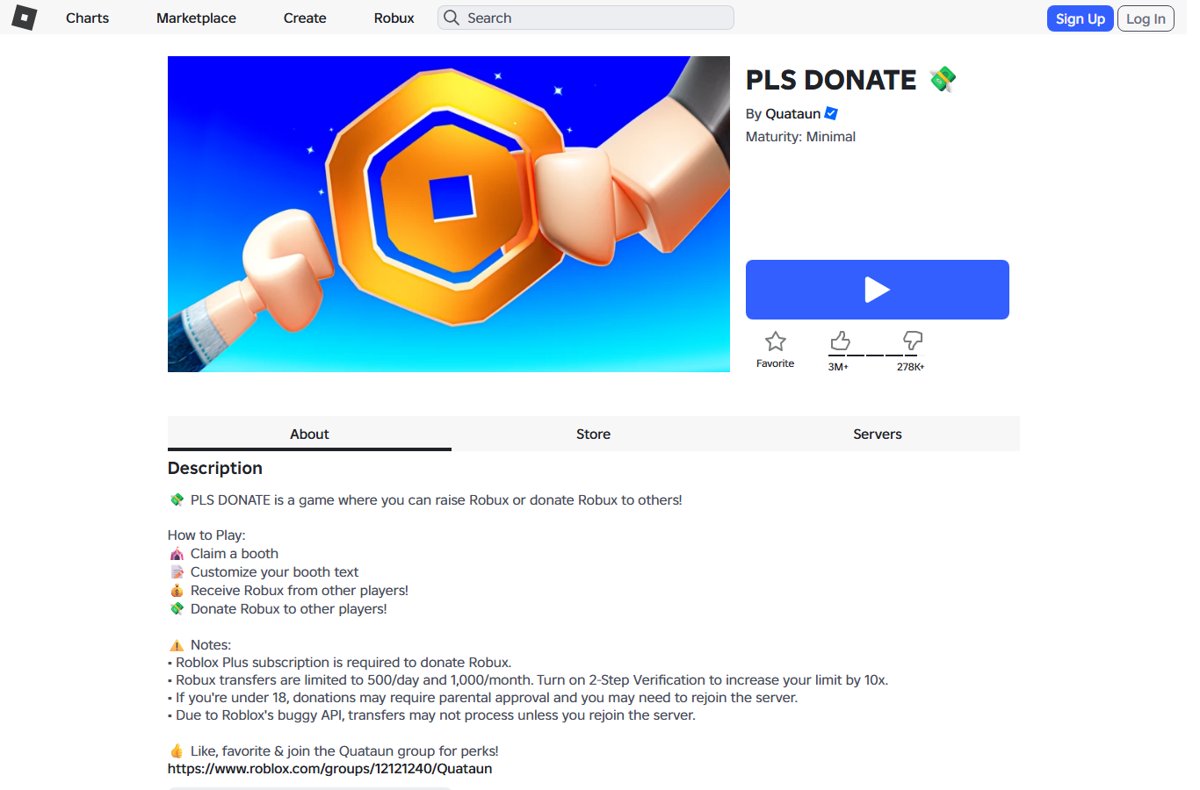
The experience's own description lists four steps: claim a booth, customise your booth text, receive Robux, and donate Robux to others.
- Sign in to Roblox on the website, the desktop app or the mobile app.
- Search for PLS DONATE and open the experience made by Quataun.
- Select the Play button and wait for the server to load.
- Walk to an empty booth and claim it.
- Edit the booth text so it says what you are saving for.
- Stay near your booth and chat politely while players walk past.
Donations now arrive as direct Robux transfers, so you no longer need to create game passes before you play.
What Is Pls Donate in Roblox?
| Detail | What the Roblox listing shows |
|---|---|
| Name and creator | PLS DONATE, published by the Quataun community |
| What you do | Raise Robux from other players or donate Robux to them |
| Genre | Social |
| Server size | 28 players |
| Maturity rating | Minimal, suitable for everyone |
| Voice chat | Not supported |
| Visits | More than 5.2 billion |
| Donation method | Roblox Robux transfers, which need a Roblox Plus subscription to send |
Figures come from the PLS DONATE page on roblox.com and change daily.
Before You Start: What You Need
Receiving Robux and sending Robux have different requirements. Check the row that matches what you want to do.
| Requirement | To receive donations | To donate Robux |
|---|---|---|
| A Roblox account | Yes | Yes |
| Roblox Plus subscription | No | Yes |
| Age Check (16 and older) | Yes, or received Robux are held | Yes |
| Linked parent account (under 16) | Yes, with approval for each transfer | Yes, with approval for each transfer |
| 2-Step Verification | Optional | Optional, raises your limits 10x |
| Robux balance | No | Yes, at least 10 Robux per transfer |
Roblox also notes that some regions require parental approval for users under 18. To complete an Age Check, open Settings, go to Account Info, find Age Group, and choose Continue with selfie or Continue with ID.
How Donations Work in Pls Donate
Pls Donate uses Robux transfers, a Roblox platform feature. Roblox processes every transfer itself, and the game never handles your payment.
| Rule | Value |
|---|---|
| Who can send | Roblox Plus subscribers only |
| Amount per transfer inside a game | 10 to 500 Robux |
| Standard limit | 500 Robux a day and 1,000 Robux a month |
| Limit with 2-Step Verification | 5,000 Robux a day and 10,000 Robux a month |
| Split of an in-game transfer | 90% to the recipient, 10% to the game that hosts it |
| Roblox platform fee | None |
| Reversals | None; every transfer is final |
| Cash out through DevEx | Not allowed for Robux received as transfers |
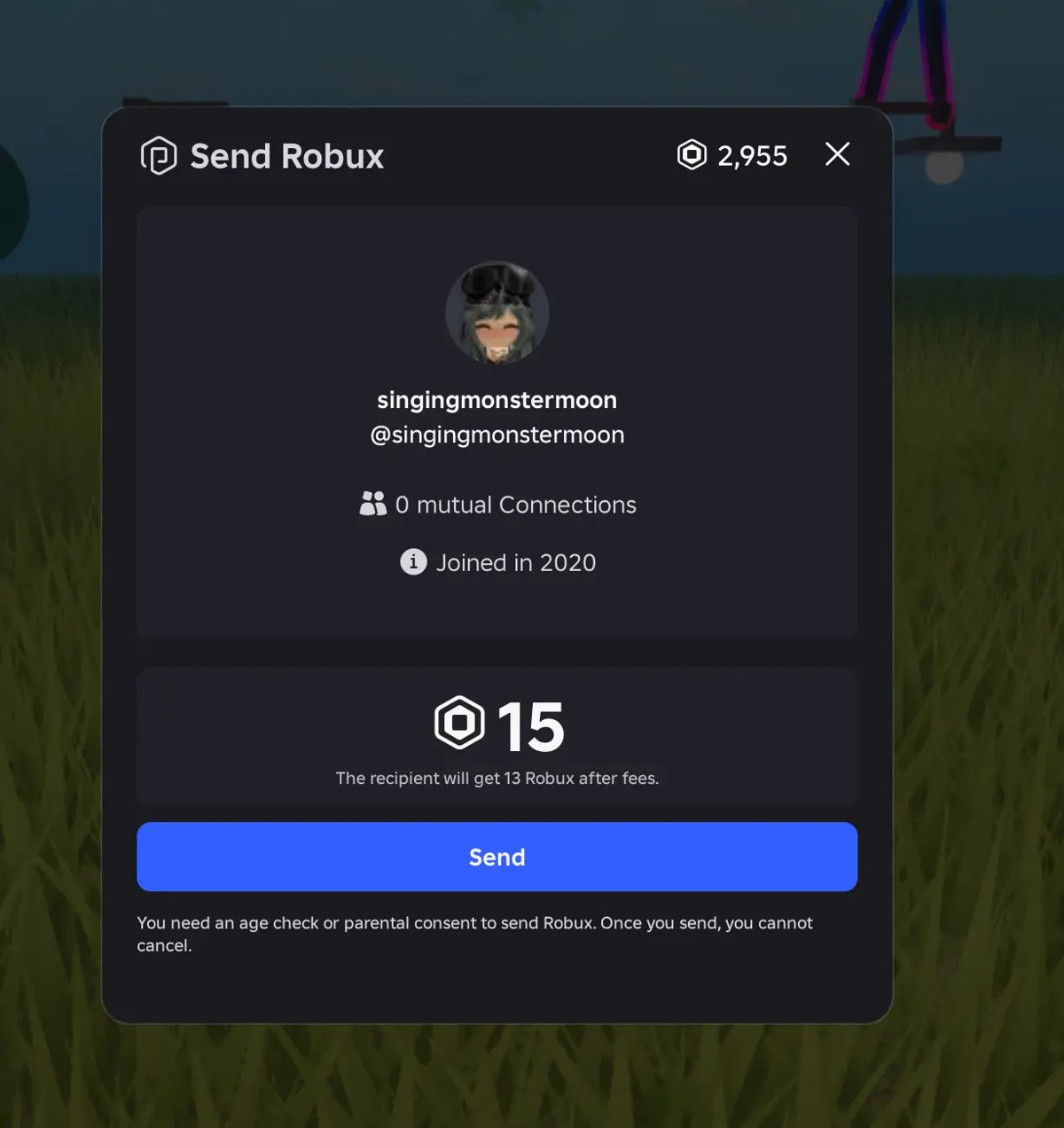
The 90/10 split means a 100 Robux donation lands as 90 Robux in the recipient's balance. That explains most "I received less than they sent" reports.
Steps 1, 2, 5 and 8: Why the Old Game Pass Setup No Longer Applies
Older Pls Donate guides start with building an experience and selling passes from it. Roblox disabled cross-game pass sales on May 30, 2026, and pointed developers to Robux transfers instead.
| Old step | Status now | What to do instead |
|---|---|---|
| Create a Roblox experience to hold your game passes | Not needed for Pls Donate | Join PLS DONATE and claim a booth |
| Create donation game passes and put them on sale | Passes can no longer be bought from another game | Nothing; donors send Robux directly |
| Refresh your booth buttons after adding passes | No pass buttons to refresh | Rejoin the server if a transfer stalls |
| Add more donation buttons at new prices | Donors now pick any amount from 10 to 500 Robux | State a goal amount in your booth text |
Passes still work inside the experience that owns them. In the Creator Dashboard, the path is Creations, your experience, Monetization, Passes, Create pass.
Step 3: Join Pls Donate
These steps work on a Windows PC or laptop, a Mac, and in a browser.
- Go to roblox.com and sign in.
- Type PLS DONATE in the search bar and press Enter.
- Open the result made by Quataun.
- Select Play.
- Let Roblox open the app, or install the Roblox app when prompted.
- Wait for the lobby to load with the rows of booths.
Step 4: Claim a Pls Donate Stand
- Walk along the booth rows and look for one without a player name on it.
- Stand next to the empty booth until the claim prompt appears.
- Accept the prompt to make the booth yours for this session.
- Check that your username now shows on the booth.
- Stay in the server; the booth is tied to your current session.
If every booth is taken, leave and join another server from the experience's Servers tab.
Step 6: Customize Your Stand Text
Booth text is the one thing every passer-by reads. Short, specific text works better than a wall of emoji.
- Walk up to the booth you claimed.
- Open the booth's edit option from the on-screen prompt.
- Type a short message with one clear goal, for example "Saving 400 Robux for a new avatar".
- Remove anything that asks for passwords, links or off-platform payment.
- Save the text and step back to read it the way other players see it.
- Update the goal once you reach it so the message stays accurate.
Step 7, the booth's look, is covered in the table below.
How to Make a Good Pls Donate Stand
| Booth element | Do this | Avoid this |
|---|---|---|
| Goal | Name one item or amount you are saving for | "Pls donate anything" with no goal |
| Text length | One or two short lines | Paragraphs nobody stops to read |
| Booth design (Step 7) | Pick a colour or skin that keeps the text readable | Busy designs that hide your message |
| Amount | Ask for a realistic figure inside the 10 to 500 Robux range | Asking one player for thousands |
| Tone | Thank everyone, including people who only chat | Guilt trips or begging in all capitals |
| Honesty | Say what the Robux is for | Fake giveaways or promises to donate back more |
How to Check If You Received Robux
- Sign in on roblox.com in a browser.
- Select the Robux icon in the upper-right corner.
- Select your Robux amount to open My Transactions.
- Choose Summary to see incoming and outgoing Robux.
- Look for the transfer and check whether it shows as pending.
- On mobile, tap the Robux icon at the top of the app to see your balance.
A received transfer stays on hold for 7 days if you have not met the age requirements. If you still have not met them after that, Roblox returns the Robux to the sender.
How to Donate to Other Players
Donating needs a Roblox Plus subscription, an Age Check, and enough Robux in your balance.
- Subscribe to Roblox Plus on the Roblox Plus page, the App Store or Google Play.
- Complete the Age Check under Settings > Account Info > Age Group.
- Join PLS DONATE and walk up to the booth you want to support.
- Open the donate prompt on that booth and pick an amount from 10 to 500 Robux.
- Confirm the transfer in the Roblox confirmation window.
- Rejoin the server if the transfer does not process, as the game's own notes advise.
Turn on 2-Step Verification under Settings > Security to raise your limits to 5,000 Robux a day. A verified email address is required first.
How to Play Pls Donate on Mobile
The same steps work on iPhone, iPad and Android phones and tablets.
- Install Roblox from the App Store or Google Play and sign in.
- Tap the search icon and type PLS DONATE.
- Open the experience by Quataun and tap Play.
- Use the on-screen joystick to walk to an empty booth and claim it.
- Tap the booth's edit prompt to set your text.
Roblox Plus can be bought through the Apple App Store and Google Play Store. It cannot be bought in the Samsung Galaxy Store version of the Roblox app.
How to Play Pls Donate on Xbox or Console
Console play depends on the developer allowing console access for the experience. Roblox Plus cannot be purchased on Xbox or other consoles.
- Open the Roblox app on your Xbox and sign in.
- Search for PLS DONATE.
- Select the experience and choose Play if it appears.
- Claim a booth and set your text with the on-screen keyboard.
- Buy Roblox Plus on the web or a phone if you also want to donate.
If PLS DONATE does not show up in search on your console, the developer has not enabled console access. Play on a PC, laptop or phone instead.
Can You Use Clothing Instead of Game Passes?
No. You need neither clothing nor game passes to receive donations in Pls Donate now. The experience's description lists Robux transfers as its only donation method, with a Roblox Plus subscription required to donate. Donors send Robux straight to your account, so there is nothing to list for sale.
Safety Tips for Pls Donate
| Risk | Why it matters | What to do |
|---|---|---|
| Transfers are final | Roblox cannot reverse a Robux transfer | Only donate what you are happy to give away |
| "Donate and I'll send double back" | A common scam; nobody can guarantee a return | Ignore it and report the player |
| Free Robux generator links | Roblox says these steal passwords and account access | Never enter your login outside roblox.com |
| Requests to move to other apps | Off-platform deals have no Roblox protection | Keep all conversation inside Roblox |
| Account takeover | A stolen account loses its Robux | Turn on 2-Step Verification |
Tips to Get More Donations Without Spamming
| Tip | How to apply it |
|---|---|
| Use a specific goal | Name the item and the Robux you still need |
| Be friendly in chat | Greet people and talk normally instead of repeating "pls donate" |
| Thank donors properly | Thank each donor by name in chat once, right after the donation |
| Pick a busy server | Join a server with players moving past the booths |
| Do not harass other players | Never follow people around or message them repeatedly |
| Donate occasionally yourself | Small donations to others build goodwill in a server |
Troubleshooting: Pls Donate Donations Not Showing
A donation was sent but did not go through
The game's description says transfers may not process until you rejoin the server.
- Leave the PLS DONATE server.
- Join again from the experience page.
- Check My Transactions before sending the donation a second time.
Received Robux show as pending
The recipient has not completed the Age Check or parental approval.
- Open Settings > Account Info and complete the Age Group check.
- Under 16, ask a parent to link their account and approve the transfer.
- Finish within 7 days, or the Robux go back to the sender.
You received less than the donation amount
In-game transfers pay 90% to the recipient and 10% to the game.
- Multiply the donated amount by 0.9 to get the expected figure.
- Compare that figure with the entry in My Transactions.
You cannot donate at all
Sending needs Roblox Plus and a completed Age Check, and daily or monthly limits apply.
- Confirm your Roblox Plus subscription is active.
- Complete the Age Check or get parental approval.
- Check whether you already sent 500 Robux today or 1,000 this month.
- Turn on 2-Step Verification to raise the limits.
Frequently Asked Questions
How does Pls Donate work?
Pls Donate is a Roblox social experience where players claim booths and other players send them Robux. Donations use Roblox's own Robux transfer feature, which needs a Roblox Plus subscription to send, and each in-game transfer is 10 to 500 Robux.
How do you start playing Pls Donate?
Search for PLS DONATE on Roblox, open the experience by Quataun and select Play. Walk to an empty booth, claim it, and edit the booth text with a short goal. No game passes or setup outside the game are needed.
How do you get donations in Pls Donate?
Write booth text with one specific goal, stay near your booth, and chat politely with players who pass. Busy servers help. Spamming, harassing players or promising to donate back more usually gets you ignored or reported.
How do you make a donation in Pls Donate?
Subscribe to Roblox Plus, complete the Age Check, then open the donate prompt on another player's booth. Pick an amount between 10 and 500 Robux and confirm it. The standard limit is 500 Robux a day and 1,000 a month.
How do you play Pls Donate on mobile or iPad?
Install Roblox from the App Store or Google Play, search for PLS DONATE, and tap Play. Use the joystick to reach an empty booth and claim it. Roblox Plus can be bought through the App Store and Google Play if you also want to donate.
Can you play Pls Donate on Xbox?
Only if the developer has enabled console access for the experience; search for PLS DONATE in the Roblox Xbox app to check. Roblox Plus cannot be purchased on Xbox or other consoles, so donating from a console needs a subscription bought elsewhere.
How do you play Pls Donate on a PC or laptop?
Sign in at roblox.com, search for PLS DONATE, and select Play to launch the Roblox app. Claim an empty booth and edit its text. The steps are the same on Windows laptops, desktops and Macs.
How do you earn Robux in Pls Donate?
You earn Robux only when other players choose to donate to your booth. Each in-game transfer pays you 90% of the amount sent, and received Robux cannot be cashed out through the Developer Exchange program.
How do you make a Pls Donate game?
Build an experience in Roblox Studio and integrate Robux transfers through the Roblox creator APIs. Roblox handles the transfer interface, the recipient gets 90% and your game gets 10% of each transfer, with no Roblox platform fee.