There is no QuickTime Player for Windows 11: Apple's last Windows version, QuickTime 7.7.9, was released on 7 January 2016 for Windows Vista and Windows 7, and Apple no longer supports it.
To play a .mov file on Windows 11, open it in the built-in Media Player app or in VLC instead. This guide explains what Apple still documents, how to remove an old copy, and how to handle MOV files safely.
The fastest way to play a QuickTime MOV file on Windows 11
Apple's own download page states that versions of Windows since 2009 include the key media formats QuickTime 7 once added, such as H.264 video and AAC audio. That means most .mov files open without QuickTime at all.
- Open File Explorer and go to the folder that holds the .mov file.
- Right-click the file and select Open with.
- Select Media Player. If it is not listed, select Choose another app and pick it there.
- Watch the video. If Media Player reports a missing codec, jump to the HEVC fix in the troubleshooting section below.
If you only wanted to watch the file, you are done. The rest of this page covers the QuickTime installer itself and why Apple steers Windows users away from it.
Best QuickTime Alternatives For Windows 11
Each option below is free from its maker and still receives updates, unlike QuickTime 7. Match your situation to a row.
| Your situation | Use this | Where it comes from | Why |
|---|---|---|---|
| You want to play a .mov with nothing extra installed | Media Player | Microsoft Store (free) | Plays local video and uses the codecs Windows already includes |
| You play movies and TV shows bought from Microsoft | Movies & TV | Microsoft Store (free) | Its Store listing describes it as the app for purchased movies and TV shows |
| Your .mov came from an iPhone and shows a codec message | Media Player plus HEVC Video Extensions | Microsoft Store | Microsoft adds HEVC playback through a Store codec extension |
| You want one player for almost every format | VLC media player | videolan.org | Free and open source; VideoLAN says it runs on Windows XP SP3 through Windows 11 |
| You need a feature only QuickTime 7 had | QuickTime 7.7.9, knowingly | Apple's support site | Unsupported since 2016 and built for Windows Vista and 7; weigh the security section first |
You can use VLC Media Player instead, but get it only from videolan.org, never from a download portal.
Before You Install: What You Need To Know About QuickTime On Windows 11
Every fact below comes from Apple's own support pages. Apple has archived its uninstall article and marks the download page with an "Important" notice.
| Question | What Apple documents |
|---|---|
| Is QuickTime Player supported on Windows 11? | No. Apple states that QuickTime 7 for Windows is no longer supported by Apple. |
| Which Windows versions was it built for? | Windows Vista and Windows 7. On other versions of Windows, Apple says it may not offer full functionality. |
| What is the newest version? | QuickTime 7.7.9, listed in Apple's security updates on 7 January 2016. Nothing newer exists for Windows. |
| Is QuickTime for Windows safe to use? | It gets no more security fixes. Apple's 7.7.9 notes show earlier flaws let a crafted movie file run code, and anything found since stays unpatched. |
| Do you still need it for iTunes? | No. Apple says iTunes 10.5 or later and most recent media programs no longer use QuickTime to play modern formats. |
| What about the browser plug-in? | Apple notes current browsers play video without plug-ins, and that removing legacy plug-ins enhances your PC's security. |
Installing QuickTime still makes sense in one narrow case: an older program you depend on refuses to run without it. Apple suggests asking that program's developer before you decide.
What You Need Before Downloading QuickTime
Apple lists requirements written for Windows 7-era hardware; the last three rows are common sense, not Apple requirements. Any Windows 11 PC exceeds them, but meeting them does not make the software supported.
| Requirement | What to have | What it means on Windows 11 |
|---|---|---|
| Operating system | Windows Vista or Windows 7 | Windows 11 is not on the list, so expect missing functions |
| Processor | At least a 1GHz Intel or AMD processor | Met by any Windows 11 PC |
| Memory | At least 512MB of RAM | Met by any Windows 11 PC |
| Download size | 41.9 MB | Small, but the size proves nothing about safety |
| Source | Apple's support site only | Avoid third-party download sites; they can bundle adware or altered installers |
| Account rights | An account that can install desktop programs | Windows shows a User Account Control prompt during setup |
| A real reason | A program that genuinely requires QuickTime | Confirm with that program's developer, as Apple suggests |
How To Download QuickTime Player For Windows 11 (From Apple's Support Site Only)
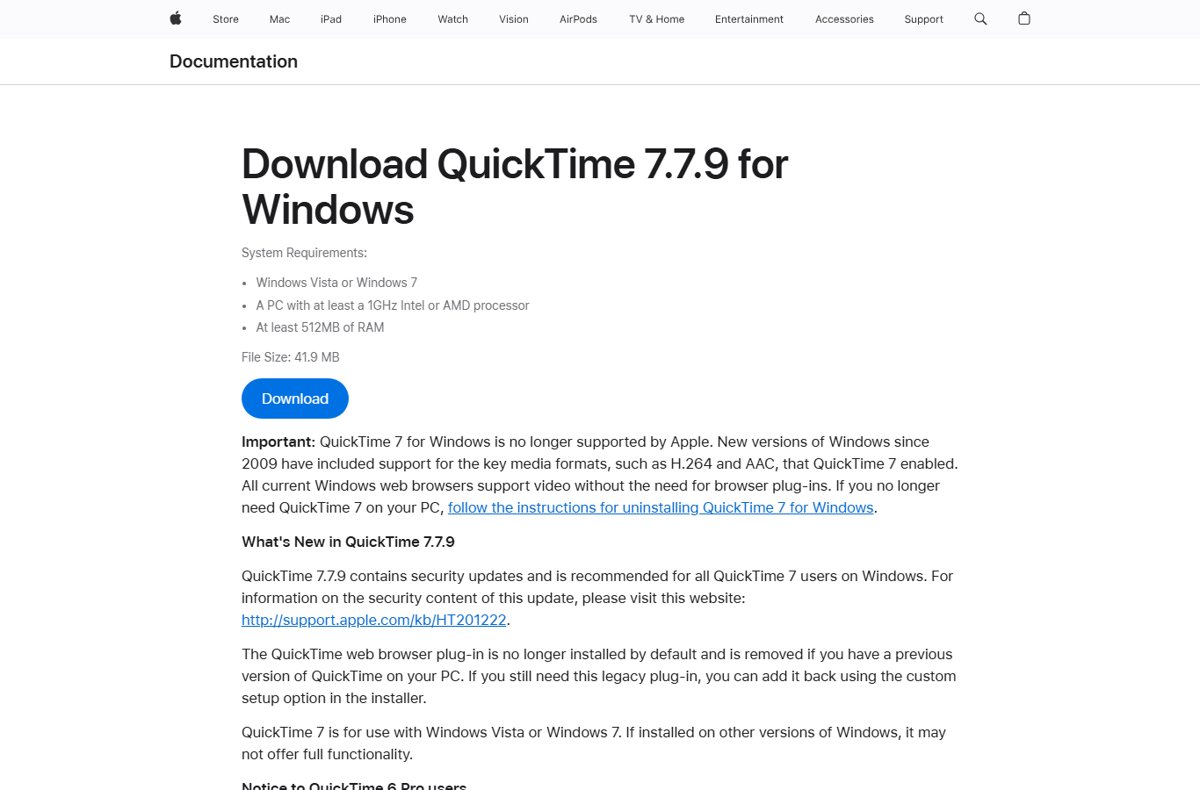
Apple still hosts QuickTime 7.7.9 on a support page, headed by a notice that the software is no longer supported. Read that notice before you select anything.
- Open support.apple.com in your browser and search for Download QuickTime 7.7.9 for Windows.
- Confirm the page address starts with support.apple.com before going further.
- Read the Important notice. It states that Apple no longer supports QuickTime 7 for Windows.
- Check the System Requirements line, which names only Windows Vista and Windows 7.
- Select Download only if you have confirmed a program needs QuickTime, and save the file to your Downloads folder.
Never take QuickTime from a mirror, a driver site or a "QuickTime for Windows 11" page. No such version exists, so any site offering one is repackaging Apple's old file or something else.
How To Install QuickTime Player In Windows 11 (Unsupported, Proceed With Care)
These steps assume you have read the security section and still need QuickTime for a specific older program.
- Close other media programs, then open your Downloads folder in File Explorer.
- Double-click the QuickTime installer you saved from Apple's page.
- Select Yes when User Account Control asks whether to allow changes.
- Follow the setup wizard screens to continue.
- Leave the legacy web browser plug-in unselected. Apple's page says 7.7.9 no longer installs it by default and only adds it through the custom setup option.
- Finish the wizard and restart the PC if setup asks you to.
If a QuickTime 7 Pro key is involved, Apple warns that installing QuickTime 7 disables Pro features in older versions such as QuickTime 6.
How To Open QuickTime Player After Installation
- Select Start and type QuickTime.
- Select QuickTime Player in the search results.
- To keep it handy, right-click QuickTime Player in the results and select Pin to Start or Pin to taskbar.
- If no QuickTime Player result appears, setup did not complete. Use the troubleshooting sections below.
How To Play MOV Files In Windows 11, With Or Without QuickTime
Opening a file works the same way whichever player you choose. Setting a default makes every .mov open in that player on a double-click.
- Right-click the .mov file in File Explorer and select Open with > Choose another app.
- Pick Media Player, VLC media player or QuickTime Player from the list.
- Select Always to use that app for every .mov file, or Just once to test it first.
- To change the default later, open Settings > Apps > Default apps.
- Type .mov in Set a default for a file type or link type, select the current app, choose the new one and select Set default.
Pointing .mov files at Media Player or VLC, rather than QuickTime, keeps an unsupported program from opening files you download from the web.
How To Update QuickTime On Windows 11
There is nothing to update to: QuickTime 7.7.9 is the final Windows release, and no newer build will arrive through Apple Software Update or anywhere else. Apple's security updates list shows 7.7.9 on 7 January 2016 as the last QuickTime release for Windows, and Apple now describes the product as unsupported. A site offering a newer QuickTime for Windows is not offering Apple software.
How To Remove QuickTime From Windows 11
Apple's instruction is to uninstall QuickTime 7 like any other program. If you use a QuickTime 7 Pro key, first copy it from the Register tab under Edit > Preferences in QuickTime Player.
- Select Start > Settings > Apps > Installed apps.
- Type QuickTime in the search box above the list.
- Select the More (three dots) button next to QuickTime 7 and choose Uninstall.
- Confirm with Uninstall, then select Yes at the User Account Control prompt.
- Follow the removal wizard to the end.
- If the Settings route fails, open Control Panel > Programs > Programs and Features, right-click QuickTime 7 and select Uninstall.
Apple also documents a shortcut: search Windows for Uninstall QuickTime and start the removal from there. Uninstalling removes the legacy web plug-in too, if it was present.
How to check QuickTime is gone and MOV files still play
- Open Settings > Apps > Installed apps and search QuickTime. No entry should appear.
- Select Start, type QuickTime and confirm no QuickTime Player app is offered.
- Double-click a .mov file. It should open in Media Player or the app you set as default.
- Open Settings > Apps > Default apps, search .mov and confirm the listed app is the one you chose.
What To Do If Windows 11 Blocks Or Fails QuickTime Setup
Never turn off Microsoft Defender or SmartScreen to force the installer through. A block on old software is a reason to stop, not a hurdle.
Windows warns about the installer or blocks it
The file may not be Apple's original, or Windows is flagging old, unsupported software.
- Delete the file if it came from anywhere other than support.apple.com.
- Ask the developer of the program that needs QuickTime whether a current version drops that requirement.
- Play your video in Media Player or VLC instead of forcing the install.
Setup stops or rolls back part way through
An earlier QuickTime copy is still installed, or media apps have files open.
- Open Settings > Apps > Installed apps and search QuickTime for an existing copy.
- Uninstall any copy you find and restart the PC.
- Close media players and video editors, then run Apple's installer once more.
- If it still fails, stop there. Apple built 7.7.9 for Vista and Windows 7 and offers no fix for newer Windows.
Common Problems And Fixes
A .mov from an iPhone will not play in Media Player
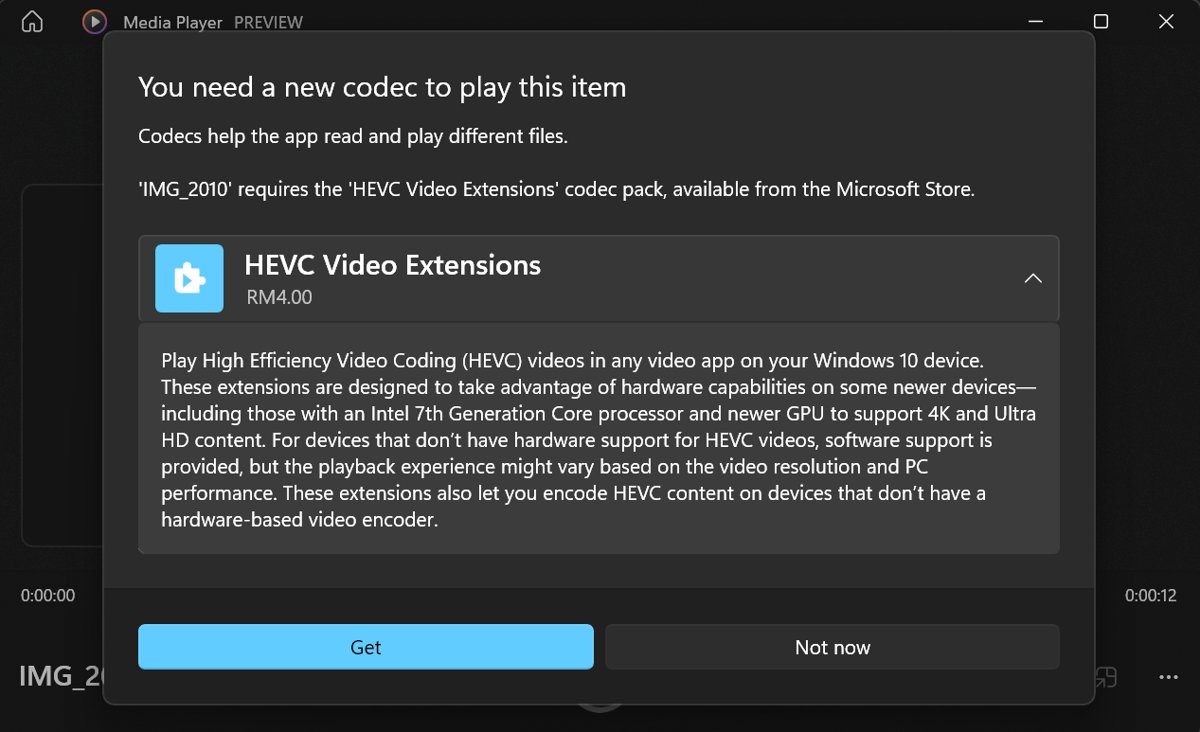
Recent iPhones record in HEVC (H.265), and Windows plays HEVC through a separate Store extension.
- Open Microsoft Store and search HEVC Video Extensions.
- Install the extension published by Microsoft, then close and reopen Media Player.
- Play the file again, or open it in VLC, which includes its own HEVC decoder.
"A codec is required to play this file"
The video uses a format Windows does not include by default.
- Check Microsoft Store for the matching codec extension, such as HEVC, VP9, AV1 or MPEG-2.
- Skip free "codec packs"; Microsoft warns they can corrupt the system and break playback.
- Try the file in VLC before installing anything else.
QuickTime Player opens but features are missing or it crashes
Apple states QuickTime 7 may not offer full functionality outside Windows Vista and Windows 7.
- Save any QuickTime 7 Pro key from Edit > Preferences > Register.
- Uninstall QuickTime using the removal steps above.
- Switch the .mov default to Media Player or VLC in Settings > Apps > Default apps.
Security Tips If You Already Installed QuickTime
| Tip | Why it matters |
|---|---|
| Uninstall QuickTime once the program that needed it is retired | Apple publishes no fixes after 7.7.9, so every new flaw stays open |
| Do not open .mov files from email or unknown websites in QuickTime | Apple's 7.7.9 notes show crafted movie files were the attack route for earlier flaws |
| Keep the legacy browser plug-in off | Apple says removing legacy plug-ins enhances your PC's security |
| Set .mov files to open in Media Player or VLC | Double-clicking a file then never launches the unsupported player |
| Keep Windows and Microsoft Defender updated, and run a scan if unsure | A clean scan confirms nothing rode in with an installer from a mirror site |
A second opinion scanner such as Malwarebytes is fine alongside Defender if you downloaded QuickTime from a non-Apple site.
Should You Install QuickTime Player On Windows 11?
No, for almost everyone. Play .mov files in Media Player, adding HEVC Video Extensions for iPhone clips, or in VLC, and uninstall any old QuickTime 7 already on the PC. QuickTime 7.7.9 was built for Windows Vista and 7, last updated in January 2016 and is no longer supported by Apple, so it gains nothing on Windows 11 and keeps known-risk code on the machine. Install it only when a specific older program truly requires it.
Frequently Asked Questions
How do I install QuickTime on Windows 11?
Apple offers only QuickTime 7.7.9, built for Windows Vista and 7, from an archived support page. It installs through a normal setup wizard, but Apple no longer supports it. For watching .mov files, Media Player or VLC is the safer choice on Windows 11.
Does QuickTime work on Windows?
QuickTime 7 ran on Windows Vista and Windows 7, and Apple ended support for the Windows version. Apple warns it may not offer full functionality on other versions of Windows, which includes Windows 10 and Windows 11.
Is QuickTime still available for Windows?
Apple still hosts the QuickTime 7.7.9 download page, but marks it with a notice that QuickTime 7 for Windows is no longer supported. No newer Windows version exists, so any "QuickTime for Windows 11" download is not from Apple.
What is the QuickTime installer?
It is the setup program for QuickTime 7.7.9, the last Windows release from January 2016. Apple's page lists it at 41.9 MB. Get it only from support.apple.com, since third-party copies may be altered or bundled with other software.
How do I get QuickTime to play MOV files?
You do not need QuickTime for most .mov files on Windows 11. Right-click the file, select Open with and choose Media Player. For iPhone videos in HEVC, add HEVC Video Extensions from Microsoft Store, or use VLC from videolan.org.
How do I use QuickTime Player on Windows?
After installing, select Start, type QuickTime and open QuickTime Player, then open a movie file from it or through Open with in File Explorer. Because the program is unsupported, avoid opening video files from unknown sources with it.
Can I download QuickTime for Windows 10 or Windows 7?
The same 7.7.9 build covers every Windows version. Apple lists Windows Vista and Windows 7 as supported systems, so Windows 7 is covered, while Windows 10 falls in the same unsupported category as Windows 11.
Do I need QuickTime for iTunes on Windows?
No. Apple states that iTunes 10.5 or later no longer uses QuickTime to play modern media formats. It plays media directly or uses the media support built into Windows.
Should I uninstall QuickTime from my PC?
Yes, if no program on the PC still needs it. Apple's archived guidance explains how to remove QuickTime 7 from Control Panel and notes that removing legacy browser plug-ins enhances your PC's security.

![HDMI port not working in Windows 11 [Easy fixing]](https://techdows.com/wp-content/uploads/2026/10/HDMI-Port-Not-Working-in-Windows-11-Easy-Fixing-600x338.jpg)