Yahoo Mail sends new email straight to Trash when a filter points at the Trash folder, or when a connected app such as Outlook deletes messages from the server.
This guide shows how to find and delete that filter, unblock senders, stop Outlook and phone apps removing mail, secure a tampered account, and get deleted emails back before Yahoo empties Trash after 7 days.
Yahoo Mail going directly to trash [fix]
A filter is the first thing to check, because Yahoo lets each filter send matching mail to any folder, including Trash.
Filters are managed in Yahoo Mail on a desktop browser, not in the phone app.
- Open Yahoo Mail in a desktop browser and sign in.
- Click the More icon on the left, below your mail folders, then select Settings.
- Click Filters to see every filter on the account.
- Click each filter and look at the folder it moves mail to.
- Select any filter that sends mail to Trash, then click the Delete icon.
- If the filter is useful, edit it instead: choose another folder and click Save.
On the older Yahoo Mail for Desktop, the same list sits under the Settings icon, then More Settings, then Filters.
Why are my Yahoo emails going to trash?
Match what you see to a row, then jump to the fix for that cause.
| What you notice | Likely cause | Fix |
|---|---|---|
| Mail from one sender or with one subject lands in Trash | A Yahoo filter sends it to Trash | Delete or edit the filter under Settings > Filters |
| Mail vanishes only while Outlook, Mac Mail or a phone app is open | The app deletes mail from the server or runs its own rule | Change the app's delivery settings or rules |
| Mail from one address never reaches the Inbox | The address or its domain is blocked | Remove it under Security and Privacy |
| Mail from a trusted sender keeps landing in Spam | It was marked as spam | Open Spam, select it and click Not spam |
| New filters, forwarding or blocked addresses you did not add | Someone else signed in to the account | Change the password and review sign-ins |
| Deleted mail is gone from Trash | Yahoo empties Trash after 7 days | Send a restore request within 7 days |
How to unblock an email address in Yahoo Mail
A blocked address or blocked domain keeps that sender's mail out of your Inbox, so a wanted sender added by mistake looks like missing mail.
Yahoo holds up to 1,000 blocked addresses, which makes an old accidental block easy to miss.
- In Yahoo Mail on a computer, click the More options icon, then select Settings.
- Select Security and Privacy.
- Under Blocked addresses, find the sender you want to receive mail from.
- Hover over the address and click its Delete icon to unblock it.
- Scroll to Block unwanted sender domains and click the trash-can Delete icon next to any domain blocked by mistake.
Domain blocking is a Yahoo Mail Plus feature with a 500-domain limit. In the Yahoo Mail app, tap the Profile icon, then Settings, then tap the X next to a blocked domain and confirm with Unblock or Remove.
How to mark email as not spam in Yahoo Mail
Spam is a separate folder from Trash, but people often find both empty of the message they expected. Clicking Not spam teaches Yahoo to deliver that sender to the Inbox from then on.
- Open the Spam folder in Yahoo Mail. If you cannot see it, click More below the Sent folder.
- Select the email from the sender you trust.
- Click Not spam to move it to the Inbox.
- Repeat for any other wanted messages, because Spam and Trash do not appear in Yahoo Mail search results.
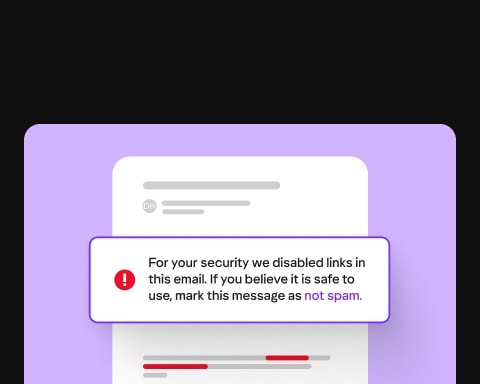
Yahoo also suggests turning off spam filtering inside third-party mail apps, because Yahoo cannot control what those filters do with your mail.
Stop Outlook deleting Yahoo emails from the server
Yahoo names apps such as Outlook and Mac Mail as a cause when they are set to delete email from the server. With IMAP, a delete in the app also moves the message to Trash in Yahoo. With POP, one delivery option removes mail from Yahoo once it downloads.
These steps cover a POP account in classic Outlook for Microsoft 365, 2024, 2021, 2019 and 2016.
- In Outlook, select File, then Account Settings, then Account Settings again.
- On the E-mail tab, select your Yahoo POP account and click Change.
- Click More Settings and open the Advanced tab.
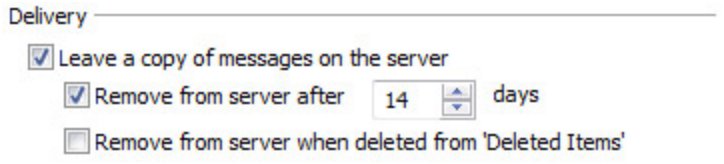
- Under Delivery, select Leave a copy of messages on the server.
- Clear any option that removes messages from the server, then click OK and Next to save.
For Mac Mail, Thunderbird or a phone app, Yahoo's advice is to check that app's settings or ask its maker how to turn off deleting from the server.
How to turn off Outlook rules that move Yahoo Mail to Deleted Items
An Outlook rule that deletes mail on a Yahoo IMAP account sends it to Trash on the Yahoo side as well, so the same mail goes missing from the Outlook inbox too. Turn the rule off first so you can test before deleting it.
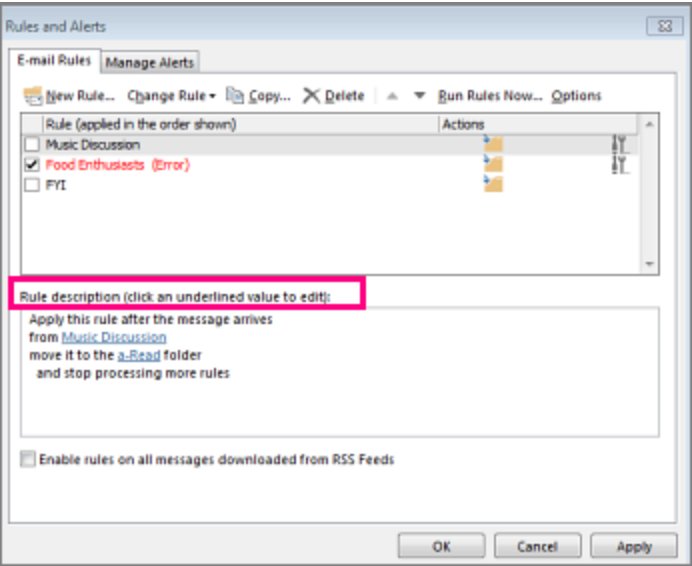
- In classic Outlook, select File, then Manage Rules & Alerts.
- On the E-mail Rules tab, read the description of each rule that applies to the Yahoo account.
- Clear the check box next to any rule that deletes messages to turn it off.
- To remove it for good, select the rule, choose Delete, then click OK.
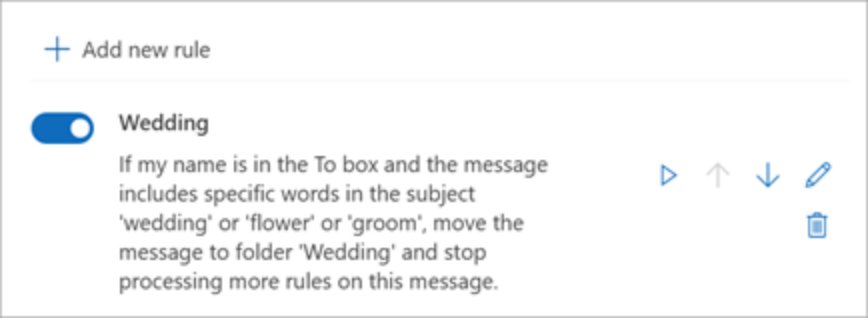
- In new Outlook, select Settings > Mail > Rules, then use the toggle or More actions > Delete rule.
Yahoo Mail filters changed by a hacker: how to secure your account
Yahoo lists new filters, auto-forwarding and changed blocked addresses as settings a hacker may alter. If you find filters you never made, secure the account before you rely on any other fix.
- Change your Yahoo password immediately.
- Open the Yahoo Account security page and review Current sign-ins; click any device you do not recognize and select Sign out.
- Under External connections, click App passwords, select any app you do not use, and choose Delete app password.
- Check Recent account activity for changes you did not make.
- In Yahoo Mail Settings > Mailboxes, open your primary mailbox and clear any Auto-forwarding address you did not add.
- Update your recovery email and phone number, then turn on two-step verification.
- Make sure your antivirus software is installed and up to date.
Auto-forwarding needs Yahoo Mail Plus and is not offered in every region, so the option may be missing from your account. If you cannot regain control, contact Yahoo Customer Care through help.yahoo.com.
How to recover emails from Yahoo Mail trash
Messages stay in Trash for 7 days before Yahoo deletes them, so move them back as soon as the cause is fixed.
- In Yahoo Mail on a computer, click the More options icon and select Trash.
- Select the messages you want to keep.
- Click the Restore to Inbox icon. On the classic view, click the Move icon and select Inbox.
- In the Yahoo Mail app, tap your profile icon, swipe down and tap Trash.
- Select the email, tap the Move icon and choose Inbox.
Once the messages are back in your Yahoo Mail inbox, they are safe from the 7-day Trash cleanup.
How long does Yahoo Mail keep emails in trash?
Yahoo empties both folders on a fixed schedule, and you cannot change either setting.
| Folder or option | How long | What it means for you |
|---|---|---|
| Trash | 7 days | Messages are deleted automatically after 7 days in Trash |
| Spam | 30 days | Spam is cleared after 30 days and does not count toward storage |
| Send a Restore Request | Mail lost or deleted in the last 7 days | Cannot be cancelled and does not always succeed |
| What a restore brings back | Trash, Sent, Archive and custom folders | Restored mail lands in the Inbox; Spam and Draft are not restored |
| Marketing mailings with deals or coupons | Not restorable | These non-email messages are excluded from restore requests |
After a restore, check Trash again and move anything there to the Inbox, or it will be deleted a second time.
Send a test email to your Yahoo Mail inbox
A test message shows whether the filter, block or app was the real cause.
- Close Outlook, Mac Mail and any phone mail app for a few minutes.
- Sign in to Yahoo Mail on a computer and send an email to your own Yahoo address.
- Ask the sender whose mail went to Trash to send one more message.
- Check that both messages arrive in the Inbox, not in Trash or Spam.
- Open your mail apps again and watch whether the messages stay in the Yahoo Inbox.
If your own test fails with an error, follow the instructions in that error message. If it only disappears once an app is open, the app is the cause.
Yahoo Mail still sending emails to trash
Filters reappear after you delete them
Yahoo treats filters you did not create as a sign that someone else may have access to the account.
- Change your Yahoo password.
- Sign out unknown devices under Current sign-ins on the Account security page.
- Delete app passwords you do not recognize, then delete the filters again.
Emails go to trash only when Outlook or a phone app is open
An IMAP app mirrors its deletes and rules to Yahoo, and a POP app can delete mail from the server after download.
- Turn off rules in the app that delete or move Yahoo messages.
- In a POP account, select Leave a copy of messages on the server.
- Turn off the app's own spam or junk filter for the Yahoo account.
Filter or block settings will not save or the Yahoo Mail page will not load
Old cached files, an outdated browser or a browser add-on can stop Yahoo pages working.
- Clear your browser cache and update the browser to the latest version.
- Make sure JavaScript is turned on, and turn off browser enhancements such as add-ons.
- Restart the computer, or try the change from another computer or device.
Mail from one contact never arrives anywhere
The address or domain is blocked, or the sender typed your address wrongly.
- Check Blocked addresses and Block unwanted sender domains under Security and Privacy.
- Ask the sender to confirm they used your full email address.
- Ask the sender to contact their own email provider if your settings are clean.
Yahoo Mail going to trash FAQs
Why are my Yahoo emails automatically deleted?
Yahoo emails are usually deleted automatically by a filter that sends them to Trash, or by a mail app set to delete messages from the server. Yahoo then empties Trash after 7 days, so the messages disappear completely unless you move them back first.
How do I stop Yahoo from deleting emails automatically?
Delete any filter that sends mail to Trash under Settings > Filters, and turn off delete-from-server options in Outlook or other apps. Yahoo's own 7-day Trash and 30-day Spam cleanup cannot be turned off, so move wanted mail to the Inbox or another folder.
Can a virus cause Yahoo Mail to send emails to the Trash?
Yahoo's guidance points to account access rather than a virus: someone who gets into the account can add filters, forwarding or blocked addresses. Change your password, review sign-ins and app passwords, and keep your antivirus software installed and up to date.
Does using Outlook affect Yahoo Mail inbox behavior?
Yes. With IMAP, deleting or moving a message in Outlook does the same in Yahoo Mail, and Outlook rules can move Yahoo mail to Trash. With POP, a delivery setting can remove messages from Yahoo after Outlook downloads them.
Why do filters reappear after I delete them?
Filters you did not create are a sign that someone else may have access to your Yahoo account. Change the password, sign out unknown devices on the Account security page, delete unknown app passwords, and then remove the filters again.
How long does Yahoo keep emails in Trash?
Yahoo keeps deleted emails in Trash for 7 days, then deletes them automatically. Spam is kept for 30 days. Neither period can be changed in Yahoo Mail settings, so restore wanted mail to the Inbox within the 7 days.
Can I recover emails deleted from Yahoo Mail Trash?
Yes, if they were lost or deleted in the last 7 days. Use Yahoo's Send a Restore Request option. The request cannot be cancelled, it does not always succeed, and Spam and Draft messages are not restored.
How many filters can Yahoo Mail have?
Yahoo Mail allows up to 500 filters. They run from top to bottom, and when two filters match the same email, the higher one is applied. Use the up and down arrows in the filters list to change the order.
Can I manage Yahoo Mail filters in the phone app?
Yahoo's filter instructions start in Yahoo Mail on a desktop browser, through Settings > Filters. Sign in on a computer to create, edit or delete a filter, and use the app's Profile > Settings screen for blocked domains.