Techdows

Windows how-to guides, fixes and software downloads

  • Home
  • Settings and hardware

    • Printers
    • Sound and microphone
    • Wi-Fi and network
    • Bluetooth
    • Display and monitors
    • Drivers
    • Keyboard shortcuts and symbols

    Using Windows

    • File Explorer
    • Storage and disk space
    • Taskbar, Start and desktop
    • Apps and default programs
    • Accounts and sign-in
    • Copilot in Windows
    • Command Prompt and PowerShell

    Updates and fixes

    • Windows Update
    • Windows 11 26H2
    • Error codes and BSOD
    • Boot, BIOS and recovery
    • Security and Defender
    • Task Manager and performance
    • DLL and runtime errors

    Popular fixes

    • Get help in Windows 11
    • Connect a wireless printer
    • Re-pair Bluetooth earbuds for stereo sound
    • Cancel a stuck print job
    • Change default programs

    All Windows guides →

  • Browse by type

    • Web browsers
    • Office and productivity apps
    • PC games and launchers
    • Phone and media apps
    • Developer tools
    • Creative apps
    • CAD software
    • System utilities and drivers

    Popular downloads

    • GTA V for PC
    • YouTube app for PC
    • Google Meet for PC
    • Cisco Packet Tracer
    • TikTok for PC

    Windows tools

    • PC Health Check app
    • HEVC Video Extension
    • DirectX 12
    • Cinebench R23

    All download guides →

  • Browser guides

    • Microsoft Edge
    • Google Chrome
    • Firefox
    • Web browsers for PC

    Microsoft Edge

    • Fix WebView2 using too much memory
    • Internet Explorer mode in Edge
    • Manage Edge favorites
    • Set or remove Edge as default

    Chrome and Firefox

    • Make Chrome the default browser
    • Restore closed tabs
    • Change the default web browser

    All browser guides →

  • Office guides

    • Outlook
    • Excel
    • Word and PowerPoint
    • OneDrive
    • Install Microsoft 365

    Meetings and other tools

    • Teams, Zoom and Google Meet
    • Google Docs and Sheets
    • PDF tools

    Office apps

    • Office product key
    • Office Deployment Tool
    • What is OneDrive?
    • Turn off OneDrive in Windows 11

    Outlook and Teams

    • Outlook inbox view changed
    • Schedule an email in Outlook
    • Outlook dark mode
    • Teams breakout rooms

    All Office and productivity guides →

  • PHP security

    • PHP2Shell patch download
    • PHP critical RCE security update
    • CVE-2026-109618 fix
    • CVE-2026-109619 explained
    • Mitigations if you can't update

    Update PHP

    • Update PHP to the latest version
    • Check your PHP version
    • Update PHP on Ubuntu and Debian
    • Restart PHP-FPM

    Hosting and local servers

    • Update PHP in XAMPP
    • Change PHP version in cPanel
    • Update PHP in Laragon and WampServer
    • Update PHP Docker images
    • WordPress PHP version check

    PHP downloads

    • PHP 8.5.12 download
    • PHP 8.4.27 download
    • PHP 8.3.36 and 8.2.35 download
    • Download PHP for Windows

    PHP2Shell by platform

    • PHP 8.3 fix on Ubuntu 24.04
    • PHP 8.1 fix on Ubuntu 22.04
    • PHP 8.2 and 8.4 fix on Debian
    • Update PHP on IIS
    • Cloudflare PHP2Shell WAF rule

    All PHP guides →

  • Sections

    • Gaming
    • Apple
    • Android
    • Apps and services
    • Developer and IT

    Apple

    • iPhone tips and fixes
    • Reset and restore iPhone
    • iPad
    • Mac and macOS
    • Apple Account and iCloud
    • Apple devices on Windows

    Apps, Android and gaming

    • Gmail and Google account
    • YouTube
    • Social media accounts
    • Streaming TV
    • Android and Samsung Galaxy
    • PC gaming and Xbox
    • Roblox and Minecraft on PC

    Developer and IT

    • WSL and developer setup
    • Virtual machines
    • Group Policy and Intune
    • Windows Server
    • Website error codes
  • News
Home›How to

How to

3,719 articles

Google Chrome
Chrome disable extensions command line switch

How to Disable all Extensions when you can’t open the Chrome browser?

May 1, 2013 by Venkat Eswarlu 2 Comments
Chrome disable extensions command line switch

Sure, there is an extension available that lets you disable all Chrome extensions with a single click, but this extension will only be helpful when you able to launch the browser. But if Chrome browser denies to load and crashes
Posted in: Google Chrome, How to, Troubleshooting
Google Chrome
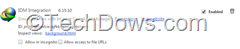
IDM Integration Chrome extension

How to Install IDM Integration Extension in Google Chrome Manually

May 1, 2013 by Venkat Eswarlu 2 Comments
IDM Integration Chrome extension

The article which I’ve written way back in 2008 on how to integrate internet Download manager into Chrome is old and needs to updated which I did. If you’ve Google Chrome installed on your computer and when you install IDM

Posted in: Google Chrome, How to, Tips and Tricks
How to
Avast Free AV with SecureLine Installed but not activated

How to Uninstall or Remove SecureLine VPN from Avast v8?

May 1, 2013 by Venkat Eswarlu Leave a Comment
Avast Free AV with SecureLine Installed but not activated

If you’ve recently installed latest Avast v8 cleanly on your computer by choosing “Express Settings” during the setup then you should know that SecureLine VPN service also installed for you along with Avast. FYI, recent minor update 8.0.1488.286 for Avast

Posted in: How to, Tips and Tricks
How to

How to Restore Default Settings for CCleaner

May 1, 2013 by Venkat Eswarlu Leave a Comment

Popular Crap Cleaning tool aka CCleaner from Piriform helps you not only clean temporary files in Windows but also protects your privacy by deleting browsers history and even more this tool allows to manage browser extensions and plugins as well.

Posted in: How to, Tips and Tricks
How to

How to Set Foxit Reader’s Zoom Level to 100% by Default for Every PDF Display

May 1, 2013 by Venkat Eswarlu 2 Comments

We’ve already covered how to Set Default Zoom Level in Nitro PDF Reader to 100%, and by default Foxit Reader application on Windows sets default Zoom level for every PDF document to “Fit Width”, if you want that to be

Posted in: How to, Tips and Tricks
Firefox
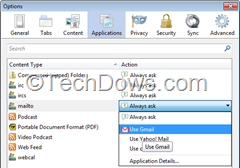
Firefox Applications panel

How to Set Gmail as Default E-Mail Program in Firefox

May 1, 2013 by Venkat Eswarlu Leave a Comment
Firefox Applications panel

Gmail in Google Chrome already opens all email links by default, if you want Google mail to do the same in Firefox, then follow the steps mentioned below. Firefox uses Windows Operating System’s default email client like Thunderbird, Windows Live

Posted in: Firefox, How to, Tips and Tricks
How to
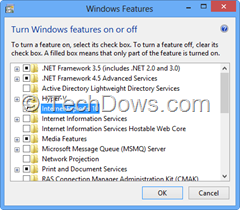
Windows features

How to Uninstall and Reinstall Internet Explorer 10 in Windows 8

May 1, 2013 by Venkat Eswarlu Leave a Comment
Windows features

We’ve already covered how to Uninstall IE10 in Windows 7 that gets back IE8/9 and in Windows 8, if you don’t like Internet Explorer 10 for the reasons like offering two versions: desktop and metro or modern UI or lack

Posted in: How to, Internet Explorer, Tips and Tricks
How to

How to Test Anti-keylogger Protection Software?

April 1, 2013 by Venkat Eswarlu Leave a Comment

Is your Anti-keylogger software specially developed to encrypt keystrokes and prevent them from being reaching hands of hackers through legit/malicious keyloggers is really working or not? if you’ve any doubts you can find that out with legit, safe and free

Posted in: How to, Security, Tips and Tricks
How to

How to Disable Firefox Health Report?

April 1, 2013 by Venkat Eswarlu 1 Comment

Firefox 21 Beta has been released and available for testing with new features like three state of  UI for Do Not Track, ability to restore all removed thumbnails from most controversial New Tab Page and Health Report has been preliminarily

Posted in: How to, Tips and Tricks
Firefox

How to Disable Plugin Hang UI in Firefox 20

April 1, 2013 by Venkat Eswarlu Leave a Comment

Mozilla has added plugin Hang UI for Windows in Firefox 20 which appears and allows the user to terminate not responding plugins like Flash before Firefox killing it after waiting for preset time 45 seconds. Reason for Mozilla to create

Posted in: Firefox, How to
How to
Google Drive Offline setup instructions

How to Setup Offline Access for Google Drive

April 1, 2013 by Venkat Eswarlu 1 Comment
Google Drive Offline setup instructions

Google Drive now allows their users to view and edit their documents from drive.google.com in Chrome browser when they’re not connected to internet, but they need to complete two steps for that and these steps enables offline access to Google

Posted in: How to, News, Tips and Tricks
How to
Installing or uninstalling Avast Ad blocker

How to Install or Uninstall Avast Ad Blocker

March 1, 2013 by Venkat Eswarlu 1 Comment
Installing or uninstalling Avast Ad blocker

This article guides you on how to install or remove Avast Ad Blocker from your Computer. Avast has released v8 with Ad Blocker, Software Updater, Browser cleanup tool and other new features where Ad Blocker is optional feature powered by

Posted in: How to, Tips and Tricks
« Previous 1 … 304 305 306 … 310 Next »

More from Techdows

Scan MacBook Pro for viruses and malware - MacBook Pro screen showing code
How to scan your MacBook Pro for viruses and malware
How to · 5 hours ago
Can't log in to apps on iPhone because of cookie settings - iPhone on a table
Can't log in to apps on iPhone because of cookie settings? How to fix it
How to · 5 hours ago
Change colors of system elements and font sizes in Windows 11/10 - customized Windows 11 desktop
Change colors of system elements & font sizes in Windows 11/10
How to · 4 hours ago
Flip camera on Windows 10 - laptop webcam video call on screen
How to flip camera on Windows 10: A step-by-step guide for users
How to · 4 hours ago
iCloud Passwords not autofilling in Microsoft Edge - iPhone held over a Windows laptop
iCloud Passwords not autofilling in Microsoft Edge on Windows? How to fix it
How to · 4 hours ago
Alphabetize in Word - letter tiles arranged in alphabetical order
How to alphabetize in Word: step-by-step guide for easy sorting
How to · 3 hours ago
Create and use a Microsoft Teams calendar - weekly calendar on a laptop screen
How to create and use a Microsoft Teams calendar
How to · 3 hours ago
Change Microsoft Word margins in Office 365 - stack of printed documents on a desk
How to change Microsoft Word margins in Office 365: a step-by-step guide
How to · 3 hours ago

© 2009–2026 Techdows · About · Contact · Privacy Policy

Copyright © 2026 Techdows.

Techdows WordPress Theme by Techdows