To set the clock to UTC, turn off the automatic time zone setting and pick a zone with no offset: (UTC) Coordinated Universal Time on Windows, a zero time zone offset on iPhone, and a UTC city such as Reykjavik on a Mac.
This guide covers each device, the Windows commands that do it in one line, how to see a UTC clock without changing your own, and how to switch back.
Set clock to UTC on Mac, iPhone and Windows
Every device sets the time zone automatically from your location by default. That switch has to go off first, or the device moves the clock back to local time.
| Device | Turn off | Then choose |
|---|---|---|
| Mac | Set time zone automatically using your current location | A city on UTC all year, such as Reykjavik |
| iPhone | Set Time Zone Automatically | Set By > Time Zone Offset, then an offset of zero |
| Windows 11 or Windows 10 | Set time zone automatically | (UTC) Coordinated Universal Time in the Time zone list |
| Windows from a command line | Nothing | Set-TimeZone -Id "UTC" or tzutil /s "UTC" |
How to set a Mac clock to UTC
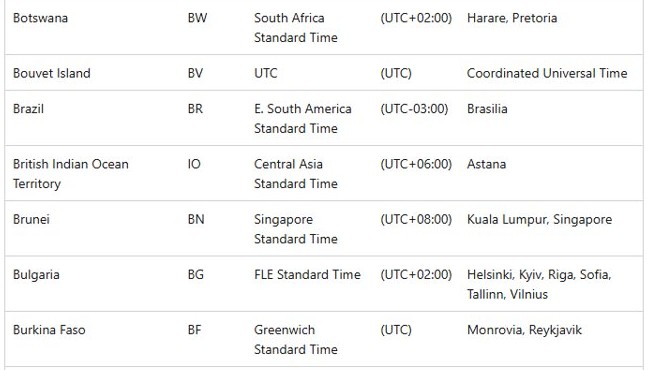
macOS has no time zone called UTC in Date & Time settings. It sets the zone from a city, so pick one that stays on UTC all year. Reykjavik sits in the Monrovia, Reykjavik zone, which is plain UTC with no summer time.
- Choose Apple menu > System Settings.
- Click General in the sidebar, then click Date & Time. You may need to scroll down.
- Turn off Set time zone automatically using your current location.
- Type Reykjavik in the closest city text field, select the full city name from the list, then press Return or click OK.
- Leave Set time and date automatically on so the network time server keeps the clock accurate.
Avoid London, Dublin or Lisbon if you want UTC all year. Those cities move their clocks forward in summer, so they leave UTC for part of the year.
How to set iPhone time zone to UTC
iPhone sets the time zone automatically when Location Services is on. Turning that off lets you set an offset instead of a city.
- Open the Settings app.
- Tap General, then tap Date & Time.
- Turn off Set Time Zone Automatically.
- Tap Set By, then tap Time Zone Offset.
- Tap + or – until the offset reads zero.
- Or tap Time Zone City and search for Reykjavik to use a city instead.
Turn on 24-Hour Time on the same screen if you want the clock to read like UTC timestamps, for example 15:00 rather than 3:00 PM.
How to change time zone to UTC in Windows 11
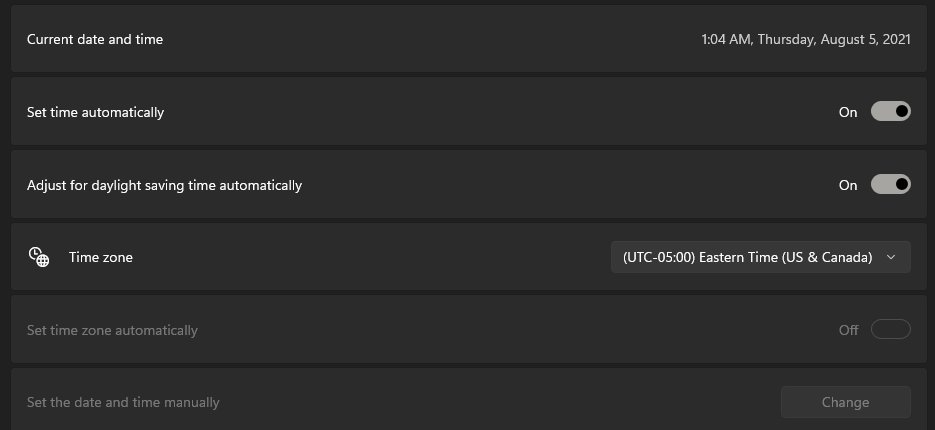
Windows has a dedicated UTC zone in its time zone list, on the same page where you set the time and zone manually. These steps are the same when you change the time zone in Windows 10.
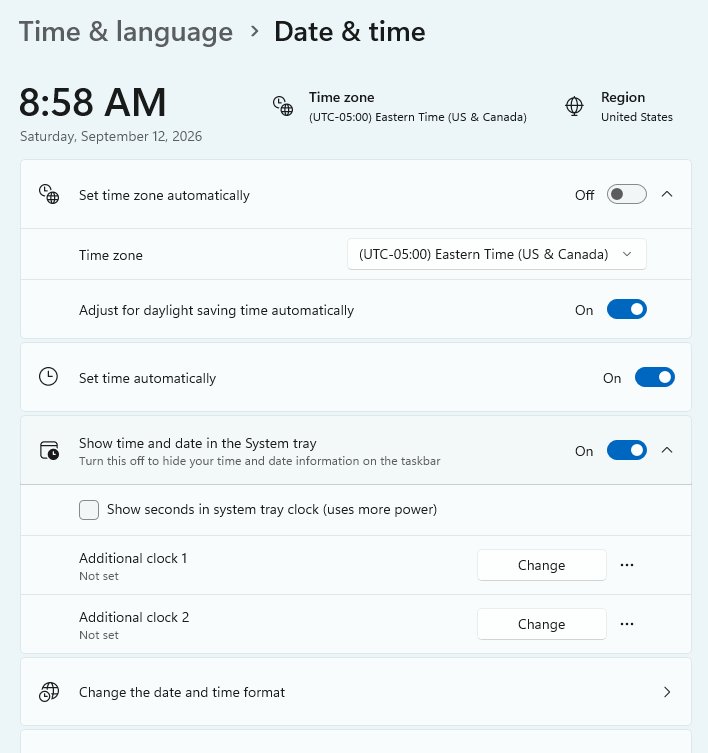
- Select Start > Settings > Time & language > Date & time.
- Turn off Set time zone automatically.
- Open the drop-down menu next to Time zone.
- Select (UTC) Coordinated Universal Time.
- Leave Set time automatically on so Windows keeps the time itself correct.
Do not pick (UTC) Dublin, Edinburgh, Lisbon, London for UTC. That entry is GMT Standard Time, which changes for summer time; (UTC) Coordinated Universal Time never does.
Set-TimeZone UTC in PowerShell
The Set-TimeZone cmdlet changes the system time zone on Windows in one line. Run it in PowerShell.
Set-TimeZone -Id "UTC" -PassThru-Id "UTC" selects the Coordinated Universal Time zone by its ID. -PassThru prints the zone that was applied. Get-TimeZone -ListAvailable lists every other ID if you need one.
You should see: The output shows Id : UTC, DisplayName : (UTC) Coordinated Universal Time, BaseUtcOffset : 00:00:00 and SupportsDaylightSavingTime : False.
tzutil set time zone to UTC from Command Prompt
tzutil is the Windows Time Zone utility, and it runs as soon as you open Command Prompt. It takes the same time zone IDs as PowerShell, and the ID must be in quotes.
tzutil /s "UTC"/s sets the current time zone to the quoted ID. tzutil /l lists every valid ID with its display name, and tzutil /g prints the current one.
You should see: The command returns to the prompt with exit code 0, and tzutil /g then prints UTC.
UTC vs GMT time zone in Windows
Three Windows entries show "(UTC)" in the list. Only one of them is fixed UTC with no daylight saving change.
| Windows list entry | Time zone ID | Countries using it | Daylight saving |
|---|---|---|---|
| (UTC) Coordinated Universal Time | UTC | Bouvet Island; also the usual choice for servers | Never |
| (UTC) Monrovia, Reykjavik | Greenwich Standard Time | Iceland, Ghana, Senegal | No |
| (UTC) Dublin, Edinburgh, Lisbon, London | GMT Standard Time | United Kingdom, Ireland, Portugal | Yes, in summer |
Pick the first row for servers, logs and anything that compares timestamps across regions.
How to show a UTC clock without changing time zone
If you only need to read UTC now and then, keep your local time zone and add a second clock instead.
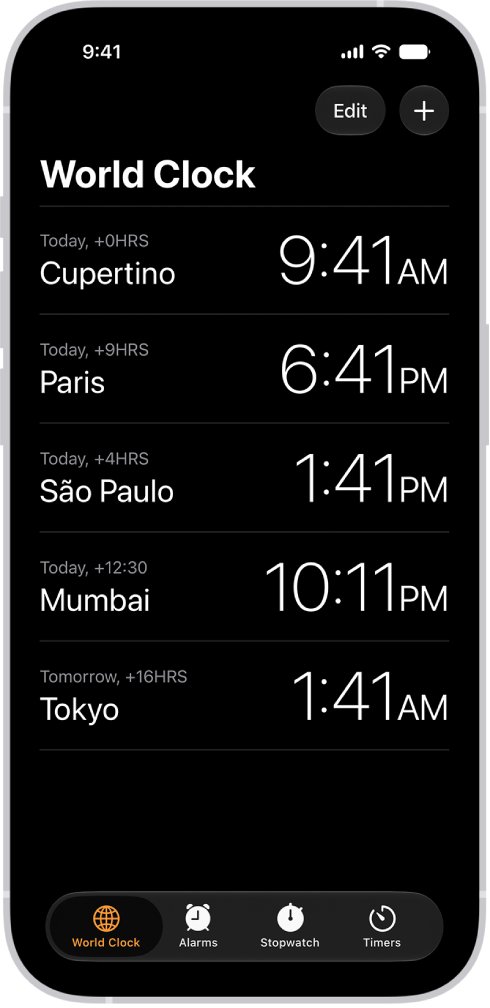
- On iPhone, open the Clock app.
- Tap World Clock.
- Tap the add button, then choose Reykjavik.
- Read UTC from the Reykjavik row next to your local time.
- Swipe left on the row and tap delete when you no longer need it.
On a PC, you can add a second time zone clock set to Coordinated Universal Time, so the taskbar shows UTC beside local time. You can also switch Windows to 24-hour time to match UTC timestamps.
How to tell which time zone Windows is using
Settings shows the zone name, but a command gives the exact ID. Use it to tell UTC apart from the London entry.
tzutil /gPrints the ID of the current Windows time zone. Get-TimeZone in PowerShell shows the same zone with its offset and daylight saving support.
You should see: UTC means the clock is on Coordinated Universal Time. GMT Standard Time means it is on the London zone, which changes in summer.
On a Mac, open System Settings > General > Date & Time and read Time zone and Closest city. On iPhone, the Date & Time screen shows the offset or city you chose.
How to set time zone back to automatic
Turning the automatic setting back on returns each device to the time zone of your current location.
- On Windows, go to Settings > Time & language > Date & time and turn on Set time zone automatically.
- On a Mac, go to System Settings > General > Date & Time and turn on Set time zone automatically using your current location.
- On iPhone, go to Settings > General > Date & Time and turn on Set Time Zone Automatically.
- Make sure Location Services is on, because automatic time zones need your location.
Clock not showing the correct time after setting UTC
The time zone switches back to local time
Automatic time zone is still on, so the device resets the zone from your location.
- Open Date & Time settings on the device.
- Turn off the automatic time zone switch.
- Choose the UTC zone, offset or city again.
The time zone says UTC but the minutes are wrong
Automatic time is off, so the clock is not syncing with a time server.
- On Windows, turn on Set time automatically.
- On a Mac, turn on Set time and date automatically, click Set, and enter a network time server for your region.
- On iPhone, turn on Set Time Automatically.
The clock is an hour off UTC in summer
A London, Dublin or Lisbon zone was chosen, and it moves forward for summer time.
- On Windows, select (UTC) Coordinated Universal Time instead of the London entry.
- On a Mac or iPhone, choose Reykjavik as the city instead of London.
tzutil or Set-TimeZone returns an error
The time zone ID is mistyped or missing its quotes.
- Run
tzutil /lto list valid IDs. - Type the ID exactly, inside quotes:
tzutil /s "UTC". - Run
tzutil /gto check the result.
Set clock to UTC FAQ
How do I set the clock on my computer to UTC?
On Windows, go to Settings > Time & language > Date & time, turn off Set time zone automatically, and choose (UTC) Coordinated Universal Time. On a Mac, turn off the automatic time zone in Date & Time settings and choose Reykjavik as the closest city.
How do I set the clock on a laptop to UTC?
A laptop uses the same settings as a desktop. On a Windows laptop, choose (UTC) Coordinated Universal Time in Date & time settings or run Set-TimeZone -Id "UTC" in PowerShell. On a MacBook, use a UTC city such as Reykjavik.
How do I set the clock to the correct time?
Turn on automatic time. On Windows that is Set time automatically, on a Mac it is Set time and date automatically, and on iPhone it is Set Time Automatically. The device then syncs with a time server and stays correct whatever time zone you choose.
Why do we set the clocks back, and does UTC change?
Clocks go back when daylight saving time ends in regions that use it. UTC itself never changes: the Windows UTC zone reports SupportsDaylightSavingTime as False. Only zones such as London's GMT Standard Time shift with the seasons.
How do I set my clock settings to 24-hour time?
On iPhone, turn on 24-Hour Time in Settings > General > Date & Time. On a Mac, turn on 24-hour time in Date & Time settings. The menu bar then shows 15:00 instead of 3:00 PM.
How do I set the clock time manually on a Mac?
Open System Settings > General > Date & Time, turn off Set time and date automatically, click Set, enter the date and time, then click Set again. Turn the automatic option back on later so the Mac resyncs.
Can I see a UTC clock without changing my time zone?
Yes. On iPhone, add Reykjavik in the Clock app's World Clock tab, which shows UTC next to local time. On Windows, add a second clock set to Coordinated Universal Time in the additional clocks settings.
How do I set my iPhone clock to UTC?
Go to Settings > General > Date & Time, turn off Set Time Zone Automatically, tap Set By, tap Time Zone Offset, and set the offset to zero with the + or – buttons.