A GPU (graphics processing unit) draws everything you see on screen by turning the scene data your apps and games send it into millions of coloured pixels, many times a second, and it also speeds up other parallel work such as video encoding and AI.
This guide explains how a GPU renders a frame, how it differs from a CPU, integrated versus dedicated graphics cards, what the specs mean, and how to see your GPU at work in Windows 11.

What does a GPU do in a computer?
The GPU is the processor that renders graphics: it takes the shapes, textures and lighting an app describes and computes the colour of every pixel on your display, frame after frame. It is built from hundreds or thousands of small cores that work on many pieces of data at once. That parallel design suits graphics, where every pixel needs the same kind of maths, and it also makes the GPU fast at video editing, machine learning and scientific computing.
The CPU stays in charge of the computer. It runs Windows and your programs, then hands the drawing work to the GPU through the graphics driver.
What does a GPU do: Step by step
Most real-time graphics, including almost every game, are drawn with a technique called rasterization. Here is the path one frame takes from app to screen.
| Step | What the GPU does | Why it matters |
|---|---|---|
| 1. Process visual data | Receives draw commands from the CPU through the driver, plus 3D models built from a mesh of triangles | Each corner of a triangle, a vertex, carries its position, colour, texture and facing direction |
| 2. Transform the scene | Works out where every vertex sits from the camera's point of view | Scenes can hold millions of polygons, so this runs across many cores at once |
| 3. Rasterize | Converts the triangles into pixels on a flat 2D grid | A 4K screen has roughly 8 million pixels to fill |
| 4. Shade and texture | Calculates each pixel's final colour from lighting and applied textures | This is the heaviest step and the one that sets image quality |
| 5. Sort depth | Uses a depth buffer (z-buffer) so objects in front hide the ones behind them | Stops distant walls showing through nearer objects |
| 6. Render images to the display | Writes the finished frame to memory buffers and sends it to the monitor | Frames are typically refreshed 30 to 90 times a second, so the work never stops |
Ray tracing is the other approach. It follows the path of light rays through each pixel to produce realistic reflections, shadows and refraction, and newer GPUs include dedicated ray tracing hardware to do it in real time.
What's the difference between a GPU and a CPU?
Both are silicon processors that handle data, but they are built for opposite kinds of work. Modern PCs need both.
| CPU (central processing unit) | GPU (graphics processing unit) | |
|---|---|---|
| Cores | A few powerful cores | Hundreds or thousands of smaller cores |
| Design goal | Low latency: finish each task quickly | High throughput: finish many tasks at once |
| Best at | Serial work, running Windows and apps, game logic, spreadsheets | Parallel work: rendering, video processing, AI |
| Operations at once | A handful | Thousands |
| Role in a PC | The brain that runs the system and hands out work | The accelerator that takes over graphics and parallel jobs |
Many newer processors also include an NPU (neural processing unit), which works alongside the GPU on AI tasks while using less power.
GPU vs graphics card: integrated and dedicated GPUs
GPU and graphics card are often used as if they mean the same thing. The GPU is the chip; the graphics card is the add-in board that carries the GPU along with its memory, power delivery, cooling and display outputs.
| Integrated GPU | Dedicated (discrete) GPU | |
|---|---|---|
| Where it lives | Built into the processor, next to the CPU cores | Separate chip on its own board, usually in a PCI Express slot |
| Memory | Shares system RAM | Has its own VRAM on the card |
| Power and heat | Low, good for battery life | Higher, needs its own cooling |
| Cost and size | Included in the processor; allows thin, light laptops | Extra part, larger and more expensive |
| Good for | Office work, web, streaming video, light gaming and editing | Modern 3D games, 4K video editing, 3D rendering, local AI |
| Examples | Intel Iris Xe and UHD Graphics, Intel Arc in some Core Ultra chips | NVIDIA GeForce RTX, AMD Radeon RX, Intel Arc graphics cards |
Most GPUs sold are integrated. Many laptops carry both: the integrated GPU handles the desktop to save battery, and the dedicated GPU takes over for games and creative apps. To find out which ones your PC has, check what graphics card you have in Windows.
What is a GPU used for besides gaming?
GPUs started as fixed-function chips for 3D games and became general-purpose parallel processors. These are the main jobs they now do.
| Use | What the GPU does | Who benefits |
|---|---|---|
| Gaming | Renders 2D and 3D scenes at higher resolutions and frame rates | PC and console players, VR users |
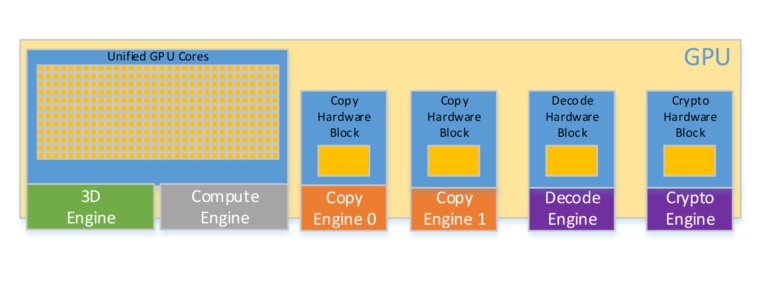
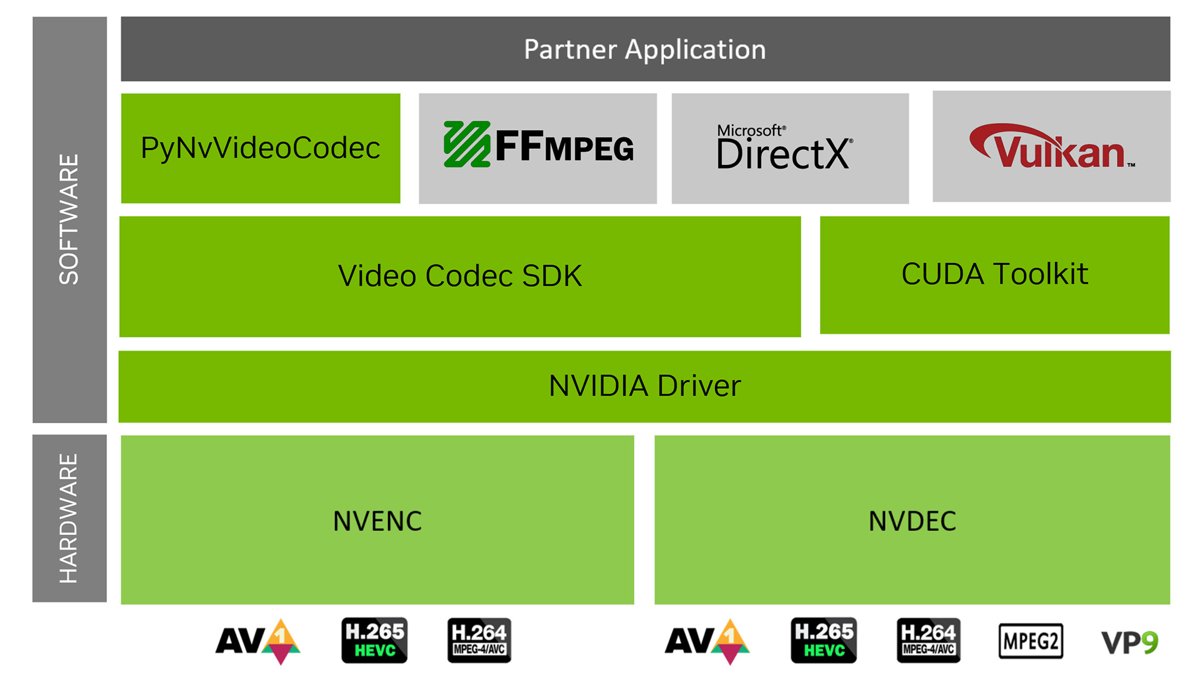
| Video playback and streaming | Decodes and encodes video in dedicated media hardware, separate from the graphics cores | Anyone watching video, streamers, video call users |
| Video editing and 3D | Speeds up effects, previews and final renders | Editors, designers, 3D artists |
| AI and machine learning | Runs the matrix maths that trains and runs neural networks | Developers, researchers, local AI app users |
| Scientific and high-performance computing | Splits simulations into thousands of tasks done at once | Researchers, engineers, supercomputers |
| Cloud and data centre | Serves cloud gaming, rendering and AI to remote users | Businesses and cloud services |
Software reaches this power through programming platforms such as NVIDIA CUDA, first released in 2007, which let developers run general-purpose code on the GPU.

How important is a GPU for your PC?
Every PC needs a GPU to show a picture, but not every PC needs a dedicated one. Match what you do to a row.
| What you do | GPU you need | Why |
|---|---|---|
| Web, email, Office, video streaming | Integrated graphics | Light graphics work; a dedicated card adds cost, heat and power draw |
| Casual or older games, photo editing | Recent integrated graphics, or an entry dedicated card | Modern integrated GPUs handle light gaming and editing |
| Current 3D games at high settings | Dedicated GPU | Frame rate and resolution depend mostly on the GPU |
| 4K video editing, 3D rendering | Dedicated GPU with plenty of VRAM | Large projects need fast parallel processing and memory |
| Running AI models locally | Dedicated GPU with plenty of VRAM, or an NPU for light AI features | Model size is limited by GPU memory |
Understanding GPU specs
Spec sheets list many numbers. These are the ones that change what a GPU can do.
| Spec | What it means | What to look for |
|---|---|---|
| Cores (CUDA cores, stream processors, Xe cores) | The parallel units that do the maths; each vendor names them differently | Compare core counts only within one vendor's own line-up |
| VRAM (dedicated memory) | Memory on the card for textures, frames and AI models | More VRAM helps high resolutions, big textures and large AI models |
| Shared GPU memory | System RAM the GPU can borrow; Windows caps it at half of physical memory | Slower than VRAM; integrated GPUs rely on it |
| Ray tracing hardware | Dedicated units for realistic light, shadow and reflection effects | Needed for ray-traced games at playable frame rates |
| AI hardware (for example NVIDIA Tensor Cores) | Units that speed up matrix operations for AI and AI upscaling in games | Matters for AI apps and features like upscaling |
| Media engine | Hardware video encoders and decoders | Helps streaming, recording and video editing |
| Power and cooling | How much power the card draws and how much heat it gives off | Check the card maker's power supply and case size requirements |
How to see what your GPU is doing in Windows 11
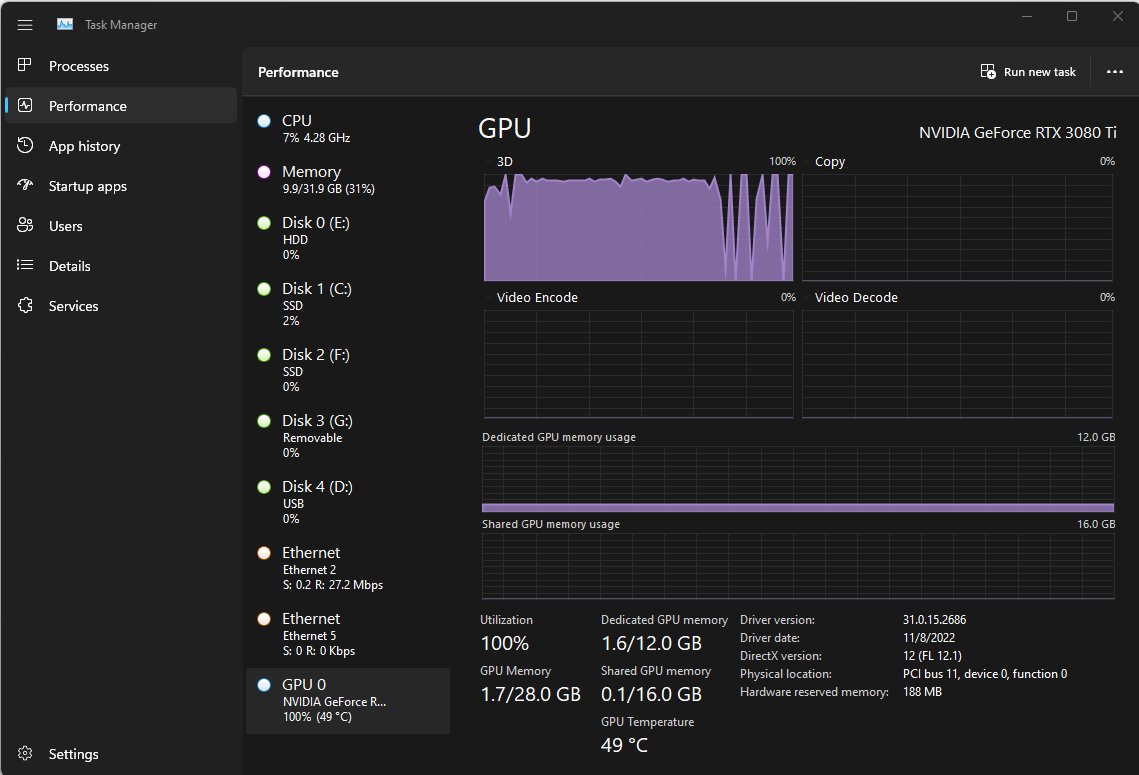
Task Manager shows each GPU, how busy its engines are, and how much memory it uses.
- Press Ctrl + Shift + Esc to open Task Manager.
- Select the Performance tab.
- Select GPU 0 in the left pane. A PC with two GPUs also lists GPU 1.
- Read the engine graphs at the top right, such as 3D, Copy and Video Decode. Select an engine name to switch the graph to another engine.
- Read Dedicated GPU memory and Shared GPU memory below the graphs. On a dedicated card, dedicated memory is the VRAM on the card.
- Play a video or start a game and watch which engine rises. Video playback usually loads the video engine, while games load the 3D engine.
The Processes tab also has a GPU column, which helps you check GPU usage per app when something is slowing the PC down.
How to choose which GPU an app uses in Windows 11
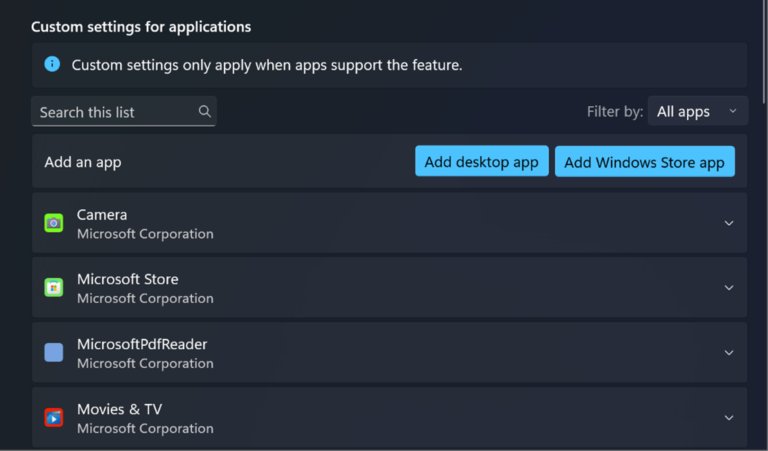
On a laptop with integrated and dedicated graphics, Windows decides which GPU runs each app. You can override it per app in the Windows 11 graphics settings.
- Open Settings > System > Display > Graphics.
- Under Custom settings for applications, find the app. If it is missing, select Add desktop app or Add Windows Store app and pick it.
- Expand the app and set its GPU preference to the high performance GPU for games and creative apps, or the power saving GPU for battery life.
- Restart the app so it opens on the chosen GPU.
- To undo the change, expand the app and select Reset.
The same page holds Advanced graphics settings, where supported PCs can turn on hardware-accelerated GPU scheduling and variable refresh rate.
Tips for understanding what a GPU does
These points clear up the most common confusion about GPUs.
| Tip | Why it helps |
|---|---|
| Think of the GPU as a crowd and the CPU as an expert | The GPU does many simple tasks at once; the CPU does a few complex ones quickly |
| Look at both GPU and CPU for gaming | A slow CPU can hold back a fast GPU, and the reverse |
| Watch Task Manager during the task you care about | It shows whether the GPU is actually the busy part |
| Compare VRAM against the resolution and apps you use | Running out of VRAM forces the GPU to use slower shared memory |
| Keep the graphics driver up to date from the GPU maker or PC maker | The driver is how Windows and apps talk to the GPU |
| Read benchmarks for your own games and apps | Price and core counts alone do not predict performance in a specific task |
GPU and graphics card FAQ
What is the function of a GPU?
A GPU's main function is to render graphics: it calculates the colour of every pixel in each frame shown on your display. It also accelerates other parallel tasks, including video encoding and decoding, photo and video effects, and AI workloads.
What does the GPU do, in simple terms?
The GPU draws the picture on your screen. Apps describe what should appear, and the GPU turns that description into millions of coloured dots dozens of times every second, so windows, videos and games move smoothly.
Why is a GPU important?
Without a GPU, the computer cannot show a picture, and without a capable one, games stutter and video editing crawls. A GPU handles graphics and parallel work far faster than the CPU, which leaves the CPU free to run Windows and your programs.
What does a GPU primarily do?
A GPU primarily accelerates graphics rendering, both 2D and 3D. That covers the Windows desktop, video playback, games and 3D apps. Its parallel design was later put to work on general computing tasks such as machine learning.
Can I upgrade my GPU?
On most desktop PCs, yes: a dedicated graphics card sits in a PCI Express slot and can be replaced, as long as the power supply and case fit the new card. An integrated GPU is part of the processor, so it can only change with the processor.
Do I need a separate GPU if I'm not gaming or editing videos?
No. Integrated graphics handle web browsing, Office, video streaming and video calls well, and they use less power. A separate GPU becomes worth it for modern 3D games, heavy video or 3D work, and running AI models locally.
Can GPUs be used for more than just graphics processing?
Yes. GPUs now accelerate AI training and inference, scientific simulations, video encoding, data centre workloads and cloud gaming. Platforms such as NVIDIA CUDA let developers run general-purpose code on the GPU's parallel cores.
Is a more expensive GPU always better?
Not for every user. A pricier GPU is faster in demanding games and creative apps, but for office work and video it adds cost, power draw and heat with no visible gain. Match the GPU to the apps and resolution you actually use.
What is the role of a GPU in AI?
AI models rely on huge numbers of matrix calculations, which the GPU's thousands of cores process in parallel. Many GPUs add dedicated AI units, such as NVIDIA Tensor Cores, and the amount of VRAM limits how large a model can run locally.