Tizen OS is a Linux-based, open-source operating system that Samsung uses on all of its Smart TVs, and it has also run on Samsung watches, phones, signage and Family Hub refrigerators.
This guide explains where Tizen came from, its core features, which devices run it, how it compares with Android TV and Wear OS, how apps are built for it, its security model and where it is heading.
What is Tizen OS?
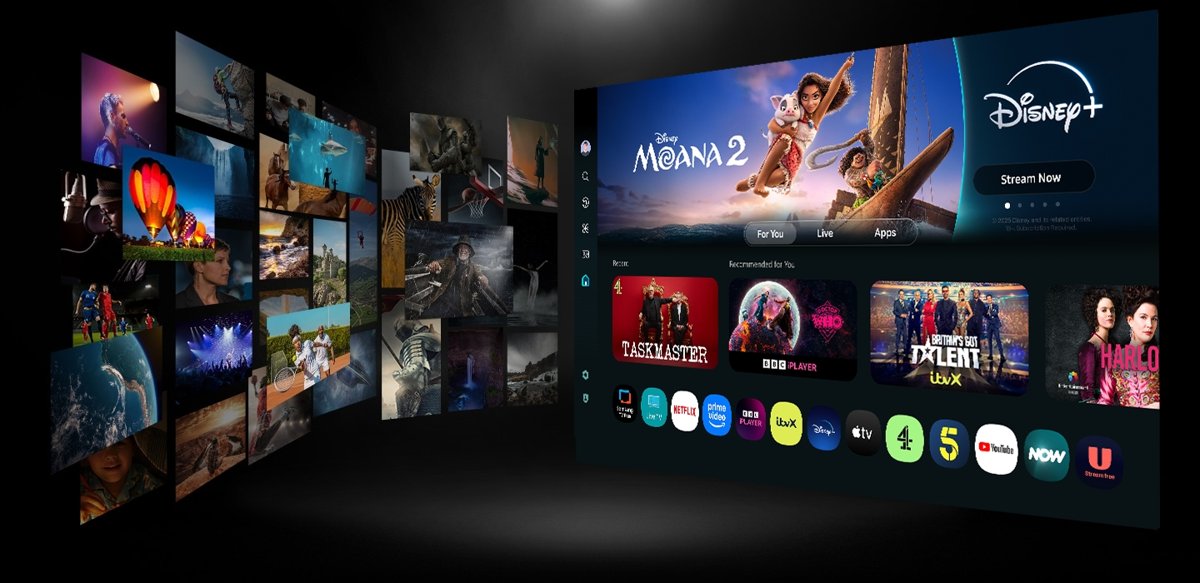
Samsung describes Tizen as a Linux-based open-source platform. Its UK Smart TV page puts it more simply: Tizen is the operating system that powers all Samsung Smart TVs.
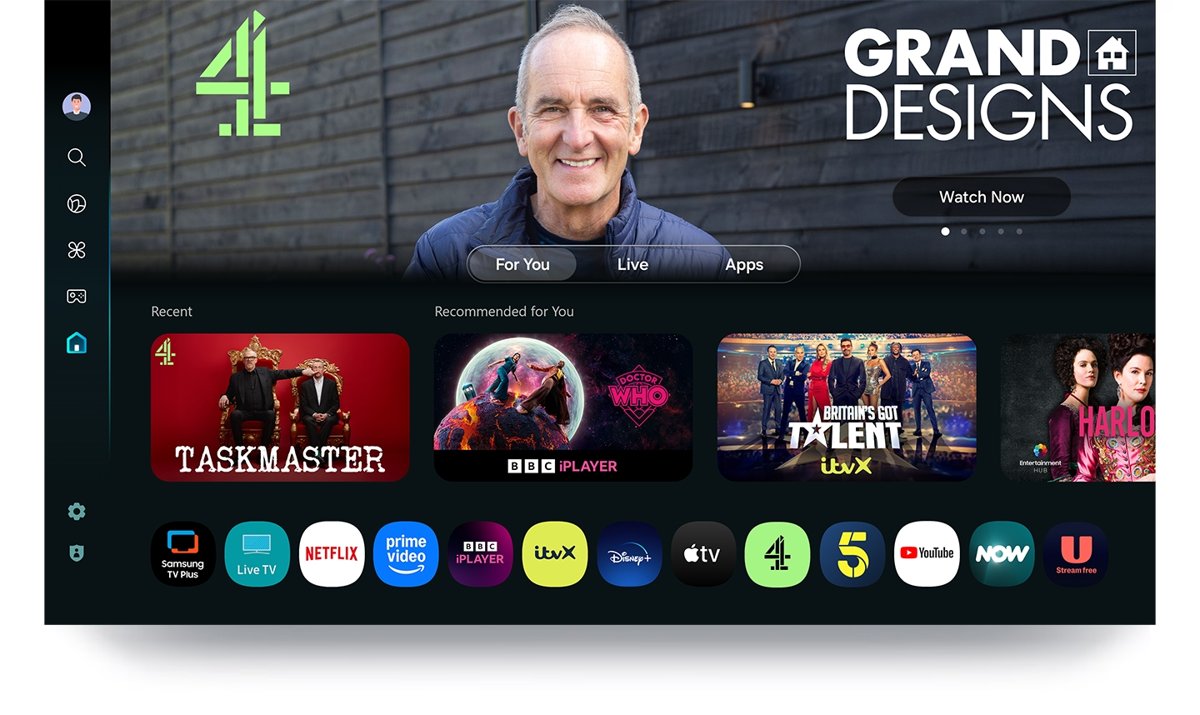
On a current Samsung TV, the interface you see on top of Tizen is called One UI Tizen. The Smart Hub home screen, the app list and Samsung TV Plus all run on it.
If you own a Samsung Smart TV, you already use Tizen OS: it is the software behind the Home screen, the apps and the settings menus. Samsung builds Tizen for its own hardware, so a Samsung TV runs Tizen rather than Android TV or Google TV. The same platform also ran Samsung's Gear and Galaxy watches up to the Galaxy Watch3.
Origins and development of Tizen OS
Samsung's developer documentation records how Tizen moved through its device lines. The table lists the milestones Samsung itself publishes.
| Milestone | What changed |
|---|---|
| Gear S2 smartwatch | Shipped on Tizen 2.3.1 and later moved to 2.3.2 |
| 2015 Samsung Smart TVs | First TV model year in Samsung's Tizen table, on Tizen 2.3 |
| 2016 to 2018 TVs | Tizen 2.4, 3.0 and 4.0; the web engine moved from JavaScriptCore to V8 in 2016 |
| Tizen 4.0 | Tizen .NET support arrived for Smart TV, so apps could be written in C# |
| Galaxy Watch3 | The last Samsung watch on Tizen, running Tizen 5.5 |
| Galaxy Watch4 | Samsung switched its watch OS from Tizen to Wear OS Powered by Samsung |
| 2023 TV lineup | Tizen 7.0 and the start of OS upgrades on Samsung TVs |
| 2026 TV lineup | Tizen 10.0, with the TV toolchain moving to GCC 14.2.0 |
Core features of Tizen OS
| Feature | What it gives you |
|---|---|
| Linux base, open source | Samsung calls Tizen a Linux-based open-source platform, and most Tizen .NET projects are developed in public |
| One UI Tizen | The current TV interface, with a personalised Home screen |
| Smart Hub and apps | Popular streaming apps such as Netflix and YouTube, installed from the Home screen |
| Samsung TV Plus | Free movies and shows on Samsung Smart TVs released since 2016; ads may appear |
| SmartThings IoT hub | Connects SmartThings-compatible devices to the TV over Wi-Fi, Bluetooth or another wireless link |
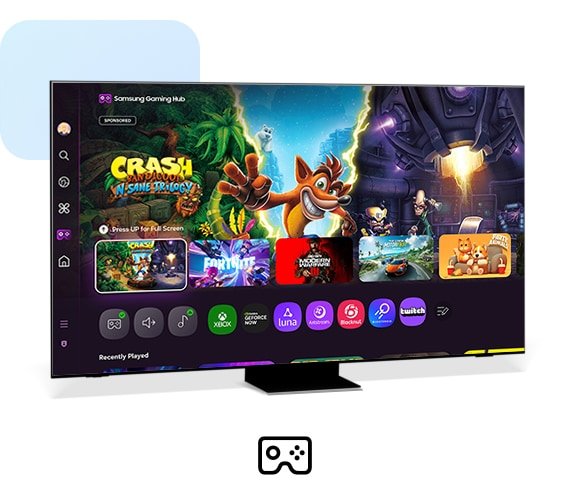
| Gaming Hub | Games from streaming services played on the TV |
| Samsung Knox Security | Blocks malicious apps and sites automatically on Tizen TVs launched since 2015 |
| Web and .NET app engines | HTML5, CSS3 and JavaScript apps, plus C# apps through Tizen .NET |
Key device categories running Tizen OS
Samsung says Tizen runs on 50 million Samsung devices, including TVs, wearables, mobile phones and other IoT devices. Its developer site groups the current Tizen targets by product line.
| Device category | Tizen status | Notes |
|---|---|---|
| Samsung Smart TVs | Current | Every Samsung Smart TV runs Tizen; 2026 models ship with Tizen 10.0 |
| Smart Signage and Smart Hospitality Display | Current | Samsung's commercial displays sit under the same Visual Display group as Smart TV |
| Family Hub refrigerators | Current | Tizen Studio builds native apps for the Family Hub refrigerator |
| Smartwatches (Gear S2 to Galaxy Watch3) | Ended | Galaxy Watch4 and later run Wear OS Powered by Samsung |
| Mobile phones | Past | Samsung lists mobile phones among the devices Tizen has run on; current Samsung Galaxy phones run Android |
Tizen OS version by Samsung TV year
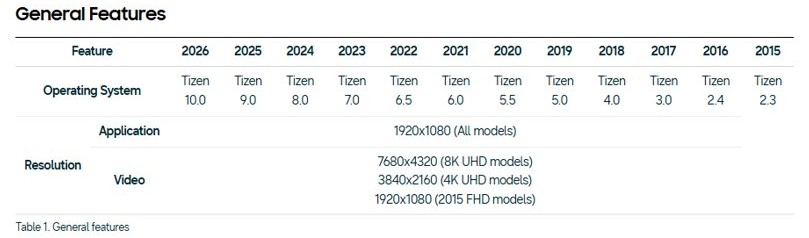
Each Samsung TV model year maps to one Tizen version. Use the table to find what your TV shipped with.
| TV model year | Tizen version | JavaScript engine |
|---|---|---|
| 2026 | Tizen 10.0 | V8 |
| 2025 | Tizen 9.0 | V8 |
| 2024 | Tizen 8.0 | V8 |
| 2023 | Tizen 7.0 | V8 |
| 2022 | Tizen 6.5 | V8 |
| 2021 | Tizen 6.0 | V8 |
| 2020 | Tizen 5.5 | V8 |
| 2019 | Tizen 5.0 | V8 |
| 2018 | Tizen 4.0 | V8 |
| 2017 | Tizen 3.0 | V8 |
| 2016 | Tizen 2.4 | V8 |
| 2015 | Tizen 2.3 | JavaScriptCore (JSC) |
From the 2023 lineup onward, Samsung TVs support OS upgrades, so the version on a 2023 or later set can be newer than the one it shipped with. A 2023 Tizen 7.0 model can take Tizen 8.0 or later firmware.
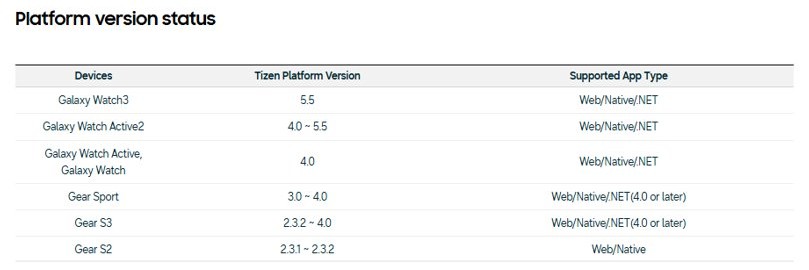
Which Galaxy Watch runs Tizen OS
| Watch | Tizen version range |
|---|---|
| Gear S2 | 2.3.1 to 2.3.2 |
| Gear S3 | 2.3.2 to 4.0 |
| Gear Sport | 3.0 to 4.0 |
| Galaxy Watch | 4.0 |
| Galaxy Watch Active | 4.0 |
| Galaxy Watch Active2 | 4.0 to 5.5 |
| Galaxy Watch3 | 5.5 |
| Galaxy Watch4 and later | Not Tizen: Wear OS Powered by Samsung |
Developers can no longer register new or updated Tizen watch apps in Seller Portal. Tizen watch faces and apps already on sale in Galaxy Store stay available but cannot be updated.
How Tizen OS differs from other operating systems
| Point | Tizen OS (Samsung) | Android TV / Google TV and Wear OS (Google) |
|---|---|---|
| Who builds the devices | Samsung TVs, signage and appliances, plus older Samsung watches | Many TV and watch makers; Samsung watches since Galaxy Watch4 |
| Base | Linux-based, open-source platform | Android |
| TV app languages | HTML5, CSS3 and JavaScript web apps, or C# with Tizen .NET | Android apps built in Android Studio |
| App store | Apps reach Samsung TVs through TV Seller Office and the Smart Hub | Google Play |
| Phone and TV apps | TV apps are web or .NET apps built for Tizen | Google recommends one Android app that supports both phones and TVs |
| Security layer on TVs | Samsung Knox Security on Tizen TVs since 2015 | Google's Android security model |
Application ecosystem and development for Tizen
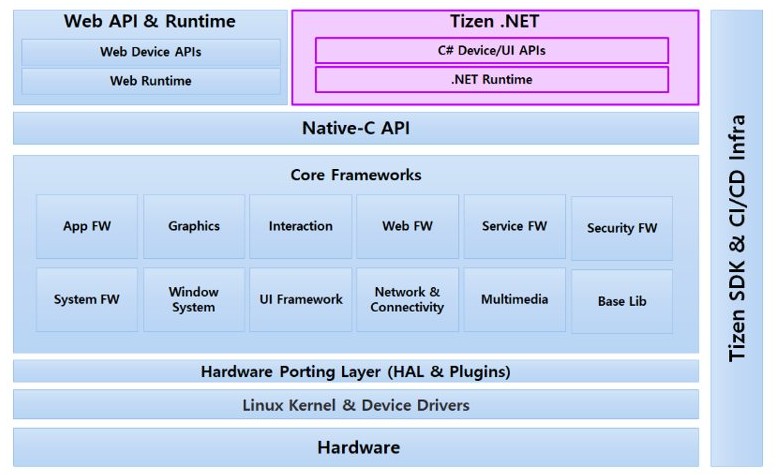
Tizen originally offered C-based native frameworks and HTML5 web frameworks. Tizen .NET added C# development on a managed runtime, built on .NET and the TizenFX API.
| Tool or framework | What it is for |
|---|---|
| Web apps (HTML5, CSS3, JavaScript) | The main TV app type; recent TVs run JavaScript on V8 |
| Tizen .NET and TizenFX | C# apps with access to the application framework, account, location, media and connectivity features |
| NUI | Samsung's hardware-accelerated C# UI toolkit for 2D and 3D interfaces |
| .NET MAUI with Tizen.TV.UIControls | Cross-platform C# UI, with extensions that work on Tizen TV only |
| Tizen Studio | The SDK for TV web apps and Family Hub native apps |
| VS Code extension and Visual Studio Tools for Tizen | Create projects, certificates and test runs from the editors developers already use |
| TV Simulator, TV Emulator and Remote Test Lab | Test without a TV; Samsung recommends a real TV for final testing |
| TV Seller Office and Galaxy Store | Distribution channels Samsung lists for TV apps and older watch apps |
How to install apps on a Samsung Tizen TV
Apps on a Tizen TV come from the TV's own app list, not from Google Play, which is why Kodi on a Samsung smart TV needs a separate streaming device. Agreement to the Smart Hub Terms and Conditions and Privacy Policy is needed first.
- Press the Home button on the Samsung remote.
- Search for the app you want by name.
- Select the app in the results.
- Select Install and wait for the download to finish.
- Open the app from the Home screen.
How to start building a Tizen TV app
- Install the Samsung TV SDK through Tizen Studio or the Samsung VSCode Extension.
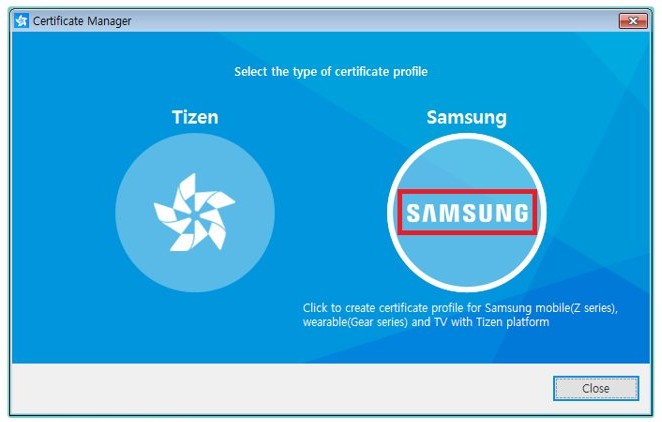
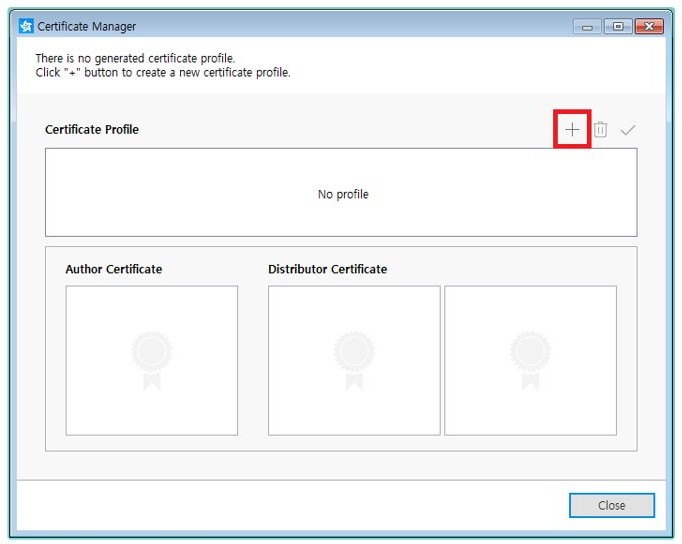
- Create a certificate profile in Certificate Manager, choosing Samsung as the profile type and TV as the device type.
- Add the target TV's DUID, found on the TV under Menu > Support > Contact Samsung > Unique Device ID.
- Back up the author certificate; app updates must be signed with the same one.
- Create a project from one of the predefined templates.
- Test the app in the TV Simulator, then the TV Emulator, then on a real Samsung TV with developer mode turned on.
Advantages of Tizen OS
| Advantage | Why it matters |
|---|---|
| Long OS upgrade window on new TVs | Samsung promises Tizen OS upgrades for up to 7 years on eligible TVs from 2023 onward |
| Built-in security | Samsung Knox Security covers Tizen TVs launched since 2015 and blocks malicious apps and sites |
| Free content out of the box | Samsung TV Plus is free on Samsung Smart TVs released since 2016 |
| Smart home hub in the TV | The built-in IoT hub connects SmartThings devices without a separate hub |
| Web-standard apps | Developers build TV apps with HTML5, CSS3 and JavaScript, or with C# |
| Open-source base | Linux underneath, with Tizen .NET projects developed publicly |
Challenges and limitations of Tizen OS
| Limitation | What it means for you |
|---|---|
| Separate app store from Android | Apps must be built and published for Tizen through Samsung, not through Google Play |
| Watch platform discontinued | No new or updated Tizen watch apps can be registered; Galaxy Watch4 and later use Wear OS |
| Older TVs do not get the 7-year promise | Samsung supports OS upgrades only from the 2023 lineup onward |
| Upgrades do not change hardware | Samsung says OS upgrades do not cover hardware performance, features or durability, and some features may be missing on older sets |
| Features change every year | Samsung states that TV general features are not fixed and can change each year |
| Toolchain change in 2026 | Native binaries built with GCC 9.2.0 must be rebuilt for 2026 TVs, which use GCC 14.2.0 |
Samsung’s role in Tizen OS development
Samsung decides what Tizen runs on today: it publishes the SDKs, the TV version table and the app distribution rules. It also decided to move its watches to Wear OS.
| Samsung's role | What Samsung does |
|---|---|
| Platform owner on its devices | Ships a new Tizen version with each TV model year |
| Developer support | Runs the Samsung Developer site with Tizen Studio, the VS Code extension, emulators and Remote Test Lab |
| App gatekeeper | Requires every app to be signed with valid certificates, and runs TV Seller Office |
| Security | Adds Samsung Knox Security and ongoing security updates to Tizen TVs |
| Open-source work | Develops most Tizen .NET projects, including TizenFX and NUI, in public repositories |
Tizen OS in automotive and IoT
In the home, Tizen's IoT role is clear. Samsung's current developer site lists no in-car Tizen platform, so there is no current Samsung automotive product to point to.
| Area | Where Tizen fits |
|---|---|
| Smart TV as a smart home hub | The built-in IoT hub connects SmartThings-compatible devices; a Samsung account and a wireless connection are needed |
| Family Hub refrigerator | Tizen Studio builds native apps for it, and Remote Test Lab gives virtual access to the platform |
| Smart Signage and hospitality displays | Commercial screens in Samsung's Visual Display line |
| Automotive | No Tizen in-vehicle platform appears in Samsung's current developer programmes |
Security aspects of Tizen OS
| Security layer | How it works |
|---|---|
| App signing | Every app must be signed with valid certificates before it can be installed or run, which proves its source and that it was not altered |
| Author certificate | Updates must carry the same author certificate as the original app, or they are treated as a different app |
| Distributor certificate and privilege level | The distributor certificate sets the privilege level an app needs and the DUIDs of test devices |
| Samsung Knox Security | Applies to Tizen TVs launched since 2015 and blocks malicious apps and sites automatically |
| Security updates | Samsung's security team ships updates; Knox needs the latest software update installed |
Keep a Tizen TV on the latest software update so Knox protection stays current.
Future prospects of Tizen OS
Tizen OS has a long future on Samsung TVs and a finished one on Samsung watches. Samsung shipped Tizen 10.0 on its 2026 TVs and promises Tizen OS upgrades for up to 7 years from release year on eligible sets, so a 2026 model is covered into the 2030s. On watches, Galaxy Watch4 and later run Wear OS, and Tizen watch apps can no longer be updated in Galaxy Store.
For developers, the direction is web apps plus C# through Tizen .NET and .NET MAUI, with a newer GCC 14.2.0 toolchain for 2026 TVs.
Tizen OS FAQ
What is Tizen OS on a Samsung TV?
Tizen OS is the Linux-based operating system that powers all Samsung Smart TVs. It runs the One UI Tizen Home screen, the Smart Hub app list, Samsung TV Plus and the TV's settings.
Is Tizen OS based on Android?
No. Samsung describes Tizen as a Linux-based open-source platform, separate from Android. Tizen TV apps are built as web apps or with Tizen .NET and come from Samsung's own app list.
Which Tizen version does my Samsung TV have?
It depends on the model year. 2015 TVs shipped with Tizen 2.3, 2020 with 5.5, 2023 with 7.0, 2024 with 8.0, 2025 with 9.0 and 2026 with 10.0. TVs from 2023 onward can get later versions through OS upgrades.
How long will Samsung update Tizen OS?
Samsung promises Tizen OS upgrades for up to 7 years from release year on eligible TVs from 2023 onward. Coverage varies by region and model, and upgrades do not change the TV's hardware performance or durability.
Do Samsung Galaxy Watches still use Tizen?
No. Galaxy Watch4 and later run Wear OS Powered by Samsung. The Gear S2, Gear S3, Gear Sport, Galaxy Watch, Galaxy Watch Active, Active2 and Galaxy Watch3 ran Tizen.
Is Tizen OS secure?
Samsung Knox Security protects Tizen TVs launched since 2015 by blocking malicious apps and sites automatically. Every Tizen app must also be signed with valid certificates before it can be installed or run.
Can I install apps on a Tizen TV?
Yes. Press Home on the remote, search for the app, select it and choose Install. Apps come from Samsung's own TV app list, which includes popular streaming apps such as Netflix and YouTube.
How do developers build Tizen apps?
Developers build TV apps with HTML5, CSS3 and JavaScript, or in C# with Tizen .NET. Samsung provides Tizen Studio, a VS Code extension, Visual Studio Tools for Tizen, a TV emulator and Remote Test Lab.