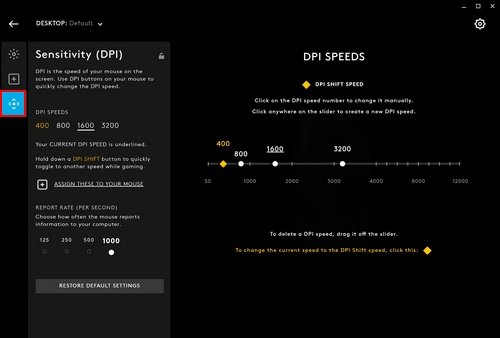
Open Logitech G HUB, click your mouse and use the Sensitivity (DPI) tab to add, remove and adjust up to five DPI speeds for the active profile.
This guide covers DPI speeds, per-game profiles, on-board memory, DPI button assignments, and the fixes for DPI that resets or will not change.
How to manage mouse DPI settings using Logitech G Hub?
G HUB runs on Windows and macOS. If it is not installed yet, download Logitech G HUB from Logitech first and plug in the mouse or its receiver.
- Open Logitech G HUB and wait for your mouse to appear on the home screen.
- Pick the profile you want to change from the profile drop-down in the top-left corner. Use DESKTOP – Default for everyday use.
- Click the picture of your mouse to open its settings.
- Select the Sensitivity (DPI) tab.
- Drag the slider, or select one of the preset DPI speeds, to change the speed you use.
- Click an empty spot on the slider to add another DPI speed, up to five in total.
- Move the mouse across the desktop and adjust the speed until the cursor feels right.
G HUB saves DPI changes to the profile you selected, so another game profile keeps its own speeds.
No explicit save button is needed; the change applies as soon as the slider moves.
What DPI speeds and DPI Shift mean in Logitech G HUB
DPI sets how far the cursor travels for each inch the mouse moves. A higher DPI moves the pointer further with less hand movement.
| G HUB term | What it controls | Limit or rule |
|---|---|---|
| DPI speed | One sensitivity level the mouse can switch to | Up to five per profile |
| DPI SHIFT SPEED | The speed tied to the DPI shift (Sniper) button on mice that have one | Cannot be removed from the slider |
| Profile | A set of DPI speeds, button assignments and lighting for one app or game | The DESKTOP – Default profile cannot be deleted |
| Persistent profile | One profile that G HUB uses for every game and app | Set in Global Settings; NONE by default |
| On-Board Memory Mode | Writes your customisations directly to the mouse | Needed for settings to follow the mouse to a PC without G HUB |
| DPI range | The lowest and highest speed the slider allows | Depends on the sensor, for example 100 to 8200 on the G705 |
Factory presets vary by model. The G705 ships with 800, 1600 and 3200 DPI, while the G502 LIGHTSPEED ships with 400, 800, 1600, 3200 and 6400 DPI.
To slow the cursor without touching sensor DPI, lower the Windows mouse pointer speed in Settings instead.
How to add or remove DPI speeds in Logitech G HUB
Fewer speeds make the DPI button faster to cycle. Remove any level you never use.
- In G HUB, select the profile from the drop-down in the top-left corner.
- Click your mouse, then open the Sensitivity (DPI) tab.
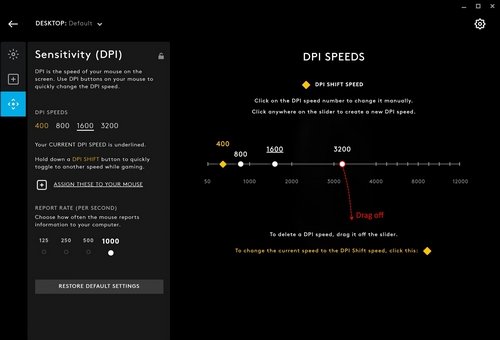
- To add a speed, click anywhere on the slider. G HUB creates a new DPI speed at that point and selects it.
- To remove a speed, click and hold its dot, drag it down off the slider and release.
- Repeat until the profile holds only the speeds you want, up to a maximum of five.
Every speed can be removed except the DPI SHIFT SPEED. If the slider refuses a sixth dot, delete one first.
How to change DPI on a Logitech mouse with the DPI button
Once the speeds are set in G HUB, the buttons on the mouse switch between them without opening the app.
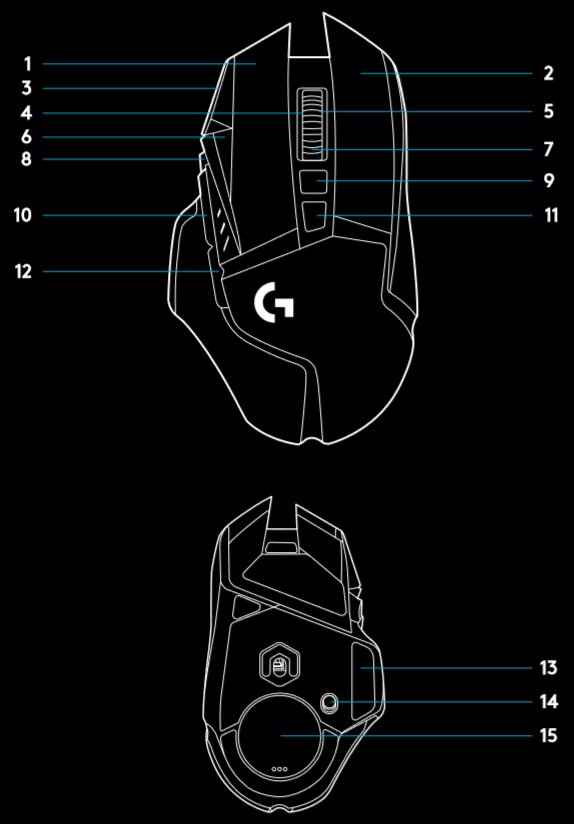
- Find the DPI button. On the G705 it sits below the scroll wheel.
- Press it once to step to the next DPI speed in the active profile.
- Keep pressing until the cursor speed suits the task.
- On mice with separate buttons, use DPI up and DPI down instead. The G502 LIGHTSPEED maps them to buttons G8 and G7.
- Hold the DPI shift (Sniper) button, G6 on the G502 LIGHTSPEED, when you need the DPI shift speed.
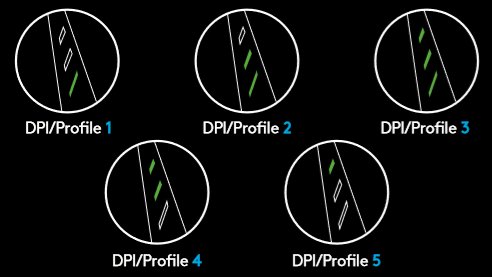
The G502 LIGHTSPEED shows the active DPI level on three LEDs above the thumb buttons, so a quick glance confirms the step.
How to set a different DPI for each game in Logitech G HUB
Because DPI speeds live in profiles, a game profile can run a lower DPI for aiming while the desktop profile stays faster.
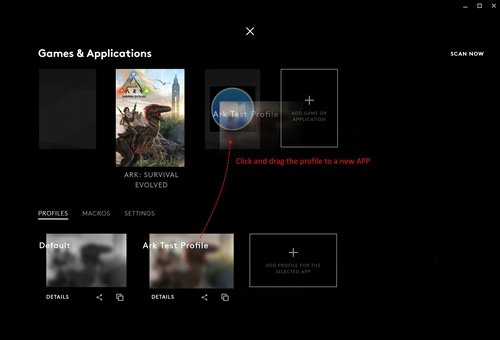
- Click the profile name at the top of the G HUB home page to open Games & Applications.
- Select the game or app whose profile you want to use.
- Return to the home page with that profile active, click the mouse and open Sensitivity (DPI).
- Set the DPI speeds for that game.
- To reuse the profile elsewhere, drag it onto another app on the Games & Applications page. G HUB copies it there.
To remove a game profile you no longer need, select it under PROFILES, click Details below the profile picture, then click DELETE.
How to use one DPI profile for all games in G HUB
A persistent profile stops G HUB from switching DPI when a game launches. Use it when one setting suits everything.
- On the G HUB home page, click the Settings (gear) icon in the top-right corner.
- Select the Settings option to open Global Settings.
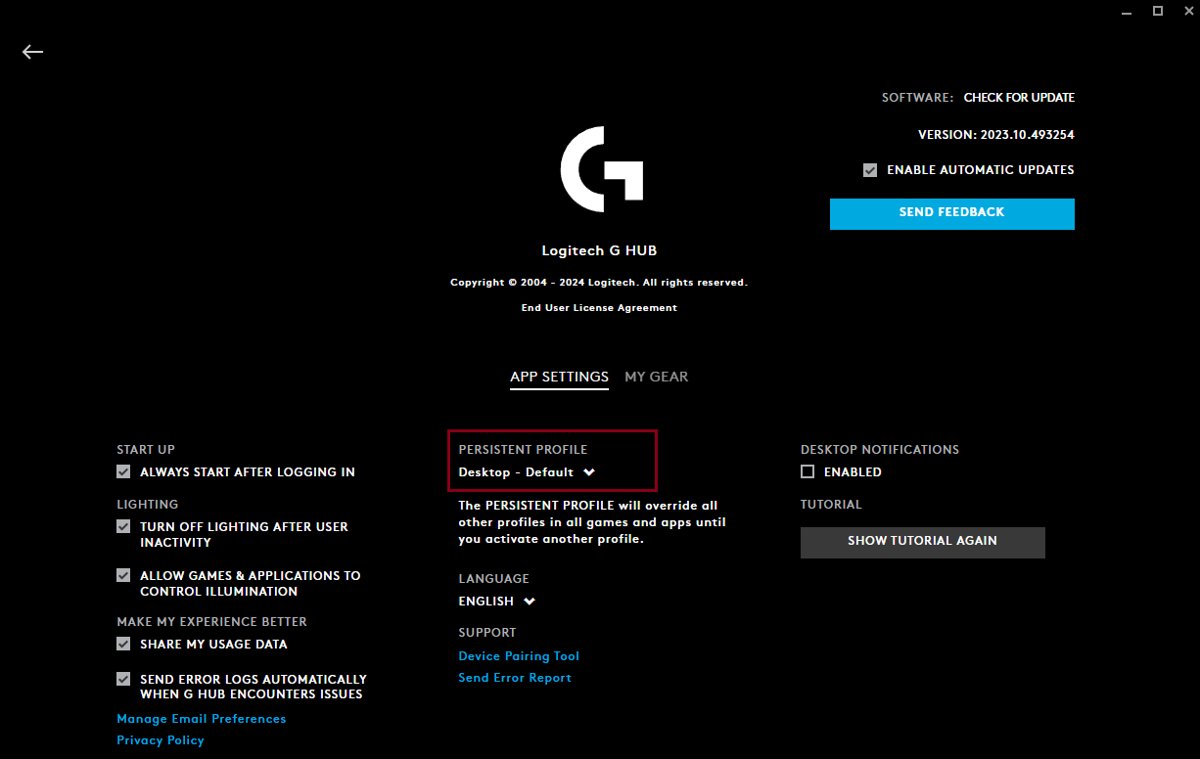
- Find PERSISTENT PROFILE. It shows NONE when no profile is locked.
- Open the drop-down and select the profile whose DPI you want everywhere, such as DESKTOP – Default.
Set PERSISTENT PROFILE back to NONE to return to automatic per-game switching.
How to save DPI settings to a Logitech mouse with On-Board Memory
On-Board Memory mode stores your customisations in the mouse itself. Use it before taking the mouse to a tournament PC, a work laptop or any machine without G HUB.
- Connect the mouse. For a wireless model, use the supplied USB cable or the wireless USB receiver.
- Open G HUB and select your gaming mouse.
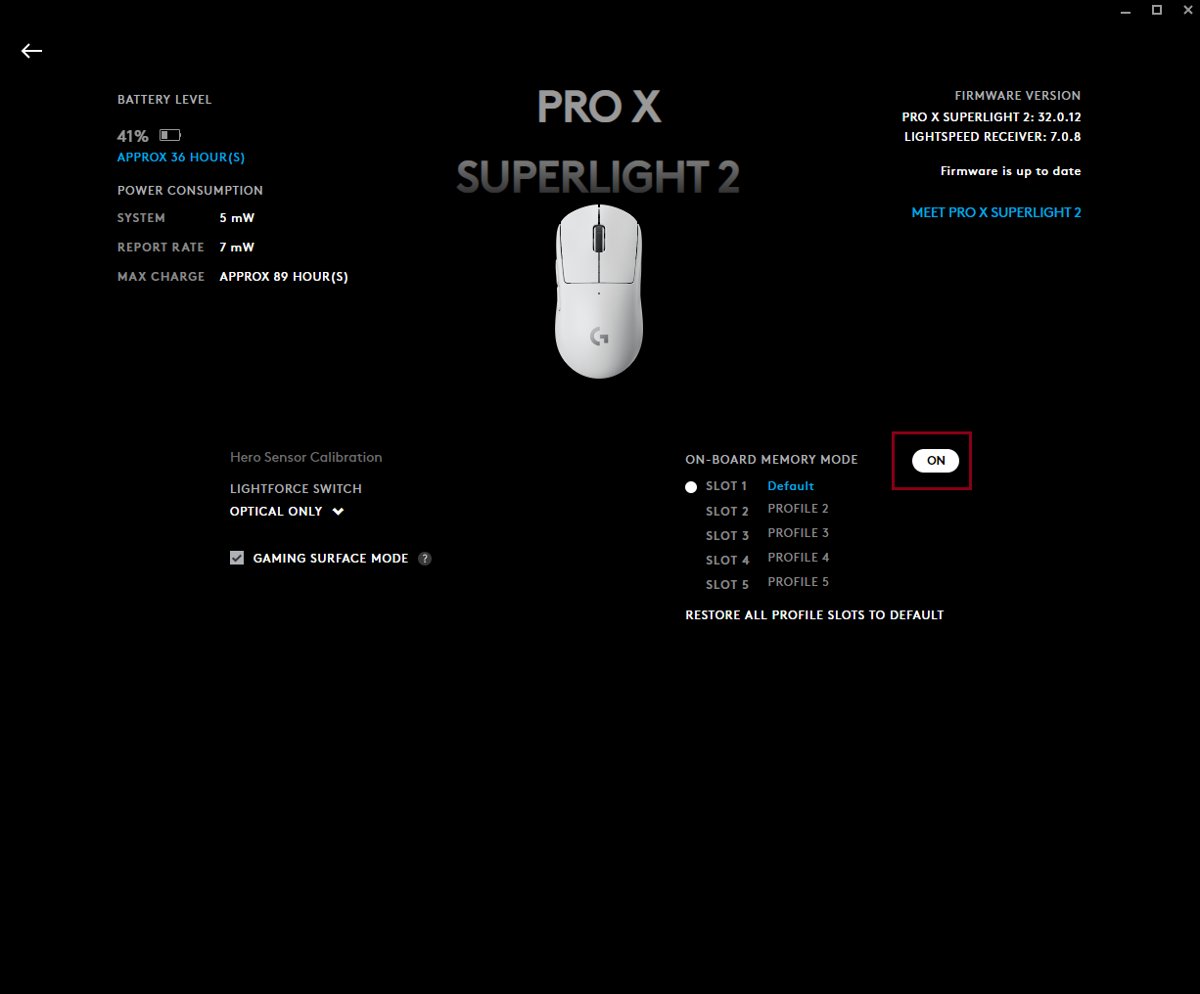
- Click the Gear icon in the upper-right corner of the mouse page.
- Turn On-Board Memory Mode to On.
- Return to Sensitivity (DPI) and set the speeds. G HUB now writes them straight to the mouse.
Models with several onboard slots, such as the G502 LIGHTSPEED, can hold up to five onboard profiles. Extra profiles are added from G HUB.
How to assign DPI buttons in Logitech G HUB
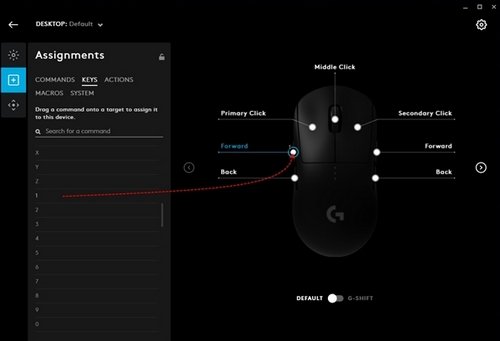
Any programmable button can be rebound in the Assignments tab, including the buttons that switch DPI.
- Select the profile you want to change, or use DESKTOP – Default.
- Click the mouse, then open the Assignments tab.
- Pick a command from the lists on the left. The KEYS tab holds plain keyboard keys.
- Drag the command onto the white circle next to the button you want to change.
- To put a DPI button back to its factory job, click the button and choose USE DEFAULT.
- To switch a button off, click it and choose DISABLE.
Rebinding a DPI button removes its DPI function in that profile. If DPI stops cycling, check this tab first.
How to tell which DPI your Logitech mouse is using
- Open G HUB, click the mouse and select Sensitivity (DPI) to see the speeds saved in the active profile.
- Check the profile drop-down in the top-left corner. The DPI shown belongs to that profile only.
- Press the DPI button and watch the indicator LEDs, if your model has them. On the G502 LIGHTSPEED, three LEDs above the thumb buttons show the level.
- Drag the cursor across the screen at each level to compare the speeds.
Logitech G HUB DPI not changing or resetting
DPI settings reset after sleep or a restart
G HUB cannot write to its settings file, so the session's changes are lost.
- Open File Explorer and go to
C:\Users\<user name>\AppData\Local\LGHUB. - Right-click settings.db and click Properties.
- Clear the Read-only box and click OK.
- Repeat for settings.backup.
- On a Mac, open
~/Library/Application Support/lghubwith Go > Go to Folder, then set both files to Read & Write under Sharing & Permissions in Get Info.
DPI feels different after changing the wireless report rate
Windows' Enhance pointer precision interferes with the DPI G HUB sets.
- Open Control Panel and click Hardware and Sound.
- Under Devices and Printers, click Mouse.
- Open the Pointer Options tab and, under Motion, clear Enhance pointer precision.
- Click Apply. In Windows 11 the same toggle is under Settings > Bluetooth & devices > Mouse.
DPI button does nothing
The button was reassigned in this profile, or a persistent profile is overriding the one you edited.
- Open the mouse's Assignments tab, click the DPI button and choose USE DEFAULT.
- Open Global Settings and check whether PERSISTENT PROFILE names a different profile.
- Connect the receiver directly to the PC rather than through a hub, and try another USB port.
- If the button still fails, assign a different command to it. If that also fails, the button may have a hardware fault.
Mouse does not appear in G HUB, so DPI cannot be changed
G HUB is out of date, or Windows loaded the device driver incorrectly.
- Update G HUB to the latest version.
- Unplug the USB receiver, wait 10 seconds and plug it back in, ideally into another port on the PC itself.
- Type Device Manager in the taskbar search and open it, then click View > Devices by container.
- Expand the mouse, right-click it and choose Uninstall Device, ticking Delete the driver software for this device.
- Plug the mouse into a different USB port so G HUB can download the driver again.
For problems that go beyond DPI, such as a dead receiver, work through the wider Logitech mouse not working fixes. If Windows does not detect the receiver at all, fix USB devices not recognized first.
How to reset Logitech G HUB settings to default
A reset clears every profile, including DPI speeds, and rebuilds the settings file from scratch. Keep the backup if you may want the old setup back.
- Right-click the G HUB icon in the system tray and select Quit.
- Go to
C:\Users\<user name>\AppData\Local\LGHUB. - Copy settings.db to a safe place such as the Desktop.
- Delete settings.db from the LGHUB folder.
- Start G HUB again. It rebuilds settings.db with default settings.
- To restore your old DPI setup, quit G HUB, copy the backup back into the LGHUB folder and start G HUB.
Logitech G HUB DPI FAQ
What is the best DPI setting for everyday use?
There is no single correct value, so start with your mouse's factory presets. The G705 ships with 800, 1600 and 3200 DPI, and the G502 LIGHTSPEED ships with 400 to 6400 DPI. Pick the level that crosses your screen without lifting the mouse repeatedly.
Can I change DPI without Logitech G Hub?
Yes. Press the DPI button on the mouse to cycle its stored speeds. To change the speeds themselves you need G HUB once; turn on On-Board Memory Mode and the mouse keeps them on any PC. The Windows pointer speed slider changes cursor speed, not sensor DPI.
Why is my DPI setting not changing?
Usually you edited a different profile from the one in use, or a persistent profile overrides it. Check the profile drop-down in the top-left corner and Global Settings. If DPI resets after a restart, clear the Read-only attribute on settings.db in the LGHUB folder.
How many DPI levels can I create?
G HUB allows up to five DPI speeds per profile. Click the slider in the Sensitivity (DPI) tab to add one and drag a dot down to remove one. The DPI SHIFT SPEED cannot be removed, so delete a regular speed if the slider is full.
Do DPI settings affect gaming performance?
DPI changes how far the cursor or camera moves for each inch of hand movement, not the game's frame rate. Games that use raw input read the mouse data directly, so the sensor DPI from G HUB matters more there than the Windows pointer speed.
Does G HUB work with Mac and Windows?
Yes. Logitech G HUB is available for recent versions of Windows and macOS, and the Sensitivity (DPI) tab works the same way on both. On a Mac its settings file lives in the lghub folder under Library/Application Support in your user folder.
How can I make sure my G HUB settings are saved?
Make sure G HUB can write to settings.db and settings.backup in the LGHUB folder by clearing their Read-only attribute. For settings that stay with the mouse on any PC, also turn on On-Board Memory Mode from the Gear icon on the mouse page.