To cancel Apple Music before it renews, open Settings, tap your name, tap Subscriptions, choose Apple Music and tap Cancel Subscription, at least 24 hours before the trial or billing period ends.
This guide covers canceling on iPhone, iPad, Mac, Windows, Android and the web, free trials, family and student plans, subscriptions billed by a carrier or Google Play, and what to do if you were already charged.
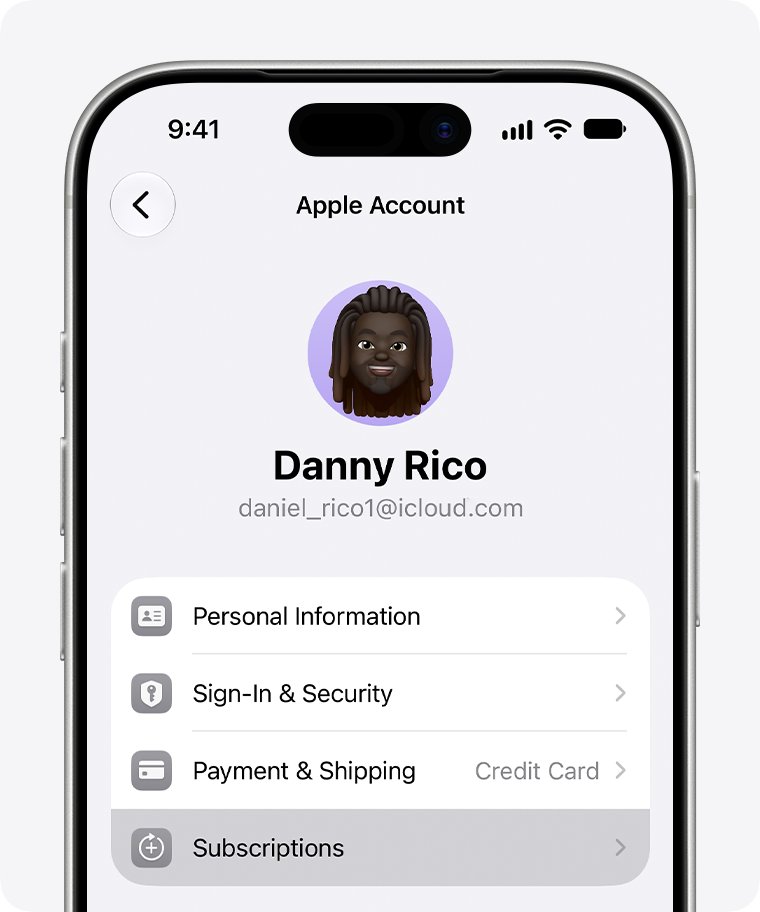
How to cancel Apple Music subscription on iPhone before it renews
Canceling now stops the next renewal. You do not need to wait until the last day, and the iPad steps are the same.
- Open the Settings app and tap your name.
- Tap Subscriptions.
- Tap Apple Music.
- Scroll down and tap Cancel Subscription.
- Confirm when asked. The subscription page then shows an expiration message instead of a renewal date.
If there is no Cancel Subscription button, or you see an expiration message in red text, the subscription is already canceled.
When does Apple Music charge for automatic renewal?
Apple subscriptions renew automatically until you cancel them, so the timing matters more than the device you use.
| Rule | What it means for Apple Music |
|---|---|
| Subscriptions renew until canceled | Apple Music keeps billing every period until you tap Cancel Subscription |
| Charge timing | Apple charges no more than 24 hours before the next subscription period starts |
| Free trial deadline | Cancel at least 24 hours before the trial ends to avoid the first charge |
| Canceled free trial | A free trial canceled before it ends can't be reactivated |
| Subscription ends | You lose access to everything in Apple Music that needs a subscription |
| Price increase | Apple notifies you before a higher price applies and asks for consent where required |
The safest move is to cancel as soon as you decide you don't want the renewal, rather than on the final day.
How to cancel Apple Music free trial before it ends
A free trial is canceled the same way as a paid plan. The difference is the deadline: Apple says to cancel at least 24 hours before the trial ends.
- Find the trial end date on the Apple Music entry in Settings > your name > Subscriptions.
- Tap Apple Music, then tap Cancel Subscription.
- Confirm the cancellation.
- Check that the entry now shows an expiration message rather than a renewal date.
Apple allows one Apple Music trial per person or family. A trial canceled early can't be restarted, so cancel only when you are sure.
Cancel Apple Music subscription on the web at account.apple.com
Use the web when you don't have an Apple device to hand, for example on an Android phone billed by Apple or on a work PC.
- Go to account.apple.com and sign in with the Apple Account that pays for Apple Music.
- Open the Subscriptions section.
- Select Apple Music.
- Choose Cancel Subscription and follow the onscreen instructions.
- If the web page offers Continue on Device instead, finish on your iPhone, iPad or Mac.
On music.apple.com, click your photo or monogram in the top-right, click Settings, then click Manage under Subscriptions to reach the same subscription page.
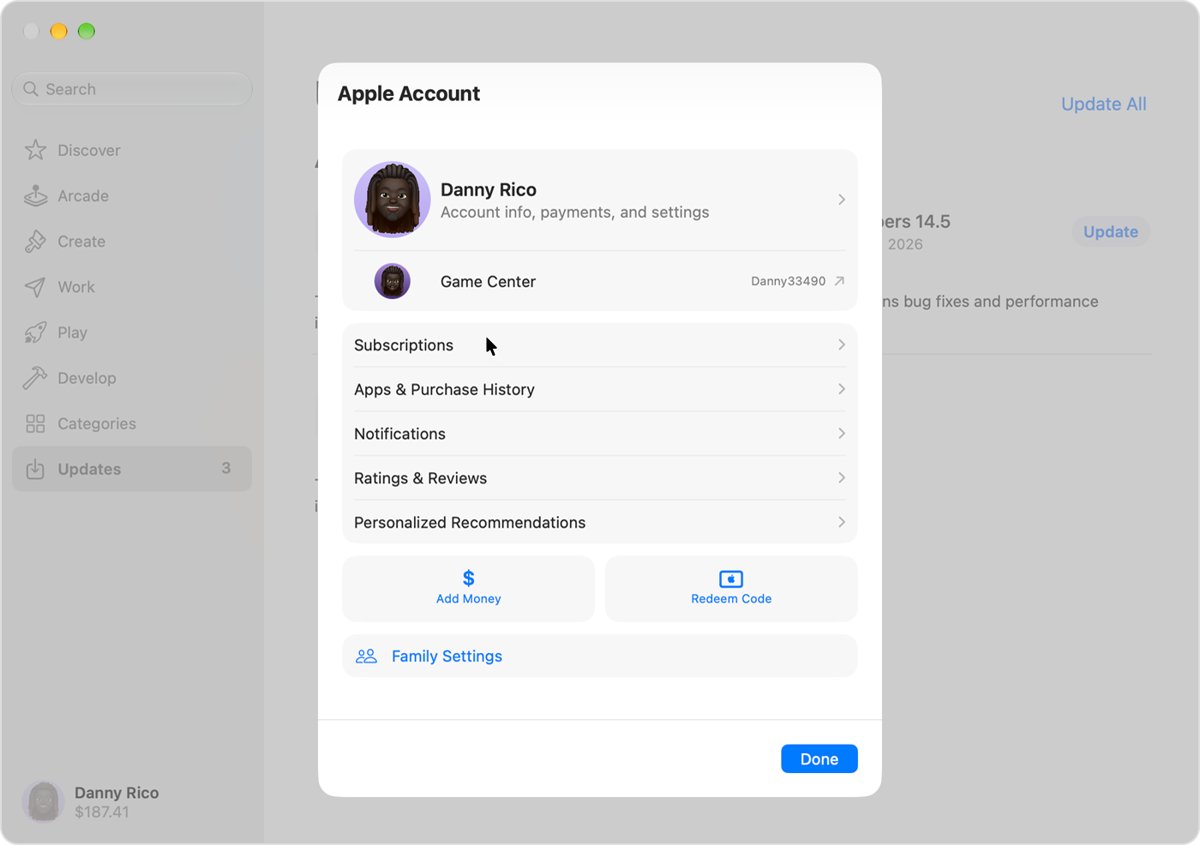
How to cancel Apple Music on Mac
- Open the App Store on the Mac.
- Click your name at the bottom of the sidebar. If you are signed out, click Sign In and sign in with your Apple Account.
- On the page that appears, click your name. Sign in again if asked.
- Click Subscriptions.
- Click Apple Music, then click Cancel Subscription.
How to cancel Apple Music on Windows PC
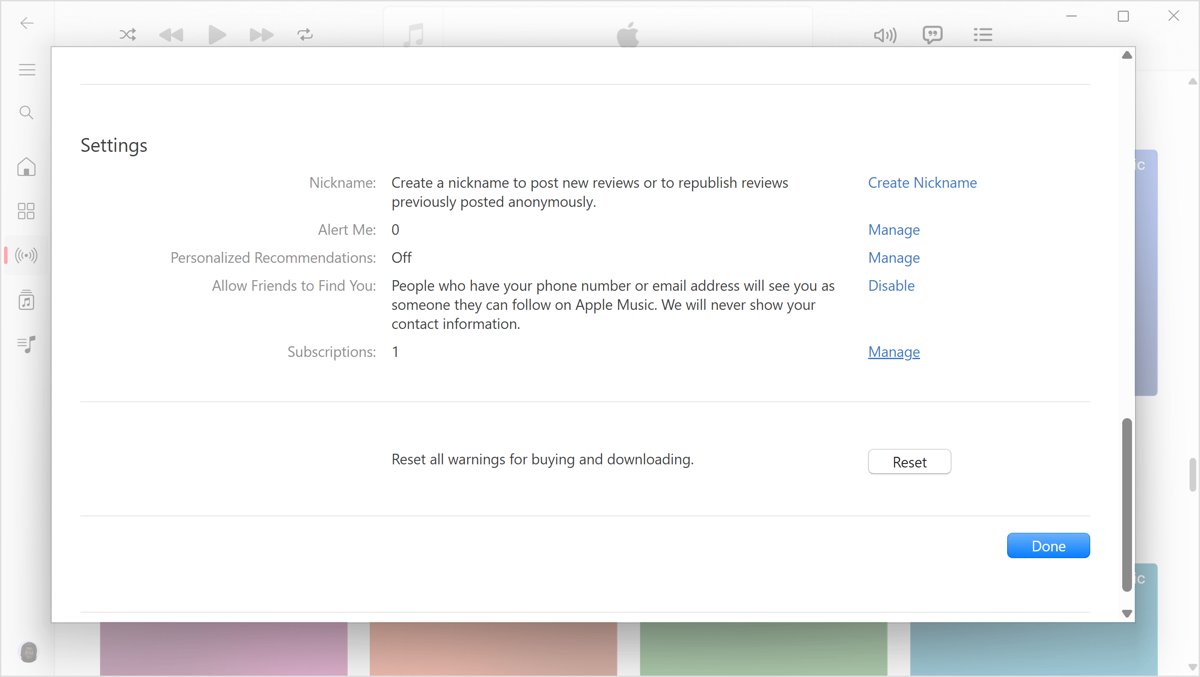
On Windows, cancel from the Apple Music app, the Apple TV app or older iTunes for Windows.
- Open the Apple Music app (or the Apple TV app).
- Click your name at the bottom of the sidebar, then choose View My Account. Sign in if prompted.
- In the Settings section, click Manage next to Subscriptions.
- Click Edit next to Apple Music.
- Click Cancel Subscription.
- In older iTunes for Windows, choose Account > View My Account from the menu bar, then use Manage > Edit > Cancel Subscription.
How to cancel Apple Music on Android
Android has two billing routes, and the right place to cancel depends on who charges you.
| Who bills you | Where to cancel | How |
|---|---|---|
| Google Play | Google Play app | Cancel Apple Music in the Google Play app's subscriptions |
| Apple | account.apple.com | Sign in with your Apple Account and follow the onscreen instructions |
| Not sure | Your email receipts | A "receipt from Apple" means Apple bills you; otherwise check the Google Play receipt |
Uninstalling the Apple Music app does not cancel the subscription. Billing continues until you cancel it.
Cancel Apple Music family or student subscription before renewal
Family and student plans renew automatically too, with a few extra rules about who can cancel and what the plan turns into.
| Plan | Who can cancel | Renewal rule to know |
|---|---|---|
| Family subscription | The Apple Account that pays for it, usually the family organizer | You can't cancel a family member's subscription from your own account |
| Joining a family plan | No action needed for the old plan | An individual or student plan's renewal is canceled automatically when the organizer starts a family plan |
| Student subscription | The student's own Apple Account | If you don't reverify, or after 48 months, it renews as an individual plan |
| Plan switch instead of cancel | The paying Apple Account | Tap See All Plans on the Apple Music subscription to move to a cheaper plan |
If you are told to verify student status and you have graduated, choose I'm No Longer A Student and then cancel if you don't want the individual price.
How to check if Apple Music subscription is canceled
Open the subscription again after canceling. The page itself is the proof.
- Go to Settings > your name > Subscriptions.
- Tap Apple Music.
- Look for an expiration message in red text where the renewal date used to be.
- Confirm that the Cancel Subscription button is gone.
- Repeat the check on any other Apple Account you use, in case a second account also pays for Apple Music.
Can't cancel Apple Music subscription? How to fix it
Apple Music is not listed under Subscriptions
The subscription belongs to another Apple Account or is billed by another company.
- Search your email for "receipt from Apple" or "invoice from Apple".
- Check which Apple Account appears on the Apple Music receipt.
- Sign in with that Apple Account and cancel from Subscriptions.
- If a family member's account is on the receipt, ask them to cancel it.
There is no Apple receipt for the Apple Music charge
Apple Music was bought through a wireless carrier, Google Play or another provider.
- Check your bank or card statement to see which company charges you.
- Contact that carrier or provider to cancel.
- For Google Play billing, cancel in the Google Play app.
Canceling on music.apple.com does not work
Some subscription changes can't be finished on the web.
- Try account.apple.com > Subscriptions instead.
- If the page shows Continue on Device, cancel from Settings on an iPhone or iPad, or from the App Store on a Mac.
- On Windows, use the Apple Music app's View My Account page.
Apple Music charged you after you meant to cancel
The cancellation came within 24 hours of renewal, or it was never completed.
- Cancel the subscription now so the next period doesn't renew.
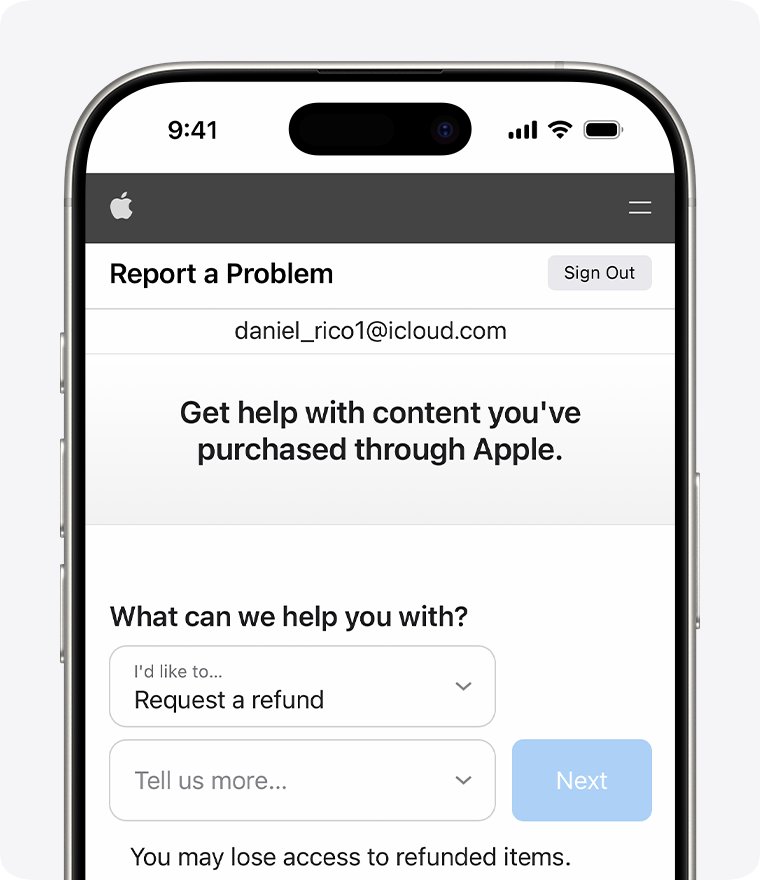
- Sign in to reportaproblem.apple.com.
- Choose I'd like to > Request a refund, pick a reason and select the Apple Music charge.
- Wait 24 to 48 hours for an update on the request.
Refunds are not guaranteed, and Apple refund eligibility varies by country or region.
Cancel Apple Music subscription FAQ
Can I cancel Apple Music before the renewal date?
Yes. You can cancel at any time from Settings > your name > Subscriptions > Apple Music > Cancel Subscription. Canceling early only stops the next renewal, and the subscription page then shows when it expires.
How long before renewal should I cancel Apple Music?
Cancel at least 24 hours before the renewal or trial end. Apple charges no more than 24 hours before the next period starts, so a cancellation inside that window can miss the deadline.
If I cancel the Apple Music free trial, can I restart it?
No. Under the Apple Media Services terms, a free trial for an Apple subscription canceled before it ends can't be reactivated. Apple also limits Apple Music to one trial per person or family.
What happens to my library when Apple Music ends?
When the subscription ends, you lose access to every Apple Music feature and song that needs a subscription.
Why can't I cancel Apple Music on music.apple.com?
Some subscription changes can't be completed on the web and show Continue on Device instead. Cancel from Settings on an iPhone or iPad, the App Store on a Mac, or the Apple Music app on Windows.
How do I cancel Apple Music if it came with my phone carrier plan?
Contact the wireless carrier or provider that bills you. Apple can't cancel a subscription another company charges for, and Apple Support handles changing which Apple Account is linked to it.
Does deleting the Apple Music app cancel my subscription?
No. Removing the app from an iPhone or Android phone leaves the subscription running. Only Cancel Subscription, or canceling with the company that bills you, stops the renewal.
Can I get a refund for an Apple Music renewal?
You can ask. Sign in to reportaproblem.apple.com, choose I'd like to > Request a refund, select the Apple Music charge and submit. Apple reviews each request, and approval is not guaranteed.
Why is Apple charging me when I don't see Apple Music?
The charge may come from another Apple Account, a family member or a different subscription. Check the receipt to trace an unknown Apple charge back to the account that made it.