To configure a domain controller in Windows Server, install the Active Directory Domain Services role, then promote the server with Promote this server to a domain controller in Server Manager or with Install-ADDSForest in PowerShell.
The steps apply to Windows Server 2025, 2022, 2019 and 2016 and cover a new forest, an additional domain controller, DNS and time settings, health checks and the errors that stop a promotion.
Promote Windows Server to a domain controller with PowerShell
This creates a brand-new forest on a standalone server. Sign in as the local Administrator and open PowerShell as administrator.
- Install the role and its tools:
Install-WindowsFeature -Name AD-Domain-Services -IncludeManagementTools. - Run the readiness test first:
Test-ADDSForestInstallation -DomainName "corp.contoso.com". - Create the forest:
Install-ADDSForest -DomainName "corp.contoso.com". - Type and confirm the Directory Services Restore Mode (DSRM) password when prompted.
- Press Y to accept the automatic restart.
- Sign in after the restart with the domain Administrator account, shown as CORP\Administrator.
Install-ADDSForest installs the DNS Server role by default, so the new domain controller also hosts the domain's DNS zone. Replace corp.contoso.com with your own domain name.
Domain controller setup: Server Manager or PowerShell?
| Your situation | Use this | Account you need |
|---|---|---|
| First domain controller, new organization | Add a new forest, or Install-ADDSForest |
Local Administrator on the server |
| Second or later DC in an existing domain | Add a domain controller to an existing domain, or Install-ADDSDomainController |
Member of Domain Admins |
| New child domain or new domain tree | Add a new domain to an existing forest, or Install-ADDSDomain |
Member of Enterprise Admins |
| Branch office with weak physical security | Read-only domain controller (RODC) option | Domain Admins, or a delegated account for a staged RODC |
| Server Core, or many servers to build | ADDSDeployment PowerShell cmdlets | As above for the scenario |
| Desktop Experience, first time doing this | Server Manager wizard | As above for the scenario |
The old dcpromo.exe wizard is deprecated since Windows Server 2012. Server Manager's Review Options page has a View script button that exports your wizard choices as a PowerShell script.
Domain controller requirements on Windows Server
| Item | What to set | Why it matters |
|---|---|---|
| Windows Server version | Windows Server 2025, 2022, 2019 or 2016 | AD DS is a Windows Server role; Windows 11 cannot be a domain controller |
| IP address | A fixed IPv4 address on the server | Clients and other DCs use this address as their DNS server |
| DNS client setting (first DC) | Point to the server's own IP address | The first DC registers its own records in its own DNS zone |
| DNS client setting (extra DC) | Point to an existing DC that runs DNS | The new server must find the domain during promotion |
| Computer name | Final name set before promotion | Rename the server first with Rename-Computer |
| Disk for the database | An NTFS volume | Do not store the AD database, logs or SYSVOL on ReFS |
| DSRM password | A strong password or passphrase | Needed to sign in when AD DS is offline for repairs |
| Functional level (Windows Server 2025 DC) | Windows Server 2025 or Windows Server 2016 level | A 2025 DC does not support the 2012 R2 level |
Set a static IP address and DNS server on the domain controller
Run these in an elevated PowerShell window before you add the role. Use your own addresses in place of the examples.
- Find the network adapter's index:
Get-NetIPAddress -AddressFamily IPv4and note the InterfaceIndex value. - Set the fixed address:
New-NetIPAddress -InterfaceIndex 12 -IPAddress 192.168.0.10 -PrefixLength 24 -DefaultGateway 192.168.0.1. - Point DNS at the server itself for a first DC:
Set-DnsClientServerAddress -InterfaceIndex 12 -ServerAddresses ("192.168.0.10"). - For an extra DC, put an existing DC's DNS address there instead.
- Rename the server:
Rename-Computer -NewName "DC01" -Restart. - Run
ipconfig /allafter the restart and check the address, gateway and DNS server.
Never point a domain controller at your internet provider's DNS servers. The Netlogon service then fails to register the records that other computers use to find the domain.
How to configure domain controller in Windows Server step by step
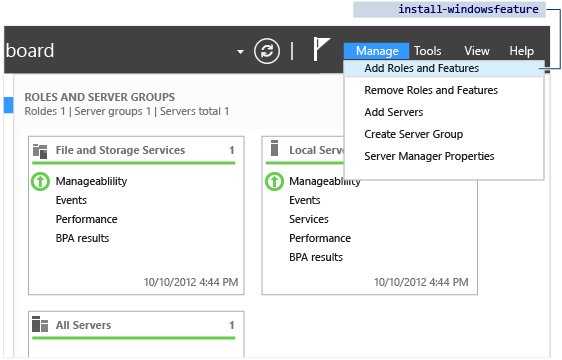
Server Manager installs the role first, then hands you to the Active Directory Domain Services Configuration Wizard for the promotion itself.
- Open Server Manager, select Manage, then Add Roles and Features.
- On Before you begin, select Next.
- Choose Role-based or feature-based installation and select Next.
- Choose Select a server from the server pool, pick this server and select Next.
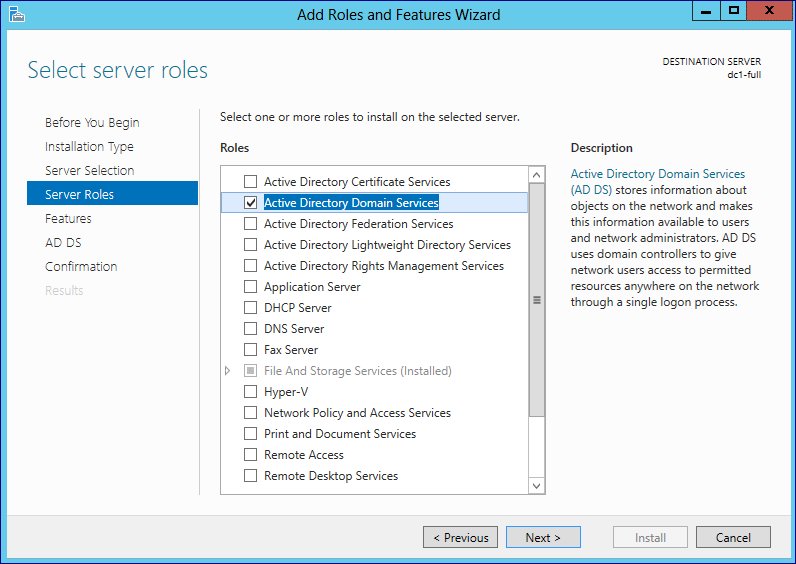
- Tick Active Directory Domain Services, select Add Features in the pop-up, then Next.
- Select Next on Features and on the Active Directory Domain Services page.
- Select Install on Confirm installation selections.
- On Results, select Promote this server to a domain controller.
If you close the wizard before promoting, select the notification flag or Tasks in Server Manager to reopen the promotion link. Adding the role on its own does not need a restart.
How to promote server as domain controller in Windows Server
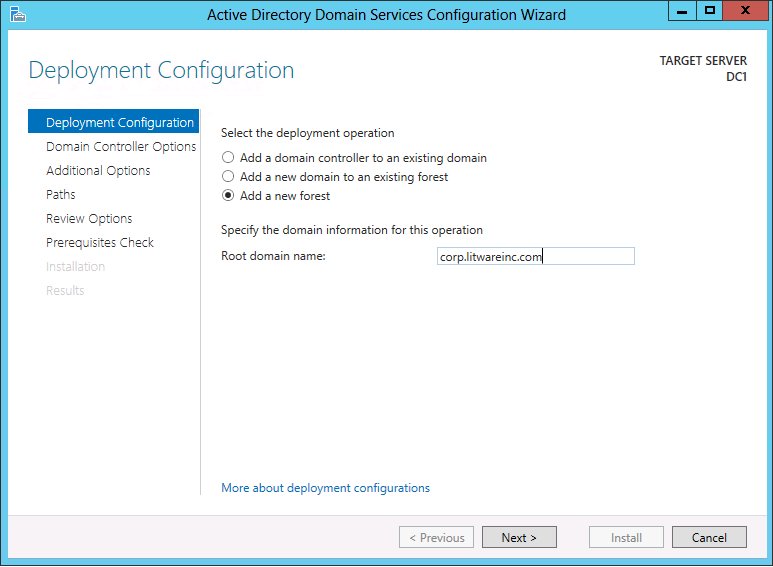
These are the configuration wizard pages for a new forest, which is what most first-time setups need.
- On Deployment Configuration, select Add a new forest and type the root domain name, such as
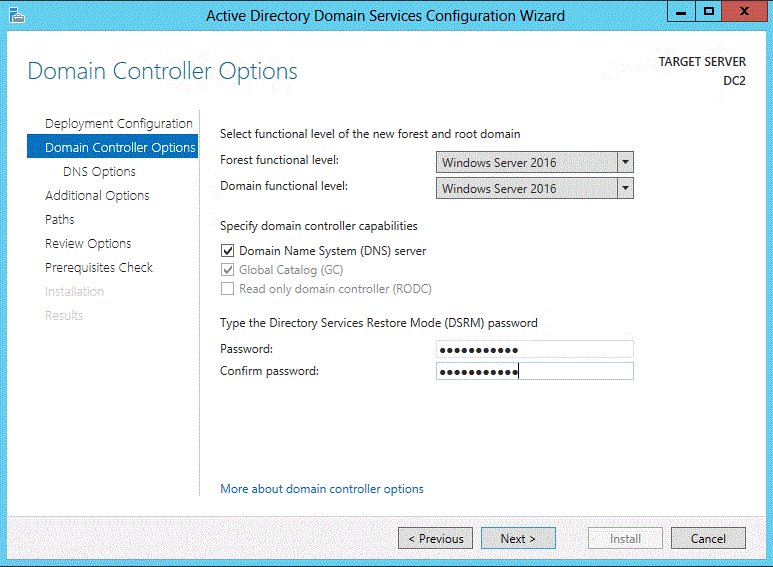
corp.contoso.com. - On Domain Controller Options, pick the forest and domain functional levels, keep Domain Name System (DNS) server ticked and type the DSRM password.
- On DNS Options, leave Update DNS delegation clear unless a parent DNS zone exists that you can update, then select Next.
- On Additional Options, accept or change the NetBIOS domain name.
- On Paths, accept the default database, log file and SYSVOL folders or choose another NTFS volume.
- Review Review Options, and select View script if you want the PowerShell equivalent.
- On Prerequisites Check, wait for validation to pass, then select Install.
- Let the server restart automatically when the Results page completes.
The first domain controller in a forest is always a global catalog server and cannot be a read-only domain controller. The wizard greys those options out.
How to configure additional domain controller
A second domain controller keeps sign-ins working when the first one is offline. Every DC in a domain holds a full copy of that domain's directory data.
- Set a static IP on the new server and point its DNS at an existing domain controller.
- Join the server to the domain, or use domain admin credentials during promotion.
- Install the role:
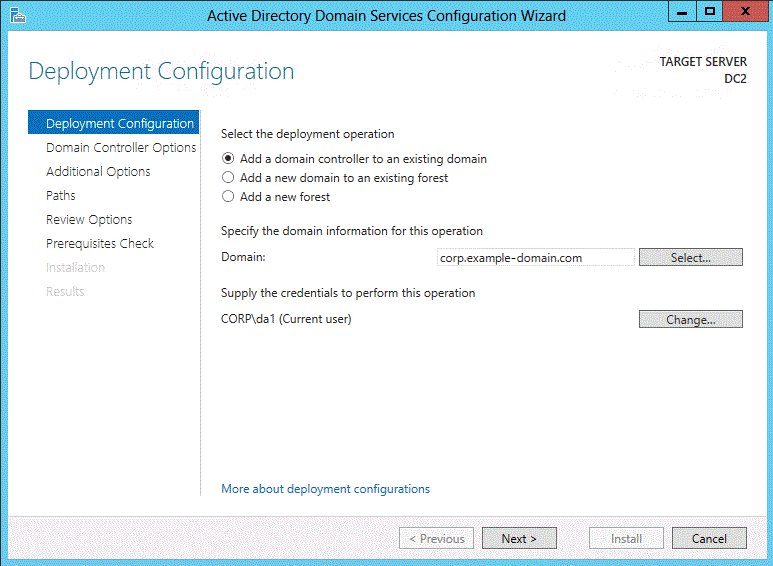
Install-WindowsFeature -Name AD-Domain-Services -IncludeManagementTools. - In Server Manager, start the promotion and select Add a domain controller to an existing domain.
- Type the domain name, select Change… if the signed-in account is not in Domain Admins, then select Next.
- Tick Domain Name System (DNS) server and Global Catalog (GC), choose the site and type a DSRM password.
- On Additional Options, let the wizard choose a replication source or pick a specific DC, then finish the wizard.
The PowerShell equivalent is Install-ADDSDomainController -DomainName "corp.contoso.com" -Credential (Get-Credential CORP\Administrator). Microsoft recommends DNS and global catalog on every domain controller.
How do I assign a domain to a Windows server?
Member servers and Windows 11 PCs join the domain; they do not become domain controllers. The computer's DNS must point to a domain controller first.
- Set the computer's DNS server to the domain controller's IP address with
Set-DnsClientServerAddress. - Open PowerShell as administrator on the computer you want to join.
- Run
Add-Computer -DomainName "corp.contoso.com" -Restart. - Enter a domain account that may join computers when prompted.
- Sign in after the restart with a domain account, such as CORP\username.
To rename and join in one pass, run Rename-Computer -NewName "SRV02" -Force first, then Add-Computer with -Options JoinWithNewName,AccountCreate, so the computer restarts only once.
Configure DNS forwarders on domain controller
Forwarders send internet name lookups from your internal DNS server to an outside resolver. Without them the server uses root hints.
- Sign in to the domain controller and open PowerShell as administrator.
- Add a forwarder:
Add-DnsServerForwarder -IPAddress 172.23.90.124 -PassThru, with your resolver's address in place of the example. - Repeat the command for a second resolver if you have one.
- Clear the local cache with
ipconfig /flushdns. - Run
dcdiag /test:DNS /DnsForwardersto test the forwarder settings.
Keep the domain controller's own network adapter pointed at internal DNS. The forwarder is where the outside address belongs.
Configure domain controller as NTP server
Kerberos sign-in depends on matching clocks. Domain controllers take time from the PDC emulator, and the PDC emulator in the forest root domain should take time from a reliable outside source.
- Find the PDC emulator:
Get-ADDomainController -Discover -Service "PrimaryDC". - On that server, open an elevated Command Prompt.
- Set the outside source:
w32tm /config /manualpeerlist:"ntpserver.contoso.com" /syncfromflags:manual /reliable:YES /update, with your NTP server's name in place of the example. - Restart the time service:
net stop w32timeand thennet start w32time. - Check the result with
w32tm /query /status. - Leave other DCs on the default domain hierarchy, which
w32tm /config /syncfromflags:domhier /updaterestores.
Microsoft recommends a hardware time source where possible, because time taken from the internet is not authenticated.
How to check domain controller health with dcdiag
- Open an elevated Command Prompt on the new domain controller.
- Run
dcdiagand look for passed test on each line of the summary. - Run
dcdiag /test:DNSto check DNS registration, delegation and forwarders. - Run
dcdiag /v /f:C:\dcdiag.txtfor a full log when anything fails. - In PowerShell, run
Get-ADDomainController -Discoverand check that your server is returned. - Open Active Directory Users and Computers and check that the server appears under Domain Controllers.
A failed test in the first minutes after a restart can be timing. Wait a few minutes and run dcdiag again before you start changing settings.
What is a domain controller in Windows Server?
| Part | What it does on the domain controller |
|---|---|
| Directory data store | Holds user, computer, group, printer and server objects for the domain |
| Authentication | Checks sign-ins so one domain username and password works across the network |
| Schema | Defines which object classes and attributes the directory can hold |
| Global catalog | Lets users find objects anywhere in the forest, whichever domain holds them |
| Replication | Copies every change to all other domain controllers in the domain |
| Group Policy | Delivers policy settings, such as a domain password policy, to joined computers |
What is the difference between Active Directory and domain controller?
| Term | What it is | Example |
|---|---|---|
| Active Directory Domain Services (AD DS) | The directory service and its database | The corp.contoso.com domain with its users and groups |
| Domain controller | A Windows Server that runs AD DS and holds a copy of the directory | DC01 and DC02 in that domain |
| Domain | A boundary of directory objects that share policies and replication | corp.contoso.com |
| Forest | The top container of one or more domains that share a schema and global catalog | contoso.com plus emea.corp.contoso.com |
Once directory sign-ins work, the usual next role is a DHCP server, which must be authorized in Active Directory before it hands out addresses.
Windows is unable to find a default server with Active Directory Web Services running
Active Directory PowerShell cmdlets and Active Directory Administrative Center talk to a domain controller through Active Directory Web Services (ADWS). This error means they reached no DC with that service available.
Error appears on the domain controller itself
The ADWS service is stopped or disabled, so the AD module cannot manage this server.
- Open PowerShell as administrator on the DC.
- Run
Get-Service ADWSand check the Status column. - Run
Start-Service ADWSif it shows Stopped. - Open services.msc and set Active Directory Web Services to Automatic if it was disabled.
Error appears on a member server or Windows 11 PC
TCP port 9389, which ADWS listens on, is blocked between the computer and the DC.
- Check the firewall rules or firewall Group Policy object that apply to the domain controllers.
- Allow inbound TCP 9389 to the domain controllers.
- Run
gpupdate /forceon the DC after you change a firewall GPO. - Run the cmdlet again.
Error appears right after promotion or on a computer outside the domain
The computer cannot locate a domain controller, usually because its DNS points elsewhere.
- Run
ipconfig /alland check that the DNS server is a domain controller. - Fix the DNS server address with
Set-DnsClientServerAddress. - Run
ipconfig /flushdns, thenipconfig /registerdnson the DC. - Target a named DC directly, for example
Get-ADUser -Filter * -Server DC01.corp.contoso.com.
Unable to promote server to a domain controller on Windows Server
The Prerequisites Check fails and Install stays greyed out
Server Manager will not continue until every prerequisite test passes.
- Read each failed item on the Prerequisites Check page; each one names the repair.
- Run the matching test cmdlet, such as
Test-ADDSDomainControllerInstallation -DomainName "corp.contoso.com", for the full text. - Fix the reported problem, then go back and run the check again.
- Do not use
-SkipPreChecks; Microsoft warns it can leave a half-promoted server.
The domain cannot be contacted when adding a domain controller
The new server's DNS does not point at a DC that hosts the domain's zone.
- Set the new server's DNS to an existing domain controller's IP address.
- Run
ipconfig /flushdns. - Run
Get-ADDomainController -Discover -Domain "corp.contoso.com"once the AD module is installed, or retry the wizard.
Access denied or insufficient permissions
The account lacks the group membership the scenario requires.
- Use the local Administrator for a new forest.
- Use a Domain Admins member for an additional domain controller.
- Use an Enterprise Admins member for a new child or tree domain, and Schema Admins too for the first DC of a newer Windows Server version in an existing forest.
- Select Change… on Deployment Configuration to enter those credentials.
Install from media (IFM) is rejected
IFM cannot create the first DC in a domain and does not work across Windows Server versions.
- Promote the first DC of the domain over the network instead.
- Create the IFM media on a domain controller that runs the same Windows Server version as the new one.
Windows Server domain controller FAQ
How to create a domain controller?
Install the Active Directory Domain Services role on Windows Server, then promote the server with Server Manager's Promote this server to a domain controller link or the Install-ADDSForest cmdlet. The server restarts and becomes the first domain controller of a new forest.
How to install a domain controller?
Run Install-WindowsFeature -Name AD-Domain-Services -IncludeManagementTools, or add the role in Server Manager's Add Roles and Features wizard. Installing the role alone does not make the server a domain controller; the promotion step does that and then restarts the server.
How to add a domain controller to a domain?
Point the new server's DNS at an existing domain controller, install the AD DS role, and choose Add a domain controller to an existing domain in the configuration wizard. You need an account in the Domain Admins group to finish.
How to connect to a domain controller?
Sign in at the server's console or over Remote Desktop with a domain admin account, such as CORP\Administrator. From Windows 11, install the RSAT Active Directory tools from Optional features to manage the domain without signing in to the DC.
How to access a domain controller from Windows 11?
Join the PC to the domain, sign in with a domain account and add the RSAT Active Directory Domain Services tools from Settings, Optional features. Active Directory Users and Computers and the AD PowerShell module then manage the domain remotely.
What is the use of a domain controller?
A domain controller stores the directory of users, computers and groups, checks every domain sign-in, and replicates changes to other domain controllers. It is also where Group Policy settings for joined computers are kept and delivered.
Can Windows 11 be a domain controller?
No. Active Directory Domain Services is a Windows Server role, available on Windows Server 2016, 2019, 2022 and 2025. Windows 11 can join a domain and manage it with RSAT, but it cannot host the directory.
Does a domain controller need a static IP address?
Yes, in practice. Clients and other domain controllers use the DC's address as their DNS server, so an address that changes breaks name resolution and sign-ins. Set the fixed address before promotion.
How many domain controllers should a domain have?
At least two. Each domain controller holds a full copy of the domain's directory, so a second one keeps sign-ins and DNS working when the first is offline for updates or repairs.
What is the DSRM password used for?
The Directory Services Restore Mode password signs in to a domain controller when AD DS is offline, for example during a directory restore. By default it only needs to be nonblank, so choose a long passphrase and store it safely.