Minecraft color codes are the section symbol (§) followed by one character: §0 to §9 and §a to §f give the 16 standard colors, and §r resets the text to normal.
This guide lists every code with its name, the extra Bedrock colors, the style codes, hex colors in Java Edition, and how to use them on signs, in /tellraw and on the scoreboard.
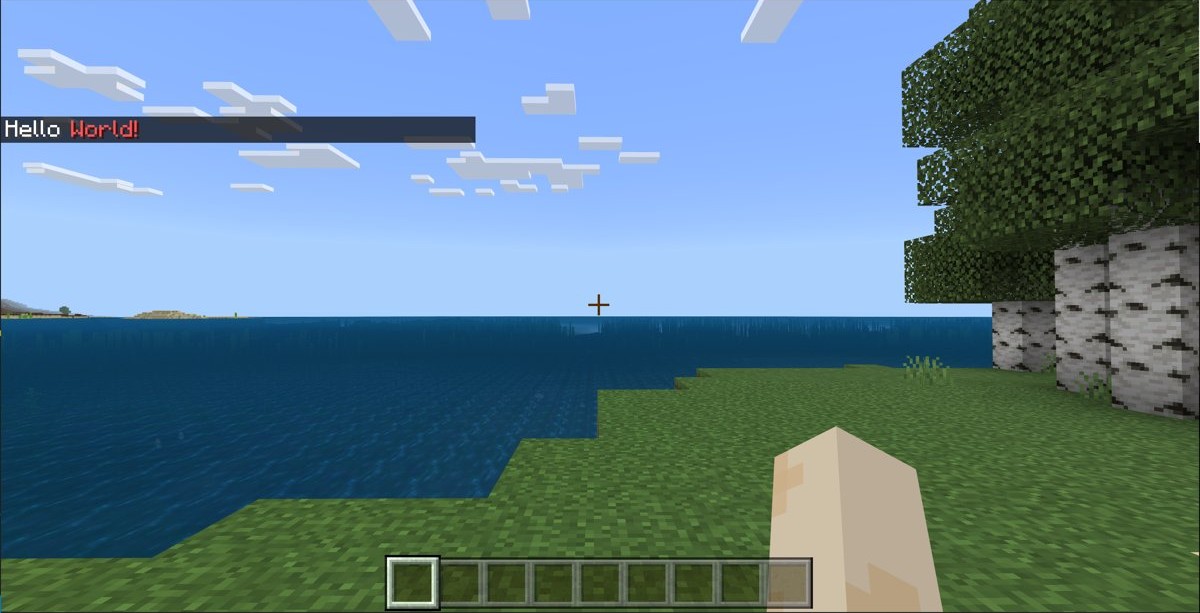
Using Minecraft color codes
A color code changes every character that comes after it, until another code or §r appears. Place it directly in front of the word you want to color, with no space.
- Pick a color from the code table below, for example §c for red.
- Type or paste the § symbol, then the code character, directly before your text:
§cWarning. - Add §r where the color should stop:
Welcome §cHome§r!. - Put the text where Minecraft reads formatting codes, such as a sign, an item or entity name, or a /tellraw message.
- Check the result in game; the text after the code shows in the new color.
In Bedrock Edition you can also write the code as the Unicode escape \u00A7c inside raw JSON text, which gives the same red.
The section symbol
Every Minecraft formatting code starts with §, also called the section symbol or silcrow. Most keyboards have no key for it, so use one of these routes.
| Method | What to do | Works where |
|---|---|---|
| Alt code (short) | Hold Alt and type 21 on the numeric keypad | Windows keyboards with a numpad |
| Alt code (long) | Hold Alt and type 0167 on the numeric keypad | Windows keyboards with a numpad |
| Copy and paste | Copy § from this page and paste it into the game or file | Any device |
| Unicode escape | Write \u00A7 in place of § inside raw JSON text |
Bedrock raw text, commands and files |
The number row above the letters does not work for Alt codes. Use the numeric keypad, or copy the symbol if your laptop has none.
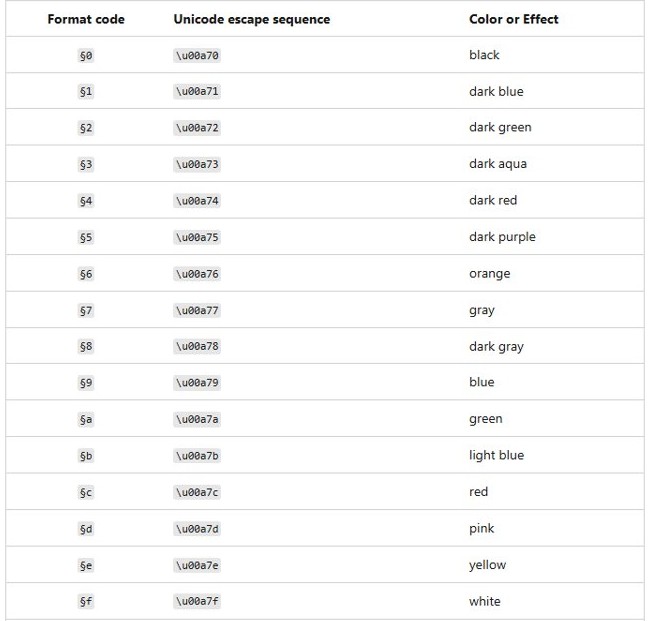
Minecraft color codes
These are the 16 standard color codes, 0 to 9 and a to f. The names below are the ones Mojang uses in the Bedrock Edition reference.
| Code | Unicode escape | Color |
|---|---|---|
| §0 | \u00a70 | Black |
| §1 | \u00a71 | Dark blue |
| §2 | \u00a72 | Dark green |
| §3 | \u00a73 | Dark aqua |
| §4 | \u00a74 | Dark red |
| §5 | \u00a75 | Dark purple |
| §6 | \u00a76 | Orange |
| §7 | \u00a77 | Gray |
| §8 | \u00a78 | Dark gray |
| §9 | \u00a79 | Blue |
| §a | \u00a7a | Green |
| §b | \u00a7b | Light blue |
| §c | \u00a7c | Red |
| §d | \u00a7d | Pink |
| §e | \u00a7e | Yellow |
| §f | \u00a7f | White |
Green (§a) matches the hex value #55ff55 in Java Edition, which Mojang gives as the example when it added hex colors.
Minecraft Bedrock color codes beyond the 16 colors
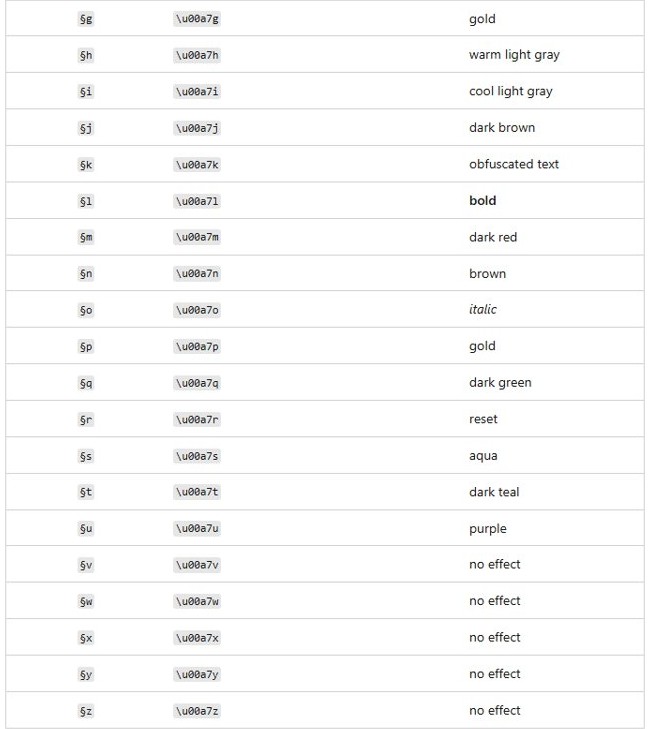
Bedrock Edition reads extra letters as colors too. Several of them are material colors that do not exist in the standard 16, which makes them handy for gold, brown or teal text.
| Code | Unicode escape | Color in Bedrock |
|---|---|---|
| §g | \u00a7g | Gold |
| §h | \u00a7h | Warm light gray |
| §i | \u00a7i | Cool light gray |
| §j | \u00a7j | Dark brown |
| §m | \u00a7m | Dark red |
| §n | \u00a7n | Brown |
| §p | \u00a7p | Gold |
| §q | \u00a7q | Dark green |
| §s | \u00a7s | Aqua |
| §t | \u00a7t | Dark teal |
| §u | \u00a7u | Purple |
These letters are documented for Bedrock only. In Minecraft Java Edition on PC, use a hex color in a text component when you need a shade outside the 16.
Minecraft style codes
Style codes change the look of the text rather than its color. Combine one with a color by placing both in front of the text, color first: §c§lAlert.
| Code | Unicode escape | Effect in Bedrock |
|---|---|---|
| §k | \u00a7k | Obfuscated (scrambled, shifting characters) |
| §l | \u00a7l | Bold |
| §o | \u00a7o | Italic |
| §r | \u00a7r | Reset all colors and styles |
| §v to §z | \u00a7v to \u00a7z | No effect |
In Bedrock, §m and §n are colors (dark red and brown), not strikethrough or underline. Text copied from a Java guide that uses them will change color instead of gaining a line.
Hex color codes in Minecraft (Java Edition 1.16+)
Java Edition 1.16 added full RGB colors: the color property of a text component can hold a hex value prefixed by #. Mojang's example is #55ff55, which looks the same as green.
Since Java Edition 1.21.5, commands such as /tellraw and /title take text components in SNBT form instead of JSON, so {"text":"Welcome back"} becomes {text:'Welcome back'}.
/tellraw @s {text:'Welcome back',color:'#55ff55'}Sends Welcome back to you (@s) in the RGB color #55ff55. Change the six hex digits to any color, for example #ff8800 for orange. If you play an older Minecraft version from 1.16 to before 1.21.5, write the component as JSON: {"text":"Welcome back","color":"#55ff55"}.
You should see: The message appears in chat in the exact color you set, not the nearest of the 16 standard colors.
Hex colors work only inside text components, such as /tellraw, /title and custom names. A § code cannot hold a hex value.
How to change sign text color in Minecraft
In Java Edition you color sign text with dye instead of codes. Right-clicking a sign with a dye has changed its text color since Java Edition 1.14.
- Place a sign and write your text.
- Hold a dye of the color you want, such as red dye.
- Right-click the sign to change its text color.
- Use a Glow Ink Sac on the sign to make the text glow so it stays visible at night; it works with any dye color.
- Use a normal Ink Sac on the sign to remove the glow.
- Walk to the back of the sign and interact with it to give that side its own text and color.
- Use Honeycomb on the sign when you are done to wax it and block further edits.
Glow Ink Sacs drop from Glow Squids. Both sign sides and waxing arrived in Java Edition 1.20, and a sign can be edited after placing it by interacting with it until it is waxed.
In Bedrock Edition, Mojang lists signs among the places where formatting codes change text, so a code such as §9 in front of the text makes it blue.
Minecraft tellraw color codes in Bedrock
Bedrock's /tellraw command sends a raw JSON message, and § codes work inside its text. It needs the Game Directors permission level but does not require cheats.
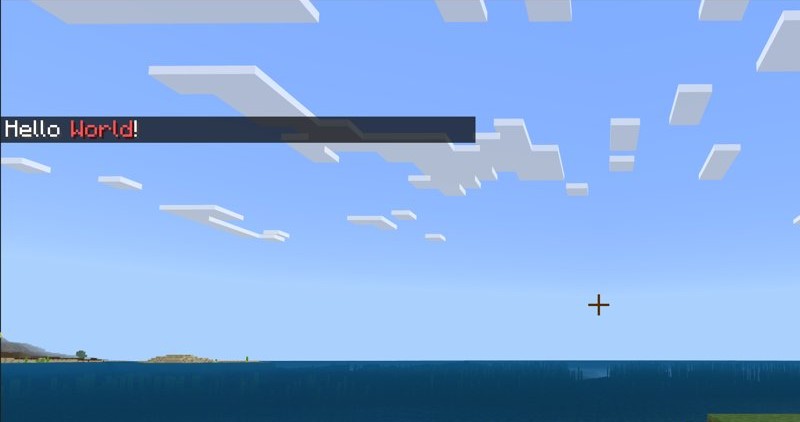
/tellraw @a {"rawtext":[{"text":"Welcome §cHome§r!"}]}Sends Welcome Home! to all players (@a). §c turns Home red, and §r resets the formatting so the exclamation point is the default color. The same raw text works with /titleraw for on-screen titles.
You should see: Every player sees Welcome in white, Home in red, and the exclamation point back in white.
All raw text goes on one line in the command box. If you need a line break inside the message, use \n.
How to color a player name on the Minecraft scoreboard
In Bedrock, a formatting code inside the name you add to a scoreboard objective colors that name on the display.
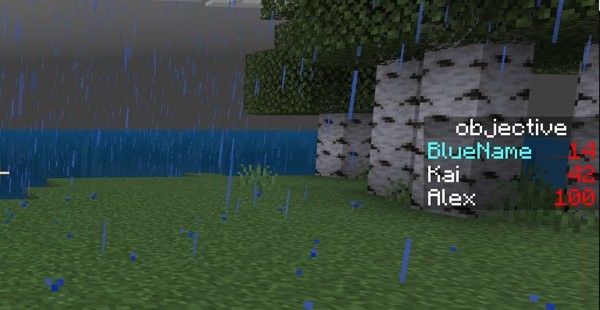
/scoreboard players add §bBlueName objective 7Adds 7 points to the player entry BlueName on the objective called objective. The §b in front shows the name in light blue. Replace objective with the name of your own scoreboard objective.
You should see: The scoreboard sidebar or list shows BlueName in light blue with its score.
Minecraft color codes not working
Why isn't my color code working in Minecraft chat?
Mojang documents formatting for /tellraw messages, titles, books, signs, names and scoreboard displays, not for typed chat lines.
- Send the colored text through /tellraw instead of typing it as a normal chat line.
- Check that the code sits directly before the text with no space between § and the character.
- Add §r after the colored part so the rest of the line is not affected.
The & symbol shows up instead of a color
The game's own formatting symbol is §, not &.
- Replace each & in front of a code with §.
- Copy § from this page if the Alt code does not work on your keyboard.
Alt + 21 does not type the section symbol
Alt codes need the numeric keypad, not the number row.
- Turn on Num Lock.
- Hold Alt and type 0167 on the numeric keypad, then release Alt.
- If there is no keypad, copy and paste the symbol instead.
Java /tellraw with JSON gives an error after updating
Java Edition 1.21.5 and later read text components in commands as SNBT.
- Rewrite the component in SNBT form, for example
{text:'Welcome back',color:'#55ff55'}. - Use single quotes around text values, as in Mojang's example.
- Run the command again.
§m or §n changes color instead of adding a line
In Bedrock, §m is dark red and §n is brown.
- Remove §m and §n from Bedrock text if you wanted strikethrough or underline.
- Use §l for bold or §o for italic to make the text stand out instead.
Minecraft color codes FAQ
What is the section symbol (§) in Minecraft and why do I need it?
The section symbol, §, marks the start of a formatting code. Minecraft reads the character right after it as a color or style, so §c makes the following text red. Without § the game shows the letters as normal text.
Do Minecraft color codes work the same way in Java Edition and Bedrock Edition?
The 16 color codes §0 to §f are shared, but the editions differ. Bedrock adds extra colors such as §g gold and treats §m and §n as colors. Java Edition 1.16 and later add hex colors through text components.
Can I use color codes on Minecraft servers?
Yes, in places the game reads formatting, such as /tellraw messages, signs and names. In Bedrock, /tellraw needs the Game Directors permission level, so on a server an operator usually runs colored announcements. Plain chat may not apply the codes.
How do I combine color codes and style codes in Minecraft?
Place both codes in front of the text, the color first and the style second, for example §c§lAlert for bold red. Add §r afterward to clear both and return to normal text.
What does the §r reset code do in Minecraft?
§r resets the formatting, clearing every color and style set before it. Text after §r shows in the default color and weight, so Welcome §cHome§r! leaves only Home red.
What is the gold color code in Minecraft?
In Bedrock Edition, gold is §g, and §p also shows gold. The standard §6 is listed as orange in Mojang's Bedrock reference.
How do I type the § symbol on a PC?
Hold Alt and type 21 or 0167 on the numeric keypad, then release Alt. If the keyboard has no keypad, copy § from a web page and paste it into the game.
How do I make sign text glow in Minecraft?
Use a Glow Ink Sac on the sign. The text then stays bright at night and keeps any dye color you applied. Use a normal Ink Sac on the sign to remove the glow.
To test codes on your own world with friends, you can run a Minecraft server on your PC and send /tellraw messages from the console.