Press Windows key + . and open Symbols on Windows, hold the letter key on a Mac, or set up a Compose key on Linux to type letters with accents.
The sections below cover each system's built-in menus, plus Alt codes, Word shortcuts, Option keys, the Ctrl+Shift+U code entry and international keyboard layouts for anyone who types accents often.
How to type accents on a keyboard
Each system has one built-in route that needs no setup or only a minute of it. Use that first, then pick a faster method if you type accents daily.
| Your computer | Fastest built-in method | Example for é |
|---|---|---|
| Windows 10 or Windows 11 | Windows key + . then Symbols | Open the accented characters group and click é |
| Windows with a number pad | Hold Alt and type a code on the keypad | Alt + 0233 |
| Microsoft Word on Windows | A Ctrl shortcut, then the letter | Ctrl + ' then e |
| Mac | Hold the letter key, then choose from the accent menu | Hold e, then click é |
| Ubuntu or another GNOME desktop | Compose key, once you assign one | Compose then ' then e |
| Ubuntu or GNOME without a Compose key | Ctrl + Shift + U then the code point | Ctrl + Shift + U, then 00e9, then Space |
How to type letters with accents on Windows 10
The emoji panel includes a Symbols section with accented keys. It works in most text boxes on Windows 10 and Windows 11, and it needs no number pad.
- Click where you want the letter to appear.
- Press Windows key + . (period) to open the emoji panel.
- Select Symbols in the panel.
- Scroll through the symbol groups to the accented keys.
- Click the letter you want to insert it.
If you only need one letter, you can also type E with an accent on phones and Chromebooks.
Alt codes for accented letters on Windows
Hold Alt, type the four-digit code, then release Alt. The digits must come from the numeric keypad with Num Lock on, because the number row across the top of the keyboard does not work.
| Accent | Uppercase | Lowercase |
|---|---|---|
| Acute | Á 0193, É 0201, Í 0205, Ó 0211, Ú 0218, Ý 0221 | á 0225, é 0233, í 0237, ó 0243, ú 0250, ý 0253 |
| Grave | À 0192, È 0200, Ì 0204, Ò 0210, Ù 0217 | à 0224, è 0232, ì 0236, ò 0242, ù 0249 |
| Circumflex | Â 0194, Ê 0202, Î 0206, Ô 0212, Û 0219 | â 0226, ê 0234, î 0238, ô 0244, û 0251 |
| Tilde | Ã 0195, Ñ 0209, Õ 0213 | ã 0227, ñ 0241, õ 0245 |
| Umlaut | Ä 0196, Ë 0203, Ï 0207, Ö 0214, Ü 0220, Ÿ 0159 | ä 0228, ë 0235, ï 0239, ö 0246, ü 0252, ÿ 0255 |
| Cedilla | Ç 0199 | ç 0231 |
| Ring | Å 0197 | å 0229 |
| Slash | Ø 0216 | ø 0248 |
| Ligatures and Eszett | Æ 0198, Œ 0140 | æ 0230, œ 0156, ß 0223 |
| Inverted punctuation | ¡ 0161 | ¿ 0191 |
Keyboard shortcuts for accents in Microsoft Word
Word and classic Outlook have their own accent shortcuts, and these do not type accents in other apps. Press the first combination, release it, then type the letter. Use Shift with the letter to get a capital.
| Letters | Shortcut | Then type |
|---|---|---|
| á é í ó ú ý | Ctrl + ' | The vowel or y |
| à è ì ò ù | Ctrl + ` | The vowel |
| â ê î ô û | Ctrl + Shift + ^ | The vowel |
| ã ñ õ | Ctrl + Shift + ~ | a, n or o |
| ä ë ï ö ü ÿ | Ctrl + Shift + : | The vowel or y |
| å | Ctrl + Shift + @ | a |
| ç | Ctrl + , | c |
| ø | Ctrl + / | o |
| æ œ | Ctrl + Shift + & | a or o |
| ß | Ctrl + Shift + & | s |
| ¿ | Alt + Ctrl + Shift + ? | Nothing |
| ¡ | Alt + Ctrl + Shift + ! | Nothing |
Word can also convert a hex code. Type the code, such as 00E9, then press Alt + X to turn it into é. Some Office apps, such as PowerPoint, cannot convert codes this way, so use Character Map there.
How to use the United States-International keyboard on Windows
This layout turns some punctuation keys into dead keys, which wait for your next keystroke and combine with it. It suits people who type accents all day and have no number pad.
- Open Start > Settings > Time & language > Language & region.
- Select the ellipsis (…) next to your display language, then Language options.
- Next to Installed keyboards, select Add a keyboard.
- Choose United States-International from the list.
- Hold the Windows logo key and press Spacebar to switch to the new layout.
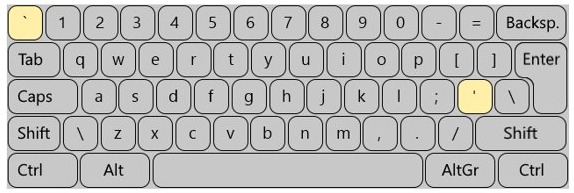
- Type ' then a letter for an acute accent, or ` then a letter for a grave accent.
- Type Shift + ` for a tilde, Shift + 6 for a circumflex and Shift + ' for an umlaut, then the letter.
How to open Character Map in Windows
Character Map lists every character in a font and copies your pick to the clipboard. It works in any app that accepts pasted text, including those with no accent shortcuts.
- Search for character from the taskbar and open Character Map.
- Choose a font from the Font list.
- Click the character you want.
- Click Select, then Copy.
- Switch to your document and paste the character.
How to type letters with accents on Mac
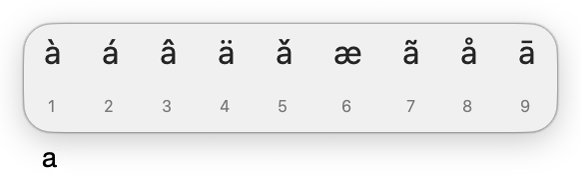
The accent menu is built into macOS and needs no setup, though Apple notes that accent marks are not available in all apps.
- In an app, press and hold a letter key such as a. The accent menu appears; if it does not, that key has no accent marks.
- Click the character you want.
- Or press the number shown below the character.
- Or use the arrow keys to reach the character, then press the Space bar.
Mac Option key shortcuts for accents
Dead keys type faster than the accent menu once you know them. Press the Option combination, release it, then press the letter. Apple gives Option-N for a tilde and Option-I for a circumflex on the ABC layout, and lists the full set below for the U.S. International – PC layout.
| Accent | Press | Then press | Result |
|---|---|---|---|
| Acute | Option-E | e | é |
| Grave | Option-` | e | è |
| Tilde | Option-N | n | ñ |
| Umlaut | Option-U | u | ü |
| Circumflex | Option-I | e | ê |
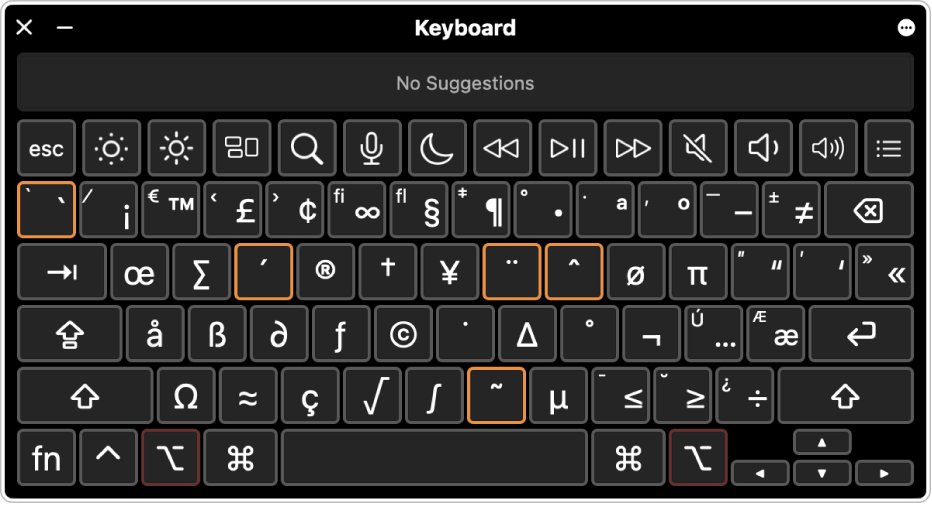
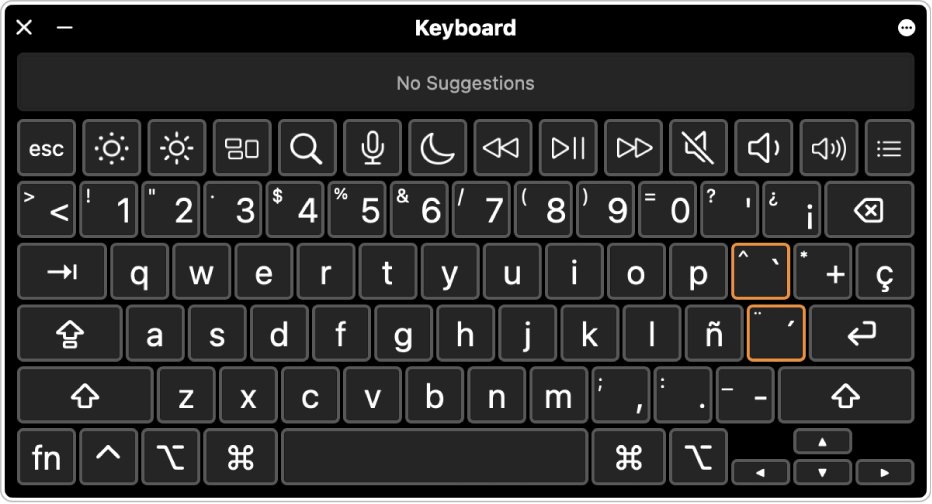
Other keyboard layouts use different dead keys. Open the Input menu in the menu bar and choose Show Keyboard Viewer, then press Option or Shift; keys with an orange outline enter accent marks. If you type several Latin-script languages, add the ABC – Extended input source in your Mac's keyboard settings for more marks.
How to open the Character Viewer on Mac
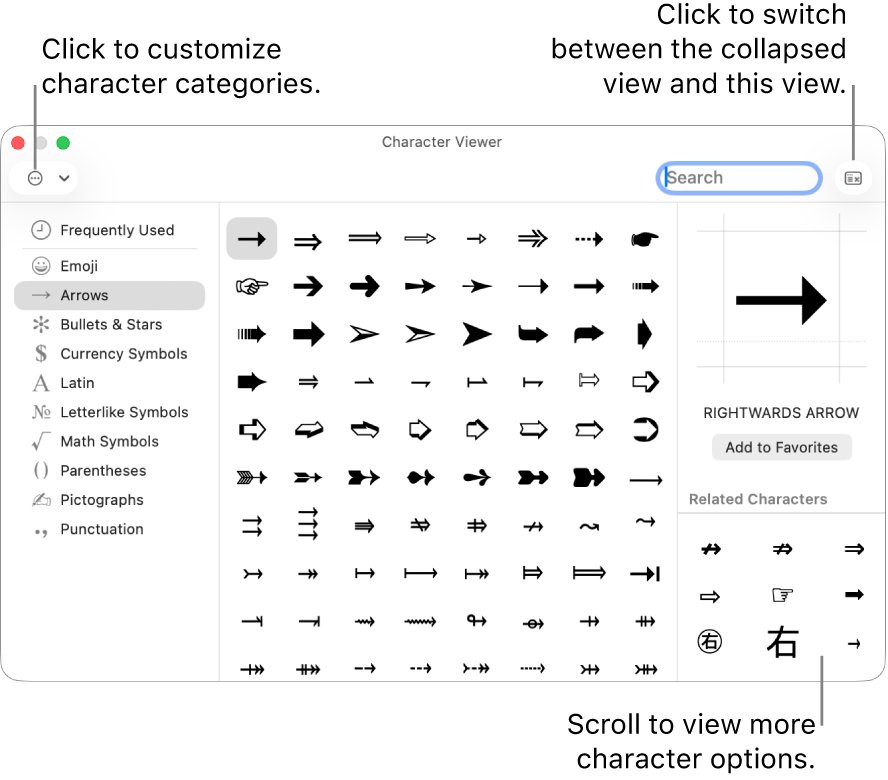
The Character Viewer covers accented letters that the accent menu does not offer, and it can be searched by name.
- Press Fn/Globe-E, or choose Edit > Emoji & Symbols.
- Click the expand button in the upper-right corner to show the full layout.
- Type a word in the search field to find a character.
- Click the character to insert it, or double-click it in the expanded view.
How to type letters with accents on Linux
A Compose key lets you press several keys in a row to build one character. Keyboards have no dedicated Compose key, so you assign an existing key to the job. These steps are for Ubuntu's GNOME desktop; other desktops keep similar settings elsewhere.
- Open the Activities overview, type Settings and open it.
- Select Keyboard in the sidebar.
- In the Type Special Characters section, select Compose Key.
- Turn the Compose Key switch on.
- Tick the key you want to use, then close the dialog.
- Type Compose, then ', then a letter for an acute accent such as é.
- Type Compose, then `, then a letter for a grave accent such as è.
- Type Compose, then ", then a letter for an umlaut such as ë, or Compose, then –, then a letter for a macron such as ē.
The Characters app in the Activities overview gives a browsable alternative. It lets you browse categories or search by keyword to insert a character, and it shows each character's code point.
Ctrl+Shift+U codes for accented letters on Linux
GNOME apps accept any Unicode character by code point. Press Ctrl + Shift + U, type the four-character code and press Space or Enter. Typing the pi symbol on Linux follows the same pattern with a different code.
| Accent | Letters and codes |
|---|---|
| Acute | á 00e1, é 00e9, í 00ed, ó 00f3, ú 00fa, ý 00fd |
| Grave | à 00e0, è 00e8, ì 00ec, ò 00f2, ù 00f9 |
| Circumflex | â 00e2, ê 00ea, î 00ee, ô 00f4, û 00fb |
| Tilde | ã 00e3, ñ 00f1, õ 00f5 |
| Umlaut | ä 00e4, ë 00eb, ï 00ef, ö 00f6, ü 00fc, ÿ 00ff |
| Other letters | ç 00e7, å 00e5, ø 00f8, æ 00e6, ß 00df |
| Inverted punctuation | ¡ 00a1, ¿ 00bf |
How to add an international keyboard layout on Ubuntu
A keyboard layout changes what the keys produce, regardless of the letters printed on them. Add one if you write in another language often.
- Open the Activities overview, type Keyboard and select Settings > Keyboard.
- In the Input Sources section, select + Add Input Source….
- Select the language, select a layout, then select Add.
- Press Super + Space to switch to the next input source, or use the indicator in the top bar.
On Debian and other systems running X, setxkbmap -model pc105 -layout us -variant altgr-intl gives a US keyboard an AltGr mapping for many umlauts and symbols. To change the permanent layout on Debian, run dpkg-reconfigure keyboard-configuration as root and choose the international option with AltGr dead keys.
Accent shortcuts not working on Windows, Mac or Linux
Alt codes not working on Windows
Alt codes only accept digits from the numeric keypad.
- Turn on Num Lock.
- Type the digits on the numeric keypad, not the number row.
- Include the leading zero in codes such as 0233.
- On a laptop with no keypad, press Windows key + . and use Symbols instead.
Ctrl+' does not type an accent outside Word
These shortcuts belong to Word and classic Outlook rather than to Windows itself.
- In other apps, press Windows key + . and use Symbols.
- Or copy the letter from Character Map and paste it.
Apostrophes and quotes behave oddly on Windows
The United States-International layout makes these keys wait for the next keystroke.
- Hold the Windows logo key and press Spacebar to cycle back to your US layout.
- Remove United States-International under Language options if you no longer want it.
Press and hold not showing accents on Mac
That key has no accent marks, or the app does not support the accent menu.
- Try a key that has accents, such as a or e.
- Try the same key in another app, because the menu is not available everywhere.
- Use a dead key such as Option-N or open Edit > Emoji & Symbols.
Compose key not working on Linux
The switch is off, or no key is ticked.
- Open Settings > Keyboard > Compose Key and confirm the switch is on.
- Tick a key you do not need for anything else.
- Press the keys one after another, not together.
- Use Ctrl + Shift + U and a code point as a fallback.
Typing accents FAQ
How do you type an accent over a letter on a keyboard?
On Windows, press Windows key + period and open Symbols, or hold Alt and type a keypad code. On a Mac, hold the letter key and choose from the accent menu. On Ubuntu, assign a Compose key or use Ctrl+Shift+U with the code point.
What is the Alt code for é?
The Alt code for é is Alt+0233, and for capital É it is Alt+0201. Hold Alt, type the digits on the numeric keypad with Num Lock on, then release Alt. The number row across the top of the keyboard does not work for this.
How do I type accents on a laptop without a number pad?
Press Windows key + period and select Symbols, which needs no keypad. Character Map works too, and in Word the Ctrl shortcuts work on any keyboard. If you type accents often, add the United States-International layout under Language options in Settings.
How do I type ñ on a keyboard?
On Windows, use Alt+0241 on the numeric keypad, or Ctrl+Shift+~ then n in Word. On a Mac, press Option-N, then n, or hold n and pick ñ. On Ubuntu, press Ctrl+Shift+U, type 00f1 and press Space.
How do I type an umlaut on a Mac?
Press Option-U, release it, then press the letter, which gives ü when you press u. You can also hold the letter key and pick the umlaut from the accent menu. Keyboard Viewer shows the dead keys for other layouts.
What is a dead key?
A dead key produces nothing on its own and waits for your next keystroke, which it combines into one accented letter. Option-N on a Mac and the apostrophe on the United States-International layout in Windows both work this way, followed by the letter you want.
What is a Compose key on Linux?
A Compose key is an existing key you assign to build special characters from several keystrokes in a row, such as Compose, apostrophe, then e for é. Set it in Settings under Keyboard, in the Type Special Characters section, on Ubuntu's GNOME desktop.
Do Word accent shortcuts work in other programs?
No, Microsoft documents these Ctrl shortcuts for Word and classic Outlook. In other programs, use Windows key + period and Symbols, an Alt code from the numeric keypad, or Character Map. New Outlook for Windows uses Alt codes rather than the Ctrl combinations.
The emoji panel and Alt codes can enter many other characters too, and a few more Windows symbol shortcuts save time if you type them often.