You can no longer install WMIC on an up-to-date Windows 11 PC as a Feature on Demand, because Microsoft removed it from versions 24H2 and 25H2 in the August 2026 preview update and from 26H1 in the September 2026 preview update.
This guide covers the Settings, PowerShell and CMD methods for builds that still offer WMIC, Microsoft's temporary WMIC package for apps that still need it, and the PowerShell commands that replace every common WMIC query.
Can you still install WMIC on Windows 11?
It depends on which Windows 11 version you run and whether it has the latest updates. Press Windows key + R, type winver and press Enter to see your version.
| Your PC | Can you add WMIC as a Feature on Demand? | What to do |
|---|---|---|
| Windows 11 24H2 or 25H2 with the August 2026 preview update or any later update | No | Install Microsoft's temporary WMIC package, or move the task to PowerShell |
| Windows 11 26H1 with the September 2026 preview update or later | No | Same as above |
| Windows 11 that has not installed those updates, or version 23H2 or 22H2 | Try it; WMIC was a Feature on Demand on these builds | Use Settings, PowerShell or CMD below. If WMIC is not offered, use the package |
| Any Windows 11 PC running a script that calls wmic | Not needed | Replace the wmic line with the matching Get-CimInstance command |
Only the wmic.exe command-line tool is gone. Windows Management Instrumentation (WMI) itself is still part of Windows, so every query WMIC ran still works through PowerShell.
How to install WMIC in Windows 11 using Settings, PowerShell or CMD
On builds where WMIC is still a Feature on Demand, managing optional features in Settings is the simplest route. Windows 11 22H2 shipped with WMIC preinstalled, while 23H2 and 24H2 had it disabled by default.
- Select Start > Settings > System > Optional features. On earlier Windows 11 builds, the page is under Settings > Apps > Optional features.
- Next to Add an optional feature, select View features.
- Type WMIC in the search box.
- Select the check box next to WMIC, select Next, then select Install.
- Wait for the install to finish, then open a new Command Prompt window and run
wmic os get caption.
If WMIC does not appear in the list, your build has the 2026 removal. Skip to the package method or the PowerShell replacements below.
Install WMIC on Windows 11 with PowerShell
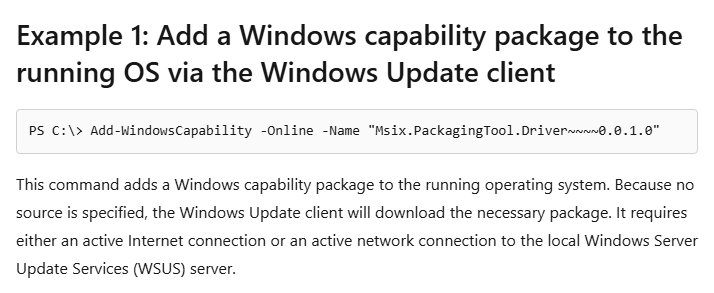
PowerShell installs the same Feature on Demand from Windows Update. Select Start, type PowerShell, select Run as administrator, and run the two commands in order.
Get-WindowsCapability -Online | Where-Object Name -like 'WMIC*'
Add-WindowsCapability -Online -Name WMIC~~~~
The first command lists the WMIC capability and its state. The second downloads and installs it through Windows Update, so the PC needs an internet connection or a reachable WSUS server.
You should see: Running the first command again shows State : Installed for WMIC~~~~. If the first command returns nothing, your build no longer offers WMIC.
How to install WMIC on Windows 11 using CMD
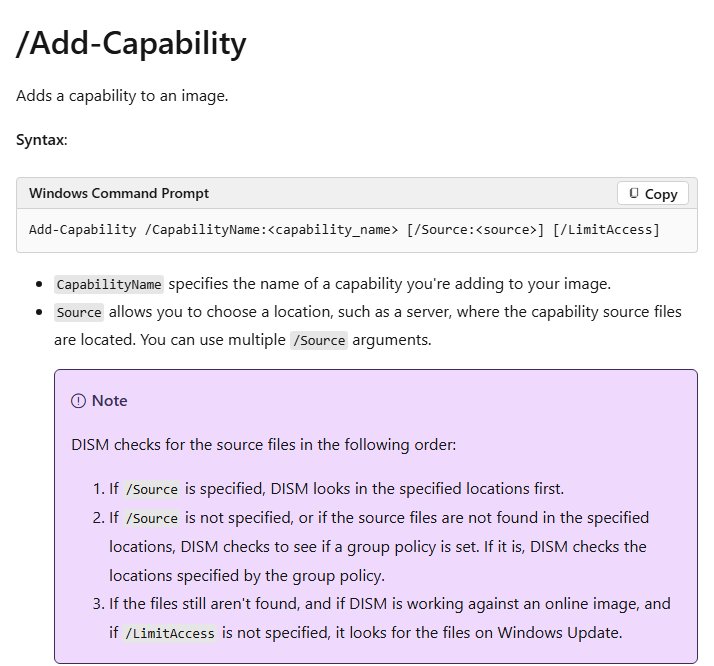
DISM does the same job from Command Prompt. Microsoft lists DISM /Add-Capability as the supported way to add the WMIC Feature on Demand. Open Command Prompt as an administrator first.
DISM /Online /Add-Capability /CapabilityName:WMIC~~~~/Online targets the running copy of Windows, and WMIC~~~~ is the capability name Microsoft gives the WMIC Feature on Demand. DISM fetches the files from Windows Update unless Group Policy points it at another source.
You should see: DISM shows a progress bar and ends with The operation completed successfully. Run wmic os get caption in a new window to test it.
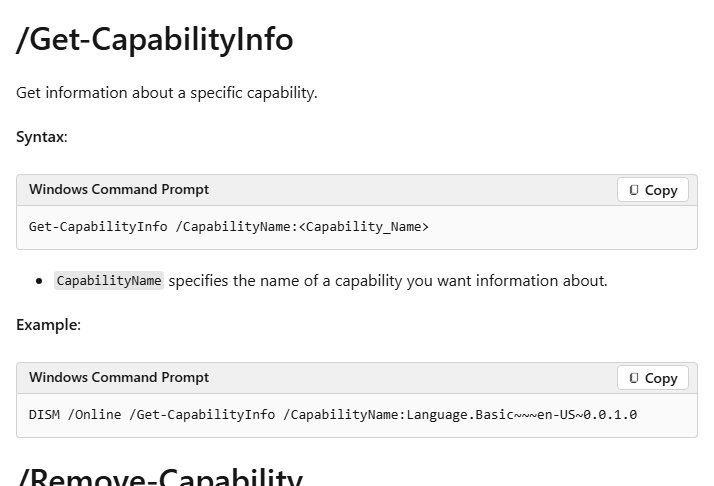
To check the state without installing anything, run DISM /Online /Get-CapabilityInfo /CapabilityName:WMIC~~~~.
How to install WMIC on Windows 11 25H2 and 24H2
For up-to-date PCs, Microsoft publishes a temporary WMIC package in KB5067470. Microsoft warns that it is not a secure, long-term solution, so use it only for an app or script that cannot be changed yet.
- Download wmic_dlc.zip from the KB5067470 article on Microsoft Support.
- Extract the ZIP file to a local folder, such as C:\wmic_dlc.
- Select Start, type PowerShell, and select Run as administrator.
- Go to the extracted folder, for example
cd C:\wmic_dlc. - Run
Set-ExecutionPolicy Bypass -Scope Processand select Yes if PowerShell asks to change the execution policy. The change lasts only for this window. - Run
.\install.ps1. - Check that the script reports WMIC has been installed successfully, then run
wmicto confirm it starts.
The script copies the WMIC files to C:\Windows\System32\wbem and registers the WMIC aliases. Retest the app or script that needed WMIC, and plan to move it to PowerShell.
How to install WMIC on Windows 11 offline
Both routes can work without internet access on the target PC. Which one you use depends on whether the build still offers the Feature on Demand.
- On a build that still offers WMIC, mount or copy the Features on Demand source that matches your exact Windows build, for example to E:\.
- Run
DISM /Online /Add-Capability /CapabilityName:WMIC~~~~ /Source:E:\ /LimitAccessfrom an elevated Command Prompt./LimitAccessstops DISM from contacting Windows Update. - On an up-to-date 24H2, 25H2 or 26H1 PC, download wmic_dlc.zip on another computer and copy it over on a USB drive.
- Extract it on the offline PC and run
.\install.ps1from an elevated PowerShell window, as in the package method above. - Run
wmic os get captionto test it.
The WMIC Feature on Demand has language satellites, so Microsoft says to add it with DISM /Add-Capability, not by installing its .cab file directly.
How to check if WMIC is installed on Windows 11
- Open Command Prompt.
- Type
wmic os get captionand press Enter. - If WMIC is installed, it prints Caption and your Windows edition, such as Microsoft Windows 11 Pro.
- If Command Prompt says wmic is not recognized as a command, WMIC is not installed.
- For the Feature on Demand state, run
DISM /Online /Get-CapabilityInfo /CapabilityName:WMIC~~~~from an elevated prompt and read the State line.
To see the current values of the WMIC global switches, run wmic context. Type wmic exit or wmic quit to leave interactive mode.
Why WMIC is missing in Windows 11: removal timeline
WMIC has been on its way out since 2016, and PowerShell has superseded it for WMI work since the Windows 10 21H1 deprecation notice.
| Year | What changed |
|---|---|
| 2016 | WMIC deprecated in Windows Server 2012 |
| 2021 | WMIC deprecated in Windows 10 |
| 2022 | Windows 11 22H2 ships WMIC as a Feature on Demand, preinstalled and enabled |
| 2024 | WMIC disabled by default in Windows 11 23H2 and 24H2, still available as a Feature on Demand |
| 2025 | Upgrading to Windows 11 25H2 removes an installed WMIC, which could still be added back |
| August 2026 | The preview update for Windows 11 24H2 and 25H2 removes WMIC, and it is no longer a Feature on Demand |
| September 2026 | The preview update for Windows 11 26H1 does the same |
Microsoft completed the removal for all currently supported Windows 11 versions by September 29, 2026.
WMIC commands and their PowerShell replacements
Each WMIC alias maps to a WMI class that Get-CimInstance reads directly. These replacements work in Windows PowerShell 5.1 and PowerShell 7.
| Old WMIC command | PowerShell replacement | Returns |
|---|---|---|
wmic path win32_process get Name |
Get-CimInstance Win32_Process | Select-Object Name |
Running process names |
wmic bios get serialnumber |
Get-CimInstance Win32_BIOS | Select-Object SerialNumber |
The PC's serial number |
wmic os get caption,version |
Get-CimInstance Win32_OperatingSystem | Select-Object Caption, Version |
Windows edition and version |
wmic cpu get name |
Get-CimInstance Win32_Processor | Select-Object Name |
Processor model |
wmic baseboard get product,manufacturer |
Get-CimInstance Win32_BaseBoard | Select-Object Product, Manufacturer |
Motherboard model and maker |
wmic memorychip get capacity |
Get-CimInstance Win32_PhysicalMemory | Select-Object Capacity |
Size of each memory module in bytes |
wmic diskdrive get model,size |
Get-CimInstance Win32_DiskDrive | Select-Object Model, Size |
Drive models and sizes |
wmic logicaldisk get name,freespace |
Get-CimInstance Win32_LogicalDisk | Select-Object Name, FreeSpace |
Free space per drive letter |
wmic path softwarelicensingservice get OA3xOriginalProductKey |
(Get-CimInstance SoftwareLicensingService).OA3xOriginalProductKey |
The product key stored in firmware, if any |
To query another PC, add -ComputerName or create a session with New-CimSession. For more one-line tools, keep the list of Windows Run, CMD and PowerShell commands handy.
Run a PowerShell WMI query from CMD instead of WMIC
Batch files do not need a full rewrite. Microsoft's own guidance is to call PowerShell from the CMD line with powershell -c.
powershell -c "Get-CimInstance Win32_BIOS | Select-Object SerialNumber"CMD starts PowerShell, runs the quoted command, and returns to the batch file. Swap the quoted part for any replacement in the table above.
You should see: The window prints SerialNumber followed by the value, the same data wmic bios get serialnumber returned.
How to uninstall WMIC from Windows 11
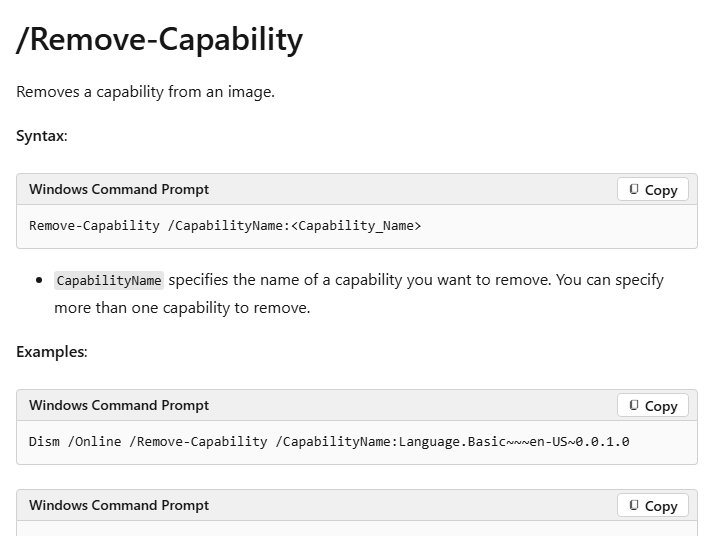
DISM /Online /Remove-Capability /CapabilityName:WMIC~~~~Run it from an elevated Command Prompt to remove the WMIC Feature on Demand. In PowerShell, Remove-WindowsCapability -Online -Name WMIC~~~~ does the same.
You should see: DISM ends with The operation completed successfully. and wmic is no longer recognized in a new window.
Could not add WMIC on Windows 11
WMIC is not listed in Optional features
The August 2026 preview update (24H2, 25H2) or September 2026 preview update (26H1), or any later update, removed WMIC as a Feature on Demand.
- Use the temporary package from KB5067470 if an app needs wmic.exe now.
- Move the task to the matching
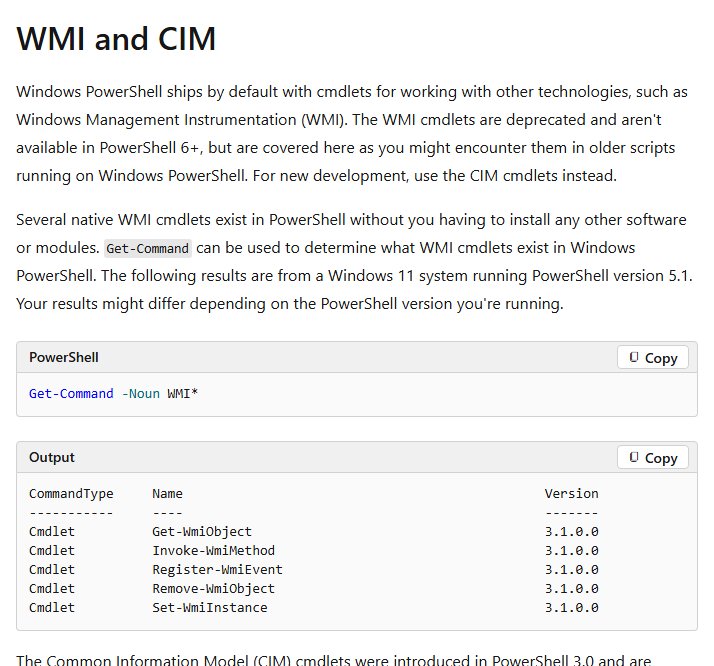
Get-CimInstancecommand for a permanent fix.
Add-WindowsCapability or DISM cannot find WMIC
The capability is no longer offered on this build, or the PC cannot reach Windows Update or a matching source.
- Run
Get-WindowsCapability -Online | Where-Object Name -like 'WMIC*'. No result means the build no longer offers WMIC. - If it is listed but the install fails offline, add
/Source:with a Features on Demand source for your exact build and/LimitAccess.
WMIC disappeared after updating to Windows 11 25H2
Upgrading to 25H2 removes an installed WMIC, and the 2026 updates stop it from being added back.
- Install the temporary package if a tool still depends on wmic.exe.
- Update the script or tool to use PowerShell.
install.ps1 will not run
The PowerShell execution policy blocks scripts in this session.
- In the same elevated window, run
Set-ExecutionPolicy Bypass -Scope Processand select Yes. - Run
.\install.ps1again from the extracted wmic_dlc folder.
wmic is still not recognized after installing it
The Command Prompt window was opened before the install finished.
- Close the window and open a new Command Prompt.
- Check that wmic.exe exists in C:\Windows\System32\wbem, then run
wmic os get captionagain.
Get-WmiObject is not recognized in PowerShell
The older WMI cmdlets are not available in PowerShell 6 and later.
- Replace
Get-WmiObjectwithGet-CimInstance, which takes the same class names. - If a script must keep
Get-WmiObject, check your PowerShell version and run it in Windows PowerShell 5.1.
WMIC on Windows 11 FAQ
How do I enable WMIC on Windows 11?
On builds that still offer it, go to Settings > System > Optional features, select View features, search for WMIC and install it. On up-to-date 24H2, 25H2 and 26H1 PCs it is no longer a Feature on Demand, so only Microsoft's temporary package restores it.
Could not add WMIC on Windows 11?
Microsoft removed WMIC as a Feature on Demand in the August 2026 preview update for Windows 11 24H2 and 25H2 and the September 2026 preview update for 26H1. On those PCs, Settings, PowerShell and DISM have nothing to add. Use the KB5067470 package or PowerShell instead.
How do I install WMIC on Windows 11 using CMD?
Open Command Prompt as administrator and run DISM /Online /Add-Capability /CapabilityName:WMIC~~~~. It works only on builds that still offer the WMIC Feature on Demand. DISM ends with The operation completed successfully when it is installed.
How do I install WMIC on Windows 11 with a PowerShell command?
Run Add-WindowsCapability -Online -Name WMIC~~~~ in an elevated PowerShell window. On up-to-date PCs, run the install.ps1 script from Microsoft's wmic_dlc package instead, after Set-ExecutionPolicy Bypass -Scope Process in the same window.
How do I install WMIC on Windows 11 25H2?
Upgrading to 25H2 removes WMIC, and since the August 2026 preview update it cannot be added back as a Feature on Demand. Download wmic_dlc.zip from Microsoft's KB5067470 article, extract it, and run install.ps1 from an elevated PowerShell window.
How do I install WMIC on Windows 11 24H2?
Before the August 2026 preview update, 24H2 offered WMIC as a disabled-by-default Feature on Demand in Optional features. After that update, the Feature on Demand is gone, so use Microsoft's temporary wmic_dlc package or the PowerShell replacements.
Can I install WMIC on Windows 11 offline?
Yes. On builds that still offer it, run DISM /Add-Capability with /Source pointing at a matching Features on Demand source and /LimitAccess. On current builds, copy Microsoft's wmic_dlc.zip to the PC on a USB drive and run install.ps1.
Is the WMIC install different on Windows 11 Pro?
No. Home, Pro, Enterprise and Education all follow the same rules. The removal applies to every edition of Windows 11 24H2, 25H2 and 26H1, and the same temporary package works on each of them.
Is WMI being removed from Windows 11?
No. Only the wmic.exe command-line tool is removed. Windows Management Instrumentation stays a supported part of Windows, and PowerShell CIM cmdlets, the WMI COM API and .NET System.Management all still query it.