To hear Apple Music at its full 24-bit/192 kHz Hi-Res Lossless quality, turn on Lossless Audio in Music settings and play through a wired connection to an external digital-to-analog converter (DAC), because iPhone and most computers stop at 48 kHz on their own.
This guide covers the quality tiers, the settings on iPhone, Mac, Windows and Android, home stereos through Apple TV 4K, HomePod and AirPlay, and why lossless sometimes does not play.
How to stream Apple Music in Hi-Res Lossless
An Apple Music subscription includes lossless at no extra cost. The fastest hi-fi setup is an iPhone or iPad wired to a USB DAC that feeds your amplifier, powered speakers or headphones.
- Update the iPhone or iPad to the latest version of iOS or iPadOS.
- Go to Settings > Apps > Music and tap Audio Quality.
- Turn on Lossless Audio.
- Choose Hi-Res Lossless as the audio quality for Wi-Fi streaming, cellular streaming and downloads.
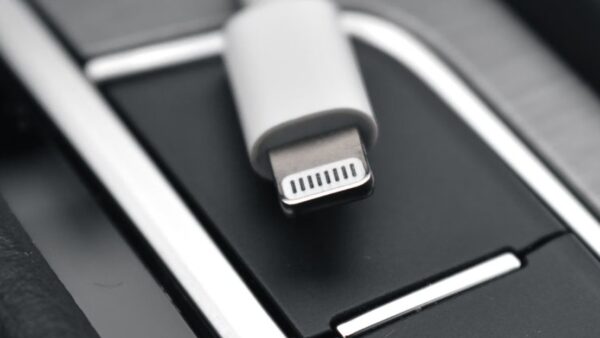
- Connect the external DAC to the iPhone's USB-C or Lightning port with the right cable or adapter, then connect the DAC to your amplifier, speakers or headphones.
- Play an album that shows the Lossless icon on its album page.
Songs you downloaded before turning lossless on stay at their old quality. Delete them and download them again from the Apple Music catalog to get the lossless versions.
Apple Music streaming devices for hi-fi: what each one plays
Every route below supports lossless, but the ceiling depends on the device and the connection. Bluetooth is the one route that is never lossless.
| Playback device | Lossless support | What you need for more than 48 kHz |
|---|---|---|
| iPhone or iPad | Wired headphones, receivers, powered speakers, built-in speakers | External DAC |
| 14-inch or 16-inch MacBook Pro | Wired output and built-in speakers | Native up to 96 kHz; external DAC for higher rates |
| Other Mac models | Wired output and built-in speakers | External DAC |
| Windows PC (Apple Music app) | Built-in speakers and wired output | External DAC (check with the PC maker) |
| Android phone (Apple Music app) | Wired headphones, receivers or powered speakers | External DAC on some phones (check with the maker) |
| Apple TV 4K | Lossless to an AV receiver over HDMI | Hi-Res Lossless only on Apple TV 4K (3rd generation or later) |
| HomePod or HomePod mini | Lossless when turned on in the Home app | Not offered |
| AirPods Max (USB-C) or AirPods Max 2 | Lossless over the USB-C cable | Not listed by Apple |
| AirPods, Beats and other Bluetooth headphones | Not lossless (Apple AAC Bluetooth codec) | Not possible over Bluetooth |
Apple Music streaming quality: Lossless vs Hi-Res Lossless
The whole Apple Music catalog is encoded in Apple Lossless Audio Codec (ALAC), from 16-bit/44.1 kHz CD quality up to 24-bit/192 kHz. The setting you choose caps what is streamed or downloaded.
| Setting | Maximum resolution | Notes |
|---|---|---|
| Lossless | 24-bit/48 kHz | Plays on built-in hardware without a DAC; Automix and Crossfade work |
| Hi-Res Lossless | 24-bit/192 kHz | Needs an external DAC above 48 kHz on iPhone and most computers; Automix and Crossfade are unavailable |
| CD Quality (catalog floor) | 16-bit/44.1 kHz | The lowest resolution lossless tracks are encoded at |
| Dolby Atmos | Spatial Audio format | Separate setting; plays on compatible headphones, speakers and receivers |
Lossless streaming uses significantly more data, and lossless downloads take significantly more storage. Higher resolutions use more than lower ones, so Hi-Res Lossless on cellular can eat a data plan quickly.
Turn on lossless audio in Apple Music on Mac
- Update the Mac to the latest version of macOS.
- Open the Music app.
- Choose Music > Settings, then click Playback.
- Select the Enable Lossless Audio checkbox.
- Click the Streaming pop-up menu and choose Hi-Res Lossless or Lossless.
- Click the Download pop-up menu and choose the quality for downloaded songs.
- To change quality while a song plays, click the audio quality button in the playback controls, then click Audio Quality Settings.
The 14-inch and 16-inch MacBook Pro play songs up to 96 kHz natively. Other Mac models need an external DAC for anything above 48 kHz.
Set the DAC sample rate for Apple Music in Audio MIDI Setup
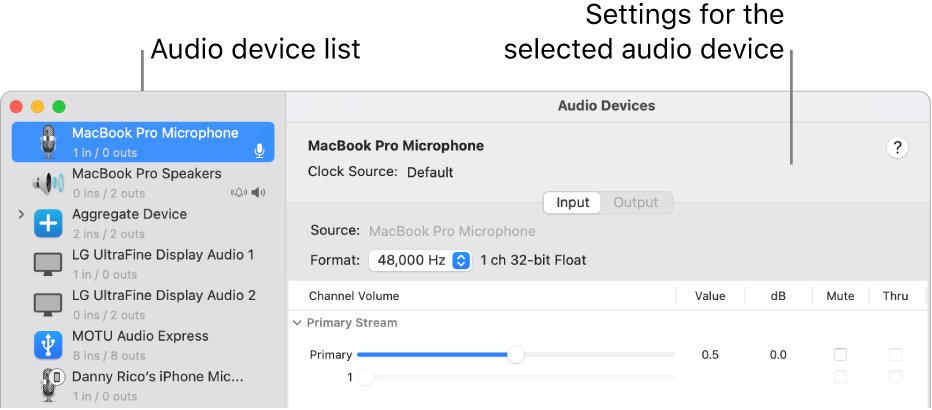
On a Mac, the Format setting in Audio MIDI Setup decides the sample rate and bit depth sent to a USB DAC. Set it to match the DAC and the music you play.
- Connect the DAC to the Mac and install any software that came with it.
- Open the Audio MIDI Setup app and choose Window > Show Audio Devices.
- Select the DAC in the sidebar.
- Control-click it and choose Use This Device For Sound Output.
- Click the Format pop-up menu and choose the sample rate and bit depth that match the DAC, such as 24-bit at 192 kHz.
- Play a Hi-Res Lossless track in Music.
If the DAC does not appear in the sidebar, check the cable and connection and reinstall the software that came with the DAC.
Apple Music lossless on Windows PC
Lossless on Windows needs the Apple Music app for Windows, not the older iTunes app. If the app refuses to sign in, fix the Verification Failed error first.
- Open the Apple Music app.
- Select Sidebar Actions at the top of the sidebar and choose Settings.
- Select Playback.
- Turn on Lossless audio.
- Choose Hi-Res Lossless or Lossless from the Streaming pop-up menu.
- Choose a quality from the Download pop-up menu for downloaded songs.
- Connect an external DAC by USB if you want sample rates above 48 kHz.
Apple Music lossless settings on iPhone, iPad and Android
| Device | Where the setting is | Extra notes |
|---|---|---|
| iPhone or iPad | Settings > Apps > Music > Audio Quality > Lossless Audio | Choose separate qualities for Wi-Fi, cellular and downloads |
| Android | Apple Music app > More > Settings > Audio Quality > Lossless | Wired output only; some phones need a DAC above 48 kHz |
| Apple Vision Pro | Settings > Apps > Music > Audio Quality > Lossless Audio | Built-in speakers and AirPods 4, AirPods Pro 3, AirPods Pro 2 (USB-C) or Powerbeats Pro 2 |
Stream Apple Music to home stereo with Apple TV 4K
An Apple TV 4K connected to an AV receiver by HDMI is the simplest way to put Apple Music lossless into a home stereo without a computer.
- Update the Apple TV 4K to the latest version of tvOS.
- Connect the Apple TV 4K to the AV receiver with an HDMI cable.
- Go to Settings > Apps > Music > Audio Quality and choose the streaming quality.
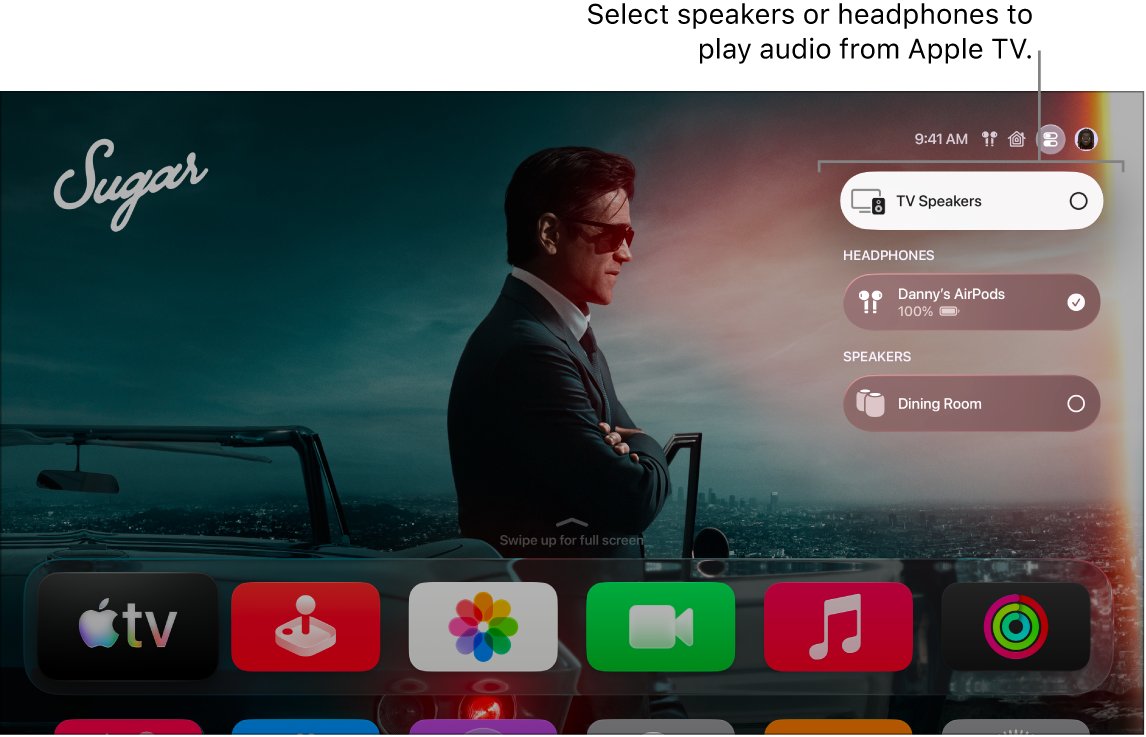
- If the receiver appears twice in the speaker list, as Receiver Speakers and as an AirPlay speaker, choose Receiver Speakers, which Apple names as the best audio quality.
- Open the Music app and play an album that shows the Lossless icon.
Hi-Res Lossless is available only on Apple TV 4K (3rd generation or later). Earlier models play standard Lossless.
How to stream Apple Music to HomePod and AirPlay speakers
HomePod has its own lossless switch in the Home app. Other wireless speakers and smart TVs receive Apple Music from an iPhone through AirPlay 2.
- To turn on lossless for HomePod, open the Home app on the iPhone or iPad used to set it up.
- Tap the Home button, tap More, then tap Home Settings.
- Under People, tap your name, tap Apple Music and turn on Lossless Audio.
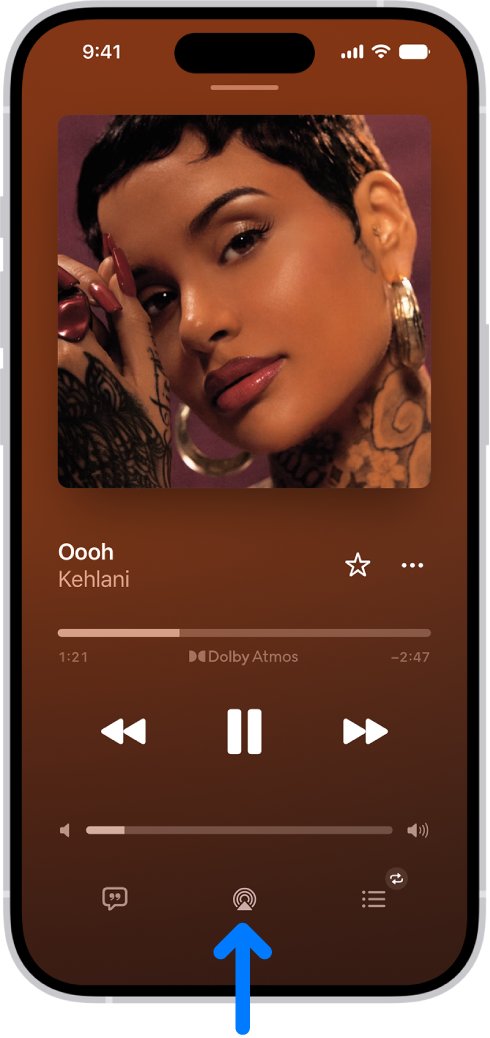
- To play on an AirPlay 2 speaker or smart TV, open Music on the iPhone and start a song.
- Tap the AirPlay button on the Now Playing screen, in Control Center or on the Lock Screen.
- Select one or more speakers; every AirPlay 2 device must be on the same Wi-Fi network as the iPhone.
Apple Music app on smart TVs, game consoles and streaming devices
Many smart TVs, consoles and streaming devices run their own Apple Music app, so the music streams directly instead of from your phone.
- Open the device's app store and download the Apple Music app. If it is not listed, the device is not supported or the app is not offered in your country or region.
- Open Apple Music.
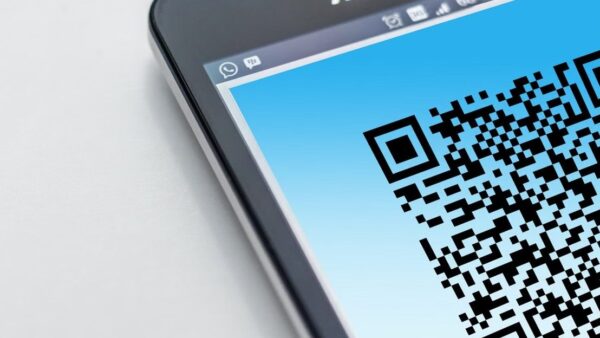
- Scan the QR code with your phone's camera and sign in to your Apple Account, or sign in manually with the remote or controller.
- Finish setup and start playing music.
- To sign out later, go to Settings > Account > Sign Out in the app.
Some content in your music library might not appear in the Apple Music app on these devices. Before selling the device, choose Reset Apple TV and Apple Music (or Reset Apple Music on a console) in the app's settings.
Turn on Dolby Atmos and Spatial Audio in Apple Music
Dolby Atmos is a separate format from lossless. It creates a three-dimensional sound on stereo headphones and on speakers or receivers compatible with Dolby Atmos.
- Go to Settings > Apps > Music on iPhone.
- Tap Dolby Atmos.
- Choose Automatic to play Atmos only on compatible headphones, speakers and receivers, or Always On to try it on any output.
- Turn on Download in Dolby Atmos if you want Atmos versions of downloaded songs.
- With AirPods 3, AirPods Pro or AirPods Max, touch and hold the volume control in Control Center, tap Spatial Audio and choose Off, Fixed or Head Tracked.
Albums available in Atmos show the Dolby icon. Dolby Atmos plays on any headphones, but not all speakers play it as intended.
How to tell if Apple Music is playing lossless
- On iPhone, make sure Lossless Audio is on in Settings > Apps > Music > Audio Quality; this also shows the Lossless icon on the Now Playing screen.
- Start a song and look for the Lossless icon on the Now Playing screen.
- On a Mac, look for the Lossless icon in the playback controls while the song plays.
- On a Mac with a DAC, open Audio MIDI Setup and check the Format of the DAC matches the rate you set.
- If the icon does not appear, check the album page: only music with the Lossless icon is available in lossless.
The quality you hear still depends on song availability, network conditions and what the connected headphones or speakers can play.
Apple Music lossless not working
Downloaded songs are not lossless
The songs were downloaded before lossless was turned on.
- Turn on Lossless Audio and set the Download quality.
- Delete the downloaded songs.
- Download them again from the Apple Music catalog.
Hi-Res Lossless plays at 48 kHz or lower
The phone or computer's built-in output stops at 48 kHz, or the DAC format is set lower.
- Connect an external DAC by wire.
- On a Mac, set the DAC's Format in Audio MIDI Setup to the higher sample rate.
- On Apple TV 4K, check that the model is the 3rd generation or later.
AirPods or Bluetooth headphones are not lossless
Bluetooth connections use the Apple AAC Bluetooth codec, which is not lossless.
- Use wired headphones or a DAC for lossless.
- With AirPods Max (USB-C) or AirPods Max 2, connect the included USB-C cable and update the firmware.
Automix or Crossfade disappeared
Automix and Crossfade are not available while Hi-Res Lossless is on.
- Open Audio Quality settings.
- Choose Lossless instead of Hi-Res Lossless.
AirPlay speakers do not appear in Apple Music
The speaker is on a different Wi-Fi network from the iPhone.
- Connect the iPhone and the speaker to the same Wi-Fi network.
- Tap the AirPlay button again and select the speaker.
Lossless setting is missing
Apple Music and lossless are not available in every country or region, or the device software is out of date.
- Update iOS, iPadOS, macOS, tvOS or the Apple Music app.
- Check that your Apple Music subscription is active.
Apple Music for audiophiles FAQ
Is Apple Music a streaming service?
Yes. Apple Music is Apple's subscription music streaming service, with over 100 million songs, no ads, offline downloads, Spatial Audio and lossless audio quality. It runs on Apple devices, Android, Windows, Sonos, smart TVs and more.
What music streaming service does Apple offer?
Apple offers Apple Music, sold as Individual, Family and Student plans, and inside the Apple One bundle. In the US the Individual plan is $11.99 a month, Family is $19.99 and Student is $6.99, with a free first month for new subscribers.
How does Apple Music Family work?
The Family plan shares one Apple Music subscription with up to five other people through Family Sharing. Each person gets their own library, recommendations and playlists, and every member gets the same lossless and Spatial Audio features as the Individual plan.
Does Apple Music have lossless audio?
Yes. Apple Music includes lossless at no extra cost. Lossless streams up to 24-bit/48 kHz, and Hi-Res Lossless up to 24-bit/192 kHz, which needs an external DAC above 48 kHz on iPhone and most computers.
Why does Apple Music sound better?
Apple Music streams its catalog in Apple Lossless (ALAC) when lossless is on and offers many tracks in Dolby Atmos. Turn on Lossless Audio and Dolby Atmos in Music settings, and use wired output, to hear the difference.
How do I stream Apple Music to a home stereo?
Connect an Apple TV 4K to the AV receiver with HDMI and choose Receiver Speakers, or wire a DAC from an iPhone, Mac or PC to the amplifier. AirPlay 2 receivers and HomePod also play Apple Music from an iPhone on the same Wi-Fi.
What is the Apple Music streaming quality?
With lossless on, Apple Music streams up to 24-bit/48 kHz (Lossless) or 24-bit/192 kHz (Hi-Res Lossless). Actual quality depends on song availability, network conditions and the headphones or speakers connected.
Is Apple Music a good streaming service for audiophiles?
It includes Hi-Res Lossless up to 24-bit/192 kHz and Dolby Atmos in the standard price. The limits are that Bluetooth is never lossless and rates above 48 kHz need a wired DAC on most devices.
Apple Music vs Apple Music Family: what is the difference?
Both plans have the same catalog and audio quality. Family costs more per month but covers you plus up to five people, each with a separate library and recommendations, while Individual covers one person.