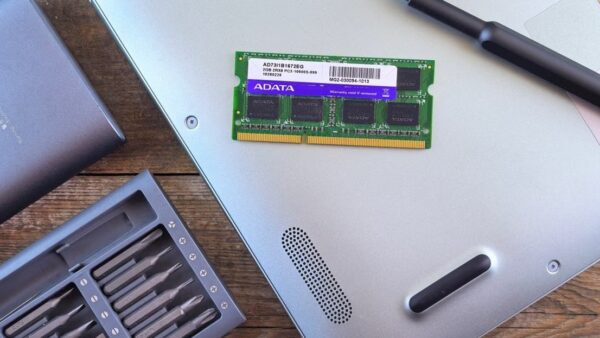
To use Bing Visual Search, open Bing Images, select the camera icon in the search box, and drag in, paste, upload or photograph an image; Bing then returns similar images, products to buy, pages that use the picture and details about what it shows.
This guide covers every place Visual Search lives, from bing.com and Microsoft Edge to the Windows Photos app, Click to Do and your phone, plus how the technology works, its limits, and what to do when a search returns nothing useful.
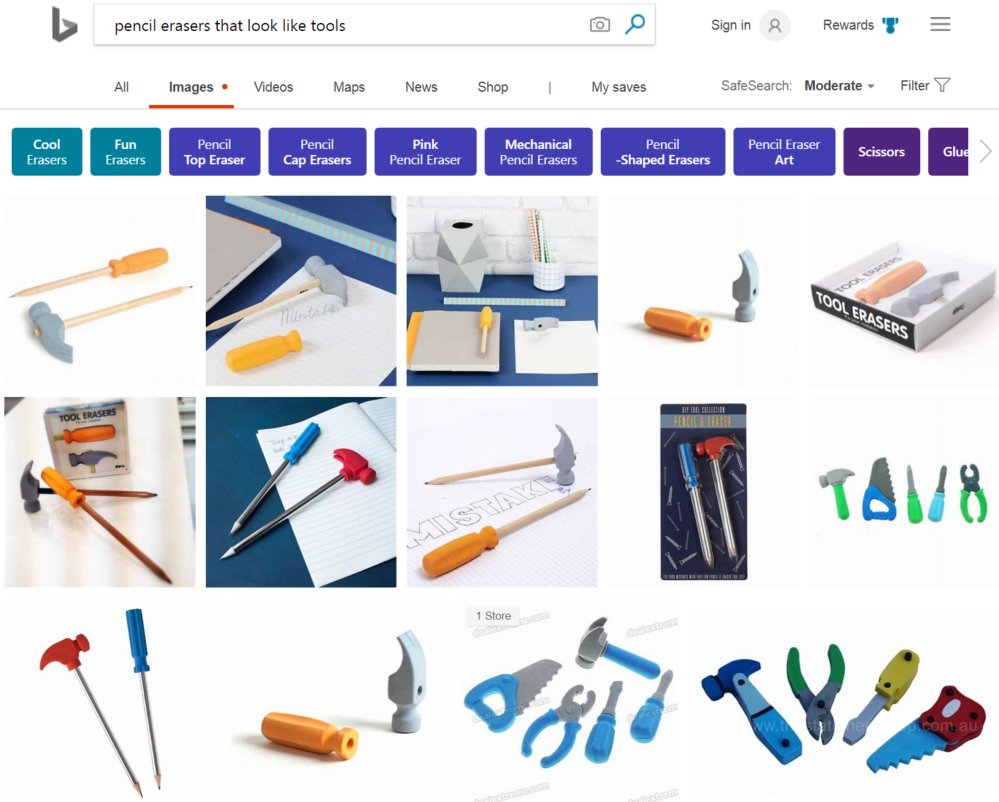
How to use Visual Search in Bing
The bing.com route works in any desktop or mobile browser, so it is the one to try first.
- Go to bing.com and select the Images tab at the top of the page, or open Bing Images directly.
- Select the camera icon in the search box.
- Drag an image into the box, select Paste image or URL, select Browse to pick a file, or select Take photo to use your webcam.
- Wait for Bing to load the results page for your image.
- Scroll through the similar images, shopping matches and pages that include the picture.
- Drag the selection box over the image to search for one object instead of the whole picture.
What is Bing Visual Search anyway?
Bing Visual Search lets you search the web with an image instead of typed words. You give Bing a picture, and it works out what is in it and finds matching content.
| What Bing returns | What it means |
|---|---|
| Visually similar images | Pictures that look like yours, useful for finding a larger or cleaner copy |
| Shopping sources | Stores selling the product, outfit or furniture in the photo, with similar styles and prices |
| Pages that include the image | Websites where the same picture is published |
| Related searches | Text searches based on what Bing recognises in the image |
| Entities | Well-known people, places and things, such as a landmark or a dog's breed |
| Text in the image | Words you can copy, translate or look up |
Visual Search is free and works on bing.com, in the Bing app, in Microsoft Edge and in several Windows 11 apps.
1. Access Visual Search
Every entry point sends the image to the same Bing service. Pick the one that matches where the picture already is.
| Where the image is | Where to start Visual Search | How |
|---|---|---|
| A file on your PC or a link | bing.com | Images tab > camera icon in the search box |
| On a web page in Edge | Microsoft Edge desktop | Right-click the image and choose Visual Search |
| In your photo library on Windows | Windows Photos app | Open the picture, select the three dots, then Visual search with Bing |
| Anywhere on screen, Copilot+ PC | Click to Do | Press Windows key + Q, select the image, choose Visual search with Bing |
| A screenshot you just took | Snipping Tool on Windows 11 | Capture the snip and run the image lookup from Snipping Tool |
| In front of you, on a phone | Bing app or Edge mobile | Tap the camera or visual search icon and take a photo |
| On a page in Chrome or Firefox | Bing Visual Search extension | Add it from the Chrome Web Store or Firefox Add-ons |
2. Upload your image
The upload box on bing.com accepts an image four ways on a computer. On a phone, the same box offers the camera and your saved photos.
- Open the camera icon in the Bing search box.
- To use a picture from another site or from File Explorer, drag it onto Drag and drop image here.
- To use an image you copied or a web address of an image, select Paste image or URL and paste it.
- To pick a file from your PC, select Browse and open the image.
- To photograph an object, select Take photo and allow Bing to use your webcam.
- On a phone, tap Take photo, or choose an image saved on your device.
Take photo needs a webcam on a desktop or laptop. A sharp, well-lit image with the object filling most of the frame gives the best matches.
3. Analyze the results
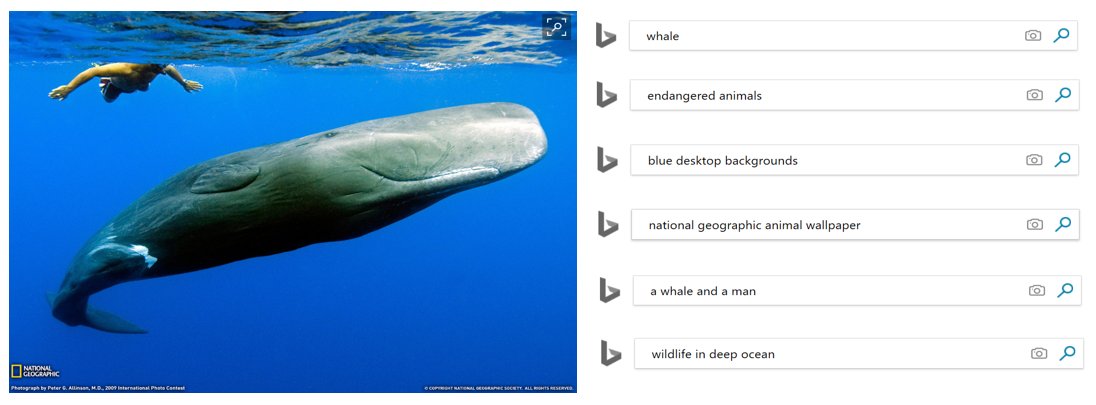
Bing groups what it finds by type. Read the results in the order that matches why you searched.
| Result type | What you see | Use it to |
|---|---|---|
| Similar images | A grid of pictures that look like yours | Find a higher-resolution copy or design ideas in the same style |
| Shopping results | Products with stores and prices | Buy the item in the photo or a lookalike |
| Pages with this image | Websites that publish the same picture | Find the original source or check where a photo is used |
| Identified object | The name of a plant, animal, landmark or product, with details | Learn what the thing is, then search it by name |
| Text and translation | Words Bing read from the image | Copy, translate or look up the text |
| Related searches | Suggested text queries | Continue the search in words |
Bing uses AI to read the image, and AI can make mistakes. Check an identification against a second result before you rely on it.
4. Refine your search
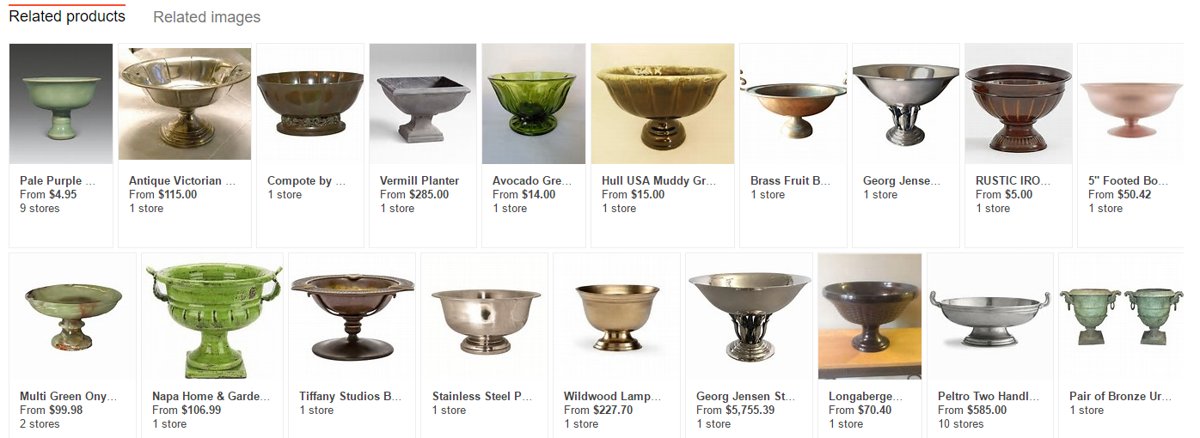
A photo often holds several things. Narrowing the search to one of them changes every result on the page.
- On the results page, drag the corners of the selection box so it covers only the object you want.
- Release the box; Bing reruns the search on that part of the image each time you change it.
- Draw a new box around a different object in the same picture to search for that item instead.
- If the matches are wrong, upload a sharper photo, or crop out busy backgrounds before you upload.
- Once Bing names the object, type that name into the search box for a regular text search.
For tighter text searches after that, Bing search operators and filters let you limit results to one site, file type or exact phrase.

How to use Visual Search in Microsoft Edge
Edge has Visual Search built into the right-click menu. It works even when Bing is not your default search engine.
- Open the web page that has the image in Microsoft Edge.
- Right-click the image.
- Choose Visual Search from the menu.
- Frame the area of the image you want to search, if Edge asks you to.
- Read the Bing results for the image.
If the Visual Search icon that appears over images gets in the way, you can turn off Visual Search in Edge and keep the right-click route.
How to use Bing Visual Search on iPhone and Android
Both the Bing app and the Edge app carry Visual Search on iPhone and Android.
- In the Bing app, tap the visual search icon, then take a photo or pick one from your gallery.
- In the Microsoft Edge app, tap the address bar, then tap the camera icon above the keyboard.
- Point the camera at the object, or choose a saved image.
- To search an image on a web page in Edge, long-press the image and select Search Bing for this image.
- Scroll the results for shopping matches, similar images and details.
Point the camera at printed text to translate or copy it. Visual Search supports the same languages as Translator in Bing, more than 100 of them.
How to use Visual search with Bing in the Windows Photos app
The Photos app in Windows 11 can send any picture in your library to Bing without opening a browser first.
- Open the Photos app and open the picture you want to search.
- Select the three dots in the menu bar.
- Select Visual search with Bing.
- Review the similar images, related websites and details Bing returns.
How to use Visual search with Bing on a Copilot+ PC
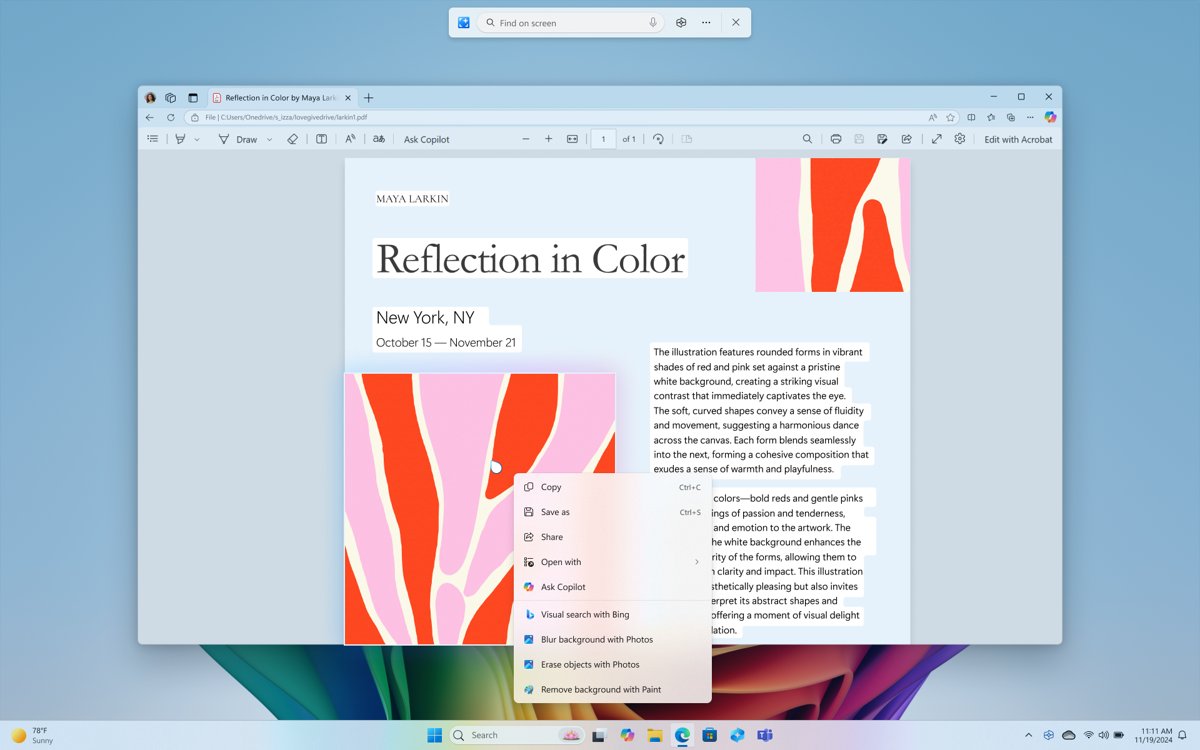
Click to Do lets a Copilot+ PC search any image on screen, including pictures inside apps that have no search option of their own.
- Press Windows key + Q, or hold the Windows key and click the screen.
- Select the image you want to search; the cursor turns blue and white while Click to Do is active.
- Choose Visual search with Bing from the actions.
- Read the results that open in your default browser.
Click to Do analyses the screen on your PC and sends the image to Bing only when you choose that action. It needs a Copilot+ PC with a 40 TOPS NPU and 16 GB of RAM, and you can switch it on or off in Settings > Privacy & security > Click to Do.
Cool real-world scenarios for Visual Search
| Scenario | What to upload | What Bing gives you |
|---|---|---|
| Shop a look or a room | A photo of clothes, furniture or decor | Where to buy it, similar styles and price options |
| Name a plant or animal | A photo of a flower, tree, insect or pet | The likely species or breed, with details |
| Identify a landmark | A holiday photo of a building or monument | The place's name and information about it |
| Translate a sign or menu | A photo of the text | The translated text, ready to copy |
| Get help with homework | A photo of a maths or science problem | The steps behind the answer, not just the answer |
| Find the original of a picture | A screenshot or saved image | Pages that publish the same image and larger copies |
| Cook something you saw | A photo of a dish | Recipes and pages about the dish |
| Find design ideas | An image with a pattern or style you like | Related visuals, patterns and designs |
After the first results, you can ask a follow-up question about the image to go deeper.
The tech magic behind Visual Search: How does it work?
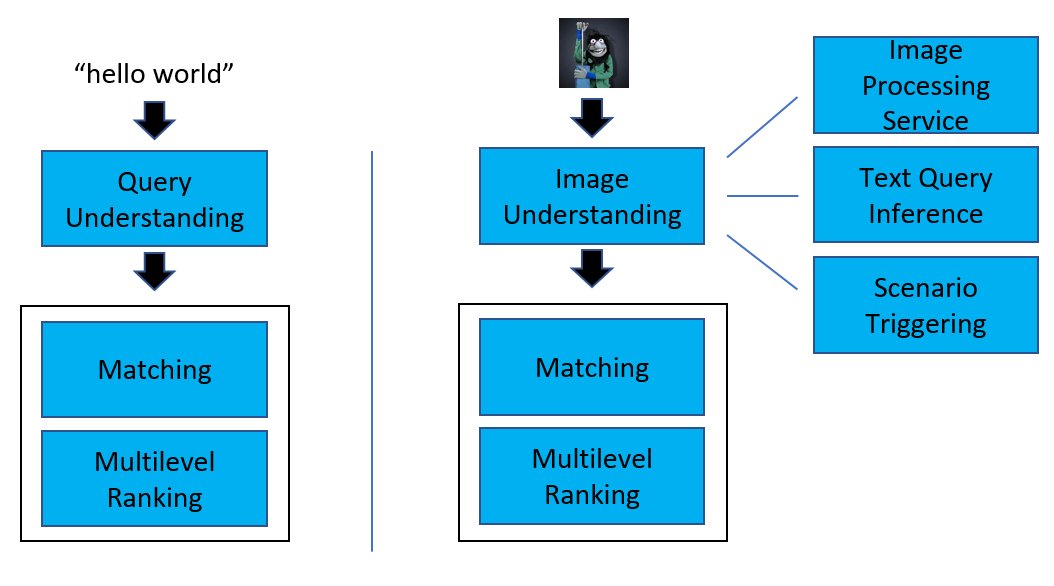
Bing has described its visual search pipeline on the Bing Blog. In short, it turns your picture into numbers that describe its content, then finds the closest matches among billions of indexed images.
| Stage | What happens |
|---|---|
| Image understanding | An image processing service detects objects and extracts deep neural network features from your picture |
| Best representative query | Bing works out the text query that best describes the image |
| Intent detection | A triggering model decides what you probably want, for example shopping when the photo shows a product |
| Embedding | Deep learning maps the image and text into vectors in one shared space, so related items sit close together |
| Matching | Vector search narrows billions of candidate images to millions, then to thousands |
| Ranking | More precise distance calculations order the candidates and remove duplicates |
| Result | The final set appears in tens of milliseconds |
Microsoft released the vector search algorithm Bing uses, called SPTAG (Space Partition Tree And Graph), as an open source project in May 2019.
What are the limitations of Bing Visual Search?
| Limitation | What it means for you |
|---|---|
| AI can be wrong | An identification of a plant, product or landmark is a strong lead, not a guarantee |
| Image quality matters | Blurry or unusual images can still return results, but sharper photos give better matches |
| Busy photos confuse it | You may need to adjust the selection box to cover just the object you want |
| Your photos may be used | Images you provide may be used to improve Bing's image processing services, so avoid uploading private documents |
| Take photo needs a webcam | A desktop without a camera can still drag, paste or browse for an image |
| Availability varies | Features differ by device type, market and browser version |
| Click to Do region limits | Visual search with Bing is not available in Click to Do in the European Economic Area |
| No public API | The Bing Visual Search API for developers was retired on August 11, 2025 |
Why should Windows users care about Bing Visual Search?
On Windows 11, Visual Search is already built into apps you use every day, so there is nothing to install.
| Built into | What it lets you do |
|---|---|
| Microsoft Edge | Search any image on a page from the right-click menu, whatever your default search engine |
| Photos app | Look up any picture in your library with Visual search with Bing |
| Snipping Tool | Capture part of the screen and run an image lookup on it |
| Click to Do | Search any image on screen on a Copilot+ PC with Windows key + Q |
| bing.com | Drag a file straight from File Explorer into the search box |
Google offers a similar tool, and the steps for reverse image search on Google work in any browser if you want a second opinion on a result.
The future of AI-powered search
Image search is moving from matching pictures to answering questions about them. These changes are already announced or live.
| Change | What it means |
|---|---|
| Follow-up questions on images | After a visual search, you can ask Bing more about what the picture shows |
| Step-by-step homework help | A photo of a problem returns the method, not only the answer |
| On-device screen analysis | Click to Do finds images and text on your screen locally before anything goes to Bing |
| Vector search at web scale | Bing has vectorised more than 150 billion pieces of data, so searches match meaning rather than exact words |
| Developers move to AI agents | The retired Bing Search APIs were replaced by Grounding with Bing Search for Azure AI Agents |
Typed questions get the same treatment, and you can use Bing AI search to ask in plain language instead of keywords.
Bing Visual Search not working
Take photo does nothing on a PC
Taking a photo on a computer needs a working webcam, and the browser needs permission to use it.
- Check that the PC has a webcam and that no other app is using it.
- Allow camera access when the browser asks for it.
- Use Browse or drag a saved photo into the box instead.
Visual search returns unrelated results
The image is blurry, or the selection covers several objects.
- Drag the selection box so it covers only the object you want.
- Upload a sharper, better-lit photo with the object filling most of the frame.
- Type the object's name into the search box once Bing suggests one.
Visual search with Bing is missing in Click to Do
The action is not offered in the European Economic Area, and Click to Do itself needs a Copilot+ PC.
- Open Settings > Privacy & security > Click to Do and check that it is on.
- If you are in the EEA, use the Photos app or bing.com instead.
- On a PC that is not a Copilot+ PC, use Edge, Photos or bing.com.
Bing Visual Search FAQ
Is Bing Visual Search free?
Yes. Bing Visual Search is free on bing.com, in the Bing app, in Microsoft Edge and in Windows apps such as Photos. Results cover similar images, shopping matches and pages that use the picture.
Does Visual Search work if Bing is not my default search engine?
Yes. Visual Search in Microsoft Edge works even when another search engine is set as the default. Right-click an image and choose Visual Search, and the results come from Bing.
Can I use Bing Visual Search on my phone?
Yes. Use the camera or visual search icon in the Bing app, or tap the address bar in the Microsoft Edge app and then the camera icon. In Edge you can also long-press an image and select Search Bing for this image.
How many languages does Bing Visual Search support?
Visual Search supports the same languages as Bing Translate, which is more than 100. That covers reading and translating text in photos of signs, menus and documents.
Does Bing keep the photos I upload?
Microsoft says the photos you provide may be used to improve Bing image processing services. Do not upload images of private documents, IDs or anything you would not share publicly.
Can Bing Visual Search find where an image is used online?
Yes. The results include pages that use the same image, as well as visually similar images. That helps you find the original source of a photo or a larger copy of it.
Does Bing Visual Search work with blurry images?
Often, yes. Bing can still return results for blurry or unusual images, but a sharp, well-lit photo with the object filling most of the frame gives noticeably better matches.
Can I use Bing Visual Search in Chrome or Firefox?
Yes. Open bing.com and use the camera icon in the search box in any browser. Microsoft also offers a Bing Visual Search extension in the Chrome Web Store and in Firefox Add-ons.
Is the Bing Visual Search API still available?
No. Microsoft retired the Bing Search APIs, including Visual Search, on August 11, 2025. Developers are directed to Grounding with Bing Search in Azure AI Agents instead.