There is no official way to download Microsoft Encarta or Encarta Kids on Windows 11, because Microsoft discontinued Encarta and no Microsoft site or store offers it. You install it from your own original disc, or from an ISO file you made from that disc.
This guide covers which editions run best, disc and ISO installs, compatibility mode, opening Encarta Kids, virtual machines, legal sources and modern alternatives.
Can you download Microsoft Encarta?
Not from Microsoft. Encarta shipped on CD-ROM and DVD, and Microsoft also sold Microsoft Student with Encarta Premium 2008 as a download in 2007, but no edition is offered anywhere by Microsoft today.
The fastest legal route is the disc you already own. You need the disc, the product key that came with it, a CD or DVD drive (a USB external drive works), and an administrator account.
- Insert your Encarta disc, or connect a USB DVD drive first if the PC has no optical drive.
- Open File Explorer, select This PC, and double-click the Encarta disc.
- Right-click setup.exe and select Run as administrator, then select Yes in the User Account Control prompt.
- Follow the setup wizard and type the product key when setup asks for it.
- Restart Windows if setup asks you to.
- Open Start, select All apps, and launch Encarta.
If setup refuses to start, switch on compatibility mode. If your edition is too old for 64-bit Windows 11, run it in a virtual machine instead.
Understanding Microsoft Encarta and Encarta Kids
Microsoft Encarta was a multimedia encyclopedia for Windows PCs, sold on disc with articles, photos, video, a dictionary, a thesaurus and an interactive world atlas. Encarta Kids arrived inside Encarta Reference Library Premium 2005, so look for it inside a Premium edition.
| Product | What it was | Key facts |
|---|---|---|
| Encarta Reference Library Premium 2005 | The edition that introduced Encarta Kids | DVD-ROM and CD-ROM versions; the DVD held 32 Discovery Channel videos and the CD held 20; released July 2004 at $69.99 |
| Encarta Kids | A children's section for ages seven and up | Pictures, large icons, interactive games and a simple, colorful interface; more than 500 new articles in 10 categories such as Animals, Everyday Life, History and Science |
| Microsoft Student with Encarta Premium 2007 | Encarta bundled with Microsoft Math and Office homework templates | Released on DVD in July 2006 at $69.95 before a $20 rebate; a CD version went to schools through volume licensing |
| Microsoft Student with Encarta Premium 2008 | The next Student edition | Sold at retail and as a download from early July 2007 at $49.95 |
| MSN Encarta | The online Encarta service | Hosted Encarta Premium content and Math Homework Help; the encarta.msn.com site no longer loads |
Which Encarta versions work best on Windows 11?
Windows 11 is 64-bit only. It runs 32-bit programs through its built-in WOW64 layer, but it cannot run 16-bit programs at all, so the age of your edition decides the route.
| Edition you own | Built for | What to expect on Windows 11 | Route to use |
|---|---|---|---|
| Encarta Premium 2005 to 2009, Microsoft Student with Encarta Premium | Windows XP and Windows Vista | Best candidates: Windows desktop programs from the XP and Vista era | Install from the disc or ISO; add compatibility mode if setup stops |
| Encarta Reference Library 2002 to 2004 | Windows 98, Me, 2000 and XP | Setup components are older and may need help | Compatibility mode for Windows XP first, a virtual machine if setup still fails |
| Encarta 95 to Encarta 99 | Windows 95 and Windows 98 | Versions that may be difficult: a 16-bit setup program will not start on 64-bit Windows | 32-bit Windows inside a virtual machine |
| Encarta Kids | Part of Premium editions from 2005 | Same as the Premium edition it came with | Install the Premium edition that lists Encarta Kids on its box |
How to install Microsoft Encarta on Windows 11 from a disc
Sign in with an administrator account first. Keep every disc in the set nearby, because multi-disc CD editions ask for the next disc during setup.
- Insert the Encarta disc into the drive and close any AutoPlay prompt that appears.
- Open File Explorer and select This PC.
- Double-click the Encarta drive to open the disc.
- Find setup.exe in the top folder of the disc. With file extensions hidden, it shows as Setup with the type Application.
- Right-click setup.exe, select Run as administrator, and select Yes.
- Enter the product key from the disc case when setup asks for it.
- Accept the default install folder, swap discs when prompted, and select Finish.
- Restart Windows if setup requests it, then open Encarta from Start > All apps.
How to install Encarta from an ISO file you already own
Windows 11 opens ISO files without extra software and shows each one as a virtual disc. This is the easiest route on laptops without a DVD drive.
- Copy your Encarta ISO to a local folder, such as Documents.
- Right-click the ISO file and select Mount.
- Open the new virtual drive that appears under This PC.
- Right-click setup.exe, select Run as administrator, and complete setup with your product key.
- Leave the ISO mounted while you use Encarta if it asks for the disc.
- To remove the virtual disc later, right-click its drive in This PC and select Eject.
If Mount is missing, another program owns ISO files. Right-click the ISO, select Properties, select Change next to Opens with, choose Windows Explorer, and select Apply.
PowerShell mounts it too: Mount-DiskImage -ImagePath "C:\Users\Public\Encarta.iso". ISO files always mount read-only.
Use compatibility mode if setup will not start
Compatibility mode runs a program with settings from an earlier version of Windows. Set it on setup.exe first, and later on the Encarta program itself if it fails to launch.
- Right-click setup.exe on the disc or mounted ISO and select Properties.
- Open the Compatibility tab.
- Tick Run this program in compatibility mode for: and pick the Windows version your edition was made for, such as Windows XP or Windows Vista.
- Select Apply, then OK.
- Right-click setup.exe again and select Run as administrator.
- If setup still fails, open Start > Settings > System > Troubleshoot > Other troubleshooters.
- Find Program Compatibility Troubleshooter, select Run, and choose Encarta's setup when the troubleshooter asks which program has problems.
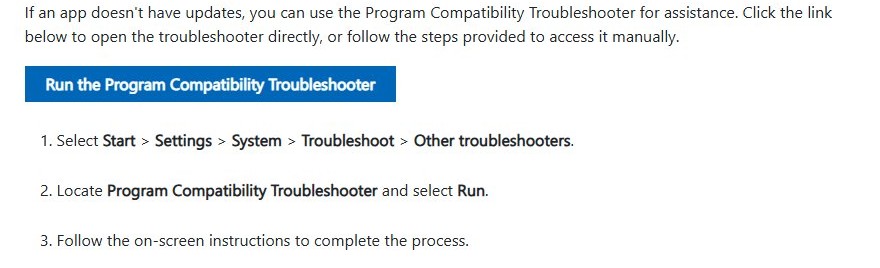
If the compatibility options are greyed out, select Change settings for all users on the same tab and set them there.
How to open Encarta Kids on Windows 11
- Select Start and type Encarta Kids. Open it if it appears in the results.
- If nothing appears, select All apps and scroll to the Encarta or Microsoft Student entries.
- Open the main Encarta program and look for Encarta Kids on its start screen.
- To check the installation folder, right-click the Encarta entry in All apps, select More > Open file location, then right-click the shortcut and select Open file location again.
- Right-click Encarta Kids and select Pin to Start so it opens in one click next time.
- If Encarta Kids is not anywhere, your edition does not include it. Install a Premium edition that lists Encarta Kids on its box.
How to tell if Encarta installed correctly on Windows 11
- Open Start > Settings > Apps > Installed apps and type Encarta in the search box.
- Confirm the Encarta or Microsoft Student entry is listed with a size and an install date.
- Open Encarta and search for any article, such as a country name, to check that the text loads.
- Play a video or sound clip in that article to test multimedia.
- Open Encarta Kids if your edition includes it, and open one of its games.
Fix common Encarta installation problems on Windows 11
“This app can’t run on your PC”
Setup is a 16-bit program, or it checks for a Windows version it knows. 64-bit Windows does not run 16-bit programs, although it converts some 16-bit installers to 32-bit automatically.
- Set compatibility mode on setup.exe for Windows XP or Windows Vista and run it as administrator.
- Run the Program Compatibility Troubleshooter from Settings > System > Troubleshoot > Other troubleshooters.
- If the message returns, install a 32-bit Windows in a virtual machine and run setup there.
Setup asks for Internet Explorer or old web components
Internet Explorer isn't available in Windows 11. IE mode in Microsoft Edge only opens websites that need Internet Explorer; it does not satisfy an installer.
- Skip any optional web components if setup lets you continue without them.
- Never install an Internet Explorer package from a third-party site.
- Install Encarta inside a virtual machine running an older Windows that includes Internet Explorer.
Setup will not start when you double-click it
AutoPlay launched a different file, or setup lacks administrator rights.
- Open the disc in File Explorer instead of using AutoPlay.
- Right-click setup.exe and select Run as administrator.
- Restart the PC, then try again with compatibility mode set.
Troubleshooting common issues in Encarta after it installs
Encarta asks for the disc every time
The installed program still expects its disc in the drive.
- Keep the disc in the drive while you use Encarta.
- Better, make a personal ISO of the disc, mount it, and reinstall Encarta from the mounted ISO.
- Mount the same ISO before each session, so Encarta finds its virtual disc.
Audio or videos do not play
An old program's media playback can fail on current Windows until it gets a compatibility setting or updated drivers.
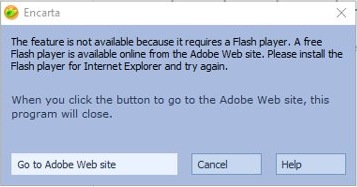
- Run the Program Compatibility Troubleshooter on the Encarta program, not on setup.
- Update your device drivers through Windows Update.
- If clips are still silent, run Encarta in a virtual machine with an older Windows.
Text is tiny or the window looks wrong on a high-resolution screen
Older desktop programs assume a 96 DPI display, so on sharper screens they appear blurry or incorrectly sized.
- Right-click the Encarta shortcut and select Properties.
- Open the Compatibility tab and open its high DPI settings.
- Tick Override high DPI scaling behavior and set the scaling to System (Enhanced).
- Select OK, then Apply, and reopen Encarta.
The program crashes when opening
Encarta needs a compatibility setting, or the install is damaged.
- Set compatibility mode on the Encarta program for the Windows version your edition was built for.
- Open Settings > Apps > Installed apps, select Encarta, and choose Advanced options > Repair if it is offered.
- Uninstall Encarta from Installed apps and reinstall it from the disc or ISO.
- If it still crashes, move it to a virtual machine.
How to run Encarta in a virtual machine
A virtual machine runs an older 32-bit Windows inside Windows 11. It is the route for 16-bit editions and for setups that demand Internet Explorer, and you need your own installation media and product key for that Windows.
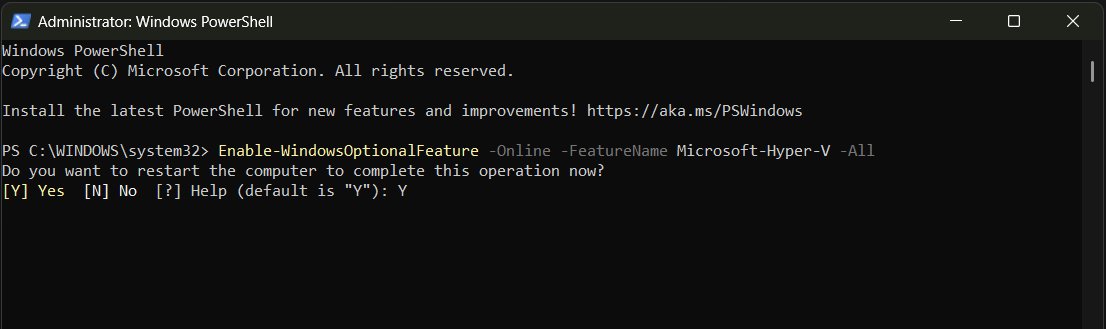
Recommended virtual machine options: Hyper-V is built into Windows 11 Pro and Enterprise but can't be installed on Windows 11 Home. VMware Workstation Pro has been free for personal, educational and commercial use since November 11, 2024, and Oracle VirtualBox is open source. VMware and VirtualBox virtual machines may not start while the Hyper-V hypervisor runs.
Basic virtual machine setup with Hyper-V takes these steps.
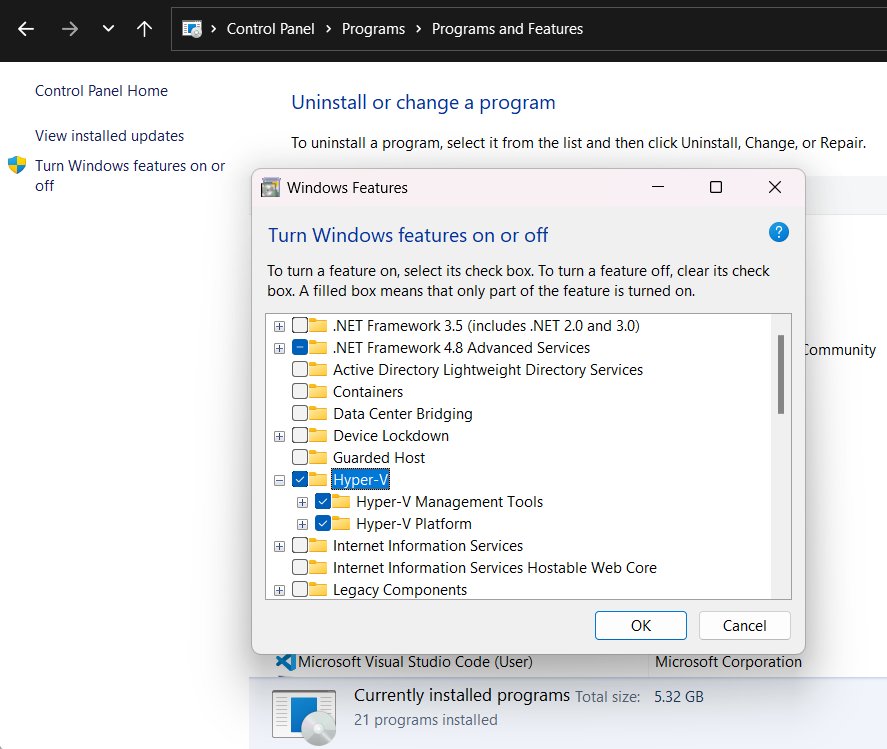
- Open Control Panel > Programs > Programs and Features > Turn Windows features on or off, tick Hyper-V, select OK, and restart.
- Open Start, type Hyper-V Manager, and open it.
- Select your PC in the left pane, then select New > Virtual Machine in the Actions pane.
- Name the virtual machine, then choose Generation 1 on the Specify Generation page. Generation 2 does not run 32-bit Windows.
- Assign memory, and skip the Configure Networking page so the old Windows stays offline.
- On Connect Virtual Hard Disk, select Create a virtual hard disk.
- On Installation Options, select Install an operating system from a bootable image file, browse to your Windows ISO, and select Finish.
- Right-click the virtual machine, select Connect, then Action > Start, and install Windows.
- Attach your Encarta ISO to the virtual machine's DVD drive in its Settings, then run Encarta setup inside the virtual machine.
Is it safe to use Encarta today?
The program itself is offline reference software. Its content stops at the year your edition shipped, and its online features depended on MSN Encarta, which no longer loads.
Scan any ISO you did not make yourself with Microsoft Defender before you open it. Keep any virtual machine running an old Windows offline, because those versions no longer get security updates.
Yes, when it comes from your own original disc or an ISO you made from it. A pressed Encarta disc contains only Microsoft's installer. The risk sits with Encarta files from download sites, which can carry malware, and with dated facts that a student might quote as current.
Where to find Encarta legally
| Source | What you get | What to check |
|---|---|---|
| Your own discs | The full product and its product key | Old software boxes, CD wallets and family PCs often still hold the disc |
| Secondhand original boxed copies | A pressed disc and its printed key | Buy only an original disc in its case, not a burned copy or a key alone |
| Libraries and schools | Access through an institution's licence | Microsoft offered Encarta through Academic Volume Licensing, so ask the librarian or IT desk |
| Microsoft | Nothing | Microsoft no longer sells Encarta on disc or as a download |
| "Free full version" download sites | Files of unknown origin | These are not Microsoft distributions; skip them |
Legal considerations
Abandonware is a label, not a licence. A discontinued program is still covered by copyright and by the licence terms in its box.
Install only a copy you own or are licensed to use, and keep any ISO you make as a personal backup. Microsoft discontinuing Encarta did not release it as free software, so a copy shared online is not a licensed copy, even when the site calls it free.
Finding the Encarta software you already own
- Check old software boxes, CD wallets and the discs that came with family PCs for an Encarta or Microsoft Student disc.
- Look on the disc case or sleeve for the product key, and keep it with the disc.
- On an old PC that still starts, open Start and search for Encarta to see if it is still installed there.
- Search backup drives for disc images: open the drive in File Explorer and type \*.iso in the search box.
- If you find nothing, ask a local library or buy an original boxed copy secondhand.
Downloading Microsoft Encarta and Encarta Kids on Windows 11
A real Encarta download does not exist, so match your situation to the row below to get your own copy onto the Windows 11 PC.
| Your situation | Do this |
|---|---|
| You own the disc and the PC has a DVD drive | Install straight from the disc |
| You own the disc but the PC has no drive | Connect a USB DVD drive, or make an ISO on a PC that has a drive and copy it over |
| You have an ISO you made from your disc | Mount it in File Explorer and run setup |
| You only want Encarta Kids | Install the Premium edition that includes it |
| Your edition is 16-bit or needs Internet Explorer | Install it inside a 32-bit Windows virtual machine |
| You own no copy | Use a library copy, an original boxed copy, or a modern alternative |
How to create a personal backup ISO from your Encarta disc
File Explorer mounts ISO files but does not create them. Oscdimg, a Microsoft command-line tool in the deployment tools of the Windows Assessment and Deployment Kit (ADK), builds an .iso from a drive or folder.
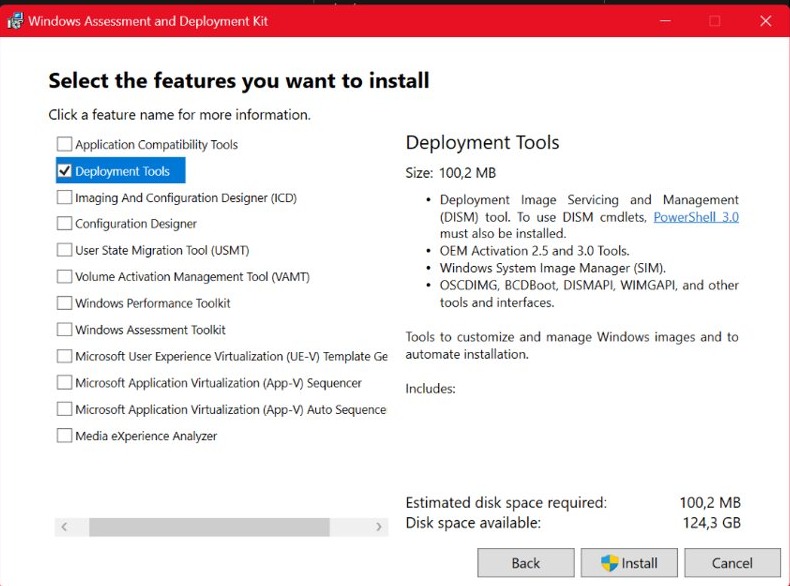
Install the ADK with Deployment Tools selected, create a C:\Backups folder, insert the disc, and start Deployment and Imaging Tools Environment as an administrator. Replace D: with your disc's drive letter.
oscdimg -j1 -h -m -lENCARTA D:\ C:\Backups\Encarta.iso-j1 writes Joliet and ISO 9660 file names, -h includes hidden files, -m lifts the default 74-minute CD size limit for DVD editions, and -l sets the volume label (no spaces). D:\ is the disc and the last path is the new ISO.
You should see: Encarta.iso appears in C:\Backups. Right-click it and select Mount to confirm the disc files open.
Repeat the command for each disc in a multi-disc set, with a different file name each time. Some discs use copy protection, and an image of such a disc may not install.
Good modern alternatives to Encarta and Encarta Kids
| Alternative | Best for | What it offers |
|---|---|---|
| Wikipedia | Encarta-style research for teens and adults | A free online encyclopedia with more than seven million English articles, written by volunteers and linked to sources |
| Simple English Wikipedia | Encarta Kids readers and English learners | Articles written with Basic English words and shorter sentences, for children and adults learning English |
| PBS KIDS | Younger children who liked Encarta Kids games | Games, videos and apps for children |
| Google Earth | The Encarta world atlas and globe | Satellite imagery, historical imagery back to 1984, and Street View |
Alternative resources for offline encyclopedia reading
Encarta worked without an internet connection. Wikipedia offers free copies of all its content for personal and offline use, and offline readers open those copies on a PC.
| Resource | What it does | Status |
|---|---|---|
| Wikipedia database copies | Free downloads of Wikipedia's content for offline use and backups | Offered by Wikipedia |
| Kiwix | Reads Wikipedia offline from ZIM files | Free and open source; the largest offline distribution of Wikipedia |
| XOWA | Opens all of Wikipedia offline | Not in active development |
Microsoft Encarta download FAQ
How do I download Microsoft Encarta?
You can't download Microsoft Encarta from Microsoft, because Microsoft discontinued it and offers no edition. Install it from your original disc, or mount an ISO you made from that disc and run setup.exe as administrator.
What is Microsoft Encarta?
Microsoft Encarta was a multimedia encyclopedia for Windows PCs, sold on CD-ROM and DVD. Premium editions added a dictionary, thesaurus, interactive world atlas and, from the 2005 edition, Encarta Kids for children aged seven and up.
Is Microsoft Encarta free?
No. Encarta was paid software, and discontinuing it did not make it free. Copies offered as a free full version are not Microsoft distributions. Free modern alternatives include Wikipedia and Simple English Wikipedia.
Can I download Encarta for Windows 10?
No. The answer is the same as on Windows 11: there is no official download. Install Encarta from your own disc or ISO, and use compatibility mode for Windows XP or Vista if setup refuses to start.
Is there an Encarta download for Android?
No. Microsoft offers no Encarta app for Android, and Encarta was sold as PC software on disc. On an Android phone, use Wikipedia or Simple English Wikipedia in a browser instead.
Does Encarta work on Windows 11?
Encarta can work on Windows 11. Editions built for Windows XP and Vista are the best candidates, with compatibility mode if setup stops, while editions with a 16-bit setup program won't run, because 64-bit Windows does not support 16-bit programs. Run those in a 32-bit Windows virtual machine.
How do I get Encarta Kids?
Encarta Kids came inside Encarta Premium editions, starting with Encarta Reference Library Premium 2005. Install a Premium edition that lists Encarta Kids on its box, then search Start for Encarta Kids or open it from the main Encarta program.
Can I install Encarta on a laptop with no DVD drive?
Yes. Connect a USB DVD drive and install from the disc, or make an ISO of the disc on a PC with a drive. Copy the ISO to the laptop, right-click it, select Mount, and run setup.