The official Obsidian download installs a free Markdown note-taking app on Windows 11, Windows 10, macOS and Linux. Obsidian 1.13.7 is the current public release, and every desktop build comes from obsidian.md.
Windows and Mac each get one Universal installer. Linux gets an AppImage, a Deb package and a Snap, and free iPhone, iPad and Android apps open the same vault of notes.
Below you will find which file to take, how to install and update it, what Sync and Publish cost, how to sync without paying, and how to remove Obsidian without losing a single note.
Which Obsidian download do you need?
Match your device to a row. Every desktop link opens the official download page, where the button for your platform starts the file.
| Your device | Download | What you get |
|---|---|---|
| Windows 11 or Windows 10 PC | Windows – Universal | Setup .exe |
| Any Mac, Apple silicon or Intel | Mac – Universal | .dmg disk image |
| 64-bit Linux (Ubuntu, Debian, Fedora and others) | Linux – AppImage, Deb or Snap | Portable AppImage or package |
| Linux on an ARM64 board or laptop | AppImage (AArch64, ARM64) | ARM64 AppImage |
| iPhone or iPad on iOS 15.6 or later | App Store | Free app, 39.6 MB |
| Android phone or tablet | Google Play | Free app, or the APK from the download page |
A Flatpak also exists for Linux, but Obsidian lists it as community maintained. Take the AppImage, Deb or Snap for a build Obsidian publishes itself.
Download Obsidian from the official page
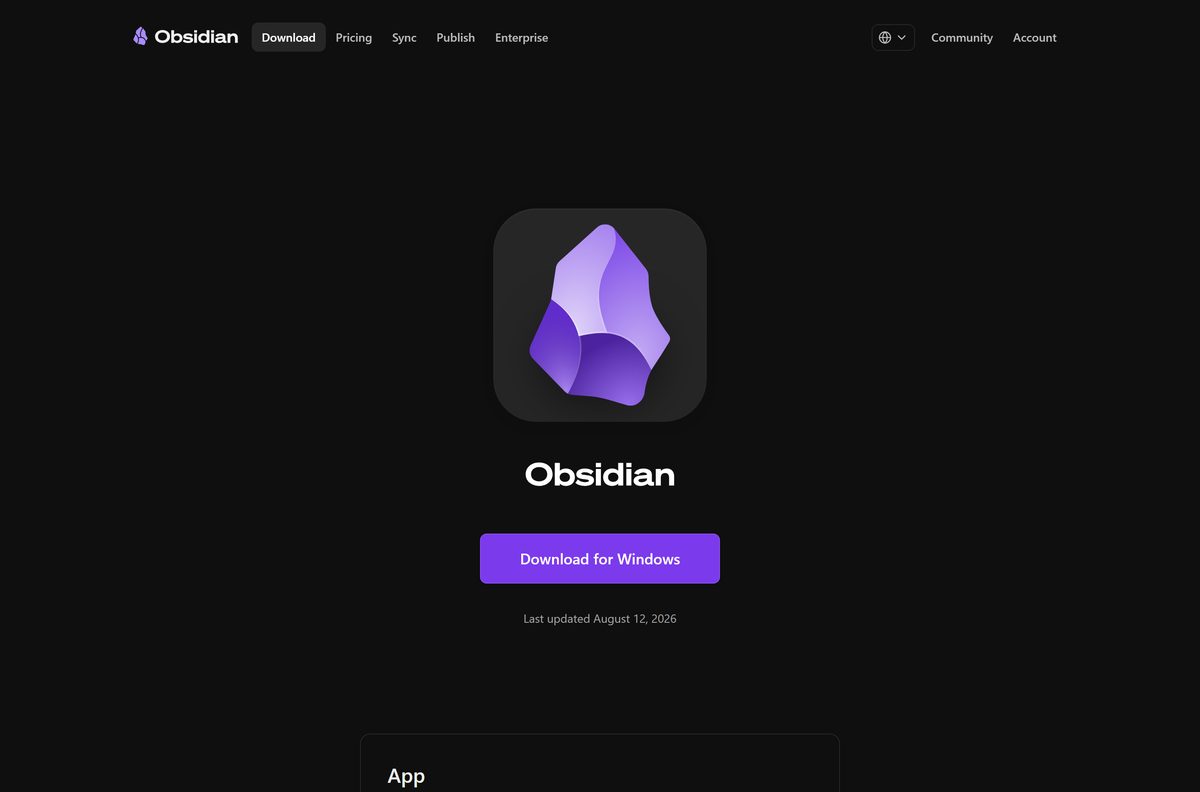
Dynalist Inc. publishes Obsidian and hosts every build link on obsidian.md. The page shows a Download for Windows button on a PC and lists the other platforms underneath.
- Obsidian download page — Windows, Mac and Linux installers plus the Android APK
- Obsidian for iPhone and iPad — free on the App Store
- Obsidian for Android — free on Google Play, 5M+ downloads
- Obsidian Web Clipper — free extension for Chrome, Safari, Firefox, Edge, Brave, Arc, Orion and Vivaldi
- Download and install Obsidian — official install guide for every platform
Sites that repackage Obsidian add nothing. The installer is free here and updates itself afterwards.
How to install Obsidian on Windows 11 and 10
The Windows installer needs no account and no licence key. Setup takes about a minute.
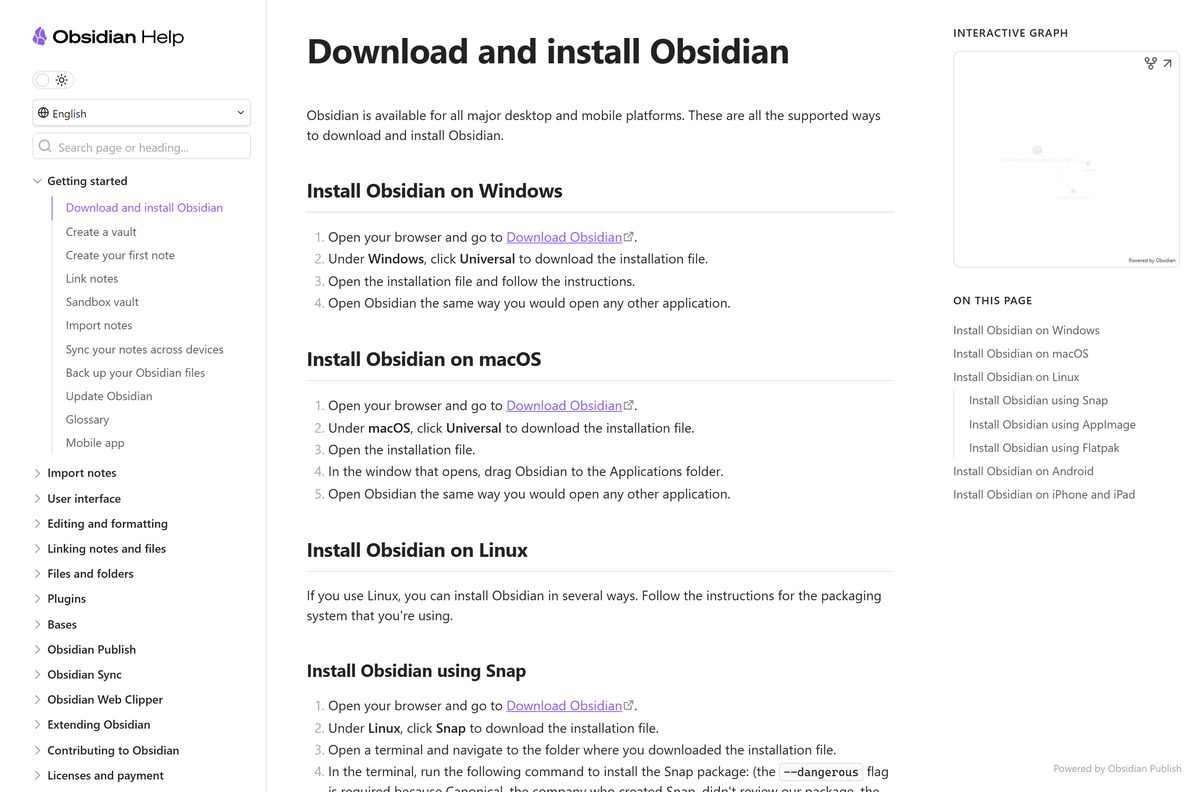
- Open obsidian.md/download in your browser.
- Under Windows, select Universal to save the installer.
- Open the downloaded .exe file from your Downloads folder.
- Follow the prompts until Obsidian opens.
- Next to Create new vault, select Create.
- Type a Vault name, select Browse to pick the folder for your notes, then select Create.
Your vault is an ordinary folder of .md files. Put it somewhere you already back up, such as your Documents folder.
Run Obsidian on Linux from the AppImage
The AppImage runs without installing a package, which suits any 64-bit distribution. ARM64 machines take the AArch64 AppImage instead.
- Under Linux on obsidian.md/download, select AppImage.
- Open a terminal in the folder that holds the file.
- Make it executable with chmod u+x Obsidian-
.AppImage . - Start it with ./Obsidian-
.AppImage –no-sandbox . - Prefer a package? Select Snap and run snap install obsidian_
_ .snap –dangerous –classic , or install the Deb file on Debian and Ubuntu.
Which Obsidian download do you need for your Mac?
There is one Mac download. The Universal DMG runs natively on Apple silicon and Intel Macs.
| Your Mac | Take this | Source |
|---|---|---|
| MacBook, iMac or Mac mini with an M-series chip | Mac – Universal DMG | obsidian.md/download |
| Older Mac with an Intel processor | The same Universal DMG | obsidian.md/download |
| Mac plus an iPhone or iPad | The DMG, plus the free iOS app on the same iCloud vault | App Store |
Open the DMG and drag Obsidian to the Applications folder. Start it from Launchpad or Spotlight, then eject the disk image.
Is Obsidian free?
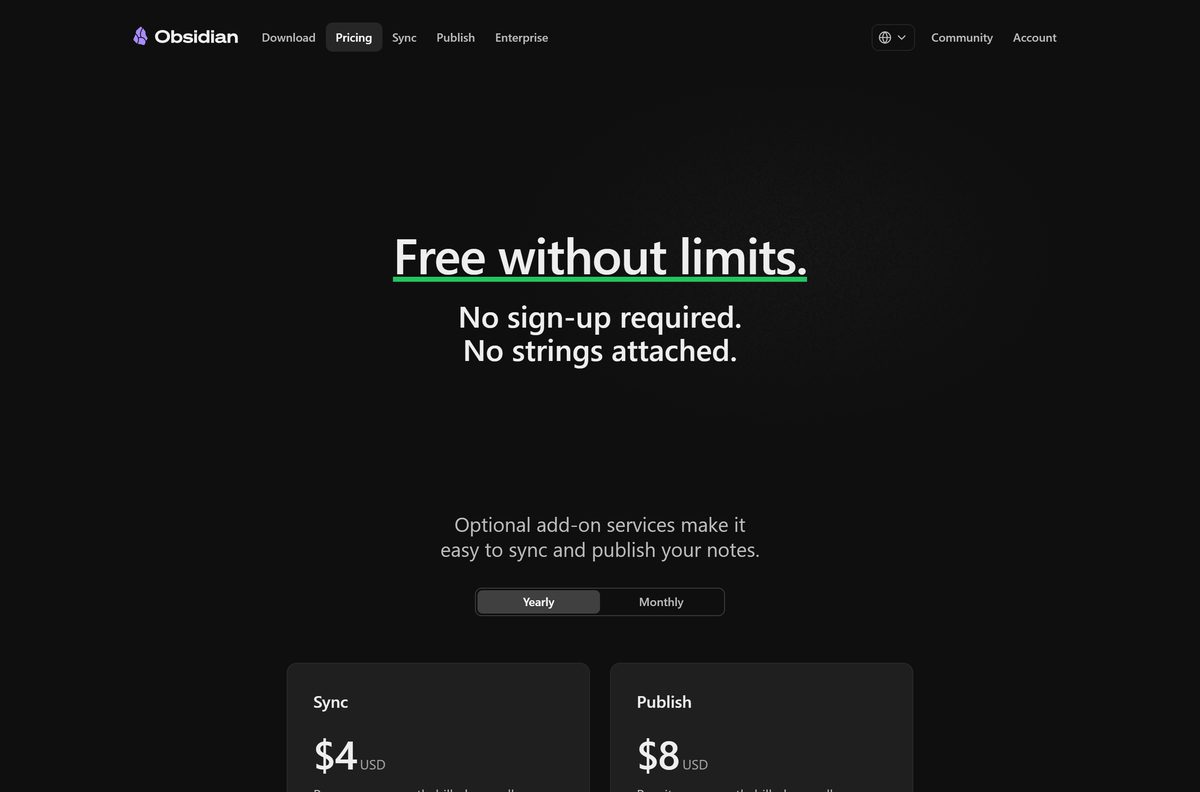
Yes. Obsidian calls itself free without limits: no sign-up, no feature cap and no trial clock. That covers work use too, because a commercial license is optional.
The paid parts are add-on services. Sync costs $4 a month billed yearly or $5 month to month. Publish costs $8 a month per site billed yearly or $10 month to month.
A Catalyst license is a $25 one-time payment for early beta access and community badges. A commercial license costs $50 per user per year and exists to support development.
Install the free app and pay only if you want first-party sync or a published website. Every editing feature, plugin and theme works without paying. Sync and Publish are hosted services, not unlocks for the app.
Should you install the Obsidian public release or a Catalyst beta?
The download page always carries the public release, currently 1.13.7 from August 12, 2026. Versions 1.14.0 to 1.14.2 went to Catalyst license holders first in September 2026.
Catalyst builds add features early, such as color highlights and opening files from outside your vault. They also carry the bugs that a beta exists to find.
Install the public release from obsidian.md/download. The public build is the one Obsidian ships to everyone, and it needs no Catalyst license. Beta builds exist to catch bugs before that.
The Obsidian changelog marks each release as public or Catalyst.
How to check your Obsidian version and update it
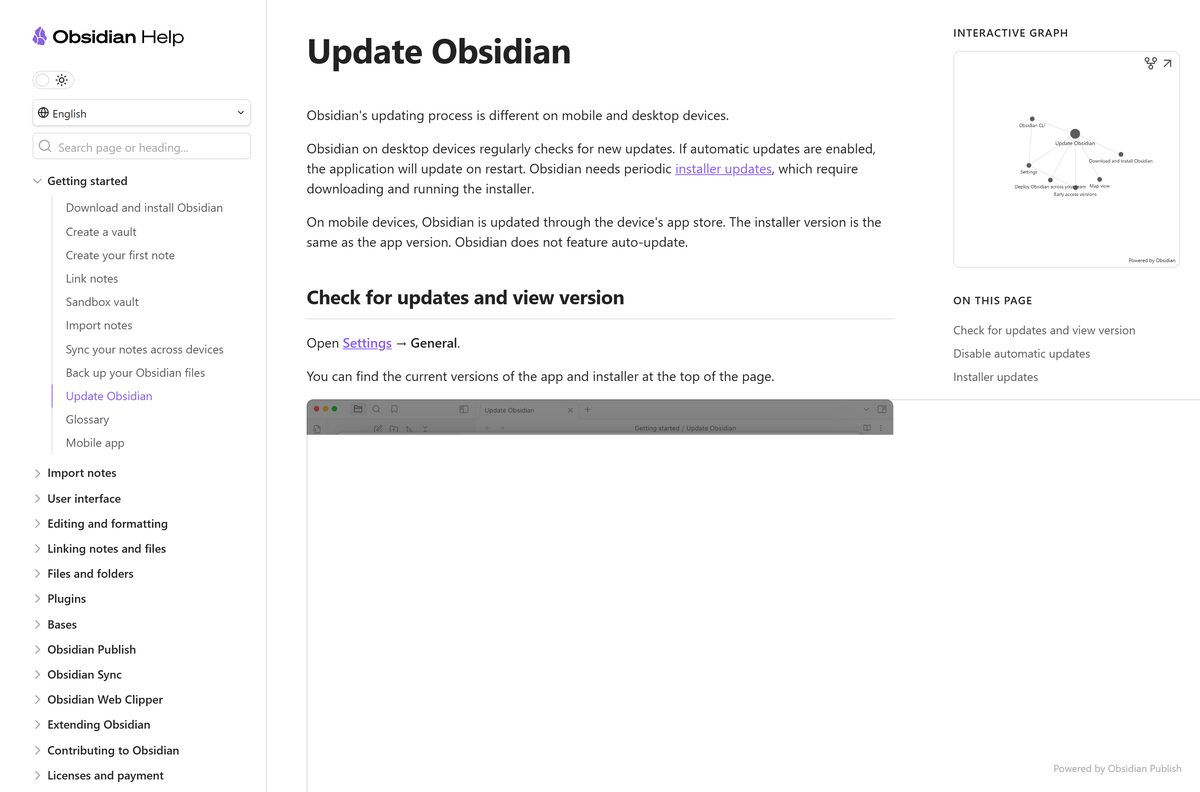
Obsidian has two version numbers. The app updates itself on restart, while the installer changes only when you run a new one.
- Open Obsidian and go to Settings > General.
- Read the app and installer versions at the top of the page.
- Select Check for updates. Obsidian offers to relaunch if an update is waiting.
- To update the installer, close Obsidian and download the current installer from obsidian.md/download.
- Run it over your existing copy. Your vaults and settings stay in place.
To stop automatic updates, turn off Automatic updates in Settings > General.
Check the Obsidian system requirements and specifications
| Specification | Detail |
|---|---|
| Software | Obsidian (desktop and mobile) |
| Developer | Dynalist Inc. |
| Latest version | 1.13.7 (public desktop release) |
| Price | Free; optional commercial license, Sync, Publish and Catalyst |
| Windows | Windows 11 and Windows 10, Universal installer |
| macOS | Universal DMG for Apple silicon and Intel |
| Linux | AppImage, Deb and Snap; ARM64 AppImage |
| iPhone and iPad | iOS and iPadOS 15.6 or later |
| Android | Google Play or APK |
| Note format | Markdown plain-text files in a local vault folder |
| Settings folder (Windows) | %APPDATA%\Obsidian\ |
| Account required | No |
| Official download source | obsidian.md/download |
| Last verified | 2026-09-25 |
Choose how to sync Obsidian between devices
Obsidian itself stores notes only on the device. Pick one sync route per vault, never two at once, or you risk conflicts and corrupted files.
| Sync route | Works best for | Watch out for |
|---|---|---|
| Obsidian Sync | Any mix of Windows, Mac, Linux, iPhone and Android | Paid, from $4 a month billed yearly |
| iCloud Drive | iPhone, iPad and Mac | Can duplicate or corrupt files on Windows |
| OneDrive | Windows and Mac | Limited on Android, no official iOS support |
| Google Drive | Desktop computers | Not officially supported on iOS |
| Syncthing | Device-to-device sync without cloud storage | Both devices must run it |
| Git | Version history for technical users | Not automatic; you push and pull by hand |
Whichever cloud you use, mark the vault folder Available offline so the service never offloads notes Obsidian needs.
Fix Obsidian sync and update problems on Windows 11 or 10
Most Obsidian problems come from the folder the vault lives in, not from the app.
Notes appear twice or get corrupted in an iCloud vault on Windows
iCloud Drive on Windows is known to duplicate or corrupt vault files.
- Close Obsidian on the PC.
- Move the vault out of the iCloud Drive folder.
- Switch that vault to Obsidian Sync, OneDrive or Syncthing.
Notes are missing or fail to open in a cloud-synced vault
The cloud service offloaded files to save disk space.
- Open File Explorer and find the vault folder.
- Right-click it and select Always keep on this device.
- Restart Obsidian once the files finish downloading.
Edits conflict or overwrite each other between devices
Two sync services are running on the same vault.
- Pick one sync service for the vault.
- Turn the other one off for that folder.
- Check recent notes on each device before editing again.
Settings warns that the installer is out of date
App updates install on restart, but installer updates do not.
- Close Obsidian.
- Download the current installer from obsidian.md/download.
- Run it and reopen your vault.
How to uninstall Obsidian without losing your notes
Uninstalling removes the app, not your vault. Your notes stay in the folder you chose.
- On Windows, open Settings > Apps > Installed apps.
- Select the three dots next to Obsidian, then Uninstall.
- To clear global settings too, delete %APPDATA%\Obsidian\ .
- On a Mac, quit Obsidian and drag it from Applications to the Trash.
- To clear Mac settings, delete ~/Library/Application Support/obsidian .
- Delete the vault folder only if you want the notes gone as well.
Each vault keeps its settings in a hidden .obsidian folder inside it. Copy that folder to carry your setup to another vault.
Choose the right Obsidian app for each device
Every official Obsidian app opens the same Markdown vault. Pick by device and by what you need to capture.
| App | Runs on | Price | Get it |
|---|---|---|---|
| Obsidian desktop | Windows, macOS, Linux | Free | obsidian.md/download |
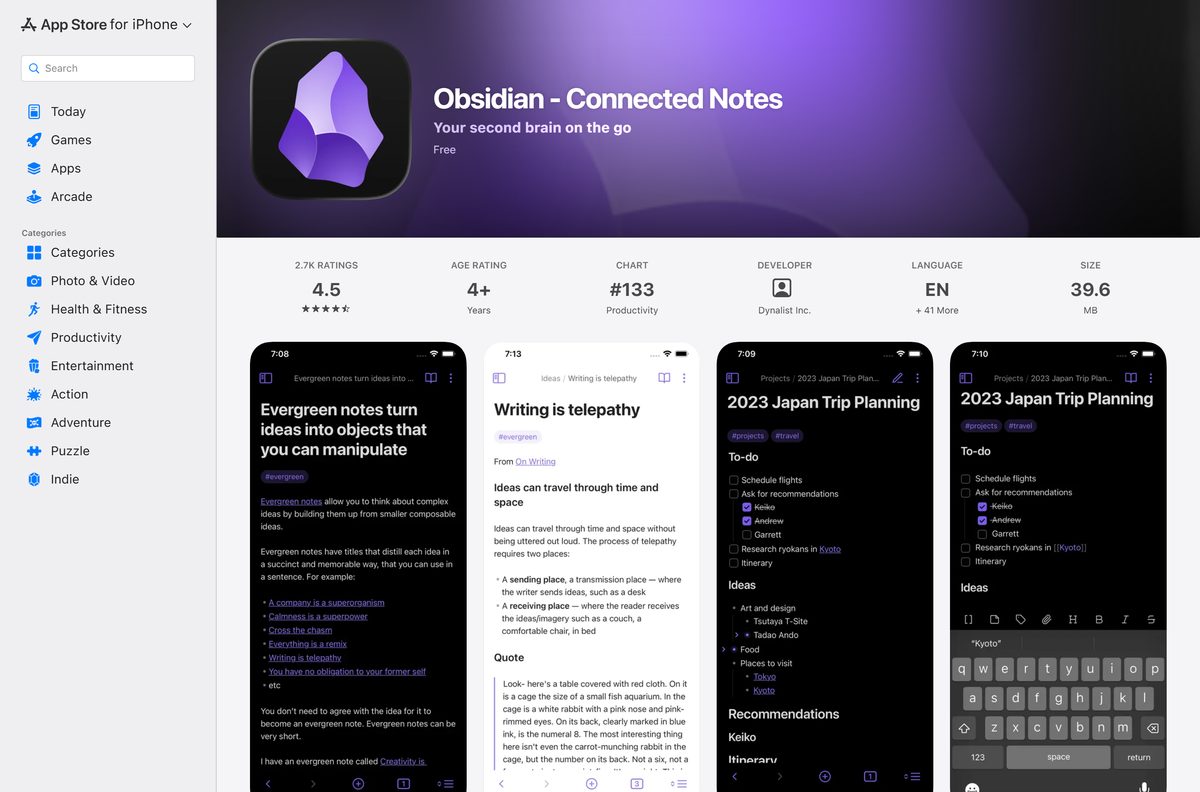
| Obsidian – Connected Notes | iPhone, iPad, Apple Vision | Free | App Store |
| Obsidian for Android | Android phones and tablets | Free | Google Play |
| Obsidian Web Clipper | Chrome, Safari, Firefox, Edge and four more | Free | obsidian.md/clipper |
| Obsidian Publish | Your notes as a public website | $8 a month per site, billed yearly | Pricing |
The Web Clipper saves web pages as Markdown notes straight into your vault, using templates for articles, recipes and papers.
Frequently asked questions
Is Obsidian free to download?
Yes. Obsidian is free on Windows, Mac, Linux, iPhone and Android, with no account and no feature limits. You pay only for optional add-ons such as Sync, Publish, a Catalyst license or a commercial license.
Do I need a commercial license to use Obsidian at work?
No. A commercial license is not required for work use. Obsidian encourages organizations to buy one at $50 per user per year to support development, and there is no minimum seat count.
Where is the official Obsidian download page?
The official page is obsidian.md/download. It carries the Windows and Mac installers, the Linux AppImage, Deb and Snap builds, the Android APK, and links to the App Store, Google Play and the Web Clipper.
Does Obsidian work on Windows 11?
Yes. Download the Universal installer under Windows on obsidian.md/download, open it and follow the prompts. The same installer covers Windows 10, and the app then updates itself on restart.
Can I use Obsidian offline?
Yes. Obsidian stores notes as Markdown files in a vault folder on your own drive. You can open, edit and search them without an internet connection, and no account is needed.
Is Obsidian Sync required to use Obsidian on several devices?
No. Sync is the paid first-party option at $4 a month billed yearly. You can also use iCloud between iPhone and Mac, OneDrive, Syncthing or Git, but never two sync services on one vault.
Is there an Obsidian app for iPhone and Android?
Yes. Obsidian – Connected Notes is free on the App Store for iPhone and iPad running iOS 15.6 or later. The Android app is free on Google Play, and an APK sits on the download page.
What is the difference between the Obsidian app and installer version?
The app version updates automatically when you restart Obsidian. The installer version changes only when you download and run a new installer. Both appear at the top of Settings > General.
Will uninstalling Obsidian delete my notes?
No. Your notes live in the vault folder you chose, as plain Markdown files. Removing the app leaves that folder alone. Delete the vault folder yourself only if you want the notes gone.