The Hamachi download for Windows 11, Windows 10 and Mac comes straight from vpn.net, the official LogMeIn Hamachi site run by GoTo. Install the client, create or join a network, and computers in different places behave as if they share one LAN.
Hamachi is free for up to 5 computers per network, with as many free networks as you like. Paid plans start at $49 a year for larger networks or for running the client unattended as a Windows service.
Below: the right file for each machine, install steps for every platform, free versus paid networks, fixes and clean removal.
Which Hamachi download do you need?
Match your machine to a row. Mac builds split by macOS version.
| Your machine | What you download | Size | Link |
|---|---|---|---|
| Windows 11 or Windows 10 PC, including ARM64 Windows 11 | hamachi.msi, version 2.4.0.23 | 13.9 MB | Hamachi for Windows |
| Mac on macOS 10.13 High Sierra to macOS 15.3.2 | Mac build 2.3.0.48, via the Mac (High Sierra to Sequoia 15.3.2) link | Not listed | vpn.net download links |
| Mac on macOS 15.4 Sequoia or later | Mac build 2.3.0.49, via the Mac (Sequoia 15.4 and above) link | Not listed | vpn.net download links |
| Ubuntu or another Debian-based distro, 64-bit | logmein-hamachi_2.1.0.203-1_amd64.deb | 1.5 MB | 64-bit DEB package |
| CentOS or another RPM-based distro, 64-bit | logmein-hamachi-2.1.0.203-1.x86_64.rpm | 1.5 MB | 64-bit RPM package |
| 32-bit Linux, an ARM board, or any other distro | The 32-bit, ARM (beta) or tarball build from the Linux page | About 1.5 MB | Hamachi for Linux page |
Download LogMeIn Hamachi from the official vpn.net site
The Download now button on vpn.net detects your system and starts the right installer. The links below go to the same files.
- vpn.net, the official Hamachi site — Download now button plus separate Windows, Linux and both Mac links
- Hamachi for Windows (hamachi.msi) — 13.9 MB · Windows 7 through Windows 11, including ARM64
- Hamachi for Linux (DEB, RPM and tarball packages) — about 1.5 MB each · 32-bit, 64-bit and ARM beta builds
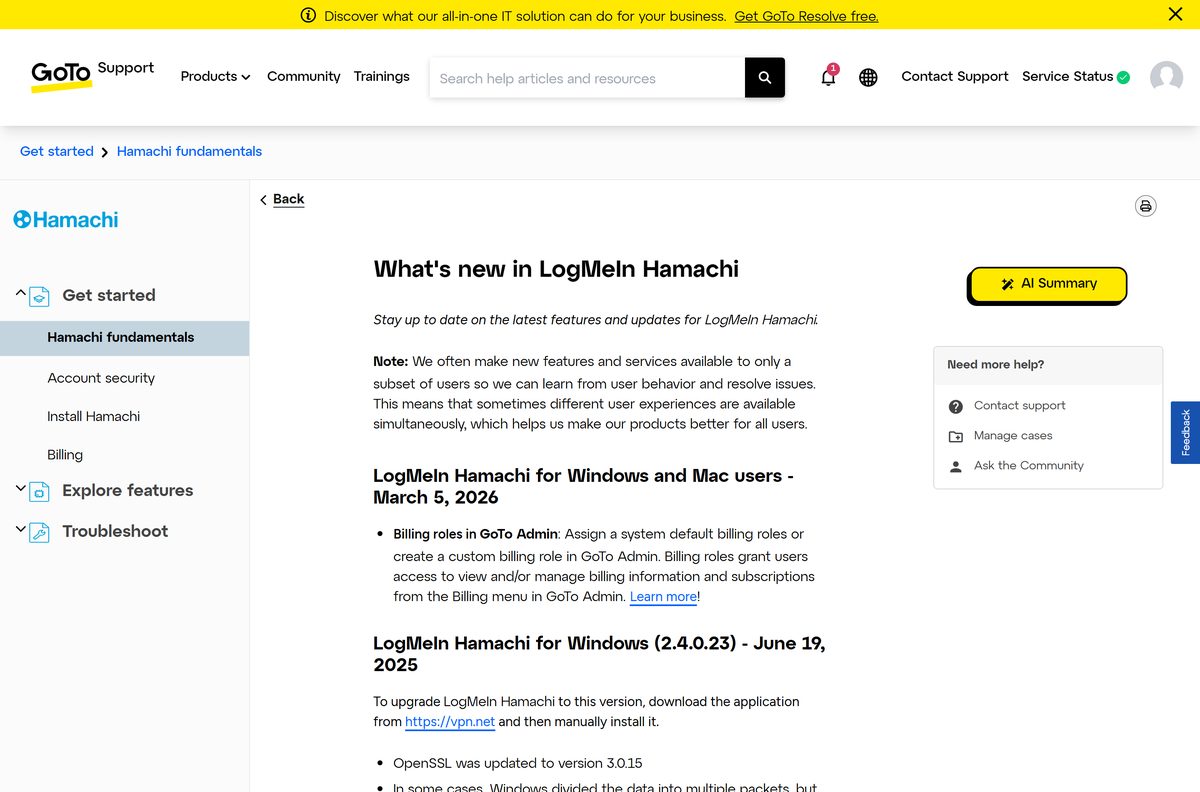
- Hamachi release notes — current build numbers for each platform
The Windows MSI is a full installer, not a web stub, so a copy on a USB stick installs offline. Signing in and joining networks still need an internet connection.

Check the Hamachi system requirements before you install
Windows XP, Vista, Server 2003 and Server 2008 stopped at build 2.2.0.633.
| Field | Value |
|---|---|
| Software | LogMeIn Hamachi |
| Developer | GoTo Group, Inc. (LogMeIn) |
| Latest version | Windows 2.4.0.23, Mac 2.3.0.49 (2.3.0.48 on macOS 15.3.2 and earlier), Linux 2.1.0.203 |
| License | Free for up to 5 computers per network; paid plans from $49 a year |
| Windows | Windows 7, 8 and 8.1 (desktop UI), Windows 10 and Windows 11 |
| Windows Server | 2008 R2, 2012, 2016 and 2019 |
| Mac | macOS 10.13 High Sierra or newer, Intel and Apple M1, M2, M3 and M4 |
| Linux | Ubuntu 16.04 LTS or newer LTS, CentOS 7.2 or newer |
| Architecture | Windows PCs including ARM64 Windows 11; Mac Intel and Apple silicon; Linux 32-bit, 64-bit and ARM beta |
| Not supported | Windows RT |
| Download size | 13.9 MB for Windows; about 1.5 MB per Linux package |
| Offline installer | Yes, the Windows MSI and Linux packages are full installers |
| Official source | vpn.net |
| Last verified | 2026-09-24 |
Gateway networks do not run on macOS, on Windows Small Business Server editions or on any system deployed in Microsoft Azure.
How to install Hamachi on Windows 11 and Windows 10
These steps install the client in client-only mode, with no LogMeIn account. That is the quickest route for a small free network.
- Open vpn.net in your browser.
- Select Download now, or select the Windows link under it.
- Open hamachi.msi from your Downloads folder.
- Follow the on-screen instructions until setup finishes. The client starts automatically.
- Select Network > Create a new network, type a network ID and a password, then select Create.
- On each other computer, select Network > Join an existing network, type the same ID and password, then select Join.
To manage networks from LogMeIn.com instead, sign in first, switch to Network mode, select Add Client, then Install LogMeIn Hamachi on this computer.
Which Hamachi download do you need for your Mac?
Open the Apple menu and select About This Mac to read your macOS version. Then pick the matching link on vpn.net.
| Your Mac says | Link to choose on vpn.net | Build | Link |
|---|---|---|---|
| macOS 10.13 High Sierra up to macOS 15.3.2 Sequoia | Mac (from macOS High Sierra 10.13 to macOS Sequoia 15.3.2) | 2.3.0.48 | vpn.net |
| macOS 15.4 Sequoia or any later release | Mac (from macOS Sequoia 15.4 and above) | 2.3.0.49 | vpn.net |
Both current Mac builds run natively on Apple M1 and later chips on macOS 12 Monterey or newer, as well as on Intel Macs.
Install Hamachi on Ubuntu or CentOS from the terminal
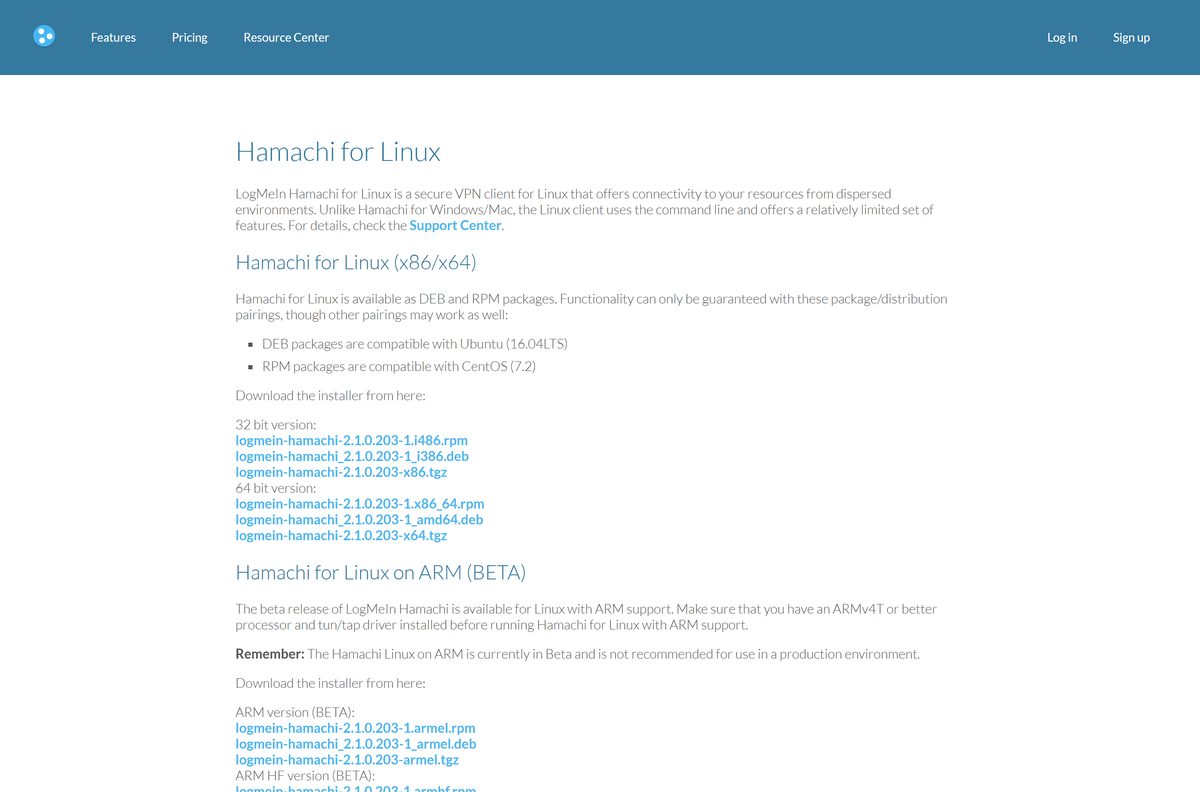
The Linux client runs from the command line with fewer features, in client-only mode by default.
- On Ubuntu, download the package: wget https://www.vpn.net/installers/logmein-hamachi_2.1.0.203-1_amd64.deb
- Install it: sudo dpkg -i logmein-hamachi_2.1.0.203-1_amd64.deb
- On CentOS, download the RPM from the Linux page and install it with sudo yum install logmein-hamachi-2.1.0.203-1.x86_64.rpm
- Sign in to the Hamachi service: sudo hamachi login
- Optionally attach the client to your account: sudo hamachi attach [email protected]
- Create a network with sudo hamachi create
, or join one with sudo hamachi join .
ARM and ARM HF builds are beta and need an ARMv4T or better processor with the tun/tap driver installed.
Is Hamachi free, and when do you need a paid plan?
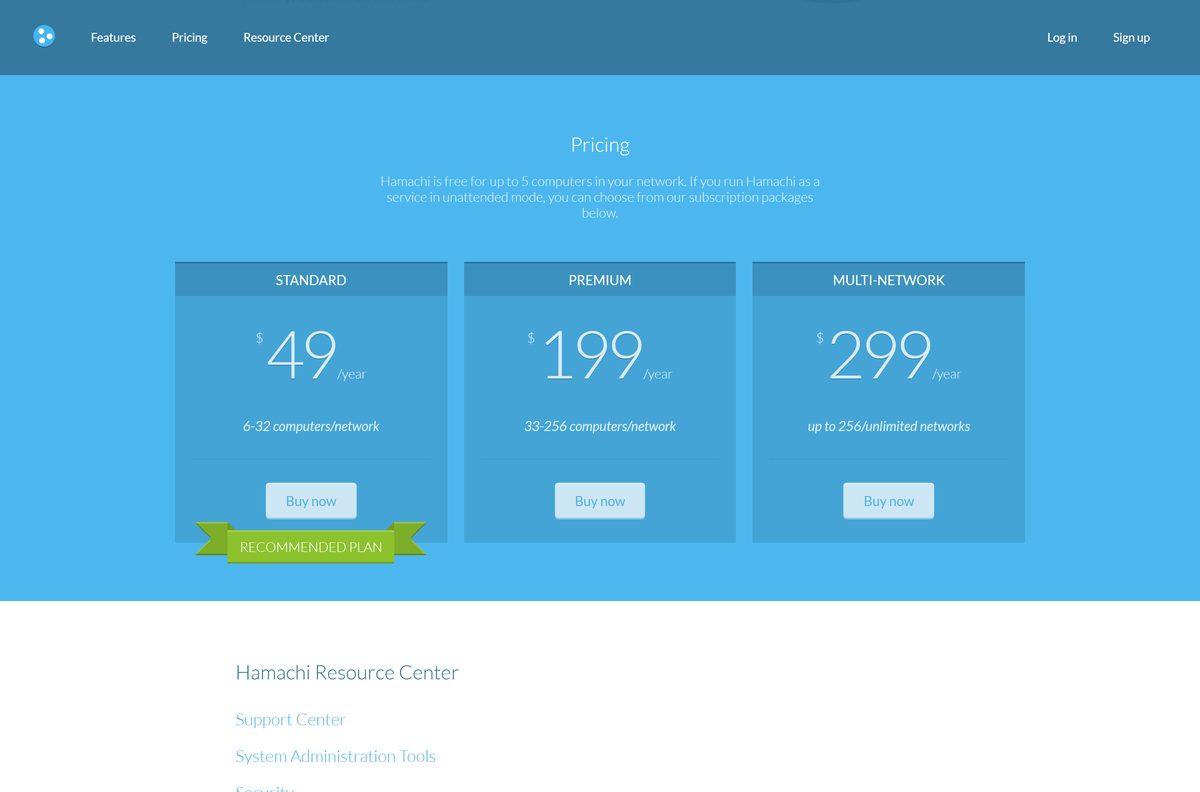
The limit is per network, not per account. Five computers fit in each free network, and you can create as many free networks as you need.
Yes. Hamachi is free for networks of up to 5 computers, with no limit on the number of free networks. Standard costs $49 a year and lifts one network to 32 members. Premium costs $199 a year for one network of up to 256 members. Multi-Network costs $299 a year and covers unlimited networks of up to 256 members each. A paid plan is also what lets Hamachi run in the background as a Windows service, so an unattended PC stays online without anyone signing in to Windows.
A lapsed paid network accepts no new members, and only five randomly chosen members stay active.
Choose an unmanaged or managed Hamachi network
Hamachi runs in two modes. A client-only client has no account and manages its own networks. An attached client belongs to a LogMeIn account and its networks are managed on LogMeIn.com.
Use client-only mode for a quick free network between friends. Attach clients to a LogMeIn account when you manage machines for other people or pay for a larger network. Client-only mode needs no sign-up, and the client itself can set network access, delete networks and evict members. An attached client lets you add, restore and deploy clients from the web without visiting each computer, and a LogMeIn ID is required for that. Only account holders can buy subscriptions, so a network larger than 5 computers means signing up.
How to check your Hamachi version and update it
Windows builds do not update themselves in place. You install the new MSI over the old one.
- On Windows, open Settings > Apps > Installed apps and find LogMeIn Hamachi to read the version number.
- Compare it with the newest entry on the release notes page.
- If yours is older, download hamachi.msi again from vpn.net.
- Run the installer and follow the on-screen instructions.
- On a Mac, the built-in updater handles builds 2.1.0.827 and later. After moving to macOS 15.4 or later, install the 2.3.0.49 build from vpn.net.
Windows 2.4.0.23 fixed dropped packets on ARM64 Windows PCs, so ARM laptops gain the most from updating.
Fix Hamachi not installing or not connecting on Windows 11 and 10
Match the error on your screen to one fix below.
The client says ‘Failed to connect to engine’
The Hamachi Tunneling Engine service stopped.
- Press Windows key + R, type services.msc and press Enter.
- Right-click Hamachi Tunneling Engine and select Restart.
- If the service still will not start, open regedit and go to HKEY_LOCAL_MACHINE\SOFTWARE\WOW6432Node\LogMeIn Hamachi on Windows 11.
- Add a String Value named EngineConfigDir , set its value to a folder on your PC, then restart the service.
- If your antivirus blocks Hamachi-2-ui.exe, add an exclusion for it.
The client cannot reach the Hamachi network adapter, and Network Connections is empty
The Windows network configuration in the registry is corrupted.
- Back up the registry, press Windows key + R, type regedit and press Enter.
- Go to HKEY_LOCAL_MACHINE\SYSTEM\CurrentControlSet\Control\Network and delete the Config key.
- Reinstall Hamachi from vpn.net.
- Open Device Manager, remove your network adapter, then select Action > Scan for hardware changes.
The client shows ‘Setup has failed’ on first start
A leftover Hamachi 1.x profile, or third-party software such as nVidia NIC drivers or Norton managing the network stack.
- Remove every Hamachi file, folder and registry entry, restart the PC and reinstall.
- Configure the nVidia or Norton software so it leaves the Hamachi adapter alone.
A blue warning icon sits next to the network name
The network is at or over its member limit.
- Select the blue warning icon, or the member count beside the network name.
- Remove a member you no longer need, or select Upgrade options to buy a larger plan.
How to uninstall Hamachi from Windows, Mac and Linux
Keep your settings if you plan to reinstall, because your networks come back automatically.
- On Windows 10 or 11, search the Start menu for Add or remove programs.
- Select Hamachi, then Uninstall.
- Tick Remove all user settings and LogMeIn Hamachi configurations only if you want your networks and memberships gone, then select Uninstall.
- On a Mac, open Applications in Finder and double-click HamachiUninstaller.
- Choose whether to remove settings, select Yes, enter your Mac password and select OK.
- On Linux after a tarball install, run /opt/logmein-hamachi/uninstall.sh . After a DEB or RPM install, remove the logmein-hamachi package in your package manager.
- On Linux, delete /var/lib/logmein-hamachi to clear saved networks and settings.
Choose between Hamachi and the other LogMeIn tools
Hamachi joins computers into one virtual network. Remote control of another computer’s screen is a different product.
| What you need | Use this | Cost |
|---|---|---|
| Play LAN games or share files between up to 5 computers | LogMeIn Hamachi, client-only mode | Free |
| A virtual network of 6 to 256 computers | LogMeIn Hamachi Standard or Premium | $49 or $199 a year |
| Many separate networks of up to 256 computers each | LogMeIn Hamachi Multi-Network | $299 a year |
| Control another computer’s screen, files and printers remotely | LogMeIn Pro (download guide) | From $30 a month, billed annually |
Frequently asked questions
Is Hamachi free to download?
Yes. The download is free, and Hamachi itself is free for networks of up to 5 computers, with unlimited free networks. Standard at $49 a year, Premium at $199 a year and Multi-Network at $299 a year cover larger networks and unattended Windows service mode.
What is the official Hamachi download page?
The official page is vpn.net, run by GoTo, the company behind LogMeIn. Its Download now button picks the right installer, and separate links serve Windows, Linux and the two Mac builds. Linux packages sit on vpn.net/linux.
Does Hamachi work on Windows 11?
Yes. Hamachi is tested on Windows 11 and supports ARM64 Windows 11 PCs. It also runs on Windows 10, 8.1, 8 and 7, and on Windows Server 2008 R2 through 2019. Windows RT is not supported.
What is the Hamachi download size?
The Windows installer, hamachi.msi, is 13.9 MB. The Linux DEB, RPM and tarball packages are each about 1.5 MB. The vpn.net page does not show a size for the Mac installer before you download it.
Is there an offline installer for Hamachi?
Yes. The Windows MSI is a full installer rather than a web stub, and the Linux packages are complete too. Copy the file to another PC and install it there. Signing in, creating networks and joining them still need an internet connection.
How do you download Hamachi for Mac?
Open vpn.net and pick the Mac link that matches your macOS version. Macs on High Sierra 10.13 up to Sequoia 15.3.2 get build 2.3.0.48, and macOS 15.4 or later gets 2.3.0.49. Both run on Intel and Apple silicon.
Does Hamachi have a 64-bit or ARM64 build?
Yes. The Windows client supports ARM64 Windows 11 PCs since build 2.3.0.106, and the Mac builds run on Apple M1 and later chips. Linux has 32-bit and 64-bit packages, plus ARM and ARM HF builds marked beta.
Is the Hamachi download safe?
It is safe when it comes from vpn.net or secure.logmein.com, both run by GoTo. Traffic between members uses AES 256-bit encryption. Current Windows and Mac builds ship OpenSSL 3.0.15, and the Mac client supports TLS 1.3.
What is the latest Hamachi version?
Windows 2.4.0.23, released June 19, 2025. The Mac client is 2.3.0.49 for macOS 15.4 and later, or 2.3.0.48 for macOS 10.13 to 15.3.2, both released May 26, 2025. Linux remains at 2.1.0.203 from August 2019.
Why will Hamachi not install on Windows 11?
The usual cause is a ‘Setup has failed’ error from a leftover Hamachi 1.x profile, or from nVidia NIC drivers or Norton managing the network stack. Remove all Hamachi files and registry entries, restart, reinstall, and configure that software to leave the adapter alone.