The MSI Center download for Windows 11 and Windows 10 is free, and MSI publishes it on the Microsoft Store. It is the control app for MSI motherboards, gaming laptops, graphics cards, desktops and gaming gear.
MSI Center gathers MSI’s own tools in one window. Gaming Mode and Smart Priority sit on its Feature Sets page, next to Smart Image Finder and MSI Companion.
Below: which MSI hardware it supports, Store and winget install steps, requirements, update checks, fixes for failed installs and clean removal.
Which MSI Center download do you need?
One package covers every supported MSI product. What matters is whether your hardware is on the supported list, because the features appear per device.
| Your MSI hardware | Supported models | Link |
|---|---|---|
| Intel motherboard | X299 and 300, 400, 500, 600 series chipsets or newer | MSI Center on the Microsoft Store |
| AMD motherboard | X399, TRX40, A320 and 400, 500 series chipsets or newer | MSI Center on the Microsoft Store |
| Gaming Series laptop | Intel 11th gen CPU or newer, or AMD Ryzen 5000 CPU or newer | MSI Center on the Microsoft Store |
| Desktop or All-in-One | MEG, MPG, Creator, PRO and Modern AIO models with Intel 11th gen CPU or newer | MSI Center on the Microsoft Store |
| Graphics card | GeForce RTX 40, 30, 20, GTX 16 and Radeon RX 6000, 5000 models listed below | MSI Center on the Microsoft Store |
| Keyboard, mouse or headset | VIGOR GK60, GK50, GK30; CLUTCH GM50 to GM08; IMMERSE GH61, GH50 | MSI Center on the Microsoft Store |
A PC built on another brand’s motherboard gains nothing from MSI Center unless it holds a supported MSI graphics card or MSI peripheral.
Download MSI Center from the official Microsoft Store listing
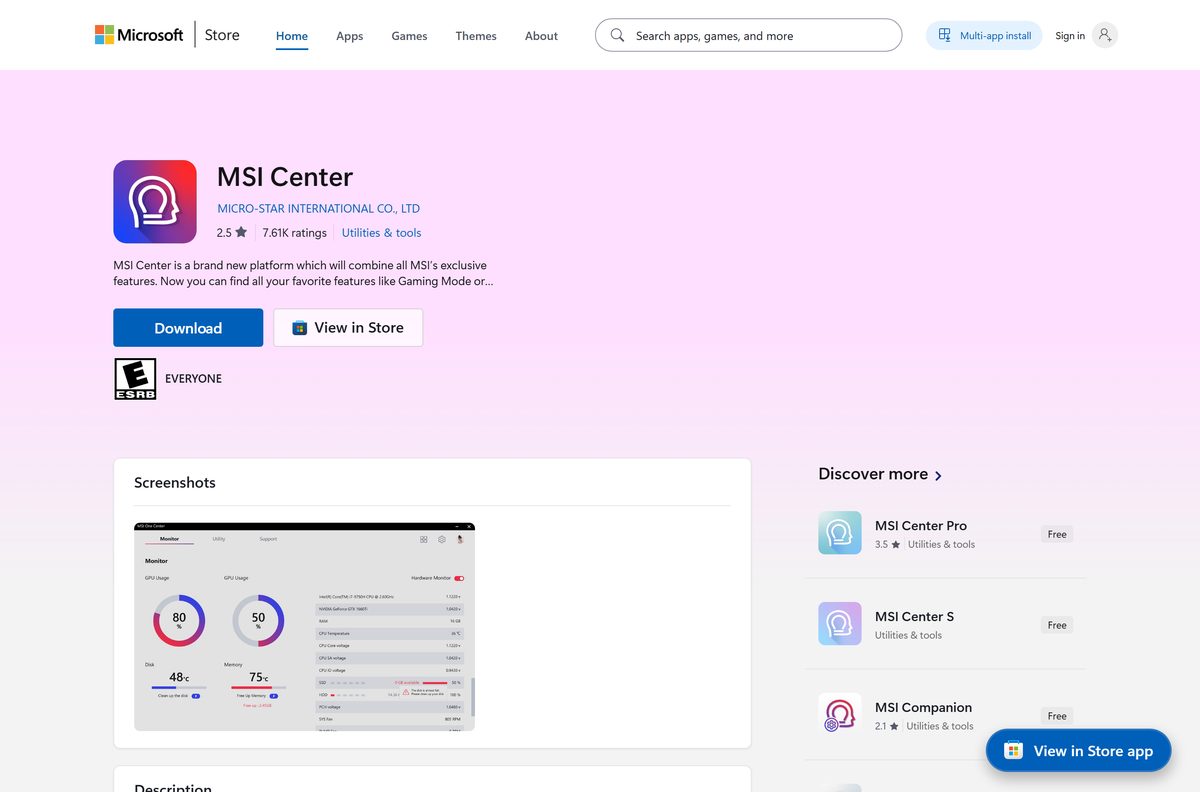
The listing is published by MICRO-STAR INTERNATIONAL CO., LTD and sits in the Utilities & tools category.
- MSI Center on the Microsoft Store — 553.0 MB download · free, x64, product ID 9NVMNJCR03XV
- winget install command reference — Microsoft’s documentation for installing Store apps by ID from a terminal
The package unpacks to about 725 MB on disk, so clear at least 1.3 GB on the system drive before you start.
Any site offering an MSI Center .exe with a crack, a key or a paid unlock is not MSI. The app has no paid tier to unlock.
How to install MSI Center on Windows 11 and Windows 10
The Store handles the download, the install and later updates in one flow.
- Select Start and open Microsoft Store.
- Sign in with your Microsoft account if the Store asks.
- Type MSI Center in the search box and press Enter.
- Open the result published by MICRO-STAR INTERNATIONAL CO., LTD, or go straight to the MSI Center listing.
- Select Get and wait for the 553 MB package to download and install.
- Select Open, or launch MSI Center from the Start menu.
- Open the Feature Sets page to reach tools such as Gaming Mode and Smart Priority.
The Store listing names the supported MSI hardware. Features built for other devices do not apply to your PC.
Install MSI Center with winget from a terminal
winget pulls the same Microsoft Store package. Store apps use their product ID as the package ID, so no exact-match flag is needed.
- Right-click Start and open Terminal on Windows 11, or Windows PowerShell on Windows 10.
- Run winget show –id 9NVMNJCR03XV –source msstore to confirm the listing reads MSI Center and Pricing: Free.
- Run winget install –id 9NVMNJCR03XV –source msstore .
- Accept the Microsoft Store source agreement if winget asks, then wait for the download to finish.
- Launch MSI Center from the Start menu.
Add –accept-package-agreements –accept-source-agreements to skip the prompts when you script the install across several MSI machines.
Is MSI Center free?
The Store lists no price, no add-ons and no trial for this app.
Yes. MSI Center is free, with no paid edition and no in-app purchases. The Microsoft Store lists it at $0.00 in the US and shows no add-ons. MSI builds it for owners of MSI hardware, so the cost sits in the motherboard, laptop, graphics card or peripheral. A download page asking for payment, a licence key or a ‘Pro’ unlock is not an MSI product.
The listing carries a 3.4 out of 5 average from more than 32,000 ratings, and no price tag at all.
Can you download MSI Center for Mac?
The Store package targets Windows desktop only. There is no macOS listing, so the answer depends on what the Mac is being used for.
| Your situation | What to do | Link |
|---|---|---|
| You own a Mac and an MSI peripheral | Plug the keyboard, mouse or headset into a Windows 10 or 11 PC to change its settings | MSI Center on the Microsoft Store |
| You run Windows on a separate MSI PC | Install MSI Center on that PC; it controls only the hardware inside or attached to it | MSI Center on the Microsoft Store |
| You want to adjust MSI gear from macOS | No MSI Center build exists for macOS | Platform list in the Store listing |
The package is x64 only, so it also has no build for Windows on ARM devices.
Check the MSI Center system requirements before you install
The operating system floor is low. The hardware list is the real requirement.
| Field | Value |
|---|---|
| Software | MSI Center |
| Developer | Micro-Star International Co., Ltd. (MSI) |
| Latest version | 2.0.71.0 (Microsoft Store package, updated 12 August 2026) |
| License | Free |
| Windows | Windows 10 build 17134 (version 1803) or later, and Windows 11 |
| Mac | Not available |
| Architecture | x64 only; no ARM64 or 32-bit package |
| Download size | 553.0 MB |
| Installed size | Up to 725.0 MB |
| Input | Keyboard and mouse |
| Hardware | A supported MSI motherboard, laptop, desktop, graphics card or peripheral |
| Offline installer | No; installs through the Microsoft Store or winget |
| Official source | Microsoft Store, published by MSI |
| Store rating | 3.4 out of 5 from 32,673 ratings |
| Last verified | 2026-09-24 |
Check your version with Win + R, then winver . A build number below 17134 needs Windows Update before the Store offers the app.
Which MSI graphics cards can MSI Center control?
Graphics support goes by series and by MSI model line. A card outside these lines does not show GPU features.
| GPU series | Supported MSI model lines |
|---|---|
| GeForce RTX 40 Series | SUPRIM LIQUID, SUPRIM, GAMING TRIO, GAMING, VENTUS 3X, VENTUS 2X, VENTUS 2X XS, AERO ITX |
| GeForce RTX 30 Series | SUPRIM, GAMING TRIO, GAMING, VENTUS 3X, VENTUS 2X, VENTUS 2X XS, AERO ITX |
| GeForce RTX 20 Series | LIGHTNING, GAMING TRIO, GAMING, SEA HAWK, SEA HAWK EK, DUKE |
| GeForce GTX 16 Series | GAMING |
| Radeon RX 6000 Series | GAMING TRIO, GAMING, MECH |
| Radeon RX 5000 Series | GAMING, EVOKE |
Read the model line from the box or the card’s shroud. The retail name, such as GAMING TRIO, decides support rather than the GPU chip alone.
How to check your MSI Center version and update it
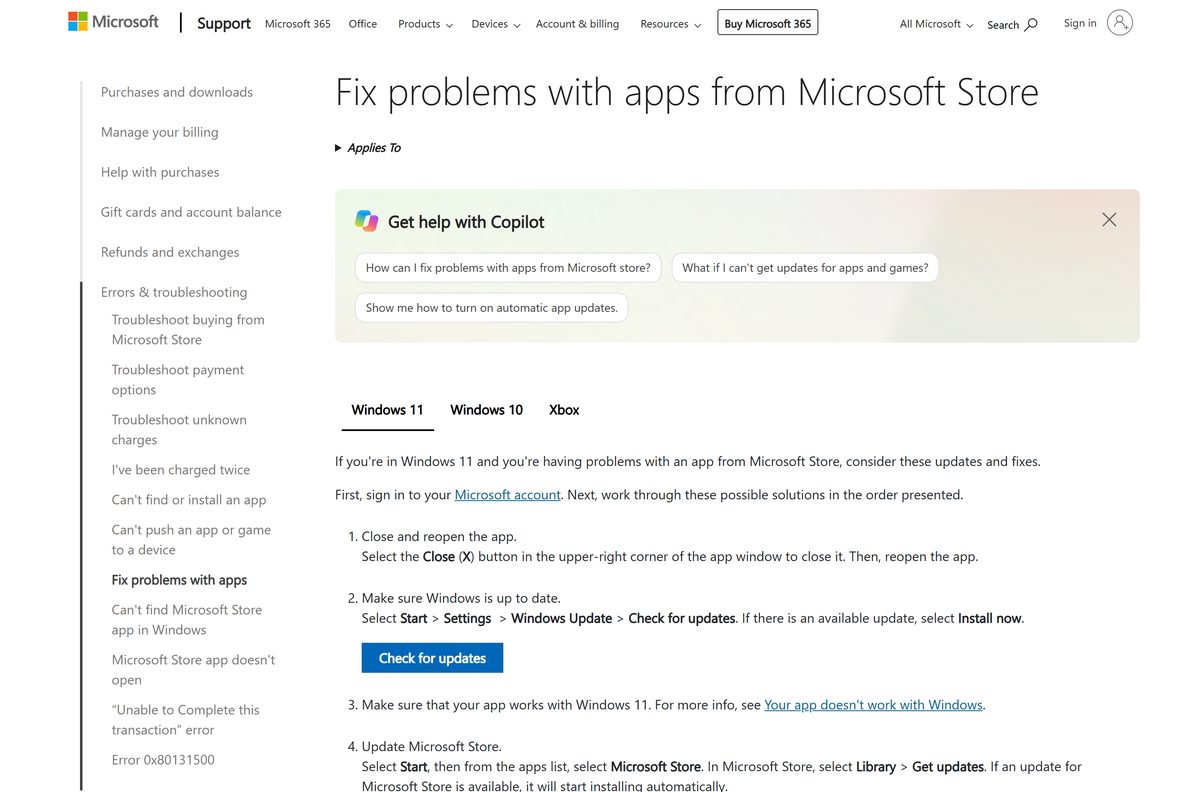
Store apps update through the Store, so there is no separate updater to download.
- Select Start and open Microsoft Store.
- Select Library.
- Select Get updates to fetch every pending app update.
- Wait for MSI Center to finish updating, then relaunch it.
- To update from a terminal instead, run winget upgrade –id 9NVMNJCR03XV –source msstore .
Run winget list –id 9NVMNJCR03XV to see the installed version next to the one on offer.
Fix MSI Center not installing on Windows 11 or 10
Each symptom below has one cause and one fix. Work through the one that matches.
The Store download stalls or fails with an error
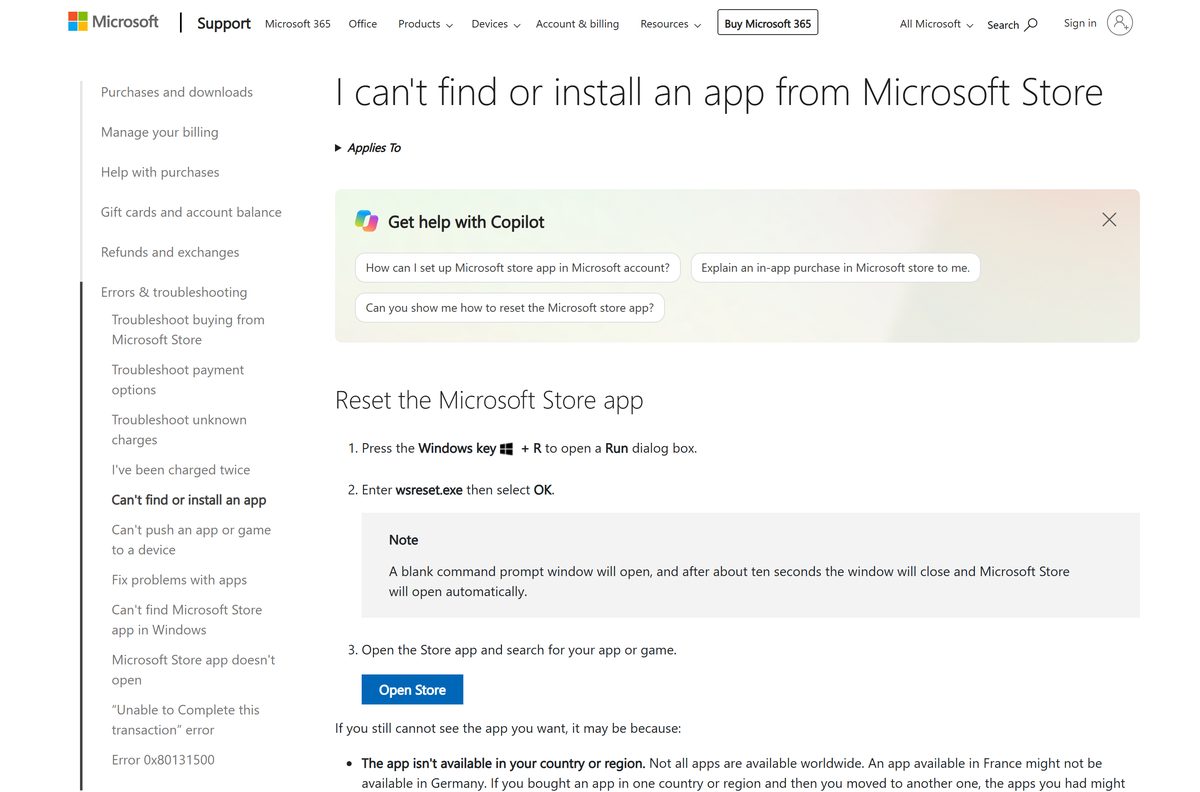
A damaged Microsoft Store cache.
- Press Windows key + R.
- Type wsreset.exe and select OK.
- Wait about ten seconds for the blank window to close and the Store to reopen.
- Search for MSI Center and select Get again.
The Get button is missing or the Store says the app does not work on this device
The PC is ARM-based or runs a Windows build older than 17134.
- Press Windows key + R, type winver and select OK.
- Confirm the build is 17134 or higher; otherwise run Windows Update.
- Open Settings > System > About and check that System type reads x64-based processor.
The install finishes but no feature sets appear
The hardware is outside MSI Center’s supported list.
- Compare your motherboard chipset, laptop CPU generation or graphics card model line with the tables above.
- Install any pending Windows updates and restart the PC.
- Reopen MSI Center and check the Feature Sets page again.
The Store asks you to sign in or shows no install progress
The Microsoft account is signed out, or Windows updates are waiting for a restart.
- Sign in to the Store with your Microsoft account.
- Restart the PC to finish any pending Windows updates.
- Open the MSI Center listing and select Get again.
How to uninstall MSI Center
Remove the app through Settings like any other Store app.
- Select Start > Settings.
- Go to Apps > Installed apps.
- Find MSI Center in the list.
- Select More (the three dots) next to it.
- Select Uninstall and confirm.
- To remove it from a terminal instead, run winget uninstall –id 9NVMNJCR03XV .
To reinstall later, open the same Store listing and select Get again.
Frequently asked questions
Short answers to the questions that come up most around the MSI Center download.
Is MSI Center free to download?
Yes. MSI Center is free on the Microsoft Store, with no add-ons, no in-app purchases and no trial period. MSI makes it for owners of its motherboards, laptops, desktops, graphics cards and gaming peripherals.
What is the official MSI Center download page?
The official route is the Microsoft Store listing at apps.microsoft.com/detail/9nvmnjcr03xv, published by MICRO-STAR INTERNATIONAL CO., LTD. The same package installs from a terminal with winget using product ID 9NVMNJCR03XV and the msstore source.
Does MSI Center work on Windows 11?
Yes. The package runs on Windows 11 and on Windows 10 build 17134 (version 1803) or later. It needs a 64-bit x64 PC and a supported MSI motherboard, laptop, desktop, graphics card or peripheral to show its features.
What is the MSI Center download size?
The Microsoft Store package is a 553.0 MB download and takes up to 725.0 MB once installed. Clear at least 1.3 GB on the system drive so the download and the unpacked app both fit.
Is there an offline installer for MSI Center?
The Microsoft Store listing offers no standalone offline installer. The package installs through the Store app or through winget, and both need an internet connection for the 553.0 MB download.
Can I download MSI Center for Mac?
No. MSI Center is published for Windows desktop only, with no macOS build. To change settings on a supported MSI keyboard, mouse or headset, connect it to a Windows 10 or Windows 11 PC and install MSI Center there.
Does MSI Center have a 64-bit or ARM64 build?
MSI Center ships as a single x64 package. There is no ARM64 build and no 32-bit build, so Windows on ARM laptops and 32-bit Windows installations cannot install it from the Store.
Is MSI Center safe to download?
Yes, when it comes from the Microsoft Store listing published by MICRO-STAR INTERNATIONAL CO., LTD. The package is delivered through Microsoft’s own Store. Avoid portal copies and anything sold with a key, because the real app is free.
What is the latest MSI Center version?
The latest Microsoft Store package is version 2.0.71.0, updated on 12 August 2026. The Store installs updates automatically, and Library then Get updates in the Store app fetches a pending update straight away.
Why won’t MSI Center install?
The usual causes are a damaged Store cache, an ARM-based PC, or a Windows 10 build older than 17134. Run wsreset.exe to reset the Store, check the build with winver, and install Windows updates before trying again.
Which MSI laptops support MSI Center?
MSI Gaming Series laptops with an Intel 11th gen processor or newer, or an AMD Ryzen 5000 processor or newer, are on the supported list. Older gaming laptops and non-gaming lines are not listed for MSI Center.