Sign in to the Fly Delta app with your SkyMiles account and it checks you in automatically 24 hours before departure, then pins your mobile boarding pass to the bottom of the screen.
This guide covers manual check-in in the app and on delta.com, check-in deadlines, bags, passport scanning for international trips, and who still has to check in at the airport.
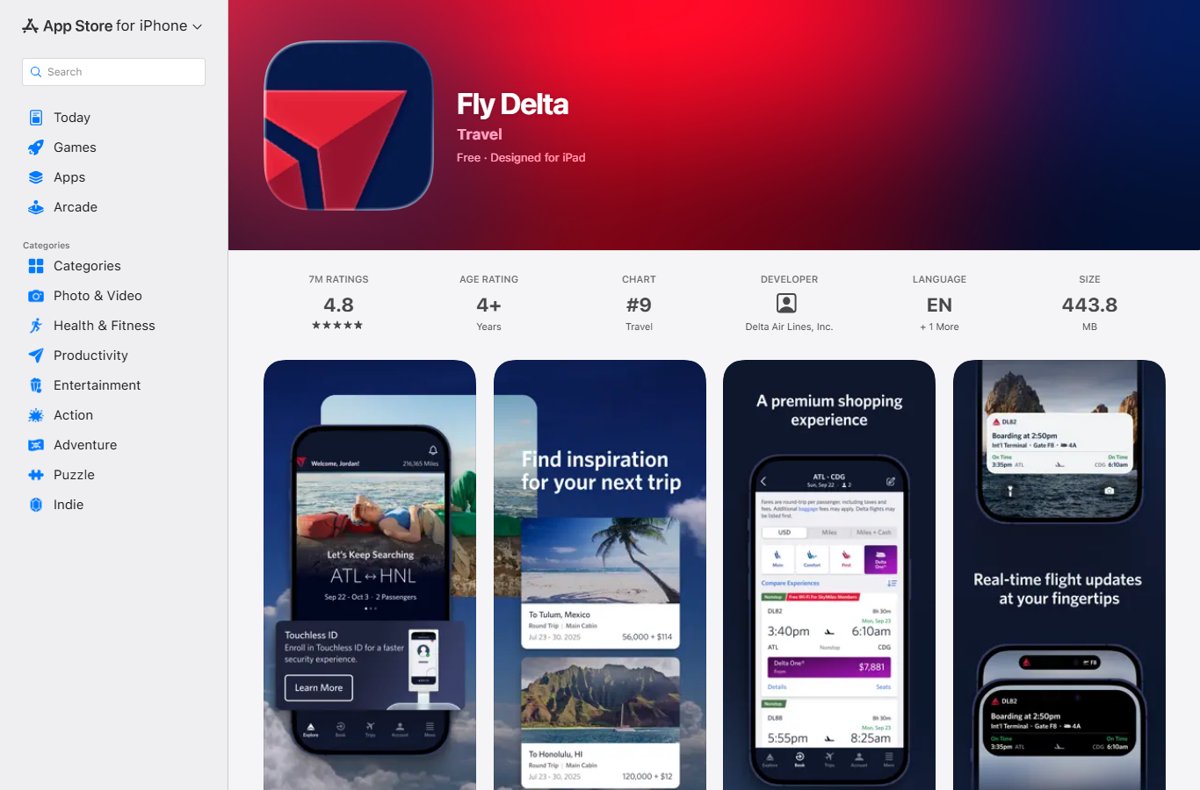
The fastest way to check in with the Fly Delta app
Delta states that when you are logged in to the Fly Delta app, you are checked in automatically 24 hours before your flight. You only need the trip to be linked to your SkyMiles account.
- Install the Fly Delta app from the Apple App Store or Google Play.
- Sign in with your SkyMiles number and password.
- Make sure the booking appears under My Trips; add it with your confirmation number if it does not.
- Wait until 24 hours before departure, when the app checks you in automatically.
- Open the Today tab and find your boarding pass pinned to the bottom of the screen.
The boarding pass stays available offline, so a dead airport Wi-Fi connection will not lock you out of it.
Why Use the Delta Airlines App for Online Check-In?
Delta offers five check-in routes. The app is the only one that checks you in without any action on your part, and it carries the boarding pass, bag tracking and seat changes in one place.
| Your situation | Use this | Why |
|---|---|---|
| You have a smartphone and a SkyMiles login | Fly Delta app | Automatic check-in at 24 hours, offline mobile boarding pass, bag tracking, seat changes and upgrades |
| No app, or booked without a SkyMiles account | delta.com (Check In in the header, or My Trips) | Finds the trip by confirmation number, SkyMiles number or credit card number; print the pass or send it to your phone |
| You want a paper pass or need to add bags at the airport | Airport kiosk | Check in with your SkyMiles, confirmation or eTicket number, print a pass, add bags and change seats |
| You travel with a pet, an unaccompanied minor or need document help | Delta check-in desk or Special Service Counter | An agent handles what online check-in cannot |
| You arrive by car with bags at a U.S. airport | Curbside check-in | Available at most U.S. airports at passenger drop-off, with no fee |
Prerequisites for Online Check-In
| What you need | Details |
|---|---|
| Delta account | A SkyMiles login is needed for automatic check-in in the app. Without one, check in on delta.com with your confirmation number. |
| The Fly Delta app | Free on iOS (Apple App Store) and Android (Google Play). |
| A flight reservation | A confirmation number, SkyMiles number or the credit card used to book lets delta.com find the trip. |
| A device with internet access | Needed for check-in itself. The boarding pass can then be opened offline. |
| Valid travel documents | Government-issued photo ID for every flight. A passport for all international travel, with the name matching the boarding pass. |
| Timing | Check-in opens 24 hours before departure. |
Step-by-Step Guide to Check In Using the Delta Airlines App
Use these steps if automatic check-in did not run, or if you want to review seats and bags before the pass is issued.
- Install and open the Fly Delta app, then sign in to your SkyMiles account.
- Open Today or My Trips and select your upcoming flight.
- Start check-in for the flight; the option appears once you are inside the 24-hour window.
- Confirm each traveler's details, and scan your passport when the app asks on an international trip.
- View, change or upgrade your seat if you want a different one.
- Select the number of bags you plan to check and pay for them, or redeem miles at most domestic airports.
- Review the itinerary and finish check-in.
- Open the mobile boarding pass pinned to the bottom of the screen.
If you still need a physical copy, print the boarding pass from delta.com or at an airport kiosk.
How to check in on delta.com instead
The website does the same job without the app. Delta's online check-in session expires after only 10 minutes of inactivity, so keep the details at hand before you start.
- Go to delta.com in a single browser window.
- Select Check In in the page header, or open My Trips.
- Find your trip with your confirmation number, SkyMiles number or credit card number.
- Confirm travelers, seats and the number of bags to check.
- Pay any bag fees, or redeem miles where offered.
- Choose to print your boarding pass or get an eBoarding Pass on your mobile device.
Delta check-in deadlines you cannot miss
Checking in online does not remove the airport cut-offs. These are Delta's standard times; a few airports set longer ones, so check your departure airport on delta.com.
| Deadline | U.S. domestic flights | International flights |
|---|---|---|
| Suggested airport arrival | At least 2 hours before departure | At least 3 hours before departure |
| Checked in with bags | At least 45 minutes before departure | At least 1 hour before departure |
| Checked in without bags | At least 30 minutes before departure | At least 1 hour before departure |
| At the gate, ready to board | 15 minutes before departure | 45 minutes before departure |
| Airports with longer times | Some, such as St. Thomas (STT) | Some require 75-120 minutes, such as Accra (ACC) and Athens (ATH) |
Additional Features of the Delta Airlines App for Check-In
These are the check-in related tools Delta lists for the app. Anything beyond this list is not documented on delta.com, so do not count on it.
| Feature | What it does at check-in |
|---|---|
| Automatic check-in | Checks you in 24 hours before the flight when you are logged in |
| Today | Puts the boarding pass, flight status and gate information for your travel day in one place |
| Mobile boarding pass | Pinned to the bottom of the screen and viewable offline |
| Seats and upgrades | View, change or upgrade your seat, reserve Preferred Seats, and track or pay for upgrades with SkyMiles |
| Bags | Pay for checked bags, then follow them with Track My Bags and real-time alerts, including baggage carousel information |
| Passport scan and document verification | Scan your passport during check-in and upload entry documents to be digitally verified before the airport |
| Notifications Center | Flight updates and gate change alerts |
Special Considerations and Tips
Online check-in is not the end of the process for every traveler. These cases send you to an agent or add a step.
| Situation | What Delta requires |
|---|---|
| International travel | A passport valid for your trip, a visa where your destination requires one, and a name that matches the boarding pass. Scan the passport in the app to verify it before you fly. |
| Traveling with a pet in the cabin | Check in with your pet at the Special Service Counter at the airport, where the agent checks the kennel and collects the pet fee. |
| Unaccompanied minor | See a Delta Airport Customer Service Agent on arrival for drop-off and pick-up arrangements. |
| Checked bags | Bags still have to be checked at the airport by the 45-minute domestic or 1-hour international cut-off. |
| Time management | Arrive 2 hours ahead for domestic flights and 3 hours ahead for international flights. |
| Airport backup | If app check-in fails, use a kiosk, a Delta check-in desk or curbside check-in. |
| International departures from the U.S. | Delta takes a photo at the gate for boarding and matches it with your passport photo through U.S. Customs and Border Protection. |
Post Check-In: What Next?
Check-in worked when a boarding pass exists for every traveler on the booking.
- Open the Today tab and confirm the boarding pass is pinned to the bottom of the screen.
- Switch your phone to airplane mode briefly and reopen the pass to confirm it loads offline.
- Check the boarding pass name against your ID or passport.
- Arrive by the suggested time and drop checked bags before the bag cut-off.
- Show your government-issued photo ID and boarding pass at security.
- Watch the Notifications Center for gate changes and be at the gate by the boarding deadline.
Troubleshooting Common Check-In Issues
The app crashes or check-in shows an error
The app session or connection failed partway through.
- Close the Fly Delta app fully and reopen it.
- Check in on delta.com through Check In or My Trips instead.
- Finish within 10 minutes of inactivity, because online check-in sessions expire after that.
- If both fail, check in at an airport kiosk or a Delta check-in desk.
Reservation not found
The trip is not linked to your SkyMiles account, or the lookup details do not match the booking.
- Search for the trip with the confirmation number from your booking email.
- Try the SkyMiles number or the credit card number used to book instead.
- At the airport, enter your SkyMiles, confirmation or eTicket number at a kiosk.
- Ask a Delta check-in desk agent if the kiosk cannot find it.
Check-in is not available yet
Check-in opens 24 hours before departure.
- Compare the current time with your departure time in the departure city's time zone.
- Stay signed in to the app so automatic check-in runs at the 24-hour mark.
- Reopen Today after the window opens.
Unable to select seats or add baggage
Miles for bag fees work only from most domestic airports, and some changes need a kiosk or an agent.
- Pay for the bags instead of redeeming miles if the miles option does not appear.
- Add bags or change seats at an airport kiosk.
- Ask a Delta check-in desk agent for anything the kiosk cannot do.
Documentation errors on an international trip
The passport scan failed, the name does not match, or entry documents are missing.
- Confirm the boarding pass name matches your passport exactly.
- Check the entry requirements for your destination in Delta's Travel Planning Center.
- Rescan the passport or upload the entry documents in the app.
- Arrive at least 3 hours early and have an agent verify documents at the check-in desk.
Final Thoughts
Sign in to the Fly Delta app with your SkyMiles account before the trip and let automatic check-in do the work at the 24-hour mark. It is the only check-in route that needs no action, and it keeps an offline boarding pass, bag tracking and passport verification in one place. Use delta.com or a kiosk only as a fallback, and go to an agent for pets, unaccompanied minors or document problems.
Frequently Asked Questions
Some of these questions come from real searches about online check-in; the Delta-specific ones are drawn from the headings of pages covering this topic.
How does online check-in work?
Online check-in confirms you will take the flight and issues a boarding pass before you reach the airport. On Delta, it opens 24 hours before departure in the Fly Delta app or on delta.com. You then go straight to security, or to bag drop if you check luggage.
Do I need to check in online for a Delta flight?
No. Online check-in is optional, and you can also check in at an airport kiosk, a Delta check-in desk or curbside. You must still be checked in by the deadline: 30 minutes before domestic departure without bags, 45 minutes with bags, and 1 hour for international flights.
Why check in online for a flight?
Checking in online saves the kiosk or counter queue and gives you a mobile boarding pass ahead of time. In the Fly Delta app it also lets you change seats, pay for bags and scan your passport before you leave home.
Does Delta automatically check you in?
Yes, in the Fly Delta app. Delta states that when you are logged in to the app, you are automatically checked in 24 hours before your flight. The booking must be linked to your SkyMiles account for this to work.
How do I check in online on the Delta website?
Select Check In in the delta.com header or open My Trips, then find the trip with your confirmation number, SkyMiles number or credit card number. You can print the boarding pass or send an eBoarding Pass to your phone. The session times out after 10 minutes of inactivity.
What is online check-in?
Online check-in is checking in for a flight through an airline's app or website instead of at the airport. With Delta it is available from 24 hours before departure and ends with a printed or mobile boarding pass.
Can I check in online for an international Delta flight?
Yes. The Fly Delta app lets you scan your passport during check-in and upload entry documents to be digitally verified. You must still be checked in at least 1 hour before departure, and Delta suggests arriving 3 hours early.
Can I check in online with a pet on Delta?
No. Delta asks you to check in with your pet at the Special Service Counter at the airport. The agent confirms the pet and kennel meet the requirements for your trip and collects the pet fee.

![Download & Install ASUS Aura Sync on Windows 10/11 [2024]](https://techdows.com/wp-content/uploads/2026/09/Armoury-Crate-Aura-Sync-effects-tab-with-Rainbow-selected-600x338.jpg)