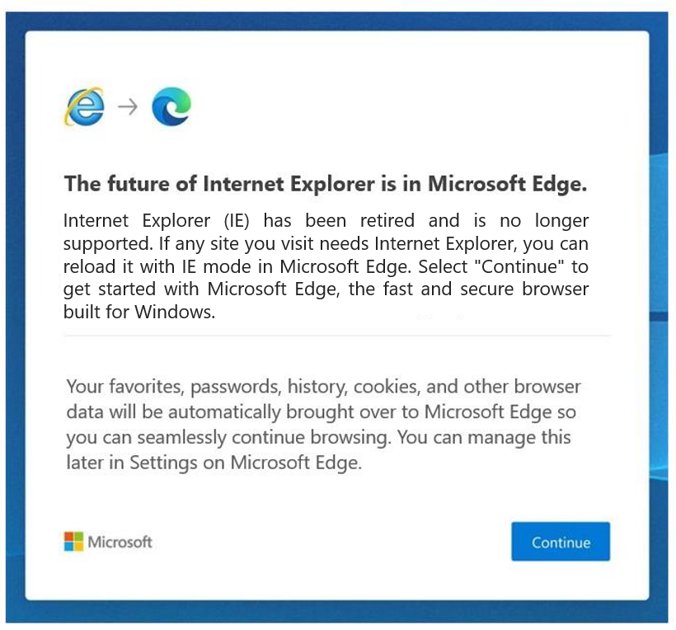
You cannot download and install Internet Explorer 11 on Windows 10 any more: Microsoft retired the desktop app on June 15, 2022, and permanently disabled it on Home, Pro and other Semi-Annual Channel editions through a Microsoft Edge update on February 14, 2023.
What works instead is Internet Explorer mode in Microsoft Edge, which Microsoft supports through at least 2029, and the built-in Internet Explorer 11 feature on Windows 10 LTSC editions, where the desktop app was never retired.
This guide shows which of the two applies to your PC, how to turn each one on, how to confirm it worked, and how to fix the problems people hit most often.
Is Internet Explorer 11 Still Available for Windows 10?
Internet Explorer 11 was never a separate download for Windows 10. It ships as a component of the operating system, so it follows the lifecycle of the Windows edition it is installed on.
Find your edition in the left column and follow the row. Any website offering an "IE11 installer for Windows 10" is not Microsoft, and its file will not bring the retired browser back.
| Your Windows 10 edition | What happens when you open IE11 | What to use |
|---|---|---|
| Home, Pro, Enterprise or Education (Semi-Annual Channel) | Internet Explorer is permanently disabled and opens Microsoft Edge instead | Internet Explorer mode in Microsoft Edge |
| Windows 10 IoT (Semi-Annual Channel) | Same as above: the desktop app lost support on June 15, 2022 | Internet Explorer mode in Microsoft Edge |
| Windows 10 Enterprise LTSC 2019 or 2021, LTSB 2015 or 2016 | The IE11 desktop app still runs; the retirement does not apply | The Internet Explorer 11 Windows feature, or IE mode |
| Windows Server 2016, 2019 or 2022 | The IE11 desktop app still runs | The Internet Explorer 11 Windows feature, or IE mode |
| Windows 7 SP1 or Windows Server 2008 R2 SP1 | Not Windows 10: these were the only systems that used the standalone IE11 installer | See the note on Windows 7 below |
On Windows 7, IE11 came as a separate installer; techdows covered the IE11 final release for Windows 7. That installer does not apply to Windows 10.
How to Check Whether Internet Explorer 11 Is Already Installed
Two facts decide your route: the Windows 10 edition, and whether the Internet Explorer 11 feature is switched on. Both take under a minute to check.
- Right-click Start and select Settings.
- Select System, then About.
- Under Windows specifications, read the edition name. If it contains LTSC or LTSB, the IE11 desktop app is still supported on your PC.
- Press Windows logo key + R, type
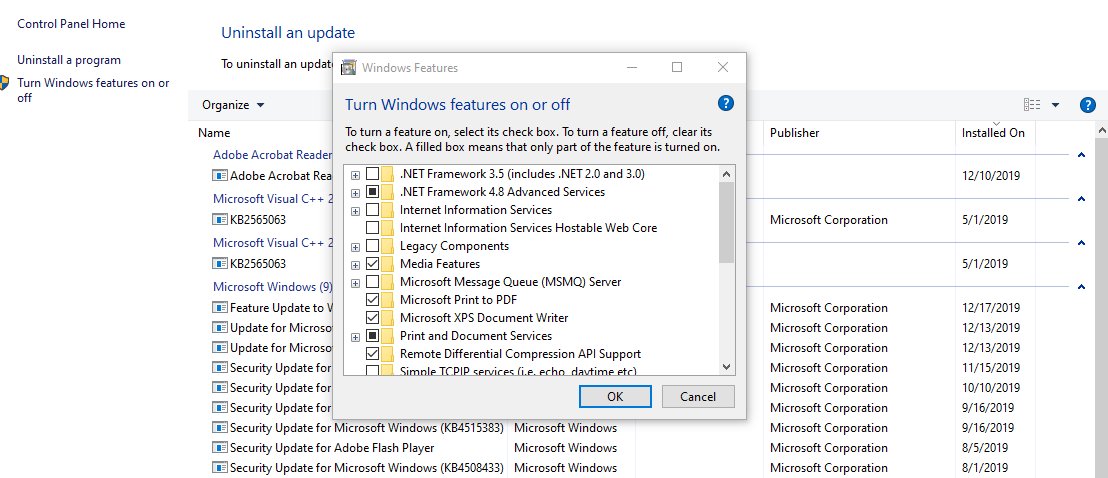
OptionalFeatures.exeand select OK. - In the Windows Features dialog, look for Internet Explorer 11. A ticked checkbox means the feature is installed.
- Close the dialog with Cancel so nothing changes.
On a Home or Pro PC the feature can be ticked and IE11 will still open Edge. That is the permanent disable, not a broken install. The older Start menu and Run box routes on LTSC are covered in opening Internet Explorer in Windows 10.
How to Use Internet Explorer Mode in Microsoft Edge
IE mode is the supported replacement on every Windows 10 edition. It renders a legacy page with the Internet Explorer 11 engine inside an Edge tab, so old intranet sites, ActiveX pages and government portals keep working.
Turn it on once, then reload each old site in IE mode.
- Open Microsoft Edge, type
edge://settings/defaultBrowserin the address bar and press Enter. - Under Internet Explorer compatibility, set Allow sites to be reloaded in Internet Explorer mode (IE mode) to Allow.
- Select Restart so Edge applies the change.
- Go to the site that needs Internet Explorer.
- Select Settings and more (the three dots), then Reload in Internet Explorer mode.
- On Edge 141 or later on a personal (non-Enterprise) PC, go to Settings > Default browser, select Add a page under Internet Explorer mode pages, enter the address, select Add, then reload the site.
- Select Leave on the information bar, or close the tab, when you are done with IE mode.
Work and school PCs often have IE mode set by an administrator through a site list, in which case the listed sites open in IE mode on their own.
How to Enable Internet Explorer 11 in Windows Features
This is the closest thing to "installing" IE11 on Windows 10. It only brings back a working browser on LTSC editions and Windows Server. On Home and Pro it restores the component that IE mode depends on, but opening Internet Explorer still launches Edge.
You need an administrator account, and Windows asks for a restart.
- Press Windows logo key + R.
- Type
OptionalFeatures.exeand select OK. - In the Windows Features dialog, tick the checkbox next to Internet Explorer 11.
- Select OK and wait while Windows applies the change.
- Restart the computer when prompted.
On Windows 10 version 1703 and later, the same feature also sits in Settings: select Start > Settings > Apps > Optional features > Add a feature, select Internet Explorer 11, then Install, and restart when prompted. Microsoft recommends the Optional features route where it is available.
How to Install Missing Windows Updates for IE11 Support
IE mode needs a current Microsoft Edge build, and the IE11 component takes its security fixes from Windows Update. Microsoft advises keeping those updates installed even after Internet Explorer is disabled, because the rendering engine stays on the system.
Windows 10 reached end of support on October 14, 2025, so a PC without an Extended Security Updates enrollment no longer gets new security fixes. The steps below still install whatever your PC is entitled to.
- Select Start > Settings > Update & Security > Windows Update.
- Select Check for updates.
- Select Download & install if updates are listed, then restart when asked.
- In Microsoft Edge, select Settings and more > Help and feedback > About Microsoft Edge.
- If the page shows An update is available, select Download and install.
- Select Restart when the page says To finish updating, restart Microsoft Edge.
The About page reads Microsoft Edge is up to date once the browser is current.
Turn on the Internet Explorer 11 feature from Command Prompt
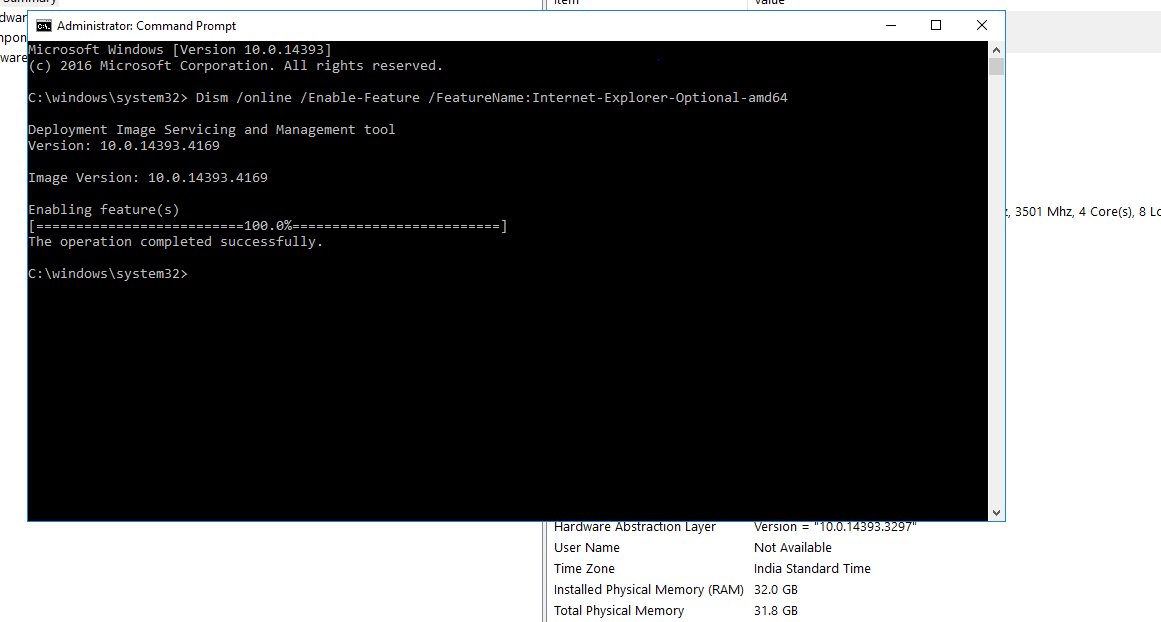
DISM does the same job as the Windows Features dialog and suits scripted setups. Open Command Prompt as administrator first. Microsoft documents two forms: the capability form below for Windows 10 version 1703 and later, and dism /online /Enable-Feature /FeatureName:Internet-Explorer-Optional-amd64 for the Windows Features version on 64-bit systems.
dism /online /Add-Capability /CapabilityName:Browser.InternetExplorer~~~~0.0.11.0Adds the Internet Explorer 11 optional capability to the running Windows installation (/online). Swap /Add-Capability for /Remove-Capability to take it out again.
You should see: DISM prints "The operation completed successfully." followed by "Restart Windows to complete this operation." Type Y to restart.
Use the same method to reverse a change that you used to make it. Microsoft recommends this pairing, Control Panel with Control Panel and DISM with DISM.
How to check it worked
- In Edge, open the legacy site and reload it in IE mode. An information bar with a Leave button appears at the top of the page while IE mode is active.
- Open
edge://settings/defaultBrowserand confirm Allow sites to be reloaded in Internet Explorer mode (IE mode) still reads Allow. - On an LTSC edition or Windows Server, press Windows logo key + R, type
iexploreand select OK. The Internet Explorer 11 window should open rather than Edge. - Reopen
OptionalFeatures.exeand confirm Internet Explorer 11 is ticked after the restart.
What still works and what does not
The retirement removed a browser, not the engine behind it. That split explains most of the confusing behaviour on Windows 10.
| Item | Status on Windows 10 Home and Pro | Source of the rule |
|---|---|---|
| IE11 desktop app | Out of support since June 15, 2022; permanently disabled on February 14, 2023 | Microsoft Lifecycle announcement |
| Internet Explorer shortcuts and icons | Launch Microsoft Edge instead; Microsoft planned to remove them in a later Windows update | Windows Experience Blog, June 15, 2022 |
| Favorites, passwords and settings from IE | Imported into Edge during the redirect | Windows Experience Blog, June 15, 2022 |
| MSHTML (Trident) engine and COM controls | Still supported for apps that depend on them | Windows Experience Blog, June 15, 2022 |
| Internet Explorer mode in Edge | Supported through at least 2029, with one year of notice before retirement | Microsoft Lifecycle FAQ |
| Microsoft 365, Teams web and Azure portal in IE11 | No longer supported; IE mode does not extend access to these | Microsoft Lifecycle announcement |
Common Problems When Opening or Installing Internet Explorer 11
Internet Explorer opens Edge instead
On Semi-Annual Channel editions the IE11 desktop app is permanently disabled and redirects to Edge by design; on managed PCs the Disable Internet Explorer 11 as a standalone browser policy does the same.
- Check your edition under Settings > System > About > Windows specifications.
- On Home or Pro, stop trying to open IE11 and use IE mode in Edge for the old site.
- On an LTSC edition managed by an organization, ask the administrator about the Disable Internet Explorer 11 as a standalone browser policy; it lives under Computer Configuration > Administrative Templates > Windows Components > Internet Explorer.
Internet Explorer is missing from Windows Features
The capability was removed through Settings or DISM, which takes it out of the feature list rather than just unticking it.
- Select Start > Settings > Apps > Optional features.
- Select Add a feature, then Internet Explorer 11, then Install.
- Restart the computer when prompted.
- If the entry is not offered, run the DISM
/Add-Capabilitycommand above from an elevated Command Prompt.
The IE11 installer fails or says it is the wrong version
The standalone IE11 installer was built for Windows 7 SP1 and Windows Server 2008 R2 SP1; on Windows 10, IE11 is part of the operating system and cannot be installed from a separate file.
- Delete the downloaded installer and do not run installers from third-party download sites.
- Turn on Internet Explorer 11 through Windows Features or Optional features instead.
- Use IE mode in Edge if you are on Home or Pro.
Reload in Internet Explorer mode is missing or does nothing
IE mode is switched off in Edge, Edge is out of date, or the Internet Explorer 11 feature was disabled in Windows, which also disables IE mode.
- Open
edge://settings/defaultBrowserand set Allow sites to be reloaded in Internet Explorer mode (IE mode) to Allow, then select Restart. - Update Edge from Settings and more > Help and feedback > About Microsoft Edge.
- On Edge 141 or later on a personal PC, add the site under Internet Explorer mode pages with Add a page instead of looking for the menu item.
- Re-enable Internet Explorer 11 in Windows Features or Optional features and restart.
Downloads seem to go to Internet Explorer
Links and file types that used to open in IE now open in Edge, which saves files to the folder set in its Downloads settings.
- In Edge, select Settings and more > Settings > Downloads.
- Read the folder path under Location; by default it is your Downloads folder.
- Select Change to pick another folder, or turn on the option to ask where to save each file.
Frequently Asked Questions
Can I still download Internet Explorer 11 for Windows 10?
No. Internet Explorer 11 is a built-in Windows component, not a download for Windows 10, and the desktop app is permanently disabled on Home and Pro. Use Internet Explorer mode in Microsoft Edge, or enable the Internet Explorer 11 feature on an LTSC edition.
Is there an official Internet Explorer 11 installer for Windows 10?
No. Microsoft's standalone IE11 installer targeted Windows 7 SP1 and Windows Server 2008 R2 SP1. On Windows 10 the browser is turned on or off as an optional feature, so any file sold or offered as a Windows 10 IE11 installer does not come from Microsoft.
How do I know if Internet Explorer 11 is already on my Windows 10 computer?
Press Windows logo key + R, run OptionalFeatures.exe and look for a ticked Internet Explorer 11 box. Then check Settings > System > About: only LTSC and LTSB editions still open the IE11 window itself.
What should I do if Internet Explorer 11 is missing from Windows Features?
Add it back through Settings > Apps > Optional features > Add a feature > Internet Explorer 11 > Install, then restart. From an elevated Command Prompt, the DISM /Add-Capability command for Browser.InternetExplorer~~~~0.0.11.0 does the same thing.
How do I open an old Internet Explorer-only website in Microsoft Edge?
Allow IE mode at edge://settings/defaultBrowser, restart Edge, open the site and choose Reload in Internet Explorer mode from the Settings and more menu. On Edge 141 or later on a personal PC, add the page under Internet Explorer mode pages instead.
Why does Internet Explorer 11 open briefly and then redirect to Microsoft Edge?
Microsoft permanently disabled the IE11 desktop app on Semi-Annual Channel editions of Windows 10 on February 14, 2023. Opening it now launches Edge and imports your favorites, passwords and settings. Only LTSC editions and Windows Server keep the standalone browser.
Why are my downloads going to Internet Explorer?
They are not; links that once opened in Internet Explorer now open in Microsoft Edge. Edge saves files to the folder shown under Settings > Downloads > Location, which is the Downloads folder by default. Select Change there to use another folder.
How long will Internet Explorer mode in Edge be supported?
Microsoft supports IE mode in Microsoft Edge through at least 2029 on supported operating systems. It has also committed to giving one year of notice before IE mode is retired.
Does turning off Internet Explorer 11 also turn off IE mode?
Yes, if you turn it off in Windows Features, Optional features or DISM. Microsoft states that IE mode is then unavailable too. Organizations that want IE mode without the standalone browser use the Disable Internet Explorer 11 as a standalone browser policy instead.
Bottom Line
Skip every Internet Explorer 11 download for Windows 10 and set up IE mode in Microsoft Edge; enable the built-in Internet Explorer 11 feature only if your PC runs an LTSC edition or Windows Server. Microsoft permanently disabled the IE11 desktop app on Home and Pro, so no installer can revive it, while IE mode uses the same engine and stays supported through at least 2029.