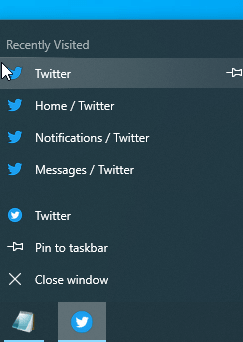
Latest Microsoft Edge Canary 77.0.196.0 build added Jumplist support for PWAs to show most recently visited pages in the web app on Windows taskbar icon right-click menu under “Recently Visited” Category.
Microsoft Edge Chromium and Chrome browsers support Progressive Web Apps and you can install them from the address bar with a single click. In the case of PWAs support, Chrome is behind the new Edge browser. Chromium Edge already allows to display back button for Web Apps where Chromium team is still working on it.
Enable Jumplist Support for PWAs in Chromium Edge browser
1. Visit edge://flags page
2. Search for “Jump” and for “Desktop PWAs JumpList includes Recently Visited Category” flag

3. Select “Enabled” and relaunch the browser.
BTW, this is what flag description says:” Navigating different pages in a PWA on Windows Desktop will add pages to the JumpList under the category Recently Visited”.
Now
1. Load mobile.twitter.com
2. Since like Chrome, new Edge also shows a + icon when you visit PWA site in the browser, click on it in the address bar to install.
3. Sign into Twitter PWA with username and password,
4. Ensure PWA is opened and its icon is visible on the taskbar, right click on it to see “Recently Visited” Category showing recently visited tabs in Twitter in the jumplists.
Related articles:
Chrome to bring Tabbed Application Mode for PWAs
Chrome is turning tabs in focus mode into PWAs






Microsoft Edge can now run PWAs on Windows Startup - Techdows
[…] Microsoft Edge Chromium adds Jump List Support for PWAs on Windows 10 […]