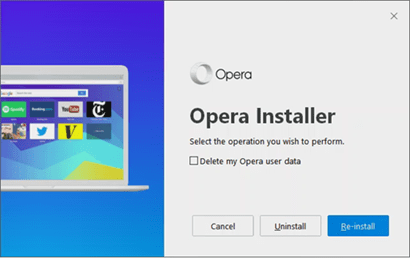
Opera 57 has entered the developer stream and is available to download for testing. The version 57.0.3058.0 based on Chromium 70 is an initial developer release, that improves Settings page styling and brings a new UI for the installer. The installer wizard informs about the – unique features in Opera – built-in ad blocker, Free VPN, Easy customization and Extensions and Built-in messengers. The Opera Uninstaller which appears when you initiate Opera Uninstall also got a new UI.

Opera 57: Opera Installer gets a new UI
Unless you install Opera 57 by using offline installer, with the online installer, you’ll notice the wizard briefs about four features (one by one) we mentioned above.
Enjoy ad-free web: Opera is the first major web browser that can block ads without extensions, that’s true also. FYI, the built-in ad blocker in Opera with no-coin addition offers protection against cryptocurrency mining.
Stay safer and more private: In the second screen, Opera tells about its VPN and malware and fraud protection it offers when you surf the web.
Easy customization and extensions: Opera installer says there are more than 1000 extensions available on Opera add-ons site to customize Opera and the browser also offers Easy Setup for first-time users.
Don’t forget Opera 55 has recently made it easy for users to install extensions from the Chrome Web Store directly.
Read: Opera 55 improves Chrome Extensions Install Experience on Web Store
Chat and browse at the same time: Opera allows to chat while browsing. You can use the messengers available on sidebar such as Facebook, Whatsapp, Telegram and VK for that.
This is Opera Uninstaller UI.
What’s your take on new Opera Installer? Let us know in the comments below.




