We’ve recently covered AutoWinRarZip app which automatically extracts files from archives in a selected folder, Unpack Monitor is similar type of freeware and portable app monitors for archives in a selected folder and automatically unpacks them to specified folder. This app currently supports RAR, ZIP, 7Z , ISO, and HJ Join files.
Extract Multiple Archives quickly with Single Click with ExtractNow
Using Unpack Monitor
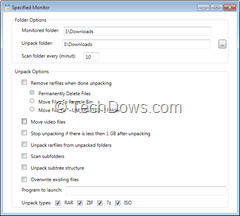
After installing the program, its icons appears in the system tray, double click to open its user interface. First click “Add directory” button and choose the folder to start monitoring it, now choose the Unpack Folder ‘s directory too.
Unpack Monitor by default scans specified monitored folder for every 10 minutes which you can change from its program window. This app offers various options after unpacking a archive such as
- Permanently remove rarfiles/move them to Recycle Bin.
- Moving video files
- Stops unpacking if there is less than 1GB after unpacking.
- Can scan for subfolders and unpack sub tree structure.
- Allows to overwrite existing files.
- Lets you launch any program.
Unpack Monitor Works on all Windows.
Trick to Extract files from Multiple WinRAR archives with a Single Click