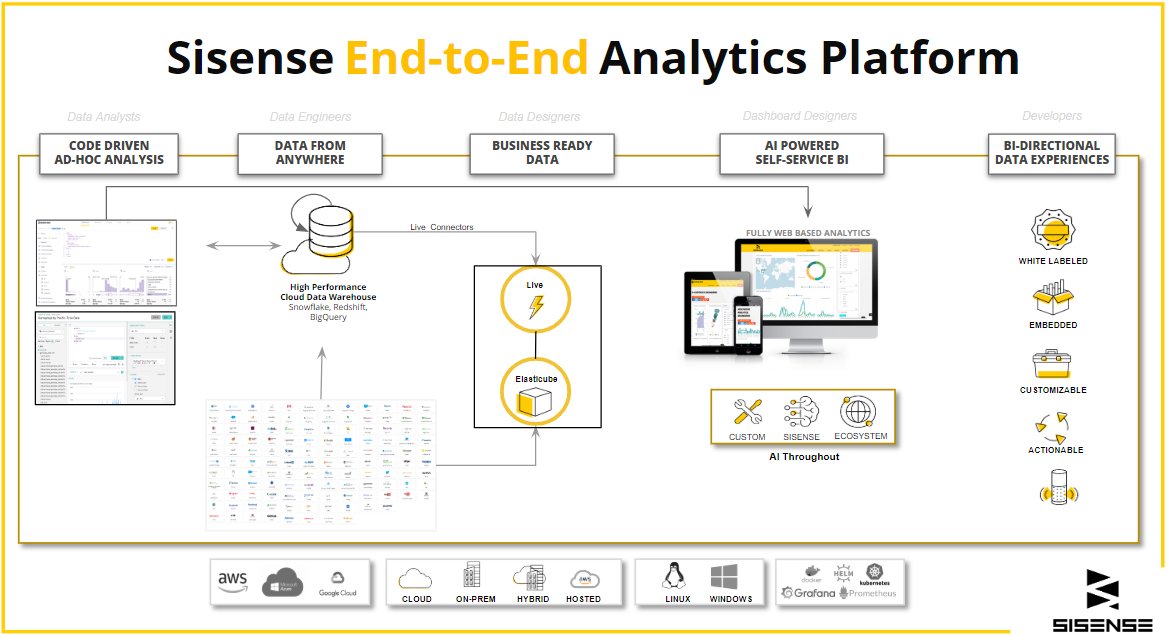
Sisense is a business intelligence platform that loads your data into a columnar database called an ElastiCube, then answers dashboard queries against it.
This guide covers the engine, the architecture layers, the deployment choices, what changed across the 2025 releases, and the questions buyers ask most.
What is Sisense?
Sisense connects to your data sources, models them, and publishes dashboards built from widgets. Every claim below comes from Sisense's own documentation.
| What you want to do | What Sisense provides | Where it lives |
|---|---|---|
| Pull data together from several systems | Connectors grouped as Live, Native ElastiCube, Partner-Supported ElastiCube, Vendor JDBC and Technology Partner | The Data page |
| Query hundreds of millions of rows quickly | The ElastiCube, a columnar database that stores data field-by-field and loads only the fields a query references | The Sisense server or cluster |
| Leave data in the warehouse instead of importing it | A Live model, which manages the schema over a Live data source | The Data page |
| Show the numbers to a team | Dashboards, each a collection of one or more widgets | The Analytics page |
| Ask a question in plain English | Simply Ask, the natural language query feature, plus the assistant | A dashboard, once an administrator enables it |
| Put analytics inside your own product | IFrame, Embed SDK, Sisense JS and Compose SDK | Your application's code |
| Stop one customer seeing another's rows | Data security rules that work at row granularity | Admin settings |
| Run it without managing servers | Sisense Cloud, hosted on AWS with an isolated cluster per customer | Sisense-managed infrastructure |
A reader who needs only the definition can stop here. The sections below explain the mechanism.
How Sisense Works: The Building Blocks
Sisense documents eight moving parts. Each one hands work to the next, from raw source to a chart somebody reads.
| Building block | What it does | Documented detail |
|---|---|---|
| Data connectivity and integration | Reaches the source systems | Connectors are listed in five groups; Live examples include Snowflake, Google BigQuery, Databricks, Redshift, Azure Synapse, Athena, ClickHouse, PostgreSQL, MySQL, Oracle and SQL Server |
| Data modeling and preparation | Turns tables into a schema | A data model is made of abstract entities that organize your data and determine how your tables relate to one another |
| In-chip data engine | Answers the query | The ElastiCube holds data in a Columnar Database Management System that stores data field-by-field, and natively supports 64-bit processing |
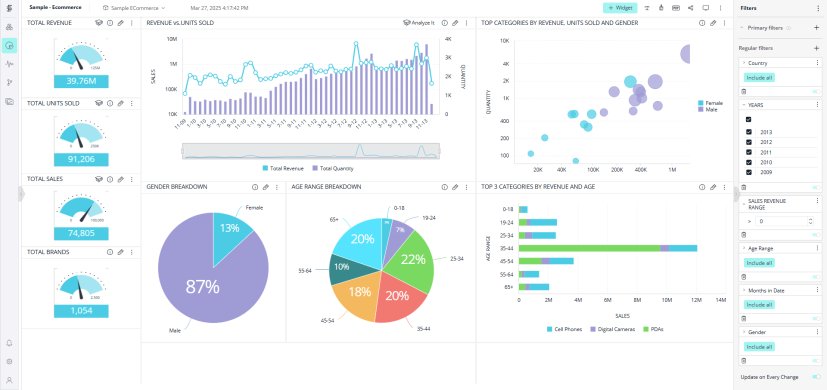
| Data visualization and dashboard building | Draws the result | A widget is a dynamic visualization of data; a dashboard is a collection of one or more widgets |
| Embedding and integration | Puts analytics in your product | Four documented methods: IFrame, Embed SDK, Sisense JS and Compose SDK |
| Artificial intelligence and machine learning | Answers questions in words | Simply Ask uses a Knowledge Graph to study relationships between organizational entities; the assistant generates queries from natural language |
| Collaboration and sharing | Gets the dashboard to other people | Dashboard owners share a dashboard, and can separately choose to Share the assistant with viewers |
| Deployment and scalability | Runs the whole thing | Sisense ships as Docker containers orchestrated by Kubernetes, installed with Helm |
Architectural Deep Dive: How Sisense Achieves Performance and Flexibility
The speed claim rests on two documented choices: columnar storage, and loading only the fields a query touches.
Sisense states that ElastiCubes do not require pre-aggregations or the creation of indexes to assure fast query response. Creation therefore takes a fraction of the time of a data mart or an OLAP cube.
| Layer | What sits here | Why it matters |
|---|---|---|
| Data layer | ElastiCube tables, Live models, and the source connectors behind both | A single dashboard can support both ElastiCube and Live data models, so imported and live data appear side by side |
| Processing layer | The Unified Analytics Engine and its metadata layer | The engine creates an abstraction layer used to formulate queries across any number of tables, from any number of data sources, in any number of formats |
| Visualization layer | The Analytics page, dashboards, widgets and the Widget Designer | Fields picked in the Data Browser are rendered by the visualization buttons, with Advanced Configuration for the rest |
| AI and ML layer | Simply Ask, the assistant, Semantic Enrichment | Semantic Enrichment uses AI to provide descriptions for a data model's tables and columns, which improves assistant responses |
| Security and governance layer | Data security rules and administrator settings | Rules control which users can access which portions of the raw data in a data model, at row granularity |
Row-level rules are inclusionary by default. When no value is assigned to Everyone, access is blocked for all users, and the most restrictive combination wins where rules conflict.
Deployment Options in 2025
Sisense documents a hosted service and two self-hosted topologies. The Windows build is a separate product line with its own documentation set.
| Your situation | Deployment to pick | What the documentation states |
|---|---|---|
| No appetite for running Kubernetes | Sisense Cloud | Hosted on Amazon Web Services; each customer gets a fully isolated cluster within their own dedicated VPC, on AWS Managed Kubernetes Service (EKS) or dedicated EC2 instances |
| Development, testing, or a small production instance you control | Self-hosted single-node Linux | Straightforward to set up, maintain and upgrade, using local storage on a single server |
| Production workload that must survive a node loss | Self-hosted multi-node Linux | Minimum three servers: one build node and two application/query nodes, with infrastructure services deployed across all three |
| An existing Windows estate | Sisense on Windows | A separate documentation set with its own release stream, currently W2026.9 after W2025.9 and W2025.3 |
| You need the cluster to grow later | Sisense Cloud, with a support request | Scaling requires a request to Sisense Support, as it may impact licensing costs |
Sisense Cloud backups are documented with a 24-hour recovery point objective and a recovery time objective of up to one hour.
What you need before a self-hosted install
Self-hosting Sisense is a Kubernetes job, not an installer double-click. Check these before provisioning anything.
| Requirement | Detail |
|---|---|
| Servers | One for single-node; three at minimum for multi-node, split into one build node and two application/query nodes |
| Container runtime | The Sisense application is provided as Docker containers, with orchestration managed through Kubernetes |
| Installer | Helm, which Sisense uses to manage node labels and pod placement |
| Kubernetes distribution | RKE2 for new installations; L2025.1 is the final version that installs or upgrades Kubernetes using RKE1 |
| Upgrade path | A direct RKE1-to-RKE2 upgrade is not supported, so plan a fresh deployment or a full uninstall and reinstall |
| Admin access | A Sisense administrator account, needed to enable AI features and to manage plug-ins |
First method: model your data in an ElastiCube
This is the import path. Use it when the data should live inside Sisense rather than stay in the source system.
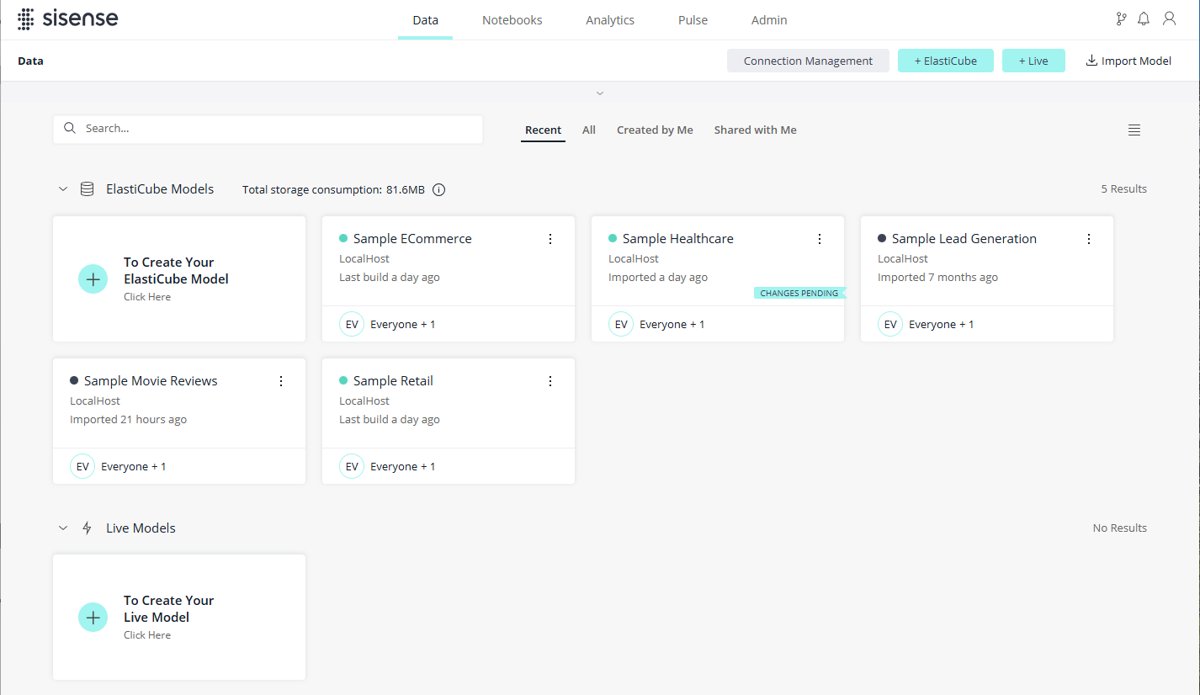
- Open Sisense and click Data in the top menu. Existing ElastiCubes and Live models are listed.
- Click the ElastiCube button to start a new model.
- Name the new ElastiCube and click Save. The name cannot contain # % ? * < > \ / | : characters.
- In the Model Editor that opens, click Add Data and choose the connector for your source.
- Supply the connection details for that source and select the tables you need.
- Click Build, then choose Replace All for a first build.
- Wait for the build log to finish and report Build Succeeded.
By Table builds on a per-table definition, and Changes Only adds new tables or updates tables with a modified schema.
Second method: build a dashboard and its first widget
Dashboards are built against a model, so finish the ElastiCube or Live model before starting here.
- Open the Analytics page and click + above the Dashboards list.
- Click the name of the Data Set shown, then pick the ElastiCube or Live model to work with.
- Click the name of the Title and type a name for the dashboard.
- Click Create. The Widget Wizard opens automatically.
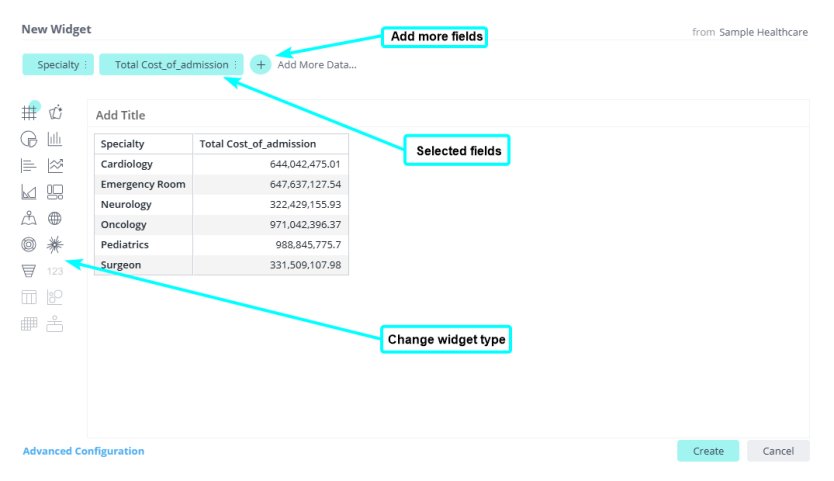
- In the Data Browser, select a field. Sisense displays it in a suggested widget.
- Repeat for any other fields you want in the same widget.
- Click a visualization button to redraw the selected fields as a different chart.
- Use Advanced Configuration at the bottom left for anything the wizard does not expose.
A single descriptive field produces a pivot widget, and a single numeric field produces an indicator widget.
Third method: ask questions in plain English with Simply Ask
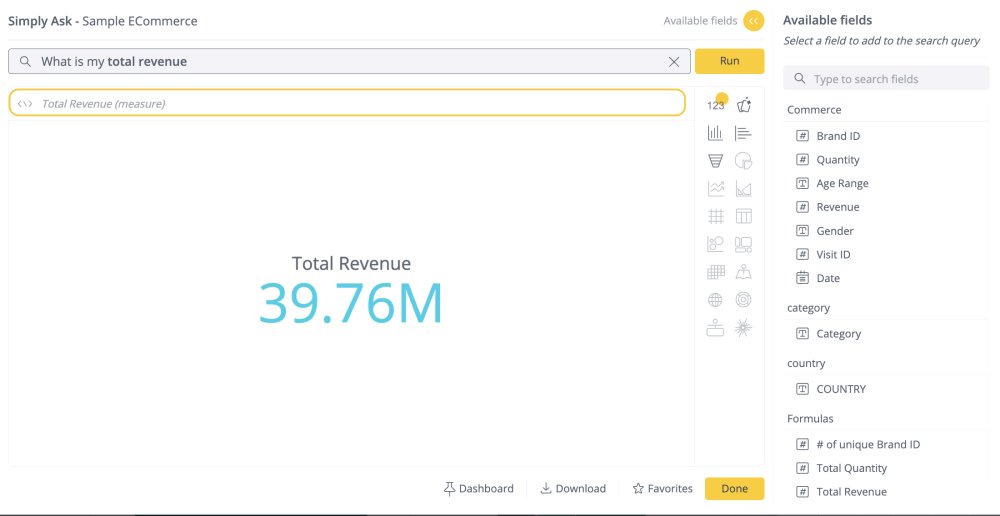
Simply Ask is Sisense's natural language query feature. It is off until an administrator turns it on, then off again until a dashboard designer enables it.
- Sign in as a Sisense administrator and open Admin.
- Go to Feature Management and find the AI section.
- Enable Simply Ask at the system level there.
- Open the dashboard you want to use it on, as its designer.
- Enable Simply Ask for that dashboard from the dashboard menu.
- Test a question before sharing, then republish the dashboard.
- Confirm viewers now see the Simply Ask button on the published dashboard.
Dashboard filters are inherited by Simply Ask queries by default, so a filtered dashboard returns filtered answers.
Fourth method: embed Sisense inside your own application
Sisense documents four embedding methods. They differ in how much code you write and how much of the result you control.
| Your situation | Method | Why |
|---|---|---|
| Fastest route to something on screen | IFrame | Opens a window to another website from within your site, keeping native dashboard functionality |
| You need custom filtering and event handling | Embed SDK | Uses the IFrame approach to display, while adding APIs to help manage the dashboard |
| You want Sisense rendering without an IFrame | Sisense JS | Loads the Sisense runtime anywhere and renders all, part, or new widgets in any DOM container |
| You want queries, charts and filters written in your own code | Compose SDK | A composable, code-driven way to use Sisense platform capabilities, built around React and TypeScript |
From L2025.1 Sisense can generate embedding code snippets for React, Angular or Vue, and L2025.3 added a Compose SDK Mode beta that previews a Fusion dashboard as Compose SDK would render it.
How to check the model and dashboard actually worked
Three checks separate a working instance from one that merely loaded without an error.
- Read the build log to its end and confirm it says Build Succeeded.
- Open the Data page and confirm the ElastiCube lists the tables you selected.
- Open the dashboard and confirm each widget draws data rather than an empty frame.
- Change a dashboard filter and confirm the widget totals move with it.
- Sign in as a restricted user and confirm the rows outside their data security rule are absent.
- If Simply Ask is enabled, ask one question you already know the answer to and compare the result with the widget.
A row stays hidden from a restricted user even when the field the rule is built on does not appear in the widget.
Key Use Cases of Sisense in 2025
Sisense lists five industries on its own solutions pages. The pattern across them is the same: consolidate sources, model once, then embed or share.
| Industry Sisense lists | Typical shape of the work | Platform feature it leans on |
|---|---|---|
| Financial services | Reporting across accounts and products, where one client must never see another's rows | Data security rules at row granularity |
| Healthcare and pharma | Combining clinical and operational systems that cannot all be copied into one place | Live models alongside ElastiCube tables on one dashboard |
| Supply chain | Stock, orders and logistics from separate systems, including retail and e-commerce sources such as Shopify | Partner-supported ElastiCube connectors |
| Technology | Analytics shipped as a feature inside a software product for its own customers | Compose SDK and the other embedding methods |
| Manufacturing | Plant and production data queried across long histories | Columnar ElastiCube storage with 64-bit addressing |
Sisense does not list retail as a separate industry page; its retail and e-commerce sources appear inside the supply chain solution and the connector list.
Advancements and Trends in 2025: How Sisense Evolved
Sisense ships numbered Linux releases through the year. The table below follows the L2025 release notes, checked on 22 September 2026.
Two themes run through them: AI moving from a dashboard add-on to a build-time assistant, and the Kubernetes base changing underneath.
| Release | What arrived | What it changes |
|---|---|---|
| L2025.1 | Dashboard AI Assistant (Beta), Embedding Widgets via Compose SDK, Widget Filters Indication, XFS as the default file system on EKS | Natural language exploration becomes a dashboard feature, and embed code can be generated for React, Angular or Vue |
| L2025.1 | Final release that installs or upgrades Kubernetes using RKE1 | Sets the deadline for the RKE2 migration |
| L2025.2 | Sisense with Kubernetes using RKE2; the Analytical Engine becomes the default translation engine for all new data models; Image Signature Validation | On-prem deployment moves to RKE2, and administrators can validate that deployed images are official |
| L2025.2 SP2 | "Analytics Assistant" and "Studio Assistant" both renamed to the assistant | Two separate AI surfaces are being consolidated into one feature |
| L2025.3 | Studio Assistant beta, Semantic Enrichment, Display Name, Compose SDK Mode (Beta), Sidebar Navigation (Beta) | AI moves into authoring, and tables and columns can be renamed without breaking dependent widgets or alerts |
| L2025.3 | ElastiCube Cloud (Limited Availability) | Data modelers can use the Sisense cloud as a destination for their ElastiCubes |
| Deprecations announced in 2025 | Legacy Export to Excel service and the legacy dashboard filters editor, both by the end of 2025; the Quest add-on in L2025.4 SP1 | Anything built on those three needs a replacement plan |
Sisense has continued the same cadence past 2025, with L2026.1 and L2026.2 release notes published on the same documentation site.
Fix Sisense when a feature is missing or a build fails
These symptoms all trace back to something Sisense documents, not to a broken install.
The Simply Ask or assistant button never appears
The feature is disabled by default for data models for users who started after version L2023.2, and it needs enabling twice.
- Sign in as an administrator and open Admin > Feature Management.
- Enable the feature in the AI section.
- Open the dashboard as its designer and enable it from the dashboard menu.
- Republish the dashboard so viewers receive the change.
- If the dashboard is linked to more than one data model, expect no NLQ; Sisense states NLQ models cannot support those dashboards.
Natural language answers are wrong for dates
Simply Ask supports the US date format only, with the month first.
- Re-ask the question using month-first dates.
- Compare the answer against a widget filtered to the same period.
- If the field name contains parentheses or other special characters, rename it; the assistant's handling of such names was corrected in L2025.2.
- Use Semantic Enrichment from L2025.3 to add descriptions to the model's tables and columns.
An add-on stops working after an upgrade
Self-developed and community add-ons are unsupported and are not included in the Sisense QA cycle for new versions.
- Open Admin > Plug-ins and check whether the add-on is still listed.
- Reinstall it by extracting the .zip contents to /opt/sisense/storage/plugins/, or through Admin > Server & Hardware > System Management > File Management.
- Test it against the new version before returning the dashboard to users.
- Prefer a Marketplace add-on, which Sisense or a partner supports and maintains.
- Leave certified add-ons unmodified, because manual changes are overwritten during an upgrade.
A user sees no data at all after data security rules are added
Rules are inclusionary, so access must be granted explicitly and the strictest match wins.
- Open the data security rule for the field in question.
- Check whether any value is assigned to Everyone; when none is, access is blocked for all users.
- Assign the values the user should see, at the user or group level.
- Re-check the user's group memberships, because the most restrictive combination wins where user and group rules conflict.
- Sign in as that user and confirm the expected rows now appear.
An upgrade from an older cluster refuses to proceed
Sisense moved on-prem deployments from RKE1 to RKE2, and the two do not upgrade into one another.
- Check the current version against L2025.1, the final release that installs or upgrades Kubernetes using RKE1.
- Plan a fresh deployment on new servers, or a complete uninstall and reinstall, because a direct RKE1-to-RKE2 upgrade is not supported.
- Move NFS implementations from the deprecated nfs-client storage class to the native nfs-csi storageClass.
- Check the kernel against the release notes, since the MongoDB 8 upgrade in L2025.3 is incompatible with Linux kernel 6.19 to 7.0.13.
- Stop relying on the AKS, EKS, GKE and Kops deployment scripts, which are no longer supported.
Frequently Asked Questions
What is Sisense software?
Sisense is business intelligence software. It connects to your data sources, models them into an ElastiCube or a Live model, and publishes dashboards made of widgets. It also embeds into other applications and answers questions in natural language.
Is Sisense a database or a reporting tool?
Both, in effect. The ElastiCube is Sisense's own analytics database, held in a Columnar Database Management System that stores data field-by-field. The dashboards, widgets and Widget Designer sit on top of it as the reporting layer.
Can Sisense query data without importing it?
Yes. A Live model manages the schema over a Live data source, so queries run against the source system. Sisense documents Live connectors for Snowflake, Google BigQuery, Databricks, Redshift, Azure Synapse and others, and one dashboard can mix Live and ElastiCube models.
Does Sisense still run on Windows?
Yes. Sisense maintains a separate Windows documentation set with its own release stream, currently W2026.9, following W2025.9 and W2025.3. The Linux releases use the L prefix instead, such as L2025.3.
Where are the Sisense release notes published?
On the Sisense documentation site, one page per release. Linux releases appear as L2025.1, L2025.2 and L2025.3, and the Windows stream carries its own notes. Each page lists new features, fixes and deprecations for that version.
Where do Sisense plugins and add-ons come from?
Three places. The Sisense Marketplace carries free and premium add-ons supported by Sisense and partners, the Sisense community offers free unsupported add-ons, and you can build your own with the Sisense JavaScript API.
Are community Sisense add-ons safe to rely on?
Not for production without testing. Sisense states that self-developed and community add-ons and scripts are unsupported and are not included in the Sisense QA cycle for new versions. Test each one after every upgrade before returning dashboards to users.
How does Sisense compare with Looker, Spotfire or Cognos?
Sisense's documentation does not publish comparisons with other vendors, so any feature-by-feature claim needs each vendor's own pages. What Sisense documents is an ElastiCube analytics database, four embedding methods, and deployment on Sisense Cloud or self-hosted Kubernetes.
How do you filter a single widget without changing the whole dashboard?
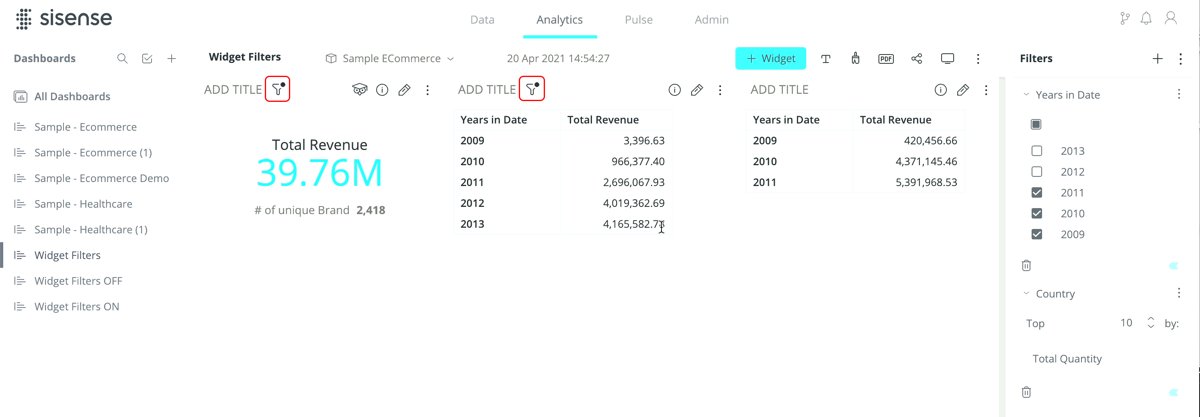
Open the widget in the Widget Designer, click the Filters tab, then Add Filter, and click a field in the Data Browser. A widget filter on a field that the dashboard already filters overrides the dashboard filter for that widget.
Does Sisense need its own servers?
Only if you self-host. Sisense Cloud runs on AWS with a fully isolated cluster in a dedicated VPC per customer. Self-hosting needs one server for a single-node install, or a minimum of three for multi-node.
What AI features does Sisense include?
Simply Ask answers questions in natural language using a Knowledge Graph over organizational entities. The assistant generates queries and charts from plain English, and Semantic Enrichment writes descriptions for a model's tables and columns to improve its answers.
How does Sisense stop one customer seeing another's data?
Data security rules control which users reach which rows of a data model, at row granularity. A user sees a row only when the rule's field holds a permitted value, and the row stays hidden even when that field is absent from the widget.
Why Choose Sisense?
Choose Sisense when analytics has to be embedded in a product or served to separate customers from one model, and skip it when a single team just needs charts over one warehouse. The ElastiCube, the four embedding methods and row-granular data security rules are built for that job, but they come with a Kubernetes deployment, an administrator to enable AI features, and an RKE2 migration to plan.