Augmented reality (AR) is technology that adds digital content, such as 3D models, labels, arrows or video, to your live view of the real world in real time, without replacing that world.
This guide defines AR, explains how a phone or headset makes virtual objects stay put on a real table, lists everyday examples, compares AR with VR and mixed reality, and covers what to check before you buy an AR device.

What is augmented reality?
IBM defines augmented reality as the real-time integration of digital information into a user's environment. The digital layer enriches what you see rather than replacing it.
Apple describes the same idea from the developer side: AR adds 2D or 3D elements to the live view from a device's sensors so that those elements appear to inhabit the real world.
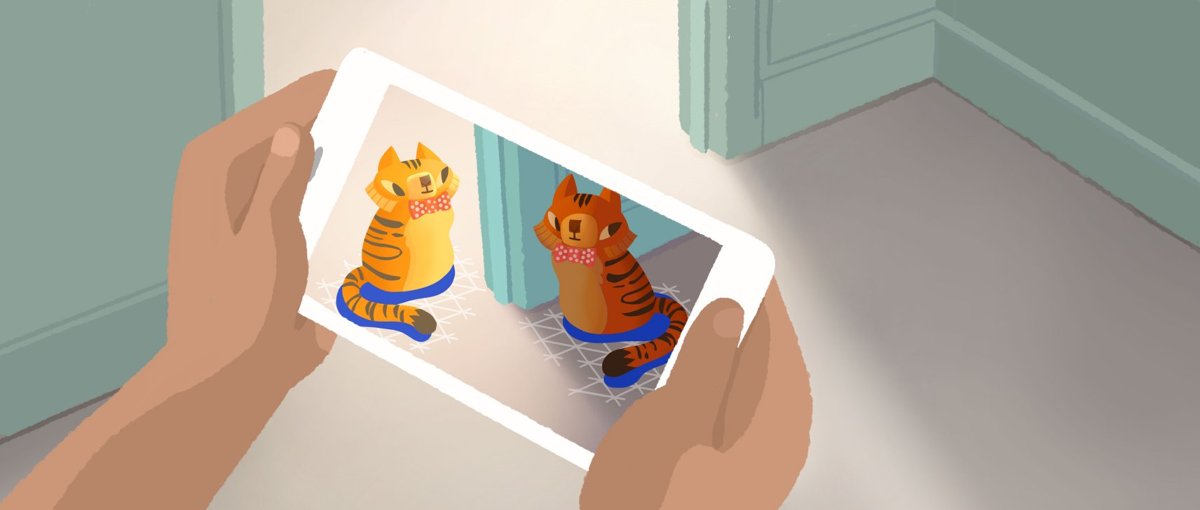
Augmented reality is a live camera or see-through view of your real surroundings with computer-generated objects or information placed on top of it, positioned so they appear to belong in the room, street or object you are looking at. The defining test is that the real world stays visible and the digital content lines up with it as you move. A filter that tracks your face, a sofa you preview in your living room and walking arrows painted over a street all pass that test.
You can try AR right now on most recent phones: search Google for an animal such as a tiger, tap View in 3D, then tap View in your space. The steps are in the Google Search section below.
What does AR stand for?
AR stands for augmented reality. "Augmented" means added to, so the phrase literally means reality with something added. The terms below appear in almost every AR app, spec sheet and developer guide.
| Term | Stands for | What it means |
|---|---|---|
| AR | Augmented reality | Digital content overlaid on a live view of the physical world |
| VR | Virtual reality | A fully digital environment that blocks out the physical world |
| MR | Mixed reality | Experiences where digital objects interact with the physical space; Microsoft treats AR and VR as points on one mixed reality spectrum |
| SLAM | Simultaneous localization and mapping | The process a device uses to work out where it is relative to the world around it |
| IMU | Inertial measurement unit | The motion sensors (accelerometer and gyroscope) whose readings are combined with the camera image |
| Pose | Position and orientation | Where the camera is and which way it points at any moment |
| Anchor | Fixed reference point | A tracked point that keeps a virtual object attached to the same real-world spot |
How does augmented reality work?
Every AR experience runs the same loop many times a second: sense the world, work out where the device is, decide where content belongs, then draw it from the right perspective. Google's ARCore and Apple's ARKit both follow this pattern.
| Stage | What happens | Why it matters |
|---|---|---|
| 1. The device captures the environment | The camera streams video of your field of view, while sensors such as the accelerometer, gyroscope and GPS add motion and location data. | Without a live view of the scene there is nothing to augment. |
| 2. The system tracks movement | Software picks out visually distinct feature points in each frame and combines them with IMU readings to estimate the camera's pose. This is SLAM. | The virtual camera must match the real camera, or objects slide around as you move. |
| 3. The system understands the surroundings | Clusters of feature points are grouped into horizontal and vertical planes such as floors, tables and walls. Supported devices also build depth maps and estimate the scene's light intensity and colour. | Planes give objects somewhere to sit; depth lets them hide behind real objects; light estimation makes them look lit by the same room. |
| 4. The application places and renders digital content | When you tap the screen, a hit test casts a ray into the scene and returns the plane or point it hits. The app creates an anchor there and renders the 3D model from the device's current pose. | Anchors keep the object attached to the real spot even as the system refines its map. |
| 5. The display updates continuously | The rendered image is overlaid on the camera feed, or shown on a see-through lens in glasses and headsets, and redrawn as you move. | Continuous updates are what make a virtual object look fixed in place rather than stuck to the screen. |
Some apps add recognition on top of this loop. ARCore's Augmented Images feature, for example, detects a specific 2D image such as a movie poster or product box and starts content from it. IBM notes that enterprise AR may also connect a recognised object to its digital twin, a 3D copy stored in the cloud.
Types of augmented reality: marker-based vs markerless AR
IBM splits AR into two fundamental types, based on what triggers the digital content.
| Type | What triggers it | Typical use | Trade-off |
|---|---|---|---|
| Marker-based AR | A known target, such as a QR code, printed image or product package, seen by the camera | Posters, packaging, museum labels, printed manuals | Cheaper and works on a wide range of devices, but only where the marker is |
| Markerless AR | No trigger; the device maps the space with its camera, motion sensors and GPS | Furniture previews, games, walking directions, measuring | More immersive and works anywhere, but needs better sensors and processing |
What do you need to use augmented reality?
Most people already own an AR-capable device. A phone or tablet with a rear camera, motion sensors and a supported operating system covers the large majority of consumer AR.
| Requirement | Android | iPhone and iPad | Headsets and glasses |
|---|---|---|---|
| Hardware | A phone that passed Google's ARCore certification (camera quality, motion sensors and CPU are tested) | An ARKit-compatible iPhone or iPad | A dedicated device such as Microsoft HoloLens (see-through holographic display) or Apple Vision Pro (visionOS) |
| Software | Google Play Services for AR, Android 7.0 or newer unless the device list names a higher minimum | ARKit is built into iOS and iPadOS; Google's ARCore features on iOS need iOS 12.0 or later | The headset's own operating system and apps |
| Store | The device must have originally shipped with the Google Play Store (separate rules apply in China) | App Store | The headset's app store |
| Permissions | Camera access; location for map-based AR | Camera access; location for map-based AR | Camera, hand and eye tracking as the app requires |
| Environment | Good light and textured surfaces | Good light and textured surfaces | Clear floor space |
How to view 3D and AR results in Google Search
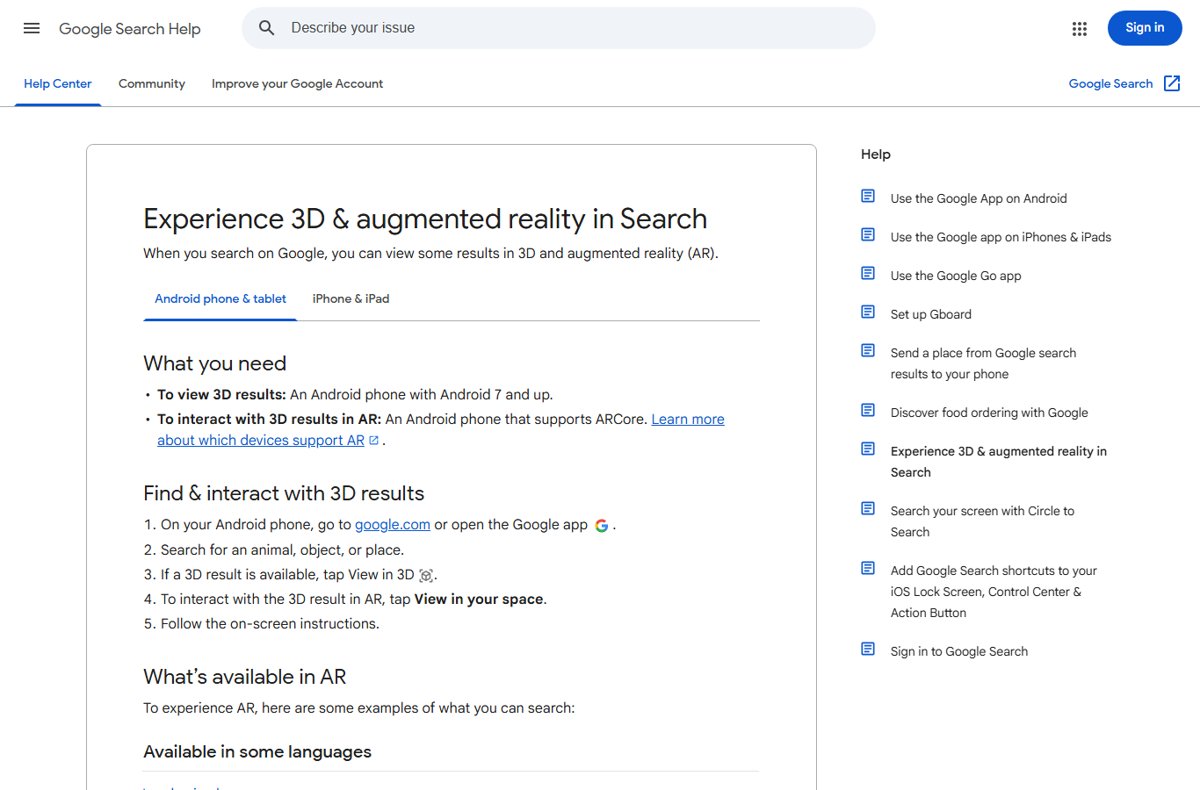
Google Search shows some animals, objects and places as 3D models you can drop into your room. Viewing in 3D needs Android 7 or later; placing the model in AR needs an ARCore-supported phone. The same option is available in the Google app on iPhone and iPad.
- Open the Google app or go to google.com on your phone.
- Search for an animal, object or place, for example "tiger".
- Tap View in 3D if it appears in the results.
- Tap View in your space to switch from the 3D viewer to AR.
- Move the phone slowly so the camera can map the floor, as the on-screen prompt asks.
- Walk around the model; it should stay in the same spot on the floor.
Google lists land animals, underwater and wetland animals, birds, house pets, cultural heritage sites and cultural objects in several languages. Human anatomy, cell structures and chemistry, biology and physics terms are available in English only.
How to check if your phone supports AR
- On Android, open Google's ARCore supported devices page and find your manufacturer and model in the Android (Google Play) table.
- Note any minimum Android version listed beside your model, and compare it with Settings > About phone on the phone.
- On iPhone or iPad, check that the app you want lists your device as compatible on its App Store page, since ARKit support depends on the device.
- Run the Google Search test above: if View in your space appears and the model lands on your floor, your phone handles AR.
What are examples of augmented reality?
AR is already part of apps used every day. These examples come from vendor documentation and IBM's overview of AR use cases.
| Example | Field | What AR adds to the real view |
|---|---|---|
| Snapchat and Instagram face filters | Social media | Masks, effects and makeup that follow your face in the camera feed |
| Pokemon GO | Gaming | Virtual creatures placed at real-world locations |
| IKEA Place | Shopping | True-to-room furniture models you can place before you buy |
| Virtual try-on for clothes, glasses and cosmetics | Retail | Products drawn on your body or face so you can judge fit and colour |
| Lens in Google Maps | Navigation | Places, directions and information overlaid on buildings and streets around you |
| Google Search 3D and AR results | Education | Life-size animals, anatomy models and cell structures in your room |
| Surgical planning and training | Healthcare | Patient data and anatomy models overlaid on the surgeon's view |
| Step-by-step work instructions | Manufacturing | Assembly and repair guidance placed on the machine being serviced |
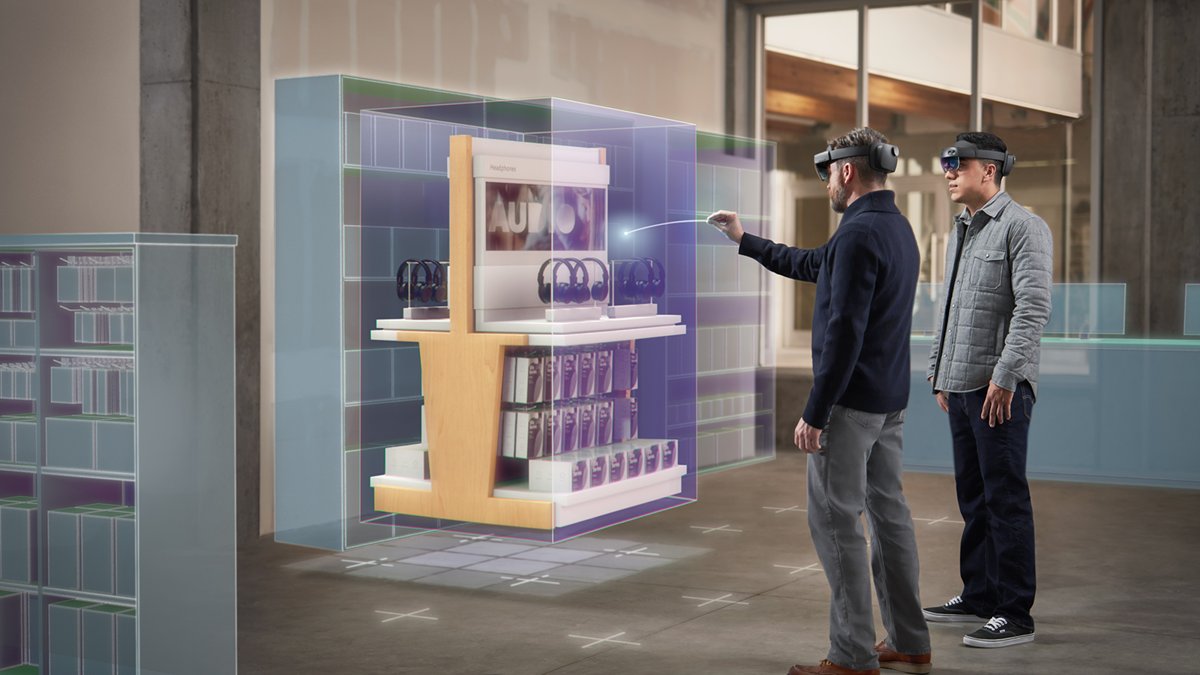
| Microsoft HoloLens design reviews | Engineering | Holographic models projected into the space where the product will sit |
Is AR the same as VR?
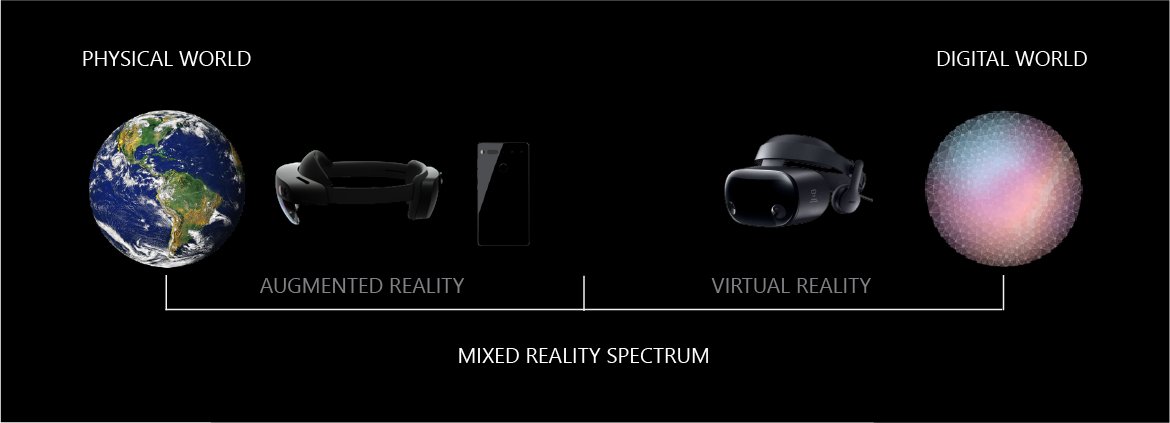
No. AR keeps you in the real world and adds to it; VR replaces the real world with a digital one. Microsoft describes both as points on a single mixed reality spectrum, a model that dates back to a 1994 paper by Paul Milgram and Fumio Kishino.
| Question | Augmented reality (AR) | Virtual reality (VR) | Mixed reality (MR) |
|---|---|---|---|
| Can you see the real world? | Yes, through a camera feed or see-through lens | No, the display is opaque and fully digital | Yes, and digital objects respond to it |
| Typical device | Phone, tablet or smart glasses | VR headset or head-mounted display | Holographic headset such as HoloLens |
| What digital content does | Sits on top of your surroundings | Surrounds you with a 360-degree computer-made world | Interacts with physical objects and surfaces |
| Example | Furniture preview, face filter, map arrows | Virtual museum tour, immersive game | Hologram placed on a real table that you can walk around |
| Choose it when | You need information tied to a real place or object | You want full immersion and the room does not matter | You need digital and physical items to work together |
What should you compare when choosing an AR device or experience?
Start with the job, not the hardware. A phone covers shopping, games and learning; hands-free work and long sessions are where glasses and headsets earn their cost.
| Factor | What to check | Why it matters |
|---|---|---|
| Device support | Your phone is on the ARCore list, or the app lists your iPhone or iPad as compatible | Uncertified devices may lack the camera and sensor quality tracking needs |
| Display type | Phone screen, see-through lens, or camera passthrough | See-through displays keep the real world in direct view; phones need a free hand |
| Tracking quality | Depth support, plane detection on walls and floors, how well objects stay anchored | Poor tracking makes objects drift and breaks the illusion |
| Hands-free use | Head-worn display, hand tracking, voice input | Workers following instructions need both hands on the task |
| Battery and comfort | Session length, weight, heat | Camera, sensors and rendering all run continuously |
| Content | Apps that do your actual job, or web AR that needs no install | A capable device with no useful apps has no value |
| Privacy | What camera, location and spatial data the app sends to the cloud | AR apps continuously see your home or workplace |
What are the limitations and risks of augmented reality?
AR depends on the device understanding a messy real world, so its limits are mostly about tracking, hardware and the data it collects.
| Area | Limitation or risk | What it means for you |
|---|---|---|
| Tracking and placement | Plane detection relies on feature points, so flat surfaces without texture, such as a white wall, may not be detected | Objects may refuse to place or may drift on plain surfaces and in dim light |
| Tracking and placement | Poses change as the system refines its map | Objects can shift slightly unless the app anchors them |
| Device and software | Only certified Android devices and ARKit-compatible Apple devices run AR apps; some features need newer OS versions | An older or uncertified phone may show 3D views but not AR |
| Device and software | Continuous camera, sensor and rendering work | Faster battery drain and warmer devices during long sessions |
| Privacy | Cloud features such as ARCore Cloud Anchors and the Geospatial API process camera and location data on Google's servers, and apps must disclose this | Read the in-app notice before you allow camera and location access, and block websites from motion sensors in Chrome if a web AR page does not need them |
| Safety and usability | Your attention is split between the screen and the real world | Stop and look up before you walk, especially outdoors with map or game overlays |
Augmented reality not working: fix tracking and placement problems
The AR app cannot find a surface or objects drift
The camera cannot pick out enough feature points on a plain, shiny or poorly lit surface.
- Turn on more lights or move to a brighter spot.
- Point the camera at a textured surface, such as a patterned rug or wood table, instead of a white wall or glossy floor.
- Move the phone slowly from side to side for a few seconds so the app can map the area.
- Place the object again once the app shows that it has detected the surface.
View in your space does not appear in Google Search
The phone is not ARCore-supported, or the search result has no AR model.
- Check that View in 3D appears first; if it does not, that result has no 3D model.
- On Android, confirm the phone runs Android 7 or later.
- Find your model on Google's ARCore supported devices list.
- If the phone is not listed, use the 3D viewer only; AR placement is not available on it.
Lens in Google Maps does not work
Lens in Maps needs Street View coverage, a supported country and an ARKit or ARCore-compatible phone.
- Go outdoors to a well-lit spot.
- Point the camera at buildings and signs across the street.
- Check that the area has Street View coverage.
- Allow camera access when Google Maps asks for it.
What is the simplest way to explain AR?
AR is your camera view with computer graphics added that stay in place as if they were really there. A child pointing a phone at the floor and seeing a life-size tiger standing on the carpet has understood AR completely. The tiger is digital, the carpet is real, and the phone keeps the two lined up as it moves.
Augmented reality: frequently asked questions
What is augmented reality in simple terms?
Augmented reality is a live view of the real world with digital objects or information added on top. A phone camera or see-through glasses show your surroundings, and the device draws 3D models, labels or arrows that appear to sit in the room or on the street.
What is the purpose of augmented reality?
The purpose of augmented reality is to put useful digital information where you need it in the physical world. It lets shoppers preview furniture at home, helps walkers follow directions on real streets, guides workers through repairs and lets students examine 3D anatomy models in a classroom.
What is the meaning of augmented reality?
Augmented reality means reality with something added. "Augmented" means enlarged or added to, so the term describes the real world enhanced with computer-generated content, as opposed to virtual reality, which replaces the real world with a digital one.
What does AR stand for in technology?
In technology, AR stands for augmented reality. It refers to apps and devices that overlay digital content on a live view of the physical world, such as Snapchat filters, IKEA Place furniture previews, Pokemon GO and the AR view in Google Search.
What do I need to use augmented reality?
You need a phone or tablet with a rear camera and motion sensors, plus AR support from the operating system. Android phones need Google Play Services for AR and ARCore certification. iPhones and iPads need ARKit compatibility. Headsets such as HoloLens and Apple Vision Pro are optional.
Is augmented reality the same as virtual reality?
No. Augmented reality adds digital content to the real world you can still see. Virtual reality blocks out the real world and replaces it with a fully computer-generated environment, usually inside an opaque headset. Mixed reality sits between them, letting digital objects interact with physical ones.
What is an augmented reality system?
An augmented reality system is the combination of hardware and software that produces AR. It includes a camera and sensors to capture the scene, tracking software such as ARCore or ARKit to locate the device, a rendering engine to draw content, and a display to show the result.
Do I need special glasses for augmented reality?
No. Most augmented reality runs on an ordinary smartphone or tablet using its camera and screen. Smart glasses and headsets such as Microsoft HoloLens add hands-free use and a see-through display, which matters most for industrial and professional work.
The bottom line on augmented reality
Try augmented reality on the phone you already own before you buy any AR glasses or headset. Phone AR uses the same tracking, plane detection and anchoring as dedicated devices, so the Google Search AR view, a furniture app or Lens in Maps shows you what AR can do at no cost. A headset is worth it only when you need hands-free use or long working sessions.