To submit an Activision ban appeal, sign in at support.activision.com/ban-appeal, check your account's enforcement status, and file an appeal if the page marks your permanent ban as ELIGIBLE FOR APPEAL.
Activision states that permanent bans are overturned only when its security team finds the infraction happened because your account was hacked, so this guide covers who can appeal, what to prepare, how to follow up, and what to do after a final decision.
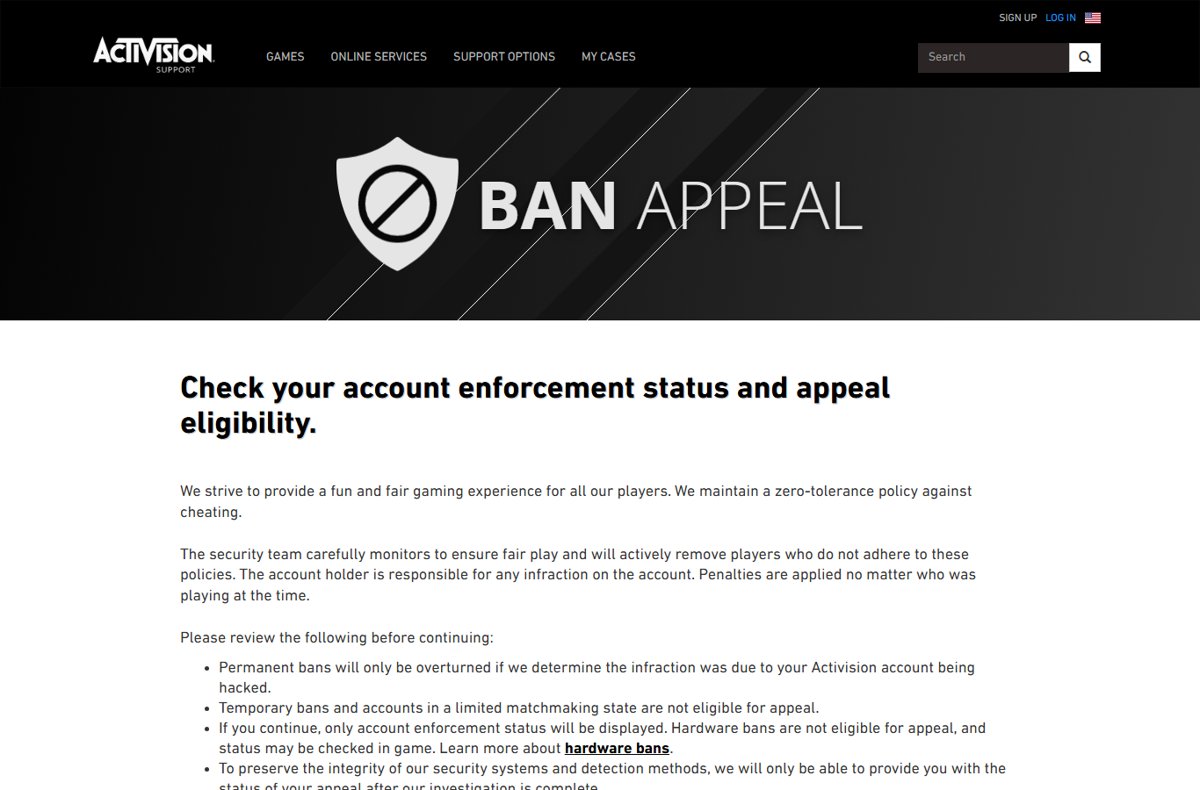
The fastest way to submit an Activision ban appeal
The official appeal lives on one page, and there is no separate ticket, email address or phone line for it. Activision says it will not respond to multiple submissions or to appeals sent through other channels.
- Open support.activision.com/ban-appeal in a browser.
- Read the notice, then select LOG IN TO CONTINUE and sign in with the Activision account that received the ban.
- Answer the account security questions about linked accounts and changes to your account details.
- Review the enforcement status the page shows for your account.
- If the ban is marked ELIGIBLE FOR APPEAL, write your explanation in the message box, keeping it under 1,000 characters.
- Submit the appeal once, then watch the email address on your Activision account for the response.
Appeals are reviewed by Activision's security team, and no outcome is guaranteed. Any website or seller that promises an unban for a fee is not part of this process.
Which route fits your ban
The ban appeal page covers only some penalties. Match your case to a row before you start, so you do not wait on a request Activision will not review.
| Your situation | Use this | Why |
|---|---|---|
| Permanent ban, and you believe someone else got into your account | Ban appeal page, and a Hacked Account Recovery Request if the security questions reveal a compromise | Activision overturns permanent bans only when the infraction was due to the account being hacked |
| Permanent ban, and you played on the account yourself | Ban appeal page, to confirm status and eligibility | You can check eligibility, but the page states the hacked-account condition plainly |
| Temporary ban | Wait for the ban to end | Temporary bans are not eligible for appeal |
| Account placed in limited matchmaking | No appeal route | Accounts in a limited matchmaking state are not eligible for appeal |
| Hardware ban on your console or PC | Check the status in game | Hardware bans are not shown on the appeal page and are not eligible for appeal |
| You spot linked accounts or detail changes you did not make | Hacked Account Recovery Request at support.activision.com/account-recovery | The recovery form is the route for compromised accounts, and it restores original progress when a hack is confirmed |
Understanding the Ban Policy
The Call of Duty Security and Enforcement Policy sets out the penalties, and it applies to Call of Duty titles from Modern Warfare (2019) onward. Active enforcements are tied to your Activision account and apply across every device linked to it.
Activision holds the account holder responsible for any infraction on the account, and applies penalties no matter who was playing at the time.
| Penalty | What Activision says it means | Can you appeal it? |
|---|---|---|
| Warning | An in-game warning issued instead of a penalty, depending on the infraction | Nothing to appeal |
| Temporary ban | Length varies with the severity of the infraction | No |
| Permanent ban | Described as lasting and final | Yes, but it is overturned only if the infraction was due to the account being hacked |
| Limited matchmaking | The account may be matched into lobbies with other accounts in a similar state | No |
| Ranked Play restrictions | Party members may also face Ranked Play restrictions while grouped with the player | Not listed as appealable on the ban appeal page |
| Hardware ban | Applies to the device, not the account | No, and it is not displayed on the appeal page |
Infractions named in the policy include boosting, circumventing security, glitching, griefing, offensive behavior, spoofing, unsupported peripheral devices and applications, and use of unauthorized software for cheating, modding or hacking. Extreme or repeated violations can lead to permanent suspension of all accounts and hardware bans.
Gathering Information Before Submitting an Appeal
The appeal form gives you 1,000 characters, so collect the facts first and write them down in order. A short, factual account is easier to review than a long complaint.
| Have ready | Why it matters | Where to find it |
|---|---|---|
| Sign-in details for the banned Activision account | The appeal page requires you to log in to continue | Your Activision account email and password |
| Access to the account's email inbox | Appeal responses arrive by email | The email address on your Activision profile |
| The ban notice or in-game message | Tells you whether the ban is temporary, permanent or on the hardware | The game's ban message or any email from Activision |
| A list of linked platform accounts | The security review asks whether any linked account is not yours | Your Activision account profile |
| Dates of any account changes you did not make | Unauthorized changes point to a hacked account, the only ground for overturning a permanent ban | Security or password-change emails in your inbox |
| The last game you played and when | The Hacked Account Recovery Request asks for it if you go that route | Your own play history and memory |
| Who else had access to the account | Penalties apply no matter who was playing | Family members or friends who used your console or PC |
The Appeal Process
This is the full walk-through of the ban appeal page, with the labels Activision uses on it. The page covers Call of Duty enforcement and links to the Call of Duty Security and Enforcement Policy.
- Go to support.activision.com/ban-appeal and read the list of conditions at the top of the page.
- Select LOG IN TO CONTINUE and sign in with the banned Activision account.
- In the account security review, answer whether there are any linked accounts you do not recognize, and whether any account details changed without you.
- If you answer yes to either question, stop and submit a Hacked Account Recovery Request instead of continuing the appeal.
- If everything on the account is yours, tick the acknowledgements and select Agree and Continue.
- Read the status the page returns: NO BAN DETECTED, TEMPORARY BAN or PERMANENT BAN, with ELIGIBLE FOR APPEAL or NOT ELIGIBLE FOR APPEAL.
- For an eligible permanent ban, write your explanation in the message box and keep it within 1,000 characters.
- Submit the appeal once and do not file it again through chat, social media or another form.
The form states that in most cases Activision responds by email within 8 hours. If the page shows NOT ELIGIBLE FOR APPEAL, there is no further step on that page.
Following Up on Your Appeal
To protect its detection methods, Activision only reports the status of an appeal after the investigation is complete. Following up means checking the right places, not sending a second request.
- Check the inbox of the email address on your Activision account, including the spam and junk folders.
- Return to support.activision.com/ban-appeal and sign in with the same account.
- Read the status message: WE'RE STILL INVESTIGATING YOUR BAN APPEAL REQUEST means the review is not finished.
- Treat YOUR BAN APPEAL HAS BEEN REVIEWED AND IS FINAL as the end of the process for that ban.
- If you also filed a Hacked Account Recovery Request, check MY CASES on the support site for that separate request.
Hacked Account Recovery Requests can take up to 2 days to process, according to the recovery form. If the account was not hacked, Activision closes the recovery request.
Tips for Increasing Your Chances of Success
No wording guarantees an unban, because the decision rests on what the security team finds in its investigation. These points keep a legitimate appeal clear and reviewable.
| Do this | Why |
|---|---|
| Be honest about who used the account | Penalties apply no matter who was playing, so shifting blame to a friend does not help |
| State the dates of any account changes you did not make | A hacked account is the only stated reason Activision overturns a permanent ban |
| Keep the message factual and under 1,000 characters | The form limits the message length |
| Stay professional | A calm, clear account is easier for a reviewer to follow |
| Mention only evidence you can describe in text | The appeal message is the space the form gives you to explain the case |
| Submit once, through the ban appeal page only | Activision does not respond to multiple submissions or appeals sent through other channels |
| Secure the account before you appeal | Change the password and review linked accounts so the problem does not repeat |
What to Do If Your Appeal Is Denied
Activision states that decisions made in the appeals process are final. There is no second-level appeal on the support site, so a new submission for the same ban will not be reviewed.
| Situation after the decision | What to do | Why |
|---|---|---|
| Appeal reviewed and marked final | Read the email response and accept the result for that ban | Decisions made as part of the appeals process are final |
| You now believe the account was hacked but did not say so | Submit a Hacked Account Recovery Request | The recovery form handles compromised accounts separately from appeals |
| The ban was temporary | Wait for it to expire | Temporary bans are not eligible for appeal |
| You want to keep playing | Follow the Security and Enforcement Policy on any account you use | Extreme or repeated violations can lead to suspension of all accounts and hardware bans |
| Someone offers to reverse the ban for a fee | Ignore the offer | Spoofing and attempts to circumvent security are listed infractions in the policy |
Fix problems with the Activision ban appeal page
These symptoms come from real Bing searches about the appeal site, sign-in and appeal status.
You cannot sign in to the ban appeal page
The page requires the Activision account that received the ban, and a compromised account may have changed details.
- Confirm you are on support.activision.com/ban-appeal and not a look-alike site.
- Sign in with the email address used on the banned Activision account.
- If the email or password was changed without you, submit a Hacked Account Recovery Request instead.
The page shows no ban even though you cannot play
The page displays account enforcement only, and hardware bans are not shown there.
- Note the exact message the game shows when you try to connect.
- Check the hardware ban status in game, as the appeal page instructs.
- Read the Hardware Bans section of the Call of Duty Security and Enforcement Policy.
The ban is marked NOT ELIGIBLE FOR APPEAL
Temporary bans, limited matchmaking and hardware bans cannot be appealed.
- Check whether the page lists the ban as TEMPORARY BAN or PERMANENT BAN.
- For a temporary ban, wait for it to end.
- If account details changed without your knowledge, use the Hacked Account Recovery Request.
The appeal status has not changed
Activision reports the status only after its investigation is complete.
- Check your spam and junk folders for an email from Activision.
- Sign in to the ban appeal page again and read the status message.
- Do not submit a second appeal, because Activision does not respond to multiple submissions.
Prevention Tips to Avoid Future Bans
Activision holds the account holder responsible for everything done on the account, so prevention covers both how you play and who can get in.
| Prevention tip | What the policy says |
|---|---|
| Familiarize yourself with game policies | Read the Call of Duty Security and Enforcement Policy; any breach of the license agreement, Terms of Use or Privacy Policy can also be penalized |
| Play fairly: no cheats, mods or exploits | Unauthorized software, boosting and glitching are listed infractions |
| Skip camo unlock tutorials and services | Anything that alters console or PC memory to acquire gear or items is considered cheating |
| Use supported controllers and apps only | Unsupported peripheral devices and applications used for cheating are an infraction |
| Do not hide your identity or hardware | Spoofing, including disguising your hardware devices, is an infraction |
| Protect your account | Use a unique password and two-factor authentication, and do not share the login, because penalties apply no matter who was playing |
| Keep chat and reports clean | Offensive behavior and malicious reporting are infractions, and can bring communication or reporting suspensions |
Frequently Asked Questions
What is the official Activision ban appeal website?
The official page is support.activision.com/ban-appeal on Activision Support. You sign in there to check your account enforcement status and appeal eligibility. Activision does not respond to appeals sent through other channels, so use only that page.
Can I submit a ticket or email Activision to appeal a ban?
No. The ban appeal page is the channel, and Activision states it will not respond to multiple submissions or appeals sent through other channels. The response to an appeal submitted on that page arrives by email.
What are valid reasons for an Activision ban appeal?
The one reason Activision states is a hacked account. Permanent bans are overturned only if the security team determines the infraction was due to your Activision account being hacked. Letting a friend play does not count, because penalties apply no matter who was playing.
Can I appeal a temporary ban from Activision?
No. Temporary bans are not eligible for appeal, and neither are accounts in a limited matchmaking state. Temporary bans vary in length depending on the severity of the infraction, so the practical option is to wait for it to end.
Can a hardware ban be appealed?
No. Activision's ban appeal page states that hardware bans are not eligible for appeal and are not displayed on the page. The policy says a hardware ban applies to the device rather than the account, and its status can be checked in game.
How long does an Activision ban appeal take?
The appeal form states that in most cases Activision responds by email within 8 hours. Activision reports the status only after its investigation is complete. A separate Hacked Account Recovery Request can take up to 2 days to process.
How do I check my Activision ban appeal status?
Sign in again at support.activision.com/ban-appeal and read the status message, and check the email on your Activision account. WE'RE STILL INVESTIGATING YOUR BAN APPEAL REQUEST means the review is ongoing; a reviewed-and-final message ends the process.
What happens if my Activision ban appeal is accepted?
Activision informs you by email once its investigation is complete. The appeal page does not publish what changes after an accepted appeal. For a confirmed hacked account, the recovery form says Activision works to restore your original progress, stats and content.
Can I appeal again after my Activision appeal is denied?
No. Activision states that decisions made as part of the appeals process are considered final, and it does not respond to multiple submissions. If you later find evidence of a hack, the Hacked Account Recovery Request is the separate route.
Do unban services work for Activision bans?
Avoid them. Only Activision's security team reviews appeals. Spoofing and circumventing security are listed infractions in the Call of Duty Security and Enforcement Policy, and extreme or repeated violations can lead to suspension of all accounts and hardware bans.
Bottom line
Sign in at support.activision.com/ban-appeal, confirm your ban is a permanent ban marked eligible, and submit one honest appeal under 1,000 characters; if your account was hacked, file a Hacked Account Recovery Request as well. Activision overturns permanent bans only when the infraction came from a hacked account, treats appeal decisions as final, and ignores duplicate or off-channel requests, so one accurate submission on the official page is the whole process.