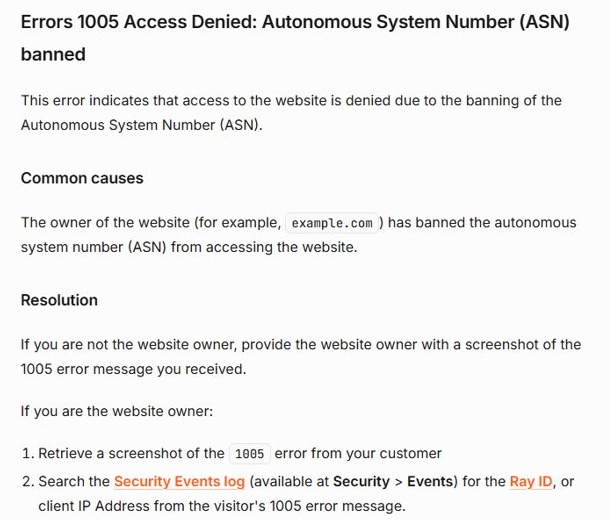
Error 1005 “Access Denied” means the website owner has used Cloudflare to ban the Autonomous System Number (ASN) of the network you are connecting from, so the fix is to reach the site from a different network or ask the owner to allow yours.
This guide covers the visitor fixes, what to send the site owner, the steps for site owners on Cloudflare, and which common tips do not affect a 1005 block.
Fix Cloudflare error 1005 access denied fast
An ASN identifies a whole network, such as your internet provider, a mobile carrier, a hosting company or a VPN service. A 1005 block applies to every address on that network, not just to you.
- Turn off your VPN or proxy if one is on, then reload the page.
- If no VPN was on, switch networks, for example from home Wi-Fi to mobile data, and reload.
- If the page still shows error 1005, take a screenshot of the full error page, including the Ray ID and the time.
- Send the screenshot to the website owner through their contact email or social account and ask them to allow your network.
What does error 1005 access denied mean?
Cloudflare shows several similar access-denied codes. The number tells you what the site owner blocked.
| Error code | What the site owner blocked | What helps a visitor |
|---|---|---|
| 1005 | Your network's Autonomous System Number (ASN) | A different network, or the owner allowing the ASN |
| 1006, 1007, 1008 or 1106 | Your IP address | A different IP address, or the owner removing the ban |
| 1009 | Your country or region | Only the owner can change it |
| 1010 | Your browser's signature | Contacting the site owner |
All of these return HTTP status 403 to the browser. The block is set on the website's side, so nothing on your PC caused it.
Turn on or off your VPN or proxy server
Many site owners ban the ASNs of VPN and hosting providers. Turning a VPN off moves you back to your home provider's ASN. If your home provider is the banned one, turning on a free VPN such as Cloudflare WARP moves you to another ASN.
- Disconnect your VPN app, or connect to a different VPN server, then reload the page.
- To check a Windows proxy, open Settings > Network & internet > Proxy.
- Under Manual proxy setup, select Set up next to Use a proxy server.
- Turn off Use a proxy server unless your workplace requires it, then select Save.
- Close and reopen the browser, then load the site again.
Fix your computer’s date and time settings
A wrong clock causes certificate errors rather than error 1005. Fix it if your clock is off, because a security warning page can hide the real error.
- Select Start > Settings > Time & language > Date & time.
- Turn on Set time automatically.
- Turn on Set time zone automatically, or pick your time zone manually.
- Reload the website.
Clear your web browser’s cache and cookies
Clearing site data does not change your ASN, so it does not lift a 1005 ban. It does rule out a stale cached copy of an old error page after the owner has unblocked you.
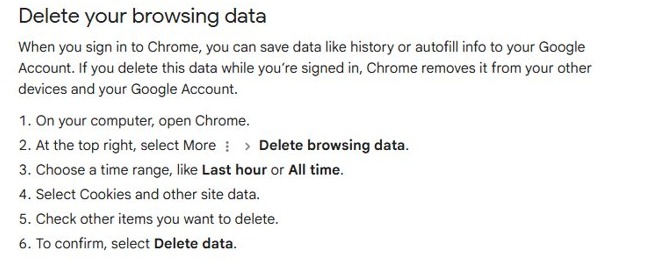
- Open Chrome and select More (three dots) at the top right.
- Select Delete browsing data.
- Choose a time range, such as All time.
- Select Cookies and other site data.
- Select Delete data, then reload the page.
Turn off your computer’s antivirus program and temporarily disable your computer’s firewall: do they fix 1005?
Your antivirus and Windows firewall run on your PC. Error 1005 is generated by Cloudflare on the website's side, after it reads which network your traffic comes from.
Keep your antivirus and firewall turned on; switching them off does not change your ASN and cannot remove a 1005 ban. Cloudflare's own documentation lists only one cause for error 1005, a banned ASN set by the site owner, so the fix is a different network or the owner's allow rule.
Switch to alternate DNS servers for error 1005
DNS turns a site name into an address. Changing DNS servers changes who answers that lookup, not the network your traffic leaves from.
| Change | Does it change your ASN? | Effect on error 1005 |
|---|---|---|
| Switch to alternate DNS servers | No | The block stays |
| Turn a VPN on or off | Yes | Can lift the block |
| Switch from Wi-Fi to mobile data | Yes | Can lift the block |
| Restart the router | No, same provider | The block usually stays |
If you still want to change DNS for other reasons, Windows sets it in Settings > Network & internet, under the network's IP assignment > Edit options, in the Preferred DNS and Alternate DNS boxes.
Fix error 1005 as a Cloudflare website owner
If visitors report error 1005 on your own site, Cloudflare's guidance is to find the event and allow the ASN.
- Ask the visitor for a screenshot of the 1005 error page.
- In the Cloudflare dashboard, open Security > Events.
- Search for the Ray ID or the visitor's client IP address from the screenshot.
- Convert the error's UTC timestamp to your local time zone when you search.
- Find the rule that blocked the request, then make sure the ASN is allowed under IP Access Rules.
Resolve your “access denied” issue and access your favorite sites
- Reload the website after each change and check the error number on the page.
- If the code changes from 1005 to 1006, 1007 or 1008, your network is now allowed but your IP address is banned.
- If the page loads normally, keep the network setup that worked for that site.
- If error 1005 returns on every network you try, wait for the site owner's reply, since only they can lift the ban.
Error 1005 access denied still showing
Error 1005 on every VPN server
The site owner has banned many VPN providers' ASNs.
- Disconnect the VPN completely.
- Load the site over your normal home or mobile connection.
- Contact the site owner if your normal connection is also blocked.
Error 1005 at work or school but not at home
Your organisation's network, or its proxy provider, sits in a banned ASN.
- Load the site on mobile data to confirm.
- Ask your IT team whether traffic passes through a proxy or security gateway.
- Send the site owner the Ray ID so they can review the block.
Error 1005 on one site only
The ban is that site's own Cloudflare rule.
- Take a screenshot showing the Ray ID and time.
- Send it to the site owner.
- Use the site's official app or another network until they reply.
Cloudflare error 1005 FAQ
What is error 1005 access denied?
Error 1005 is a Cloudflare error that means the website owner banned the Autonomous System Number (ASN) your connection comes from. An ASN identifies a whole network, such as an internet provider, VPN or hosting company.
Is error 1005 caused by my computer?
No. The block is set by the website owner in Cloudflare and applies to your network. Settings on your PC, such as antivirus, firewall or DNS, do not trigger or remove it.
Does a VPN fix error 1005?
It can. A VPN moves your traffic to a different network ASN. If the banned ASN belongs to your VPN provider, turning the VPN off fixes it instead.
Who can remove a 1005 block?
Only the website owner. They search Cloudflare's Security > Events log for your Ray ID, then allow your network's ASN under IP Access Rules.
What is the Ray ID on a Cloudflare error page?
The Ray ID is a unique identifier for your blocked request. The site owner uses it to find the exact event in the Cloudflare Security Events log, so include it when you report the error.
Will clearing cookies fix error 1005?
No. Cookies and cache do not identify your network, so clearing them leaves an ASN ban in place. Clear them only to remove a cached error page after the owner has unblocked you.