Contact Shein through its Customer Service Platform, which opens at us.shein.com/robot (or Contact Us in the site footer) once you sign in to your SHEIN account.
This guide covers the official website and app route, the email addresses Shein publishes for privacy and legal matters, the one phone number on a shein.com page, claim deadlines for missing or damaged orders, and how to spot fake support numbers.
Contacting Shein via the Official Website
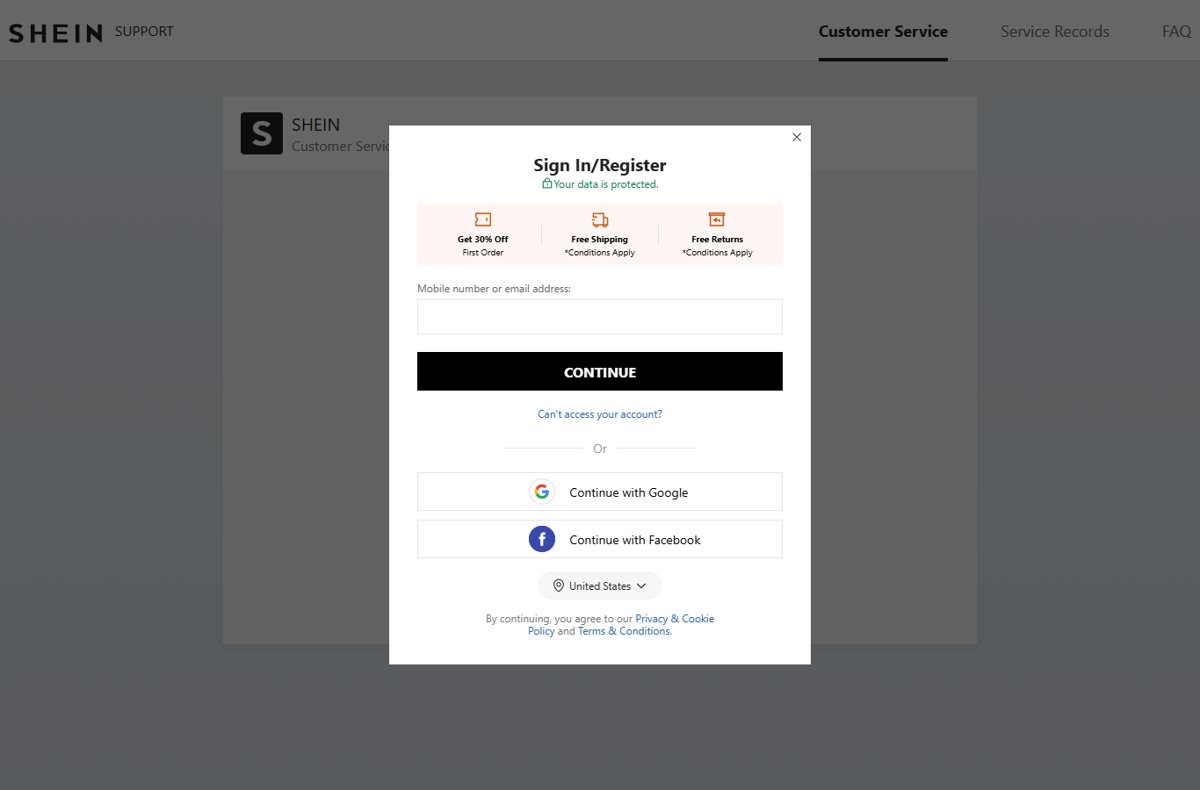
Shein's US and Canadian Terms both say customer service inquiries should be made through the Customer Service Platform. That platform is the page titled Customer Service | SHEIN, and it asks you to sign in first.
- Open us.shein.com/robot in your browser, or scroll to the site footer and select Contact Us under CUSTOMER CARE. Canadian shoppers use ca.shein.com/robot.
- Enter the Mobile number or email address on your SHEIN account and select CONTINUE, or use Continue with Google or Continue with Facebook if that is how you registered.
- Finish signing in. The page header shows three tabs: Customer Service, Service Records and FAQ.
- Stay on Customer Service and choose the order or topic your question is about.
- Describe the problem and attach photos if the item is damaged, wrong or missing.
- Return later to Service Records to read replies and follow up on the same case.
No account yet? The same page shows Sign in/Register, so you can create one and then open the platform. If you forgot your password, select Reset your password on that page.
Which Shein contact route fits your problem?
Shein splits contact by purpose. Order problems go to customer service; privacy and legal matters have their own published addresses.
| Your situation | Use this | Why |
|---|---|---|
| Missing, late, damaged or wrong order | Customer Service Platform (us.shein.com/robot) | Shein's Terms send all customer service inquiries there |
| Return an item or get a refund | My Orders > Order Details > Return Item | Returns are self-service; no agent needed to start one |
| Error in an order you just paid for | Customer Service Platform, immediately | The US Terms ask you to report order errors right after payment |
| Access, correct or delete your personal data | Privacy Center or [email protected] | Named in the US Privacy Policy for data requests |
| Legal notice, arbitration opt-out, takedown request | [email protected] (Canada: [email protected]) | Listed in the Terms for legal matters, not order help |
| Not a customer (seller, creator, rights holder) | Footer links Sell on SHEIN, Fashion Blogger, or the IP complaint portal | Each has its own intake instead of customer service |
Understanding Shein's Customer Service Approach
Shein runs support as an online, account-based service rather than a public call center. The table sums up what its own pages state.
| What Shein's pages say | What it means for you | Source page |
|---|---|---|
| Customer service inquiries should be made through the Customer Service Platform | Start every order problem online, signed in | SHEIN U.S. Terms of Use, section 16 |
| Communications include email, phone, social media, mail, instant chat and the customer service platform | Several channels exist, but the platform is the documented starting point | SHEIN Privacy Notice, customer service section |
| Chat logs are used to improve an AI-powered virtual assistant | Expect an automated assistant in the chat before or alongside human agents | SHEIN Privacy Notice |
| Customer Service, Service Records and FAQ tabs | Past cases stay in your account under Service Records | us.shein.com/robot |
| No customer service phone number appears on the US pages checked | Treat any "Shein hotline" found elsewhere with suspicion | US Terms, Privacy Notice, Return Policy, Shipping Info |
Contacting Shein via Mobile App
The SHEIN app uses the same account and the same Customer Service Platform as the website. Shein's Terms describe account actions as available "within the Site or App".
- Open the SHEIN app and sign in with the same email address or mobile number you shop with.
- Open your orders list and select the order that has the problem.
- Open the order details and use the support or customer service option shown there.
- Add your order number, a short description and photos, then send the request.
- Check replies later in the same account; they also appear under Service Records on the website.
Menu names in the app change between versions, so exact labels are not listed here. If you cannot find the option, use the website route above, since both lead to the same case history.
Live Chat Support
Live chat runs inside the Customer Service Platform, so there is no public chat link that works without signing in. Shein's Privacy Notice confirms it keeps "virtual chat logs" and uses them to train an AI-powered virtual assistant.
- Sign in and open us.shein.com/robot.
- Select the order the question concerns, so the chat has the order details from the start.
- Answer the assistant's first questions with the exact issue, such as "package marked delivered but not received".
- Ask for a human agent if the automated answers do not match your case.
- Keep the chat open until you receive a case outcome, then check Service Records for the written result.
Contact Shein via Email
Shein publishes email addresses for specific purposes, not a general customer service inbox. Use each one only for what the page names it for, or the request is likely to be redirected to the Customer Service Platform.
| Email address | Published purpose | Where Shein lists it |
|---|---|---|
| [email protected] | Access, correct or delete personal data; privacy complaints; Oregon third-party list requests | SHEIN Privacy Notice (US) |
| [email protected] | Questions about the Terms, dispute notices, arbitration opt-out, copyright or trademark takedown requests, text-program help | SHEIN U.S. Terms of Use |
| [email protected] | The same legal and Terms matters for Canadian users | SHEIN Canada Terms & Conditions |
Put the email address on your SHEIN account in any privacy request. Shein verifies requests by sending a link to that address and cannot act on an address that differs from the account.
Contacting Shein Through Social Media
Shein's Privacy Notice lists social media among its customer service channels, and the site footer links its accounts under FIND US ON. Reach those accounts from that footer, never from a search result or a direct message that contacts you first.
Use social media only to get attention on a case you already opened through the Customer Service Platform, and never post your order number, address, phone number or payment details publicly. The Terms route customer service to the platform, so a social post alone does not open a case, and impostor accounts that reply to complaints are a common way to steal account and card details.
Regional Customer Support and Phone Contacts
Each country site has its own address and legal entity. Only the Canadian Terms print a telephone number, and they still send customer service inquiries to the online platform.
| Region | Customer service route | Published phone or address | Stated purpose |
|---|---|---|---|
| United States | us.shein.com/robot | No customer service number. Privacy Office: 777 S. Alameda St., Suite 400, Los Angeles, CA 90021 | Postal contact for privacy questions |
| Canada | ca.shein.com/robot | 1-833-562-3668; 10 Canfield Drive, Markham, ON L3S 3J1 | General telephone number and business address in the Contact Us section of the Terms |
| United Kingdom and other countries | The Customer Service link in your country site's footer | Not verified here | Check your own country site's Terms or Contact Us page |
US Terms also print (800) 952-5210. That number belongs to the California Department of Consumer Affairs Complaint Assistance Unit, not to Shein; use it only to file a consumer complaint as a California resident.
How to return an item or get a refund without contacting support
Most items sold on SHEIN.com can be returned within 30 days of delivery, so a return rarely needs an agent. Bodysuits, lingerie, underwear, jewelry, cosmetics, free gifts, customized items and final-sale items cannot be returned.
- Sign in to your SHEIN account and go to My Orders.
- Find the order and click Order Details.
- Click Return Item, select the items, choose a reason and click Next Step.
- Select the Return Method, such as a Happy Returns or USPS drop-off with a QR code.
- Select the Refund Method, either the original payment method or SHEIN Wallet, and click Submit.
- Send the parcel only to the address on the Return Label or QR code, not to the sender address on your original package.
The first return from an order is free within the return window. A second return from the same order deducts a 6.99 USD shipping fee from the refund.
How to check that Shein received your request
A request you cannot find again is easy to lose. Confirm the case or return exists before you wait on it.
- Open us.shein.com/robot, sign in and select Service Records. Your case should appear with its latest reply.
- For a return, go to My Orders > Returns > Return & Refund Record > Details and confirm the items listed match what is in the parcel.
- Select Save the Label on that page to reopen the QR code or Return Label if you lost it.
- Track the refund against Shein's timeline: 5-7 days return shipping, 5-7 days receipt, 1 day warehouse check, then 1-10 business days at your bank.
Tips for Effective Communication with Shein Support
Most delays come from missed deadlines or missing proof. Shein's own pages set the time limits in the table.
| Problem | Contact Shein within | Have ready | Source |
|---|---|---|---|
| Package not arrived within the estimated time | 45 days of the payment date | Order number and tracking page | Shipping Info FAQ |
| Tracking says Delivered but no package, or missing or incorrect items | 45 days of the delivery date shown on tracking | Photos of the parcel and packing slip | Shipping Info FAQ |
| Faulty or damaged item | 90 days from the order date | Photos or video of the fault | Return Policy, Refunds |
| Loss or damage during delivery (US Terms) | 14 days after you received, or should have received, the goods | Photos and delivery details | US Terms of Use, 5.4 |
| Electronics dead on arrival or failed | Return postmarked within 30 days of delivery | Original packaging, manuals and parts | Return Policy, Electronics |
| Error in an order just paid for | Immediately after payment | Order number and the correct details | US Terms of Use |
Keep one case per problem, reply inside the same case instead of opening new ones, and save proof of mailing for any self-arranged return.
Troubleshooting Common Issues
Contacting Shein about missing items
Items from one order can ship in separate parcels, or an item was left out of the package.
- Open My Orders and check whether the order shows more than one package or tracking number.
- Photograph the opened parcel, its contents and the label.
- Open us.shein.com/robot, select the order and report the missing items within 45 days of the delivery date shown on tracking.
Package not delivered or tracking says Delivered
Carrier delays or a misdelivered parcel.
- Check the tracking page for the latest scan and estimated date.
- Ask neighbours and check your building's parcel area.
- Contact customer service within 45 days of payment for a late order, or 45 days of the delivered date for a missing parcel.
You cannot sign in to reach customer service
The platform requires a SHEIN account, and a forgotten password blocks it.
- Open us.shein.com/robot and select Reset your password.
- If you registered with Google or Facebook, use Continue with Google or Continue with Facebook instead.
- Select Can't access your account? on the sign-in form if neither works.
You cannot find a Shein phone number to call
Shein's US pages publish no customer service phone line; support is online.
- Use the Customer Service Platform instead of searching for a hotline.
- In Canada, use 1-833-562-3668 only as the general number printed in the Terms, and expect to be directed to the platform for order issues.
- Hang up on any "Shein support" number that asks for your password, a verification code, a gift card or remote access to your device.
A return was rejected or the refund is smaller than expected
The item failed the warehouse quality check, was worn or altered, or was not return-eligible.
- Open Return & Refund Record > Details to read the result.
- Compare the item against the Return Policy requirements for its category.
- Reply through the Customer Service Platform with your photos taken before shipping.
How to change or cancel a return request
- Go to My Orders and click Returns.
- Click Return & Refund Record, then Details on the return.
- Click Modify Return Items to add or remove items and give a reason, then submit.
- To stop the return entirely, click Cancel The Application on the same page.
Additional Resources & Assistance
These are the official pages that settle most questions before you contact anyone. Each one is on Shein's own domain.
- Read the Return Policy at us.shein.com/Return-Policy-a-281.html for eligibility, fees and label help.
- Read Shipping Info at us.shein.com/Shipping-Info-a-280.html for delivery windows and contact deadlines.
- Read the Terms of Use at us.shein.com/Terms-and-Conditions-a-399.html for claims, disputes and legal contacts.
- Use the Privacy Center link in the site footer for data requests or to unbind an account created with your email without permission.
- Reply HELP to any SHEIN text message for text-program help, or STOP to end those messages.
Conclusion
Sign in and use the Customer Service Platform at us.shein.com/robot for every order problem, and start returns yourself from My Orders. It is the only customer service route Shein's Terms name, it keeps a written record under Service Records, and it avoids the fake phone numbers and impostor accounts that target Shein shoppers.
Frequently Asked Questions
How do I contact Shein customer service?
Sign in to your SHEIN account and open the Customer Service Platform at us.shein.com/robot, or select Contact Us in the site footer. Shein's Terms state that customer service inquiries should be made there, and replies stay under Service Records.
How do I contact Shein by phone?
Shein's US pages list no customer service phone number, and support runs through the online platform. The Canadian Terms give 1-833-562-3668 as a general telephone number but still direct customer service inquiries to the Customer Service Platform.
Is there a Shein customer support number I can call?
Not on the US shein.com pages. Numbers advertised as a "Shein hotline" on other sites are unverified and are a common scam. Never give a caller your password, a one-time code, gift card details or remote access to your device.
How do I contact Shein by email?
Shein does not publish a general customer service email. It lists [email protected] for personal data requests, [email protected] for legal and Terms matters in the US, and [email protected] in Canada. Order problems go through the Customer Service Platform.
How do I contact Shein about missing items?
Open the order in My Orders, photograph the parcel and contents, then report it through the Customer Service Platform. Shein asks you to do this within 45 days of the delivery date shown on your tracking page.
How do I contact Shein about an order?
Sign in, open us.shein.com/robot and select the order the question is about, so the agent sees the order details. For returns you do not need an agent: use My Orders, Order Details and Return Item.
How do I contact Shein customer service in Canada?
Use ca.shein.com/robot after signing in. The Canadian Terms also list [email protected], the general number 1-833-562-3668 and the business address 10 Canfield Drive, Markham, ON L3S 3J1.
How do I contact Shein UK customer service?
Use the customer service link in the footer of the UK SHEIN site while signed in to your UK account. The UK site's own Terms and Contact Us page list its regional details, which this guide could not verify.
How can I contact Shein customer service quickly?
Sign in first, open the Customer Service Platform, and select the specific order before you describe the problem. Have photos and the order number ready, and stay within the 45-day or 90-day claim windows.
How do I contact Shein directly as a human?
Start in the Customer Service Platform chat, answer the assistant's first questions, and ask for a human agent if the answers do not fit your case. Shein's Privacy Notice confirms it uses an AI-powered virtual assistant in customer service.
How do I contact Shein if I am not a customer?
Use the channel for your purpose: [email protected] for data held about you, [email protected] for legal notices and takedown requests, and the Sell on SHEIN or Fashion Blogger links in the footer for business enquiries.