To call Zelle support, phone your bank or credit union at the number on the back of your debit card, because Zelle says its partner banks handle all enrollment and payment issues; Zelle's own line, 1-844-428-8542, is listed for fraud and scam questions.
Below: which number fits your problem, what to have ready, how to escalate, how to spot a fake "Zelle support" call, and fixes to try before you dial.
Step-by-Step Guide to Calling Zelle Support
Zelle runs inside more than 2,400 bank and credit union apps, and those banks handle your Zelle enrollment and payments. That is why the first call almost always goes to your bank, not to Zelle.
- Turn over your bank-issued debit card and find the customer service number printed on the back.
- Call that number yourself. Do not call back a number from a text, email or voicemail.
- Tell the agent the problem is with a Zelle payment, and give the date, amount and recipient.
- If the payment was unauthorized or you were tricked into sending it, say so plainly and ask the bank to open a fraud or scam claim.
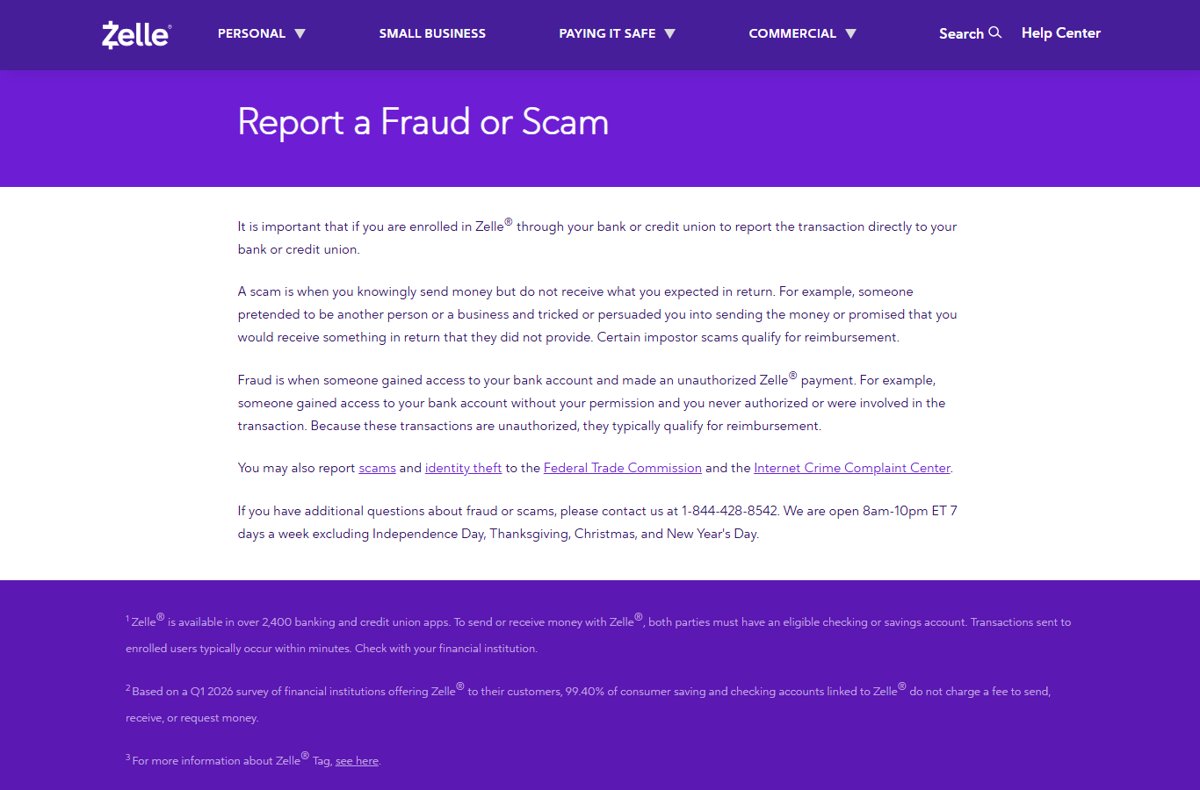
- For further fraud or scam questions after that, call Zelle at 1-844-428-8542, open 8am to 10pm ET, seven days a week.
- Write down the claim or reference number the bank gives you before you hang up.
Zelle's line is closed on Independence Day, Thanksgiving, Christmas and New Year's Day.
Understanding When to Contact Zelle Support
Zelle's contact page is direct about the split: partner banks and credit unions handle all enrollment and payment related issues for Zelle in their apps and online banking.
| Your problem | Who handles it | What Zelle's own pages say |
|---|---|---|
| Payment sent to the wrong person | Your bank or credit union | Zelle payments to an enrolled recipient cannot be reversed |
| Someone made a payment from your account without permission (fraud) | Your bank first | Unauthorized transactions typically qualify for reimbursement |
| You were tricked into paying an impostor (scam) | Your bank first, then Zelle for questions | Certain impostor scams qualify for reimbursement |
| Sending or receiving limits | Your bank or credit union | Limits are set by each bank; contact it directly |
| Changing the account Zelle pays into | Your bank or credit union | Check the bank's app FAQs or call its support team |
| Cancelling Zelle altogether | Your bank or credit union | Contact the bank to cancel the Zelle service |
| "Already enrolled" message and you do not know where | Zelle, 844-428-8542 | Zelle lists this number if you are unsure where you first enrolled |
| General fraud or scam questions | Zelle, 1-844-428-8542 | Open 8am-10pm ET, 7 days a week |
Methods to Contact Zelle Support
There are three real routes: your bank, Zelle's phone line and the online Help Center. Match your situation to a row.
| Your situation | Contact method | Why |
|---|---|---|
| You use Zelle in your bank's app or online banking | Through your bank or credit union: call the number on your debit card | Zelle says partner banks handle all enrollment and payment issues |
| You have a fraud or scam question after reporting it to your bank | Phone support: Zelle at 1-844-428-8542 | The number Zelle lists on its Report a Fraud or Scam page |
| You cannot tell which bank your email or phone number is enrolled with | Phone support: Zelle at 844-428-8542 | Zelle's enrollment FAQ gives this number for exactly that case |
| You have a how-to question (fees, timing, cancelling) | Online Help Center at zelle.com/help-center | Answers are published there, no call needed |
| You still open the old standalone Zelle app | Re-enroll through a participating bank | Zelle phased out sending and receiving in the standalone app |
Preparing Necessary Information Before Contacting Support
Gather these before you dial. Never read a password, PIN or one-time code aloud to anyone, including a caller who says they are from your bank.
| Have ready | Where to find it | Why the agent needs it |
|---|---|---|
| Payment date, amount and memo | Your bank app's Zelle activity list | Identifies the exact transaction |
| Recipient's email or U.S. mobile number | The same activity entry | Zelle payments are addressed by email or mobile number |
| The email or mobile number you enrolled | Your Zelle profile in the bank app | An email or number can be enrolled with only one bank account |
| Whether you approved the payment | Your own memory of events | Fraud (unauthorized) and scams (authorized) are handled differently |
| Screenshots of the scam messages or listing | Your phone or email | Supports a scam claim |
| Any earlier claim or reference number | Notes from a previous call | Lets the next agent pick up the case |
Verify Your Issue
The label on your problem decides the outcome, so settle it before calling.
- Open your bank's app and find the payment in its Zelle activity.
- Check whether it shows as sent, pending or cancelled.
- Ask yourself whether you approved the payment. If someone got into your account and paid without you, Zelle calls that fraud.
- If you approved it but were tricked, for example tickets that never arrived, Zelle calls that a scam.
- If it is neither, note the exact error message or behaviour, word for word.
Zelle says unauthorized payments typically qualify for reimbursement, while authorized scam payments often do not, apart from certain impostor scams.
Check the Zelle Help Center (Online Help Center)
- Go to zelle.com/help-center in a browser.
- Pick a topic tab: About Zelle, Enrolling with Zelle, Using Zelle, Your Zelle Profile, Using Zelle with a Small Business Account or Disbursements with Zelle.
- Select a question to expand its answer.
- Use Still have questions? at the bottom of a topic if the answer does not cover your case.
- If the answer tells you to contact your bank, call the number on your debit card.
The Help Center answers questions such as whether a payment can be reversed (no), whether Zelle has fees for consumers (typically none), and whether it works internationally.
Get Help Through Your Bank or Credit Union: Call the Number on Your Card
This is the route Zelle itself points to on its contact page and on its support page.
- Find the customer service number on the back of your debit card, in your banking app, or on the bank's official website.
- Call it from your own phone.
- Say the issue concerns a Zelle payment and give the date, amount and recipient.
- Ask what the bank will do next and how long it takes.
- Record the agent's name and the claim number.
Zelle adds that consumers with unauthorized payments may be able to assert rights under the Electronic Funds Transfer Act, known as "Reg E". Read your bank's account agreement for its terms.
Phone Support: Call Zelle Directly
Zelle does publish one phone number. Its pages give it for fraud and scam questions and for finding where your email or number is enrolled, not for everyday payment problems.
- Report the transaction to your bank or credit union first, as Zelle's Report a Fraud or Scam page instructs.
- Check the time: the line is open 8am to 10pm ET, seven days a week.
- Dial 1-844-428-8542.
- State whether your question is about fraud, a scam, or an "already enrolled" message.
- Keep your bank's claim number at hand if you have one.
The line is closed on Independence Day, Thanksgiving, Christmas and New Year's Day.
Use the Zelle Mobile App for Support
Zelle announced in October 2024 that it would phase out enrolling and sending money in its standalone app. Users had until March 2025 to re-enroll through a bank or credit union.
| Which app you open | What it does now | Where to get support |
|---|---|---|
| Your bank's or credit union's app with Zelle inside | Sends, receives and requests money | The bank's own support line or in-app help |
| The standalone Zelle-branded app | Consumer education about scams and fraud, plus a list of banks that offer Zelle | Re-enroll at a participating bank, then use that bank's support |
| Neither: your bank does not offer Zelle | No Zelle access | Search the list on zelle.com/get-started or ask your bank |
Escalate if Necessary
Escalate only after your bank has your report and a claim number.
- Call your bank again, quote the claim number, and ask for a status update or a supervisor.
- Call Zelle at 1-844-428-8542 with any further fraud or scam questions.
- Report the scam or identity theft to the Federal Trade Commission through FTC.gov.
- Report scams to the FBI's Internet Crime Complaint Center at ic3.gov.
- Look up your local state consumer protection office through USA.gov, which Zelle lists as a resource.
Alternatives to Phone Support: Chat and Email Support Options
Zelle's contact and support pages list no live chat and no support email address. What they do offer is below.
| Option | What exists | Use it for |
|---|---|---|
| In-app chat | Zelle lists none; your bank's app may have its own chat or messaging | Payment problems, through your bank |
| Email to Zelle | No support address is published | Nothing; do not send account details to any address claiming to be Zelle |
| Emails from Zelle | Genuine ones come only from the @zellepay.com domain | Checking whether an email is real |
| Phishing email forwarding | [email protected] (Anti-Phishing Working Group) | Forwarding a fake Zelle or bank email |
| Phishing text forwarding | Forward to SPAM (7726) | Reporting a fake text |
| Web form | The CONTACT SUPPORT button on zelle.com/contact-us | It leads to a page that routes you to your bank and to fraud reporting |
Common Issues Addressed by Zelle Support and How to Describe Your Problem
Open with one sentence that names the issue type. The agent routes the call on that sentence.
| Issue | Say it like this | Who resolves it |
|---|---|---|
| Unauthorized payment | "A Zelle payment of $X on [date] was sent from my account without my permission." | Your bank |
| Impostor scam | "Someone posing as [bank / utility / seller] got me to send $X by Zelle on [date]." | Your bank; Zelle for questions |
| Wrong recipient | "I sent $X to the wrong mobile number; the recipient is / is not enrolled." | Your bank |
| Enrollment blocked | "Zelle says my email or number is already enrolled, and I do not know where." | Zelle, 844-428-8542 |
| Pending payment | "My payment to [recipient] has been pending since [date]." | Your bank |
| Limit reached | "My Zelle payment was refused for going over a limit." | Your bank |
Give dates and amounts, not a story. Say clearly whether you authorized the payment, because that single fact decides whether it is treated as fraud or a scam.
Tips for a Successful Support Call and Effective Communication
| Tip | Why it matters |
|---|---|
| Call as soon as you notice the problem | Zelle says to report suspicious or unauthorized activity to your bank immediately |
| Dial the number yourself | Scammers spoof caller ID to look like your bank |
| Keep the claim number and agent name | The next agent can pick up the case without starting over |
| Never share a one-time passcode | A code lets a scammer enroll their own account with your email or number |
| Call Zelle within its hours | 8am-10pm ET, closed on four holidays |
Additional tips: turn on multifactor authentication, sign up for your bank's alerts about suspicious activity, and avoid public Wi-Fi for banking, as Zelle's safety tips advise.
What to Expect During the Support Process
| Stage | What happens |
|---|---|
| Classification | The agent records the payment as fraud (unauthorized) or a scam (authorized) |
| Claim | The bank opens a claim and gives you a reference number |
| Review | The bank applies its account agreement and any Reg E rights to unauthorized payments |
| Outcome | Unauthorized payments typically qualify for reimbursement; authorized scam payments often do not, apart from certain impostor scams |
| Cancellation | Possible only if the recipient has not yet enrolled with Zelle |
How to Check You Reached the Real Zelle or Your Bank
- Confirm you placed the call yourself, to a number from your debit card, banking app or bank website.
- For Zelle, confirm the number matches 1-844-428-8542 as printed on zelle.com/support/report-scam.
- Confirm the agent did not ask you to send money to yourself or to any account.
- Confirm the agent did not ask for a one-time passcode, PIN or password.
- For emails, confirm the sender ends in @zellepay.com or your bank's own domain.
If any check fails, hang up and call your bank at the number on your card.
How to Spot a Fake Zelle Support Call
Searching for a Zelle phone number is exactly when impostors strike. Zelle describes the "pay yourself" scam: a text that looks like a bank fraud alert, then a call from a number that appears to be your bank.
| Red flag | What Zelle's pages say |
|---|---|
| Caller asks you to send money to yourself | "Your bank will never ask you to send money to yourself." |
| Caller asks you to send money to an email they provide, such as yournameZelleDispute | Your bank will not ask you to send money via Zelle to any account |
| Caller asks for the security code your bank just texted | With that one-time passcode a scammer can enroll their own bank account with your email or phone number |
| Caller ID shows your bank | Scammers can spoof calls; hang up and call the number on your debit card |
| Email from a Gmail, Yahoo or AOL address | Zelle only uses the @zellepay.com domain |
| Unexpected urgent request | Phishing messages often demand immediate action; slow down |
Zelle's advice is not to reply to texts or calls even if they seem to come from Zelle or your bank. Hang up and call your bank directly.
Troubleshooting Common Zelle Problems Before Contacting Support
These fixes come from Zelle's own FAQ. Each ends at the right phone number if it does not work.
Recipient says the money never arrived
Money reaches enrolled recipients within minutes, but an unenrolled recipient must enroll first.
- Check the payment status in your bank app's Zelle activity.
- Ask the recipient whether they have enrolled with Zelle.
- Tell a new recipient to follow the enrollment notification; Zelle gives them 14 days.
- If it stays pending beyond that, call your bank.
Check Your Bank Account Details
Money lands in an account you did not expect
Your email or number is enrolled to a different account than you think.
- Open your Zelle profile in the bank app and check which account is linked.
- Use the bank app's Zelle FAQs to change the account.
- If the app has no option, call your bank's support team to change accounts.
Zelle is missing from your banking app
Your bank or credit union does not offer Zelle.
- Search for your bank on zelle.com/get-started.
- If it is not listed, call your bank to ask.
- Use a participating bank's app instead if you need Zelle.
Verify Your Email or Phone Number
Enrollment says you are already enrolled
Your email or mobile number is enrolled with another bank or credit union.
- Remember that an email or U.S. mobile number can be enrolled with only one bank account.
- Re-enroll the same email or number at your new bank if you have moved banks.
- If you do not know where it was first enrolled, call Zelle at 844-428-8542.
Your U.S. mobile number will not enroll
Zelle rejects international numbers, landlines and 1-800 numbers, and numbers enrolled elsewhere.
- Confirm the number is a U.S. mobile number, not a landline.
- Confirm it does not begin with 1-800.
- Enroll with your email address instead, or call your bank.
Check for App or Software Issues
The standalone Zelle app will not send money
Zelle phased out sending and receiving in its standalone app; it now carries scam education and a bank list.
- Check whether your bank offers Zelle on zelle.com/get-started.
- Enroll through that bank's mobile app or online banking.
- Contact the bank's support team for any app errors.
You have no smartphone
Zelle does not require one if your bank offers it online.
- Sign in to your bank's online banking website.
- Find Zelle there to send and receive money.
- Call your bank if Zelle does not appear.
Review Transaction Status and Limits
Payment refused for exceeding a limit
Each bank or credit union sets its own Zelle sending and receiving limits.
- Check your bank's Zelle FAQs for its limits.
- Call your bank directly to confirm your limit.
- Send the payment again once it fits within the limit the bank confirms.
You want to cancel a payment
Only payments to recipients who have not yet enrolled can be cancelled.
- Open the payment in your bank app's Zelle activity.
- Cancel it if the option is offered.
- If the recipient is enrolled, the money cannot be cancelled; call your bank if it was fraud or a scam.
Ensure Proper Recipient Details
Money sent to the wrong person
A mistyped email or mobile number sends money to whoever enrolled it, and Zelle payments cannot be reversed.
- Try to cancel it if the recipient has not enrolled yet.
- If it was delivered, call your bank and explain the error.
- Before future payments, confirm the recipient's email or U.S. mobile number with them directly.
- Pay only people you know and trust; Zelle does not offer purchase protection.
Additional Support Resources
| Resource | Address | Use it for |
|---|---|---|
| Zelle Help Center | zelle.com/help-center | Fees, timing, cancelling, enrollment |
| Report a Fraud or Scam | zelle.com/support/report-scam | Zelle's fraud versus scam definitions and phone number |
| Understanding Fraud & Scams | zelle.com/understanding-fraud-scams | Whether you can get your money back |
| Video Center | zelle.com/video-center | Short videos on pay yourself, phishing, rental and ticket scams |
| Federal Trade Commission | FTC.gov | Reporting scams and identity theft |
| Internet Crime Complaint Center | ic3.gov | Reporting scams to the FBI |
FAQs About Zelle Support Communications
How can I contact Zelle support?
Contact your bank or credit union first, at the number on the back of your debit card, because Zelle says partner banks handle all enrollment and payment issues. For fraud or scam questions, Zelle's own line is 1-844-428-8542, open 8am to 10pm ET every day.
What is the phone number for Zelle support?
Zelle lists 1-844-428-8542 on its Report a Fraud or Scam page for fraud and scam questions, and on its enrollment FAQ for finding where your email or number is enrolled. For payment problems, call your bank's number on your debit card.
How do I contact Zelle by phone?
Dial 1-844-428-8542 between 8am and 10pm ET, seven days a week. The line is closed on Independence Day, Thanksgiving, Christmas and New Year's Day. Report the transaction to your bank or credit union first, as Zelle instructs.
How do I get help through my bank?
Call the customer service number on the back of your bank-issued debit card, in your banking app, or on the bank's official website. Say the issue concerns a Zelle payment and give the date, amount and recipient. Ask for a claim number.
Where do I call about a Zelle payment problem?
Call your bank or credit union, not Zelle. Payments made in a bank's app or online banking are handled by that bank, including wrong recipients, pending payments, limits and changes to the linked account.
Can I contact Zelle directly?
Yes, by phone at 1-844-428-8542 for fraud and scam questions, from 8am to 10pm ET. Zelle publishes no support email and no live chat. Its contact page sends everything else to your bank or credit union.
How do I use Zelle with a phone number?
Enroll your U.S. mobile number in your bank's app, then send money by entering the recipient's U.S. mobile number or email, the amount and a memo, and confirming. International numbers, landlines and 1-800 numbers cannot be enrolled.
Does Zelle work with a phone number?
Yes. Zelle payments are addressed to an email address or U.S. mobile number, and each email or number can be enrolled with only one bank account. The recipient's bank deposits the money once they are enrolled.
Does Current support Zelle?
Search for the bank or app on Zelle's Get Started page at zelle.com/get-started, which searches the banks and credit unions that offer Zelle in over 2,400 banking apps. If it is not listed, ask its customer support directly before trying to enroll.
Are there any additional support resources?
Yes. Zelle's Help Center, its Report a Fraud or Scam page and its Video Center cover common questions and scams. Zelle also points to the Federal Trade Commission and the FBI's Internet Crime Complaint Center for reporting scams.
Will Zelle or my bank ever ask me to send money to myself?
No. Zelle's pay yourself scam page states that your bank will never ask you to send money to yourself, and will not ask you to send money via Zelle to any account. Any caller who asks is a scammer; hang up.
Bottom Line
Call your bank or credit union at the number on your debit card for any Zelle payment problem, and call Zelle at 1-844-428-8542 only for fraud or scam questions or to find where you are enrolled. Zelle's contact page states that partner banks handle all enrollment and payment issues, and only the bank can open a claim on your account.