Techdows

Windows how-to guides, fixes and software downloads

  • Home
  • Settings and hardware

    • Printers
    • Sound and microphone
    • Wi-Fi and network
    • Bluetooth
    • Display and monitors
    • Drivers
    • Keyboard shortcuts and symbols

    Using Windows

    • File Explorer
    • Storage and disk space
    • Taskbar, Start and desktop
    • Apps and default programs
    • Accounts and sign-in
    • Copilot in Windows
    • Command Prompt and PowerShell

    Updates and fixes

    • Windows Update
    • Windows 11 26H2
    • Error codes and BSOD
    • Boot, BIOS and recovery
    • Security and Defender
    • Task Manager and performance
    • DLL and runtime errors

    Popular fixes

    • Get help in Windows 11
    • Connect a wireless printer
    • Re-pair Bluetooth earbuds for stereo sound
    • Cancel a stuck print job
    • Change default programs

    All Windows guides →

  • Browse by type

    • Web browsers
    • Office and productivity apps
    • PC games and launchers
    • Phone and media apps
    • Developer tools
    • Creative apps
    • CAD software
    • System utilities and drivers

    Popular downloads

    • GTA V for PC
    • YouTube app for PC
    • Google Meet for PC
    • Cisco Packet Tracer
    • TikTok for PC

    Windows tools

    • PC Health Check app
    • HEVC Video Extension
    • DirectX 12
    • Cinebench R23

    All download guides →

  • Browser guides

    • Microsoft Edge
    • Google Chrome
    • Firefox
    • Web browsers for PC

    Microsoft Edge

    • Fix WebView2 using too much memory
    • Internet Explorer mode in Edge
    • Manage Edge favorites
    • Set or remove Edge as default

    Chrome and Firefox

    • Make Chrome the default browser
    • Restore closed tabs
    • Change the default web browser

    All browser guides →

  • Office guides

    • Outlook
    • Excel
    • Word and PowerPoint
    • OneDrive
    • Install Microsoft 365

    Meetings and other tools

    • Teams, Zoom and Google Meet
    • Google Docs and Sheets
    • PDF tools

    Office apps

    • Office product key
    • Office Deployment Tool
    • What is OneDrive?
    • Turn off OneDrive in Windows 11

    Outlook and Teams

    • Outlook inbox view changed
    • Schedule an email in Outlook
    • Outlook dark mode
    • Teams breakout rooms

    All Office and productivity guides →

  • PHP security

    • PHP2Shell patch download
    • PHP critical RCE security update
    • CVE-2026-109618 fix
    • CVE-2026-109619 explained
    • Mitigations if you can't update

    Update PHP

    • Update PHP to the latest version
    • Check your PHP version
    • Update PHP on Ubuntu and Debian
    • Restart PHP-FPM

    Hosting and local servers

    • Update PHP in XAMPP
    • Change PHP version in cPanel
    • Update PHP in Laragon and WampServer
    • Update PHP Docker images
    • WordPress PHP version check

    PHP downloads

    • PHP 8.5.12 download
    • PHP 8.4.27 download
    • PHP 8.3.36 and 8.2.35 download
    • Download PHP for Windows

    PHP2Shell by platform

    • PHP 8.3 fix on Ubuntu 24.04
    • PHP 8.1 fix on Ubuntu 22.04
    • PHP 8.2 and 8.4 fix on Debian
    • Update PHP on IIS
    • Cloudflare PHP2Shell WAF rule

    All PHP guides →

  • Sections

    • Gaming
    • Apple
    • Android
    • Apps and services
    • Developer and IT

    Apple

    • iPhone tips and fixes
    • Reset and restore iPhone
    • iPad
    • Mac and macOS
    • Apple Account and iCloud
    • Apple devices on Windows

    Apps, Android and gaming

    • Gmail and Google account
    • YouTube
    • Social media accounts
    • Streaming TV
    • Android and Samsung Galaxy
    • PC gaming and Xbox
    • Roblox and Minecraft on PC

    Developer and IT

    • WSL and developer setup
    • Virtual machines
    • Group Policy and Intune
    • Windows Server
    • Website error codes
  • News
Home›Vivaldi

Vivaldi

143 articles

Vivaldi browser guides and news from Techdows: release highlights, its deep customization options, tab and panel tips, and solutions to common Vivaldi problems. Written for users who want more control over their browser.

How to
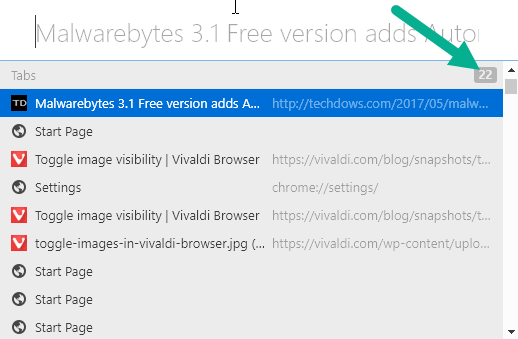
Vivaldi quick commands shows number of open tabs

Vivaldi’s Quick Commands display the number of tabs open in browser [Tip]

June 1, 2017 by Venkat Eswarlu Leave a Comment
Vivaldi quick commands shows number of open tabs

If you’re a keyboard junkie you’ll find Quick commands in Vivaldi browser more useful, you can open that by pressing F2 on Windows or … [Read more…]

Posted in: How to, Tips and Tricks, Vivaldi
News
Vivaldi browser toggle images

Vivaldi 1.10 lets you control display of images from View menu, offers a Shortcut

May 15, 2017 by Venkat Eswarlu Leave a Comment
Vivaldi browser toggle images

Vivaldi team is kept on adding new features and fixing bugs and improving the browser in Snapshot version 1.10. Till now Vivaldi 1.10 has … [Read more…]

Posted in: News, Vivaldi
News
Customize Vivaldi new tab page extensions

You can now Customize Vivaldi New Tab Page with Extensions

May 9, 2017 by Venkat Eswarlu Leave a Comment
Customize Vivaldi new tab page extensions

Vivaldi has added ‘Controlled by Extension’ option New Tab Page settings. Vivaldi by default, sets New Tab Page to Start Page, so whenever you open … [Read more…]

Posted in: News, Vivaldi
News
Downloads sorting

Vivaldi 1.10: Downloads Sorting and Set desktop wallpaper as Start Page background Image

May 5, 2017 by Venkat Eswarlu Leave a Comment
Downloads sorting

The recent snapshot version of Vivaldi 1.10 made devtools dockable and the stable release 1.9 came with notes sorting feature, today, the Vivaldi team … [Read more…]

Posted in: News, Vivaldi
News
Vivaldi 1.10 docked developer tools

Vivaldi 1.10 docks Developer Tools to main window

April 28, 2017 by Venkat Eswarlu 1 Comment
Vivaldi 1.10 docked developer tools

After Vivaldi 1.9 release with Ecosia search engine, Vivaldi team has released first snapshot of Vivaldi 1.10 for Windows, Mac and Linux platforms and the most … [Read more…]

Posted in: News, Vivaldi
News
Vivaldi 1.9 with Ecosia search engine

Vivaldi 1.9 Released, Adds Tree-Planting Search Engine Ecosia

April 27, 2017 by Venkat Eswarlu 2 Comments
Vivaldi 1.9 with Ecosia search engine

Vivaldi 1.9 stable version based on Chromium 58 is out for Windows, Mac and Linux platforms, and available with inclusion of a new Search … [Read more…]

Posted in: News, Vivaldi
Tips and Tricks
Disable Vivaldi tab notifications

Vivaldi : disable Tab Notifications

April 22, 2017 by Venkat Eswarlu Leave a Comment
Disable Vivaldi tab notifications

The social sites do show unread message notifications in their page titles, if you’ve many regular tabs or pinned tabs open for such sites, … [Read more…]
Posted in: Tips and Tricks, Vivaldi
Tips and Tricks
Vivaldi dim hibernated tabs

Vivaldi : Dim Hibernated tabs

April 11, 2017 by Venkat Eswarlu Leave a Comment
Vivaldi dim hibernated tabs

If you’ve a lot of tabs open in Vivaldi browser, the browser allows to save more resources by allowing to hibernate background tabs. To … [Read more…]

Posted in: Tips and Tricks, Vivaldi
News
Move Vivaldi extension icons

Vivaldi 1.9 : Rearrange Extension Icons Order on toolbar

April 7, 2017 by Venkat Eswarlu 1 Comment
Move Vivaldi extension icons

Vivaldi 1.7 has added the ability to hide or show all extension icons with a single click (Chrome browser lacks this, as it lets … [Read more…]

Posted in: News, Vivaldi
How to
Vivaldi update notification

How to turn off Vivaldi browser’s Auto Updates?

April 4, 2017 by Venkat Eswarlu Leave a Comment
Vivaldi update notification

Vivaldi browser has supported autoupdate feature from its initial version 1.0. Auto Update doesn’t mean, much like Chrome, Vivaldi will update itself automatically, it’s not. … [Read more…]

Posted in: How to, Tips and Tricks, Vivaldi
How to
Vivaldi web browser internal PDF Viewer

Vivaldi 1.8 : How to Manage Plugins?

March 31, 2017 by Venkat Eswarlu Leave a Comment
Vivaldi web browser internal PDF Viewer

Vivaldi 1.8 stable has been released with a new history feature that shows your browsing patterns in calendar view and history panel, and advanced … [Read more…]

Posted in: How to, Tips and Tricks, Vivaldi
News
Vivaldi new history feature

Vivaldi 1.8 gets new History feature

March 3, 2017 by Venkat Eswarlu 1 Comment
Vivaldi new history feature

Latest Vivaldi 1.8.770.9 snapshot introduces new History feature. Yes! Vivaldi team has re-written the history feature which was available for some time behind about:experiments as … [Read more…]

Posted in: News, Vivaldi
« Previous 1 … 4 5 6 … 12 Next »

More from Techdows

Clipchamp projects on OneDrive - video editing timeline on a monitor
Clipchamp now saves projects to OneDrive: What Windows 11 users need to know
How to · 5 hours ago
USB Ethernet driver missing - USB-C hub with an Ethernet port
USB Ethernet driver missing? How to fix it
How to · 5 hours ago
Turn off an Android phone - Samsung Galaxy smartphone on a wooden surface
How to turn off an Android phone: Common methods for different devices
How to · 5 hours ago
Windows accessibility mouse pointer settings - hand on a computer mouse
Optimize Windows 10/11 accessibility: Text cursor, mouse pointer & Magnifier
How to · 5 hours ago
Google driving directions in words - Google Maps app icon on a phone
Getting Google driving directions in words: A step-by-step guide
How to · 4 hours ago
iCloud storage billing - iPhone on a wooden table
Can I pay for Apple iCloud storage yearly instead of monthly? How iCloud+ billing works
How to · 4 hours ago
Find and replace text in Notepad on Windows 11 - hands typing on a laptop keyboard
How to find and replace text in Notepad on Windows 11
How to · 4 hours ago
Explorer.exe application error on Windows - the word error on a plain background
Fix Explorer.exe application error on Windows 11/10
How to · 4 hours ago

© 2009–2026 Techdows · About · Contact · Privacy Policy

Copyright © 2026 Techdows.

Techdows WordPress Theme by Techdows