To sign in to Apple TV on a smart TV or streaming device, open the Apple TV app and choose Sign In On Mobile Device, then scan the QR code with your phone or enter the code at link.apple.com.
This guide covers sign-in on Apple TV 4K, smart TVs, Roku and Fire TV, Windows, Mac, the web, iPhone and Android, plus what to do when Apple TV won't sign you in or keeps signing you out.

How to sign in to Apple TV on a smart TV
Every device uses the same Apple Account, the account formerly called Apple ID. Apple says you can still sign in with the same email address or phone number and password.
- Connect the TV to your Wi-Fi network.
- Go to the TV's home screen, open Search and find the Apple TV app, then install it if needed.
- Open the Apple TV app and follow the setup prompts until the sign-in screen appears.
- Select Sign In On Mobile Device.
- Point your phone's camera at the QR code on the TV, or go to
link.apple.comon your phone and enter the code shown on screen. - Sign in with your Apple Account on the phone and follow its prompts. The TV finishes signing in on its own.
- If your TV offers Sign in with Remote, you can choose it instead and type your Apple Account details with the TV remote.

Where to sign in to Apple TV account on each device
| Device | Where to sign in | Phone or QR option |
|---|---|---|
| Smart TV | Apple TV app setup screen | Sign In On Mobile Device with a QR code or link.apple.com |
| Roku, Fire TV and other streaming devices | Apple TV app sidebar > Settings > Sign in | Scan the QR code on screen |
| Apple TV 4K or Apple TV HD | Settings > Profiles and Accounts (older tvOS: Users and Accounts) | Use Another Apple Device with a nearby iPhone or iPad |
| Windows PC | Apple TV app > Sign In at the bottom of the sidebar | No |
| Mac | Apple TV app > Apple Account in the bottom-left corner | No |
| iPhone or iPad | Apple TV app account icon, then the onscreen prompts | No |
| Android phone or tablet | Apple TV app from the Play Store | No |
| Web browser | tv.apple.com > Sign In |
No |
How to sign in to Apple TV 4K with your Apple Account
During first setup, Apple TV 4K offers Set Up with iPhone, which copies your Apple Account and Wi-Fi settings from an unlocked iPhone held next to it. Use these steps to sign in after setup, or to add another person's account.
- Open Settings on Apple TV 4K.
- Go to Profiles and Accounts. On older tvOS versions this menu is called Users and Accounts.
- Select Add New Profile, or choose a suggested person if one appears.
- Choose Use Another Apple Device and follow the prompts on a nearby iPhone or iPad that is signed in to your Apple Account.
- Or choose Sign in Manually and enter your Apple Account email address or phone number and password.
- Enter the six-digit verification code if Apple sends one to your trusted device or phone number.
Each person can have a separate profile with their own watchlist and recommendations, which is how Apple TV handles multiple profiles in one home. If the remote stops responding while you type, pair the Apple TV remote again or use the iPhone option.
Sign in to Apple TV on Roku or Fire TV
Roku, Amazon Fire TV and other streaming devices use the Apple TV app's own settings if you skipped sign-in the first time you opened it.
- Open the Apple TV app on the streaming device.
- Press the back button or left button on your remote to open the sidebar.
- Go to Settings.
- Select Sign in.
- Enter your Apple Account email address or phone number and password, or scan the QR code on screen to sign in with your phone.
On Amazon Fire TV in the US you can subscribe to Apple TV but can't buy other content in the app. Buy or rent on another supported device, then watch on Fire TV with the same Apple Account.
How to sign in to Apple TV on my computer
On Windows, get the Apple TV app from the Microsoft Store first. The Apple TV app for Windows uses the same account as your TV.
- Open the Apple TV app on your Windows PC.
- Click Sign In at the bottom of the sidebar.
- Enter your Apple Account email address or phone number and password.
- Enter the six-digit verification code if one is sent to your trusted device or phone number.
- On a Mac, open the Apple TV app instead, click Apple Account in the bottom-left corner and follow the onscreen instructions.
Sign in to Apple TV on the web at tv.apple.com
Use the website on a computer without the app, or on a Chromebook. Apple may ask you to add or verify a credit card so the account holder has authorized viewing on the web.
- Go to
tv.apple.comin your web browser. - Choose Sign In.
- Sign in with your Apple Account email address or phone number and password.
- Add or verify a credit card if the site asks for one.
- Pick a show or movie to start watching.

Sign in to Apple TV app on iPhone, iPad and Android
- On iPhone or iPad, update to the latest software, then open the Apple TV app.
- Tap the account icon and follow the onscreen instructions to sign in with your Apple Account.
- On Android, open the Play Store, search for Apple TV and install the app.
- Open the app and sign in with your Apple Account when prompted.
- To manage the account later on Android, tap your account icon in the top-right corner and select Account Settings.

How to sign out of Apple TV
- On Apple TV 4K, open Settings > Profiles and Accounts, select the profile and choose Remove Profile. This signs that profile out.
- On a smart TV or streaming device, open the Apple TV app, go to Settings and choose the Reset option. This removes your personal information from the app.
- If you no longer have the device, remove it from your Apple Account device list instead.
- To free a place in your purchase device list, open the Apple TV app on Windows, click your name at the bottom of the sidebar, choose View My Account, scroll to Manage Devices and click Remove.
Resetting the Apple TV app on a smart TV that is also signed in to Apple Music returns the Apple Music app to its original settings as well.
How to tell if you're signed in to Apple TV
- On Windows, look at the bottom of the Apple TV app sidebar. Your name appears there instead of Sign In.
- On Apple TV 4K, open Settings > Profiles and Accounts. Your profile is listed with its Store account.
- On any device, play an Apple Original. If it plays instead of offering a subscription, the app is signed in to an account with an active Apple TV subscription.
- Check your Apple Account page on the web to see every device currently signed in to your account.
Why can't I sign into Apple TV
Apple TV app not signing in on the TV
A server outage, the network or an out-of-date app can stop sign-in from finishing.
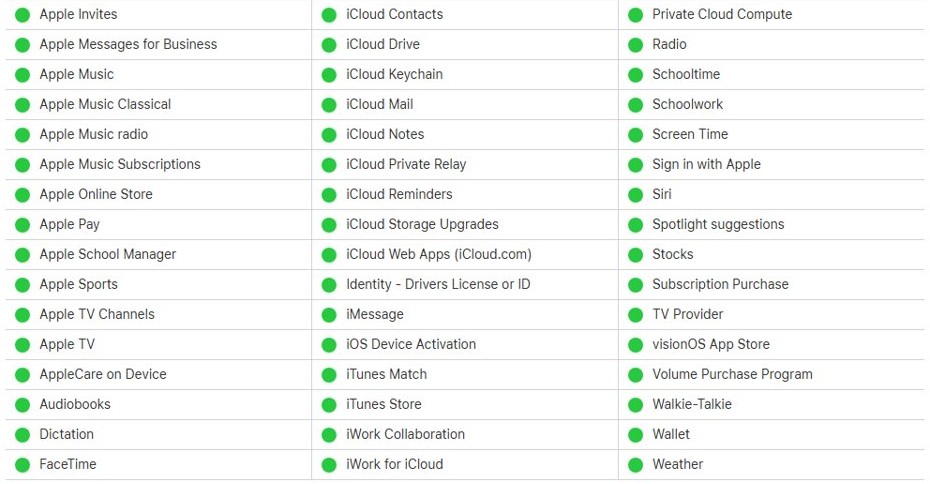
- Check Apple's system status page for an outage in your country or region.
- Connect to another network or try again later if there is no outage.
- Update the TV's software and the Apple TV app.
- Use Sign In On Mobile Device and finish sign-in on your phone.
"No iTunes Store account" or the terms won't accept
Your Apple Account isn't set up for purchases yet.
- Go to
tv.apple.comon a computer or phone and choose Sign In. - Sign in and follow the prompts to complete account setup.
- Return to the TV, sign in again and accept the terms and conditions.
Can't sign into Apple TV on computer
The web player needs an authorized payment method, or the Windows app is signed in to another account.
- On
tv.apple.com, add or verify a credit card if asked. - In the Windows app, check the name at the bottom of the sidebar and sign in with the account that holds the subscription.
- Remember you can't use two Apple Accounts for media purchases at the same time.
Forgot the Apple Account password
The password is needed on devices that can't use a phone to sign in.
- Choose Forgot password? on the sign-in screen and follow the prompts.
- Use a trusted iPhone, iPad or Mac to change the password if you have one.
- Without a trusted device, go to
iforgot.apple.comto reset the password or start account recovery.
Why does Apple TV keep signing me out
Apple doesn't publish a single cause for repeated sign-outs. Work through the account and app checks Apple documents, starting with the device list.
Apple TV signing out every night or after each restart
Resetting the app removes its saved personal information, so the next sign-in starts clean.
- Update the TV or streaming device software and the Apple TV app.
- In the Apple TV app, go to Settings and choose Reset.
- Sign in again with Sign In On Mobile Device.
Apple TV keeps signing out on Fire TV or a second device
Your account may have reached its limit of ten associated devices, no more than five of them computers.
- Open the Apple TV app on Windows or Mac and go to your account settings.
- Scroll to Manage Devices and remove devices you no longer use.
- If a device won't remove, sign out on that device and try again. Apple notes a device can take up to 90 days to move to a different Apple Account.
A profile disappears from Apple TV 4K
The profile was removed, which signs it out.
- Open Settings > Profiles and Accounts.
- Select Add New Profile and sign in again.
Apple TV sign in FAQ
How do I sign in to Apple TV with a QR code?
Open the Apple TV app on your smart TV or streaming device and choose Sign In On Mobile Device. Scan the QR code with your phone's camera, or go to link.apple.com and enter the code, then sign in on the phone.
How do I sign in to Apple TV on my computer?
On Windows, open the Apple TV app and click Sign In at the bottom of the sidebar. On a Mac, click Apple Account in the bottom-left corner of the app. Without the app, sign in at tv.apple.com in a web browser.
Can I sign in to Apple TV with my phone?
Yes. Smart TVs and streaming devices show a QR code or a link.apple.com code that you complete on your phone. On Apple TV 4K, choose Use Another Apple Device with a nearby iPhone or iPad signed in to your Apple Account.
Is signing in to Apple TV the same as Apple TV+?
Yes. Apple's support pages now call the subscription Apple TV, and it uses the same Apple Account as the app. Sign in with the account that pays for the subscription to watch Apple Originals on any device.
How do I sign in to Apple TV on Roku?
Open the Apple TV app on Roku, press the back or left button to open the sidebar, go to Settings and select Sign in. Enter your Apple Account details or scan the QR code with your phone.
Why do I have to keep signing in to Apple TV?
Apple doesn't name one cause. Update the app, reset it from its Settings and sign in again. Also remove unused devices under Manage Devices, because an account can have only ten associated devices for purchases.
How do I sign in to Apple TV through my TV or cable provider?
Some cable and satellite receivers include the Apple TV app, limited to Apple TV shows, movies and some sports. On Apple TV 4K, provider sign-in for other apps is under Settings > Profiles and Accounts > TV Provider > Sign In. Bundled subscription offers follow the provider's activation steps.
Do I need a separate account for Apple TV?
No. Apple says you need only one Apple Account for Apple TV app services. If you don't have one, create it on the Apple Account website, then sign in with it on every device.