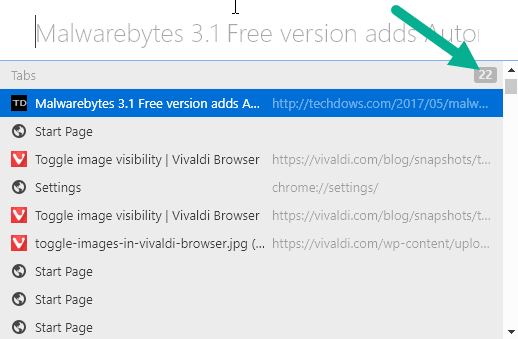
If you’re a keyboard junkie you’ll find Quick commands in Vivaldi browser more useful, you can open that by pressing F2 on Windows or by selecting ‘Quick commands’ in Tools menu. Vivaldi 1.10 has added ten more quick commands improvements and one of them is ‘show number of open tabs in the title’. Yes ! Quick commands now shows the number of tabs open in Vivaldi browser, have a look at the below screenshot.
Vivaldi 1.10 apart from above feature, offers docked devtools, sorting of downloads, lets you install new tab extensions and toggle images display in web page from view menu.
Please share this article