iTunes downloads from OneDrive because your Music folder, which holds the iTunes folder and iTunes Media by default, is backed up to OneDrive and its songs are online-only files that Windows fetches the moment iTunes reads them.
This guide shows how to keep those files on the PC, how to stop backing up the Music folder, how to move the iTunes library out of OneDrive, and what to do with the Windows download notification.
How to stop iTunes downloading from OneDrive
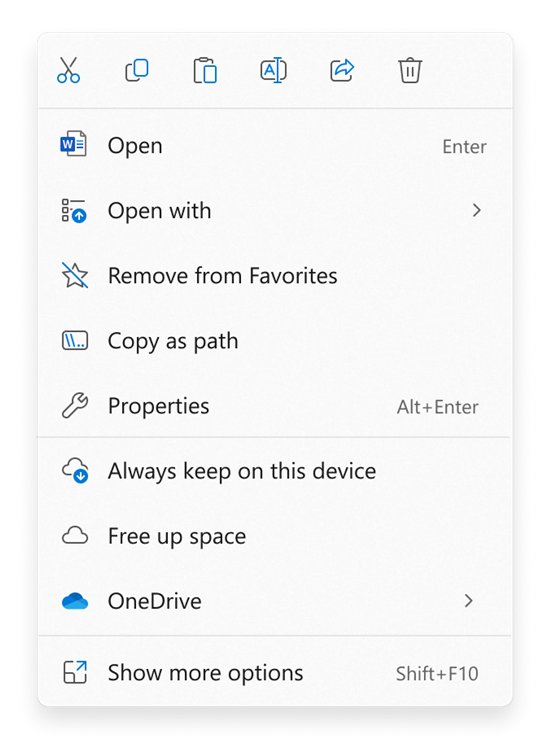
The quickest fix keeps the library where it is and tells OneDrive to store a full copy on the PC. iTunes then reads local files and nothing downloads when it opens.
- Quit iTunes.
- Open File Explorer and go to your OneDrive folder, then Music.
- Right-click the iTunes folder.
- Select Always keep on this device.
- Wait until the folder shows the green circle with the white check mark.
- Open iTunes again. It now reads the songs from the PC instead of OneDrive.
This uses disk space for the whole library, and new files added to that folder also download as always available files. If you would rather not have the library in OneDrive at all, use the folder backup or move method below.
Why is iTunes downloading from OneDrive?
Two OneDrive features combine to produce the notification. Neither is an iTunes setting.
| What is happening | Where it comes from | Effect on iTunes |
|---|---|---|
| The Music folder is in OneDrive | OneDrive folder backup of Desktop, Documents, Music, Pictures and Videos | The default iTunes location, Music\iTunes\iTunes Media, now sits inside OneDrive |
| Songs are online-only | Files On-Demand, on by default from OneDrive build 23.066 | Each song shows a blue cloud and takes no space until something opens it |
| Windows fetches files for apps | Automatic file downloads in Windows | When iTunes reads or plays a song, Windows downloads it and shows a notification naming the app |
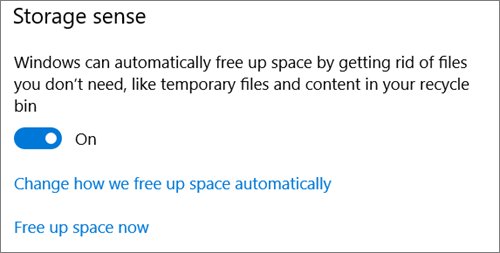
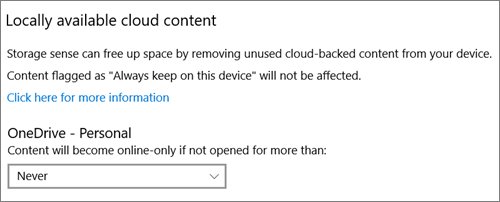
| Files go back to online-only | Storage Sense with OneDrive | Songs you have not used become online-only again, so the downloads repeat later |
OneDrive also warns that syncing a Music folder with playlist files can stop the content in your Playlists folder from working, so playlist problems often appear at the same time.
Should the iTunes library be on OneDrive?
Pick the row that matches how you want the library stored.
| Your situation | Do this | Result |
|---|---|---|
| You want OneDrive as a backup and have the disk space | Always keep on this device on the iTunes folder | No more downloads, library still backed up |
| You do not want music in OneDrive | Stop backing up the Music folder and keep files on the PC | Library returns to the local Music folder |
| You want the library on another drive | Change the iTunes Media folder location and consolidate | New and existing files live outside OneDrive |
| Downloads are rare and expected | Leave it and dismiss the notification | Songs download only when you play them |
| You never want iTunes fetching cloud files | Block iTunes from the download notification | iTunes stops downloading online-only files, but songs may not play |
How to stop OneDrive backing up the Music folder
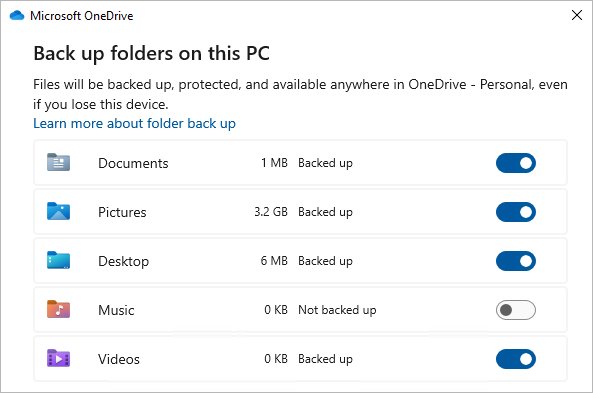
Turning off folder backup for Music takes the iTunes folder out of OneDrive. Choose to keep the files on the PC so iTunes still finds them.
- Quit iTunes so no library file is open.
- Select the OneDrive cloud icon in the notification area, select Help & Settings, then Settings.
- Go to the Sync and backup tab and select Manage backup.
- Turn off the toggle for Music.
- Choose Keep the files only on my PC.
- Open iTunes and play a song to check the library loads.
If OneDrive says "Some files couldn't be moved. Download them first by changing their state to Always keep on this device", right-click the iTunes folder, select Always keep on this device, wait for it to finish, and try again.
How to move the iTunes library out of OneDrive
Use this when you want the library on another folder or drive. Apple recommends not renaming or rearranging the iTunes folder itself, so move it with these iTunes settings.
- In iTunes, choose Edit > Preferences, then click Advanced.
- Under iTunes Media folder location, click Change and select a folder outside OneDrive.
- Click OK to save the new location. New imports go there from now on.
- Choose File > Library > Organize Library, select Consolidate files and click OK.
- Wait for iTunes to copy the files. The originals stay where they were, and copies go to the new location.
- Delete the old copies from OneDrive only after the library plays from the new folder.
Consolidating reads every song, so online-only files download once during the copy. To go back to the default location later, open the same Advanced pane and click Reset.
Restoring a library on another PC needs the latest iTunes, so update iTunes on Windows before you copy the folder across.
How to block iTunes from downloading OneDrive files
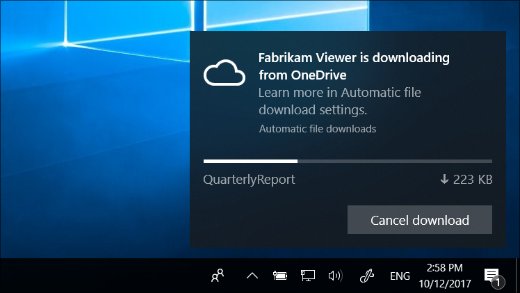
Windows shows which app is downloading, from where, how many files and the progress. You can stop the download from that notification.
- When the notification about iTunes downloading from OneDrive appears, select Cancel download.
- Select Cancel download again to stop the current download only.
- Or select Cancel download > Block app to stop iTunes from downloading online-only files in the future.
- To undo a block later, open the automatic file download settings in Windows and unblock the app.
Microsoft warns that blocking apps can make them unstable. iTunes cannot play an online-only song it is not allowed to download, so use this only if the library is elsewhere. To hide the alerts without blocking, turn off Automatic file downloads under Get notifications from these senders in notification settings.
How to tell if iTunes files are stored in OneDrive
Check the path of one song and its OneDrive status icon.
- In iTunes, choose Music from the pop-up menu at the top left, then click Library.
- Select a song and choose Edit > Song Info.
- Open the File pane and read the path next to Location. A path that contains OneDrive means the library is in OneDrive.
- Select the song and choose File > Show in Windows Explorer.
- Look at the status icon: a blue cloud means online-only, a green circle with a white check mark means always kept on the device.
OneDrive files not downloading or iTunes songs missing
Match what you see after changing OneDrive or iTunes settings.
Why can't I download files from OneDrive?
Online-only files need an internet connection, and a blocked app cannot fetch them.
- Check that the PC is online and OneDrive is signed in.
- Right-click the file or folder and select Always keep on this device.
- If you blocked iTunes earlier, unblock it in the automatic file download settings.
Songs disappeared from iTunes after stopping OneDrive backup
The files stayed only in OneDrive, or the iTunes folder moved and the library lost track of it.
- Find your iTunes folder, by default in the Music folder.
- Drag the iTunes folder onto the iTunes window to add the songs back.
- If you cannot find it, search Start for a song title or artist and drag the songs into iTunes.
- Check the Recycle Bin if search finds nothing.
iTunes playlists stopped working after OneDrive backup
Syncing a Music folder can break the links inside playlist files.
- Stop backing up the Music folder and keep the files on the PC.
- Drag the iTunes folder onto the iTunes window to restore playlists from the iTunes Library file.
- Keep a backup of the iTunes folder on an external drive before changing its location again.
Why does OneDrive download everything again?
Storage Sense turned unused songs back to online-only, so iTunes downloads them on the next scan.
- Mark the iTunes folder Always keep on this device. Storage Sense does not touch always available files.
- Or open Storage settings, select Configure Storage Sense or run it now, and change the Locally available cloud content period.
iTunes and OneDrive FAQ
Why is iTunes downloading from OneDrive?
Your Music folder, which holds the iTunes library by default, is backed up to OneDrive and its songs are online-only. When iTunes reads a song, Windows downloads it. Mark the iTunes folder Always keep on this device or stop backing up Music.
Why is everything downloading to OneDrive?
OneDrive folder backup moved standard folders such as Desktop, Documents and Music into OneDrive. Files you save there now sync to OneDrive. Open OneDrive Settings > Sync and backup > Manage backup to see and change which folders are included.
Why are my files going to OneDrive?
Folder backup is on for the folder you save into. Turn off that folder's toggle in Manage backup and choose whether to keep the files only on the PC or only in OneDrive.
Does OneDrive download all files?
No. With Files On-Demand, which is on by default, files stay online-only until you or an app opens them. Select Always keep on this device on a folder, or Download all files in Advanced settings, to keep everything local.
Can iTunes play music from OneDrive?
Yes, if the music sits in the OneDrive folder on your PC. iTunes plays it like a local file, and Windows downloads each online-only song when iTunes opens it, so you need an internet connection for songs not yet downloaded.
Where do OneDrive downloads go?
A downloaded OneDrive file stays in the same place in your OneDrive folder in File Explorer. Its icon changes from a blue cloud to locally available, and you can return it to online-only with Free up space.
Why don't I have the OneDrive app?
If the OneDrive cloud icon is missing from the notification area, the sync app is not running or not installed. You can turn on OneDrive in Windows 11 from Start, or install the OneDrive app again and sign in.
Why are OneDrive files on my computer?
You or an app opened them, or a folder is set to Always keep on this device. Online-only files take no space, but opened files stay local until you select Free up space or Storage Sense makes them online-only again.
Can I keep my iTunes library on OneDrive?
Yes, but mark the iTunes folder Always keep on this device so iTunes is not waiting on downloads. Apple's own backup advice is to copy the iTunes folder to an external drive with iTunes closed.