To open a 7z file on Windows 10, install the free 7-Zip app from 7-zip.org, right-click the .7z file, point to 7-Zip, and choose an extract command.
This guide covers the 7-Zip route, the 7z command line, Windows 11's built-in support, Mac and Linux, and what to do when an archive refuses to open.
How to open 7z files on Windows 10
File Explorer in Windows 10 has no built-in support for the 7z format, so a free archiver is the fastest route. 7-Zip is made by the author of the 7z format, needs no registration, and supports Windows 11 and Windows 10 back to Windows 2000.
- Open https://www.7-zip.org in your browser.
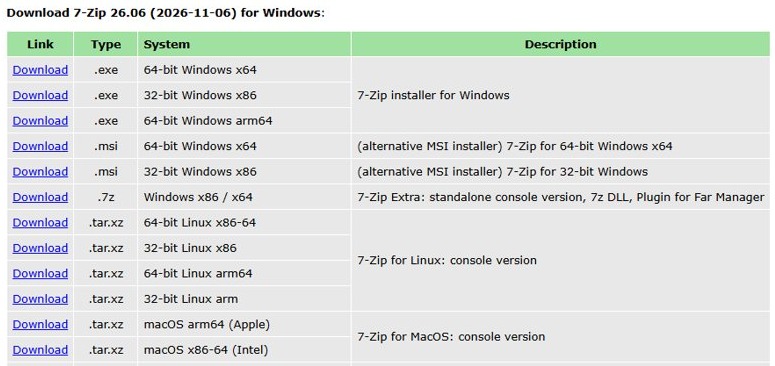
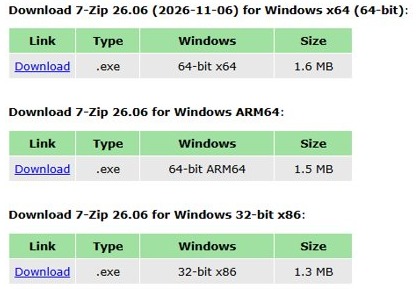
- Download the installer marked 64-bit Windows x64, unless your PC runs 32-bit or ARM64 Windows.
- Run the downloaded file and complete the installer.
- Open File Explorer and go to the folder that holds the .7z file.
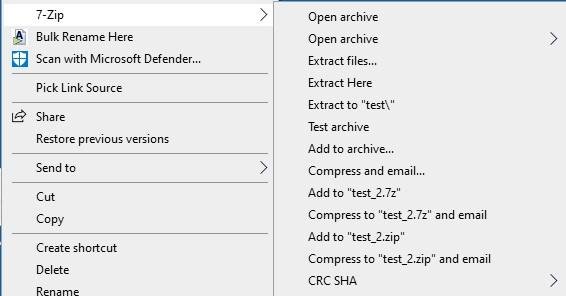
- Right-click the .7z file and point to 7-Zip in the menu.
- Choose an extract command, then confirm or change the destination folder.
- Open the new folder to use the extracted files.
Not sure which build to pick? Select Start > Settings > System > About and read System type under Device specifications. If you would rather skip the browser, you can install 7-Zip with one winget command.
App to open 7z files on Windows 10
The 7z site lists WinRAR, PowerArchiver, TUGZip and IZArc as other programs that read 7z archives. Most readers only need one of the rows below.
| Your situation | Use this | Why |
|---|---|---|
| Windows 10, one-off or regular use | 7-Zip | Free and open source, also handles ZIP, RAR, ISO, TAR and more |
| Windows 11 version 24H2 or later | File Explorer | Microsoft added 7z, RAR and TAR support, no install needed |
| Encrypted (password-protected) 7z on any Windows | 7-Zip | File Explorer in 24H2 does not handle encrypted archives |
| Scripts or a batch of archives | The 7z command from 7-Zip | Extracts with full paths to a folder you name |
| WinRAR already installed | WinRAR | Listed by 7-zip.org as able to open 7z archives |
How to open and extract 7z files in Windows
The right-click menu extracts everything at once. Use 7-Zip File Manager instead when you want to look inside the archive first or pull out just a few files.
- Right-click the .7z file in File Explorer.
- Select 7-Zip > Open archive to see its contents in 7-Zip File Manager.
- Select the files or folders you want to take out.
- Select Extract on the toolbar.
- Choose the destination folder and confirm.
- Open that folder in File Explorer to use the files.
You can also drag files from 7-Zip File Manager onto a File Explorer window. 7-Zip then unpacks them to a temporary folder first, so the Extract command is the cleaner choice for large archives.
Open 7z files with the 7z command in Command Prompt
7-Zip installs a console program, 7z.exe, in its program folder. The x command extracts files with their full folder paths, and -o sets the output folder, with no space after it.
"C:\Program Files\7-Zip\7z.exe" x "%USERPROFILE%\Downloads\archive.7z" -o"%USERPROFILE%\Downloads\archive"Extracts archive.7z from your Downloads folder into a new Downloads\archive folder, keeping the folder structure stored in the archive. Use e instead of x to drop every file into one folder, l to list the contents, and t to test the archive.
You should see: A new archive folder appears in Downloads, holding the files and subfolders from the archive.
Windows also ships a tar command that Microsoft documents as able to extract .7z files with tar -xf archive.7z. If tar on your Windows 10 PC returns an error for a 7z file, use 7-Zip instead.
Can Windows 11 open 7z files?
Yes, from version 24H2. Microsoft lists ZIP, RAR, 7z and TAR as supported archive formats, so a Windows 11 PC on 24H2 opens a .7z file like a normal folder. Windows 10 never received this feature.
| Windows version | Open a 7z file | Password-protected 7z |
|---|---|---|
| Windows 10 (all versions) | Install 7-Zip or another archiver | 7-Zip |
| Windows 11 before 24H2 | Install 7-Zip or another archiver | 7-Zip |
| Windows 11 version 24H2 or later | Double-click it, or right-click > Extract All… | 7-Zip or WinRAR, as Microsoft suggests |
| Windows 7 | 7-Zip still supports it | 7-Zip |
Test a 7z archive with 7-Zip before extracting
A test reads every file in the archive and checks it against its stored checksum without writing anything to disk. Run it on large downloads before you rely on the contents.
- Right-click the .7z file and select 7-Zip > Open archive.
- Select Test on the 7-Zip File Manager toolbar.
- Wait for the test window to finish.
- If it reports no errors, the archive is intact and safe to extract.
- If it reports Data Error or CRC Error, download the file again from its source.
How to make 7-Zip the default app for 7z files
After this change, double-clicking any .7z file opens it in 7-Zip File Manager.
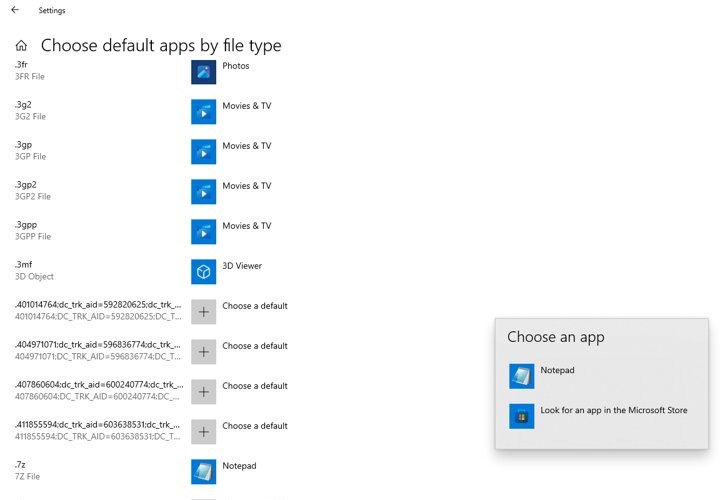
- Select Start > Settings > Apps > Default apps.
- In the file type search box, type .7z.
- Select the .7z result.
- Choose 7-Zip from the list of apps.
- Double-click a .7z file in File Explorer to check that it now opens in 7-Zip.
The same Settings page works on Windows 11. You can also set associations from inside 7-Zip File Manager, but on older Windows versions it must run as administrator to change them.
What is a 7z file?
A .7z file is an archive in the 7z format, which 7-Zip introduced. It bundles many files into one and usually compresses them harder than a ZIP file does.
| Feature | What the 7z format does |
|---|---|
| Compression | LZMA by default, plus LZMA2, PPMd, BZip2 or Copy (no compression) |
| Encryption | AES-256, with the key derived from your password |
| File size limit | Up to 16,000,000,000 GB per file |
| File names | Unicode, so non-English names survive |
| Solid mode | Compresses files as one stream for a smaller archive |
| Split archives | Large archives can be split into parts named .7z.001, .7z.002 and so on |
How to open and extract 7z files on Mac
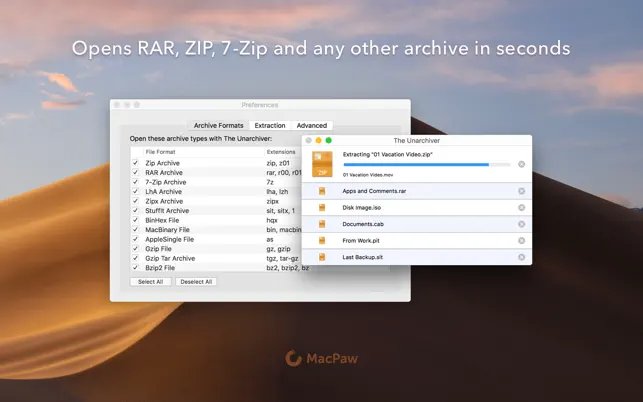
Archive Utility, the tool that opens ZIP files when you double-click them, is not documented by Apple as a 7z opener. The free Unarchiver app from the Mac App Store lists 7z among its formats and needs macOS 10.13 or later.
- Open the App Store on your Mac and search for The Unarchiver.
- Select Get, then install the app by MacPaw.
- In Finder, Control-click the .7z file.
- Choose Open With > The Unarchiver.
- Open the extracted folder that appears.
- To make it the default, select a .7z file, choose File > Get Info, pick The Unarchiver under Open with, and click Change All.
Terminal users can instead get the official 7-Zip console version for macOS, which 7-zip.org publishes for Apple silicon (arm64) and Intel (x86-64) Macs.
How to open and extract 7z files in Linux
On Ubuntu, the 7zip package provides the same 7z command as on Windows. Install it with sudo apt install 7zip, then extract from a terminal in the folder that holds the archive.
7z x archive.7z -oextractedExtracts archive.7z with full paths into a folder called extracted. Run 7z l archive.7z first to list the contents, or 7z t archive.7z to test it. Add -p followed by the password for an encrypted archive.
You should see: The extracted folder appears next to the archive, with the same folder structure the archive stores.
7-zip.org also publishes an official 7-Zip console build for 64-bit and 32-bit Linux on x86 and ARM, for distributions that do not package it.
7z file won't open on Windows 10
Windows asks which app to use, or File Explorer shows nothing inside
Windows 10 has no built-in 7z support, and no archiver is installed or associated.
- Install 7-Zip from 7-zip.org.
- Right-click the file and use the 7-Zip menu, or set 7-Zip as the default app for .7z.
"Can not open file 'name.7z' as archive"
7-Zip cannot read the header at the start or end of the file, usually because the download is incomplete or the file is not really a 7z archive.
- Compare the file size with the size listed on the download page.
- Download the file again, ideally with a different browser.
- Update 7-Zip to the latest version and try once more.
Data Error or CRC Error during extraction
Part of the archive is damaged, or the password typed was wrong.
- Check the password with the person who sent the file, then try again.
- Download a fresh copy of the archive.
- Select Test in 7-Zip File Manager to confirm the new copy is clean before extracting.
Tips for opening 7z files on Windows 10
| Tip | Why it matters |
|---|---|
| Download 7-Zip only from 7-zip.org | It is the developer's own site, with every current build and the source code |
| Pick the 64-bit x64 build on 64-bit Windows | 7-Zip's support page asks x64 users to run the x64 version |
| Keep 7-Zip updated | New versions add formats such as RAR5 and fix bugs |
| Scan extracted programs before running them | An archive is only as safe as the files inside it |
| Extract into a new folder | Stops hundreds of files spilling into Downloads or the desktop |
| Turn on file name extensions | In Windows 10 File Explorer, select View > Options > Change folder and search options, open the View tab and clear Hide extensions for known file types to see the .7z ending |
For compressing, splitting and password-protecting archives, the complete 7-Zip guide walks through each dialog. Other unusual formats, such as DMG files on a Windows PC, also open in 7-Zip.
Open 7z files on Windows FAQ
Can Windows open 7z files?
Windows 11 version 24H2 and later can open 7z files in File Explorer without extra software. Windows 10 and earlier Windows 11 versions cannot, so you need a free archiver such as 7-Zip.
Can I open 7z files without 7-Zip?
Yes. Windows 11 version 24H2 opens them natively, and 7-zip.org lists WinRAR, PowerArchiver, TUGZip and IZArc as other programs that read 7z. On a Mac, The Unarchiver from the App Store also opens them.
Is 7-Zip free to use?
Yes. 7-Zip is free, open-source software, mostly under the GNU LGPL license. You can use it on any computer, including in a company, and you do not need to register or pay.
How do I open 7z files on Windows 11 for free?
On Windows 11 version 24H2 or later, double-click the .7z file or right-click it and select Extract All. On older Windows 11 versions, or for password-protected archives, install the free 7-Zip app.
Are 7z files safe?
A 7z file is as safe as the files packed inside it. Extracting an archive does not run anything, but a program inside it can carry malware, so only open archives from sources you trust and scan programs before running them.
Can I create 7z files with 7-Zip?
Yes. 7-Zip packs and unpacks 7z, ZIP, TAR, GZIP, BZIP2, XZ and WIM. Right-click files, open the 7-Zip menu and choose the add to archive command, then pick 7z as the format and add an AES-256 password if needed.
What if I can't open my 7z file?
Test the archive in 7-Zip File Manager first. A Can not open file as archive message or a CRC error usually means the download is incomplete or damaged, so download it again and update 7-Zip to the latest version.
How do I open a 7z file on a PC without installing anything?
Only Windows 11 version 24H2 or later does this out of the box. Windows also includes a tar command that Microsoft documents as able to extract .7z files, but on Windows 10 7-Zip remains the reliable choice.
Can I open a 7z file on Windows 7?
Yes. 7-Zip still lists Windows 7, Vista and XP among its supported systems, so install it and use the right-click 7-Zip menu exactly as on Windows 10.
How do I open a password-protected 7z file?
Use 7-Zip, since Windows 11's built-in support does not handle encrypted archives. Start the extraction as normal and type the password when 7-Zip asks for it; a wrong password produces a data or CRC error.