Shockwave doesn't work with the latest Java update because current browsers no longer load plug-ins of that type, and Adobe has ended Shockwave Player, so no Java version can bring it back.
This guide covers what changed in each browser, how to play old Shockwave games, how to check and update Java separately, and how to remove the leftovers on Windows and Mac.
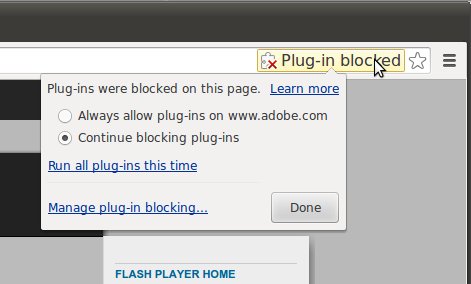
Shockwave games not working after a Java update
Java and Shockwave Player are separate products from separate companies. Oracle maintains Java, Adobe made Shockwave Player, and a Java update does not install or repair Adobe's software.
- Stop reinstalling or rolling back Java to repair Shockwave content. Neither one changes what your browser can load.
- Look on the game or site page for a version that runs without a plug-in, usually labeled HTML5 or WebGL.
- Ask the site owner or game publisher whether a current version exists if the page still asks for Shockwave.
- Uninstall any old copy of Shockwave Player left on the computer, because it no longer serves a purpose in a current browser.
- Keep Java installed only if a desktop program you use asks for it.
The timing can look like Java's fault. A browser update that removes plug-in support stops Java applets and Shockwave pages together, so both seem to break after the same round of updates.
Why Shockwave doesn't work in Chrome, Firefox and Safari
Shockwave Player and the Java applet plug-in both depended on the old Netscape Plugin API (NPAPI). Each major browser removed that support on its own schedule, and the removal is permanent.
| Browser | What changed | What it means for Shockwave and Java applets |
|---|---|---|
| Google Chrome | NPAPI turned off by default in Chrome 42 (April 2015), then removed in Chrome 45 (September 2015) | Neither plug-in can load, and no setting restores it |
| Mozilla Firefox | Firefox 52 (March 7, 2017) removed NPAPI plug-ins other than Flash | Mozilla names Java among the plug-ins no longer supported |
| Apple Safari | Safari 12 (September 17, 2018) removed legacy NPAPI plug-ins other than Adobe Flash | This is the Mac update that most often lines up with the problem |
| Internet Explorer 11 | The desktop app ended support on June 15, 2022, on certain versions of Windows 10 | Microsoft points users to Edge instead |
| Microsoft Edge | Internet Explorer mode exists for organizations that depend on legacy sites and apps | It is a business compatibility feature and does not restore Adobe's support |
Is Adobe Shockwave Player still supported?
No. Adobe has ended Shockwave Player. Adobe's old download address, get.adobe.com/shockwave, now redirects to its Shockwave end-of-life FAQ, so there is no current official installer to fetch. Treat any site offering a Shockwave installer as unofficial.
Adobe gives a direct warning about the same situation with Flash Player: unauthorized downloads are a common source of malware and viruses. Apply that warning to Shockwave installers too. Old plug-ins from download sites also receive no security fixes.
Adobe Shockwave vs Flash vs Java
Search results and browser messages often mix these three names. Each one has a different owner, status and next step.
| Product | Made by | Current status | What to do |
|---|---|---|---|
| Shockwave Player | Adobe | Ended; download address redirects to the end-of-life FAQ | Uninstall it and look for a modern version of the content |
| Flash Player | Adobe | Support ended December 31, 2020; content blocked from January 12, 2021 | Uninstall it, as Adobe strongly recommends |
| Java applets in a browser | Oracle (Java) | Blocked in practice by the browser plug-in removals above | Ask the site owner for a version that does not use an applet |
| Java for desktop programs | Oracle | Still offered on java.com, with updates | Keep it updated if a program needs it, or remove it if nothing does |
Adobe names HTML5, WebGL and WebAssembly as the open web standards that replace Flash content. Firefox 52 added WebAssembly in the same release that removed the older plug-ins.
How to play Shockwave games without the plug-in
There is no setting that makes an old Shockwave game run in a current browser. The game has to exist in another form, so the search is for the publisher's newer version.
- Note the exact game title and the publisher's name from the page that will not load.
- Search for that title on the publisher's own website.
- Check the Microsoft Store, the Mac App Store or your phone's app store for an official release.
- Open any browser version you find and confirm that it starts without a plug-in prompt.
- Contact the publisher if you paid for the game and cannot find a replacement.
Skip any page that tells you to install a plug-in or a special browser first. If the publisher never rebuilt the game, no safe official route remains.
How to check your Java version on Windows and Mac
Run this check when a desktop program reports a Java problem. It tells you what is installed, and it says nothing about Shockwave.
| Computer | Where to look | What you should see |
|---|---|---|
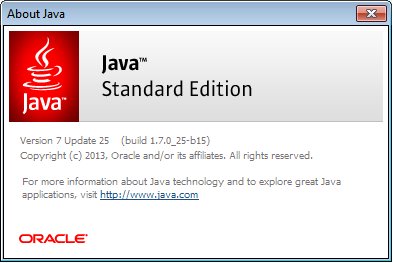
| Windows | Open Start, find the Java folder under All apps, then click About Java | A window with the installed Java version |
| Windows or Mac | Open the Java Control Panel, stay on the General tab and click About | A dialog with the version and update number |
| Mac, in Terminal | Run /Library/Internet\ Plug-Ins/JavaAppletPlugin.plugin/Contents/Home/bin/java -version |
The Java runtime (JRE) version |
| Mac, default JDK | Run java -version in Terminal |
The default JDK, which can differ from the JRE |
How to update Java on Windows
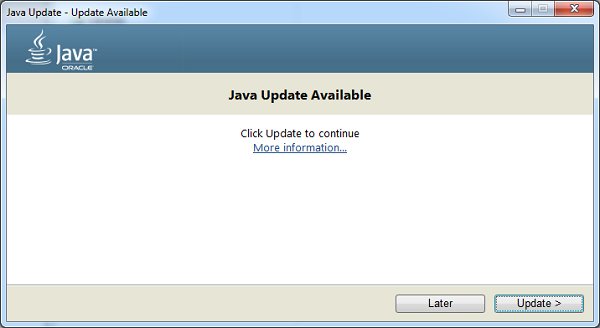
You can update Java on Windows 11 from its own control panel. The tooltip balloon that appears when a new version is ready leads to the same installer.
- Open Start, go to All apps, find the Java entry and choose Configure Java.
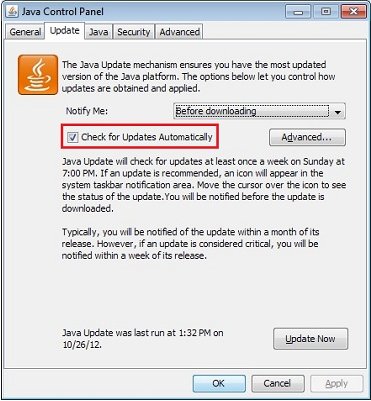
- Click the Update tab in the Java Control Panel.
- Click Update Now at the bottom of the tab while the PC is online.
- Click Yes if User Account Control appears.
- Click Update, then Finish when the installer completes.
- Close and reopen the Java Control Panel to see the new version.
A missing Update tab can mean an old 64-bit Java. Oracle says auto-update for 64-bit installations began with Java 8 Update 20. If you only need to change the schedule, you can manage Java settings from the same panel.
How to update Java on Mac
- Click the Apple menu and open System Preferences (System Settings on newer macOS).
- Click the Java icon to open the Java Control Panel.
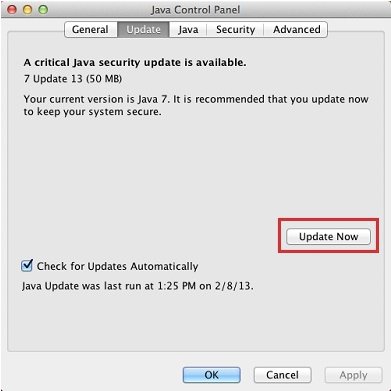
- Click the Update tab, then click Update Now.
- Click Install Update in the installer window.
- Save your work, then click Install and Relaunch.
- Relaunch your Java program yourself if it does not reopen.
If you picked Skip This Version earlier, the Update tab runs the check again. Remind Me Later brings the prompt back the next time you run Java.
How to enable Java in your web browser
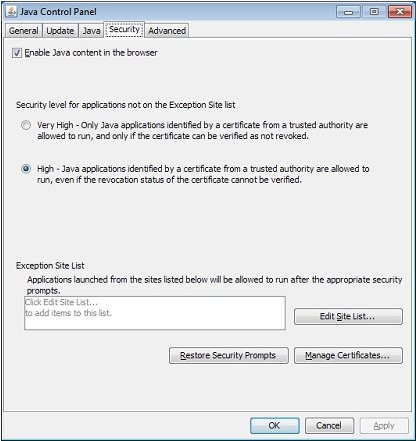
Oracle's Java Control Panel still has this switch. It only helps on an older browser that can load the Java plug-in, so it will not revive applets in current Chrome, Firefox or Safari.
- Open the Java Control Panel.
- Click the Security tab.
- Select Enable Java content in the browser.
- Click Apply, then OK.
- Close every browser window and open the browser again.
How to uninstall Adobe Shockwave Player on Windows
Old plug-ins stay on the PC until you remove them. Older installs can also carry a bundled copy of Flash, so check for Flash Player while you are in the list.
- Open Settings, then go to Apps > Installed apps.
- Find Adobe Shockwave Player in the list.
- Click the More button (three dots) beside it and choose Uninstall.
- Follow the prompts until the removal finishes.
- Use Control Panel > Programs > Programs and Features if Settings cannot remove it.
- Repeat for Adobe Flash Player if it is listed.
Adobe strongly recommends uninstalling Flash Player, because it no longer issues updates or security patches for it.
How to uninstall Java on Mac
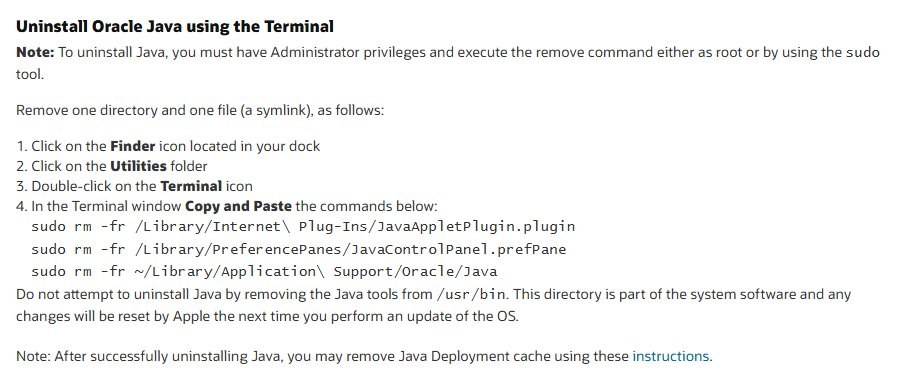
Remove Java only when nothing on the Mac needs it. Oracle's removal uses three Terminal commands and needs an administrator account.
- Open Finder, go to the Utilities folder and double-click Terminal.
- Run
sudo rm -fr /Library/Internet\ Plug-Ins/JavaAppletPlugin.pluginand enter your password if asked. - Run
sudo rm -fr /Library/PreferencePanes/JavaControlPanel.prefPane. - Run
sudo rm -fr ~/Library/Application\ Support/Oracle/Java.
Do not delete Java tools from /usr/bin. That folder belongs to the system, and Apple resets changes there at the next macOS update. On Windows, Java is removed from Installed apps like any other program, where older copies may appear as J2SE, Java 2, Java SE or Java Runtime Environment.
Shockwave Player not working: common messages
A page says Shockwave Player is required
The page was built for a plug-in that current browsers cannot load.
- Look for a newer version of the page or game on the publisher's site.
- Report the page to its owner so they know it no longer loads.
- Leave the page if the only offer is an installer from an unknown site.
Java update finished but the Shockwave game still will not load
The update changed Java only, and the browser still has no way to run Shockwave.
- Leave the new Java version in place, because rolling back would not help the game.
- Search for the game's current release on the publisher's site.
- Uninstall Shockwave Player if it is still listed on your computer.
Java applet not running after a browser update
Firefox 52, Safari 12 and Chrome 45 removed the plug-in support that applets used.
- Check that Enable Java content in the browser is selected in the Java Control Panel.
- Restart the browser if you changed that setting.
- Ask the site owner for a replacement if the applet still does not start.
Java Update tab settings cannot be changed
You may need an administrator account, or a network administrator may have locked the option.
- Sign in with an administrator account.
- Open the Java Control Panel and click the Update tab again.
- Ask your network administrator if the option is still unavailable.
Adobe Shockwave Player FAQ
What happened to Shockwave?
Adobe ended Shockwave Player, and browsers removed the plug-in system it needed. Chrome finished that removal in version 45, Firefox in version 52 and Safari in version 12. Adobe's old download address now leads to its end-of-life FAQ.
How to use Shockwave Player?
You can't use it in a current browser, because Chrome, Firefox and Safari no longer load that type of plug-in. Installing an old copy will not change that, so look for a newer version of the content from its publisher.
Do I need Adobe Shockwave Player?
No. Current browsers cannot load it, and Adobe no longer offers it as a current download. If it is still on your computer, uninstall it from Installed apps on Windows, and do not install a copy from a third-party site.
How to run Shockwave Flash?
Shockwave Flash usually refers to Adobe Flash Player content, and it no longer runs in Flash Player. Adobe blocked Flash content from January 12, 2021, and removed its download pages. Look for an HTML5 or WebGL version from the publisher.
How to play Shockwave games?
Play the publisher's current version, such as a browser release that needs no plug-in or an official app store release. A game that exists only in the old Shockwave format will not run in Chrome, Firefox or Safari.
How does Shockwave work?
Shockwave Player worked as a browser plug-in that played Shockwave content inside a web page. It relied on the plug-in system browsers have since removed, which is why those pages now show a missing plug-in message or nothing at all.
Does Java need to be installed for Shockwave?
No. Java and Shockwave Player are separate products from Oracle and Adobe. Installing, updating or removing Java does not change whether a Shockwave page loads, so keep Java only if a desktop program on your computer needs it.