To create a new workbook in Excel, press Ctrl+N, or select File > New > Blank workbook.
This guide covers both routes, plus workbooks made from a template, from an existing sheet, in OneDrive, on a phone and in VBA.
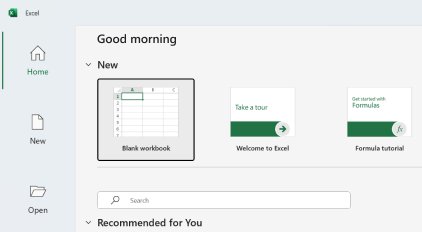
Shortcut to create new workbook in Excel
- With Excel open, press Ctrl+N to open a blank workbook.
- Select cell A1 and start typing your data.
- Press Ctrl+S to name and save the workbook.
On a Mac, press Cmd+N or Ctrl+N. On the Excel Home page in Windows, you can also press Alt+H, Y, then 3 to start from the blank workbook template.
Step by step tutorial: Creating a new workbook in Excel
Excel documents are called workbooks, and each workbook holds one or more sheets. Use these steps if you prefer the menus, or if you want to see the templates on the way.
- Open Excel. Press the Windows key, type
Exceland press Enter. - Select File at the top left of the window.
- Select New.
- Select Blank workbook. A new workbook opens with an empty sheet.
- Select Save on the Quick Access Toolbar, or press Ctrl+S.
- Under Save As, pick where to save the workbook, then browse to a folder.
- In the File name box, enter a name, then select Save.
When you open Excel fresh, the Home page already offers Blank workbook, so you can select it without opening File first. Once the sheet has data, you can password protect the workbook so it asks for a password when opened, then unprotect the workbook if you no longer need the password.
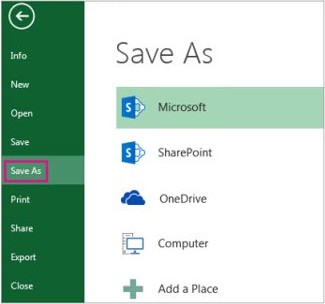
Creating a new workbook in Excel on Windows, Mac, web and mobile
| Where you are | How to create the workbook | Good to know |
|---|---|---|
| Excel for Windows | Press Ctrl+N, or select File > New > Blank workbook | Save it yourself with Ctrl+S the first time |
| Excel for Mac | Press Cmd+N or Ctrl+N | The blank workbook opens in a separate window |
| Excel for the web | Type Excel.new in the browser address bar and press Enter |
Excel for the web saves automatically |
| OneDrive in a browser | Select + Create or upload > Excel workbook | The file is stored in OneDrive and named something like Book1 |
| Excel for iPhone or iPad | Open the New tab, then choose Blank workbook | Predesigned templates are listed alongside it |
| Excel for Android | Open New, then choose Blank workbook | Predesigned templates are listed alongside it |
Pros of creating a new workbook instead of a new worksheet
You can add as many sheets as you want to one workbook, or create new workbooks to keep data separate. A new workbook is the better choice when the data has its own life.
| Pro | Why it helps |
|---|---|
| Data stays separate | Unrelated data never sits in the same file as your other sheets |
| Sharing stays simple | You can share one file with one group without exposing your other sheets |
| Its own name and location | Each workbook saves under its own file name, in its own folder |
| A clean start | A blank workbook has no leftover formats or formulas from earlier work |
| A template can set it up | A template can apply your sheets, styles and formulas each time you start one |
Cons of creating a new workbook instead of a new worksheet
When the data belongs with what you already have, a new worksheet in the same file is simpler. Press Shift+F11, or select the New Sheet plus icon at the bottom of the workbook.
| Con | What it means in practice |
|---|---|
| More files to track | Every workbook needs its own name and save location |
| Blank means no setup | Formats, headers and formulas from your other files do not carry over unless you use a template |
| Moved sheets can break | Formulas and charts that refer to a sheet can produce errors after it moves to another workbook |
| Combined totals take longer | Sheets in one workbook sit one tab apart, while separate files have to be opened and linked |
How to create a new workbook from a template
A template suits a layout you repeat, such as a daily cash book format in Excel. These steps save your own workbook as a template and then start a new file from it.
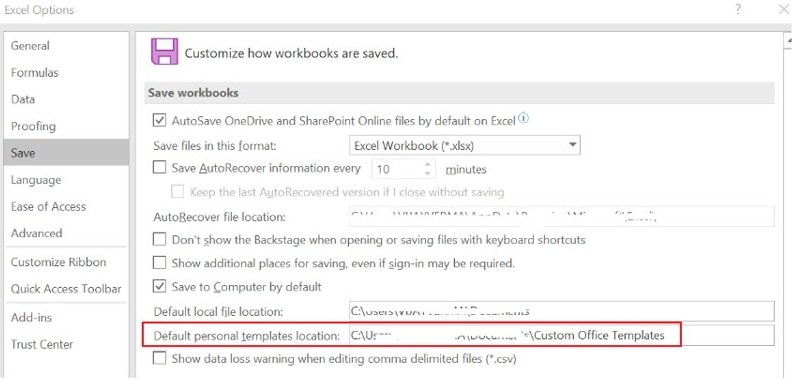
- Select File > Options > Save.
- In Default personal templates location, enter the folder path, which is typically
C:\Users\[UserName]\Documents\Custom Office Templates, then select OK. - Open the workbook you want to reuse, then select File > Export > Change File Type.
- Double-click Template, type a name in File name, select Save and close the template.
- Select File > New > Personal.
- Double-click your template. Excel creates a new workbook based on it.
You only set the template location once. To use a ready-made design instead, browse the online templates on the New page.
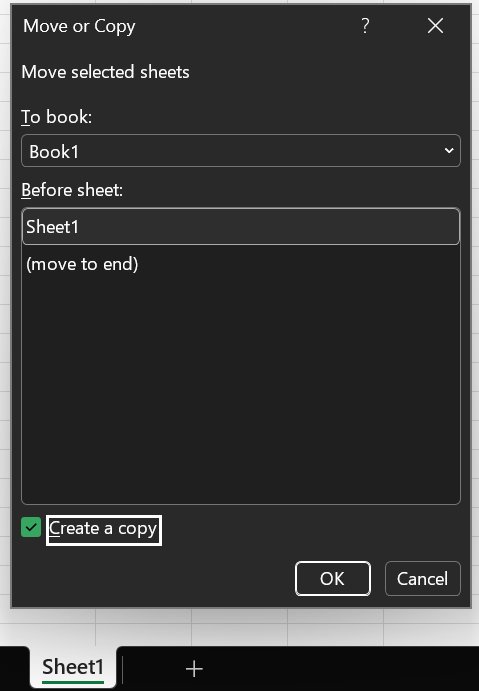
Create new workbook from sheet in Excel
- Right-click the worksheet tab you want to use, then select Move or Copy.
- In the To book menu, select new book.
- Select the Create a copy check box if the original sheet should stay where it is.
- Select OK. Excel opens a new workbook containing that sheet.
- Check any formulas or charts that refer to data on the sheet, because moving it can cause errors.
In Excel for the web, copy the sheet's data instead. Select all the data, press Ctrl+C, open the other workbook and press Ctrl+V on a blank sheet. Conditional formatting is lost when you paste this way.
Create a new workbook from OneDrive
- Open OneDrive in your browser.
- Select + Create or upload > Excel workbook.
- Select the generic name at the top of the page, usually something like Book1.
- In the File Name box, enter a new name.
- Start entering data. Excel for the web saves your work automatically.
Select Open in Desktop when you need the more advanced editing options.
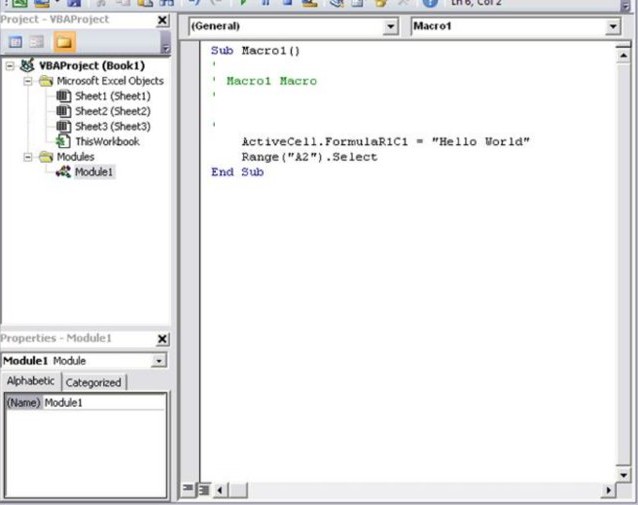
How to create a new workbook in Excel VBA
Workbooks.Add is the VBA method for a new workbook. Run it from a macro or the Immediate window in the Visual Basic Editor.
Workbooks.AddWith no argument, Excel creates a blank workbook. The number of sheets comes from the Application.SheetsInNewWorkbook property. Pass a file name, such as Workbooks.Add "Budget.xltx", to base the workbook on that file, or Workbooks.Add xlWBATWorksheet for a workbook with a single worksheet.
You should see: A new workbook opens and becomes the active workbook. The method returns a Workbook object, so you can assign it with Set wb = Workbooks.Add.
How to open a new workbook automatically when Excel starts
Excel shows its Start screen by default. On the desktop app, you can skip that screen and go straight to a blank workbook.
- Select File > Options.
- Select General, then find Start up options.
- Clear the Show the Start screen when this application starts check box.
- Select OK, then close and reopen Excel to see the blank workbook.
How to change the default new workbook in Excel
A template named Book in the XLStart folder sets what every new blank workbook contains. It can hold the number and type of sheets, cell styles, page formats, headers and formulas.
- Create a workbook with the sheets, text, formulas and formatting you want in new workbooks.
- Select File > Options > Trust Center > Trust Center Settings > Trusted Locations, and note the path of the XLStart folder.
- Select File > Save As.
- In the Save as type box, select Excel Template.
- Browse to the XLStart folder and type
Bookas the file name. - Select Save. New workbooks now start from this template.
To go back to a plain blank workbook, remove the Book template from the XLStart folder.
How to tell a new Excel workbook is saved
- Look at the name at the top of the window. An unsaved workbook still shows a generic name, usually something like Book1.
- Press Ctrl+W to close the workbook once it shows the name you chose.
- Press Ctrl+O and open the workbook from the folder you picked.
With the workbook saved and the data in place, VLOOKUP in Excel is a common next tool for pulling values from one table into another, and a drop-down list in Excel keeps typed entries consistent.
Create a new workbook in Excel FAQ
Can I create a new workbook using a keyboard shortcut?
Yes. Press Ctrl+N in Excel for Windows, or Cmd+N or Ctrl+N in Excel for Mac, and a blank workbook opens right away. In Excel for the web, type Excel.new in the browser address bar and press Enter instead.
Is it possible to create a new workbook from a template?
Yes. Select File > New, then select Personal to use a template you saved, or pick one of the online templates on the same page. Excel opens a new workbook based on the template and leaves the template file itself unchanged.
Can I create more than one workbook at a time?
Yes, one after another. Press Ctrl+N again for each extra workbook, and each one starts blank and gets its own generic name such as Book2. Save each workbook separately with Ctrl+S, because a save only applies to the active one.
How do I rename my new workbook?
Before the first save, type the name in the File name box when you press Ctrl+S. After that, press F12 to open Save As and save under a new name. In Excel for the web, select the name at the top and type a new one.
Can I create a new workbook on Excel mobile or web app?
Yes. On iPhone and iPad, open the New tab and choose Blank workbook. On Android, open New and choose Blank workbook. In a browser, type Excel.new in the address bar, or select Create or upload then Excel workbook in OneDrive.
How do I open a new workbook in Excel?
Press Ctrl+N while Excel is open, or select Blank workbook on the Home page when Excel starts. To open a file you already saved instead, press Ctrl+O and browse to it, because Ctrl+N always starts a blank file.
What is the difference between a workbook and a worksheet?
A workbook is the Excel file, and a worksheet is one sheet inside it. One workbook can hold as many sheets as you want. Press Shift+F11 to add a worksheet to the current file, or Ctrl+N to start a separate workbook.