Discord now places every account in an Adult (18+), Teen (13-17) or Unconfirmed age group automatically, and Teen and Unconfirmed accounts lose access to age-restricted servers, channels, content and settings until the owner confirms they are an adult.
This megathread covers how to see your age group in Account Status, what each group restricts, how the estimation model works, every confirmation method, what happens to your data and what to do when Discord gets your age group wrong.
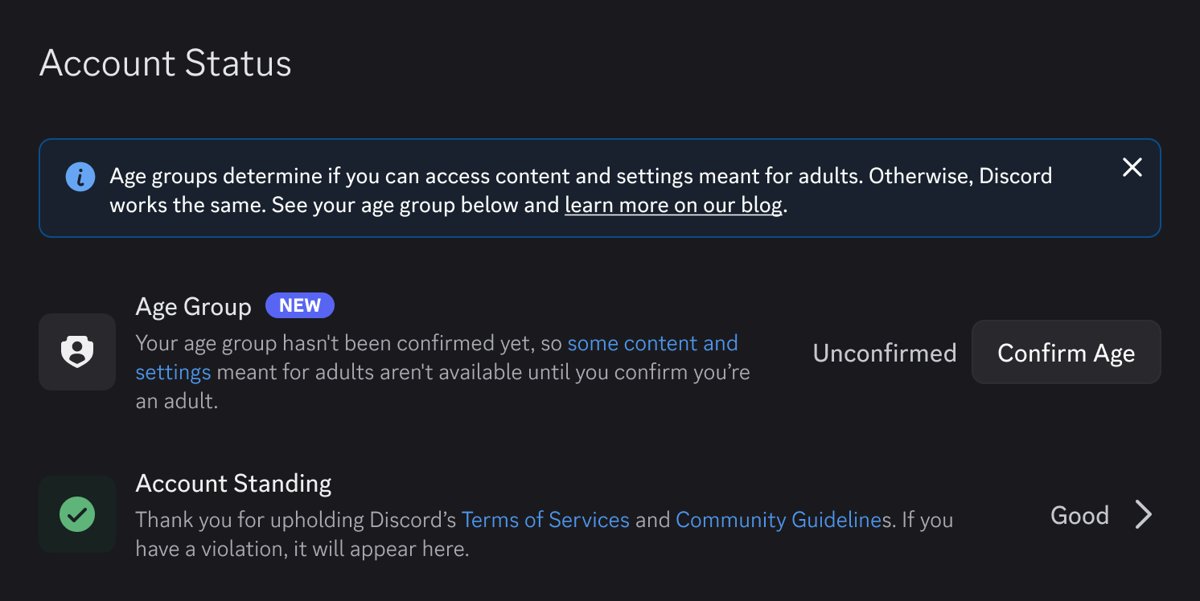
What this means for you: check Account Status before you hit a wall
Your age group decides whether an age-restricted server or setting opens for you. Checking it first saves you from finding out at a locked channel.
- Open Discord in the Discord desktop app, in your web browser or on your phone and sign in.
- Open User Settings.
- Select Account Status.
- Read your age group status: Adult Age Group, Teen Age Group or Unconfirmed.
- If you are an adult but the status is not Adult Age Group, choose the option to confirm your age group on the same page and pick a method.
Discord rolled the status out over the week of 22 September 2026, so an account can take a few days to show it. Nobody else can see your age group; it is not shown on your profile or to other members of a server.
Discord's age group system replaces February's face-or-ID plan
In February 2026 Discord announced global age assurance, then delayed it to the second half of 2026 after users objected. The original plan offered only facial age estimation or an ID scan to anyone who needed to prove they were an adult.
The version that launched on 22 September 2026 estimates the age group from account signals first. Discord says more than 90% of users will not be asked to confirm their age at all.
| Point | February 2026 plan | September 2026 age groups |
|---|---|---|
| Who gets asked to confirm | Adults who wanted age-restricted content and could not be confirmed automatically | Only accounts not placed in the adult group that want age-restricted content, spaces or settings |
| Confirmation methods | Facial age estimation or ID scan | Credit card, Apple App Store, Google Play Store, Google Wallet, video selfie, ID scan or AgeKey |
| Automatic estimate | Promised, methodology not yet published | Live, with a published technical write-up |
| Vendor list | Promised | Published on Discord's Safety Center |
| Facial estimation | Not required to run on the device | Must run entirely on your device |
| Spoiler channels | Planned | Available, so servers need not age-gate spoiler talk |
Discord's Teen and Unconfirmed accounts lose adult spaces but keep core features
Messaging friends, voice calls and non-age-restricted servers work the same in every age group. The differences sit in who can reach you, what you can see and what others can see about you.
| Area | Adult Age Group (18+) | Teen Age Group (13-17) | Unconfirmed |
|---|---|---|---|
| Age-restricted servers, channels and bot commands | Available | Blocked | Blocked until you confirm you are an adult |
| Sensitive images flagged by Discord's filters | Your own settings apply | Blurred or blocked depending on where they appear | Blurred or blocked depending on where they appear |
| Messages from people who are not friends | Your own settings apply | Sent to the message requests inbox; turning this off needs adult confirmation | Sent to the message requests inbox |
| Friend requests from strangers | No extra alert | Alert before accepting one from someone with no mutual friends or small shared server | Same alert as Teen |
| Full profile details and activity | Your own settings apply | Visible to friends and people in smaller shared servers | Visible to friends and people in all shared servers |
| Messaging friends, voice calls, normal servers | Unchanged | Unchanged | Unchanged |
Some of these protections are defaults you can change yourself. Others, such as turning off message requests or opening age-restricted spaces, unlock only after you confirm you are an adult. Some settings also vary by region because of local law.
How Discord's XGBoost model and DERE embeddings pick an age group
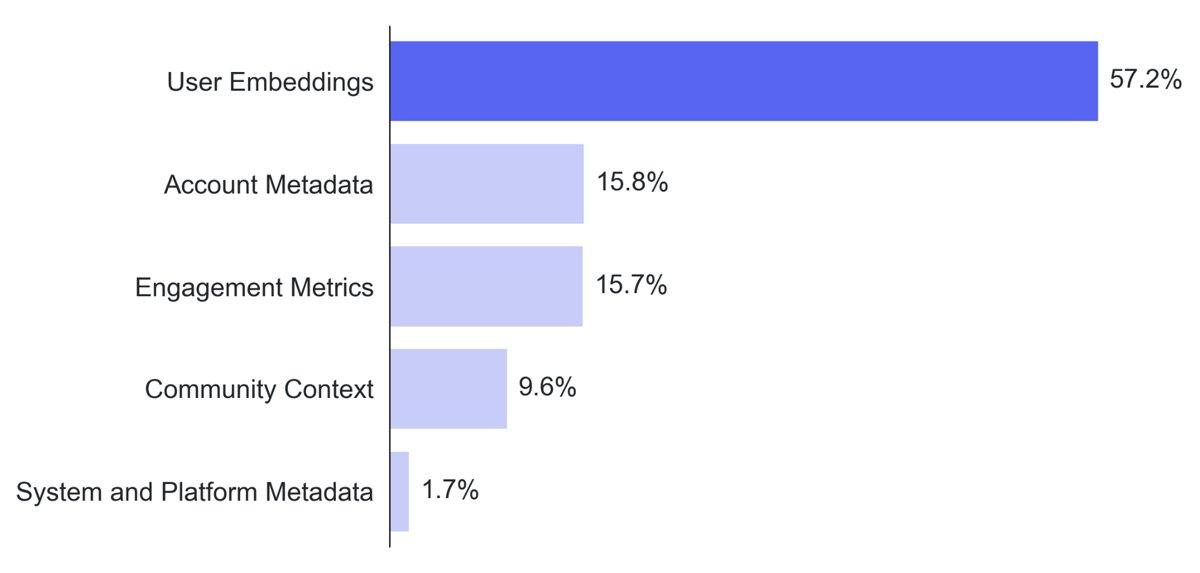
Discord's estimator is an XGBoost model, a tree-based method in which each new decision tree corrects the errors of the previous ones. It outputs a probability between 0 and 1 that an account belongs to an adult.
Two confidence thresholds turn that score into a group. Above the upper one the account is Adult, below the lower one it is Teen, and anything in between stays Unconfirmed. Scores are averaged over a longer window, so one unusual day does not flip your group.
| Signal group | What it includes | What it never uses |
|---|---|---|
| User embeddings (DERE) | Discord Entity-Relationship Embeddings: a 32-dimensional summary of the communities, games and friend connections around an account. The most predictive signal | Usernames, profile content or message text |
| Account metadata | Account age, subscription history, email and phone verification status | Name or identity documents |
| Engagement metrics | Counts only: active days in the past month, servers owned, messages sent | What the messages say |
| Community context | Categories of servers you join, read from server names and descriptions | Private messages or voice calls |
| System and platform metadata | Operating system, browser type and hardware platform | Race, gender, ethnicity or other protected attributes |
The model was trained on age groups from users who had already confirmed their age in regions with age assurance laws; it never saw their selfies or IDs. It is not currently used for accounts in the UK and Australia, where local law sets the confirmation rules.
Discord widens age confirmation beyond selfies and ID scans
Discord now offers seven ways to confirm you are an adult. Which ones you see depends on your region and device.
| Your situation | Use this method | What Discord receives |
|---|---|---|
| You do not want to share an ID or a selfie | Credit card check through k-ID and Stripe | Only whether you are an adult or the result was inconclusive |
| You use Discord on an iPhone or iPad | Apple App Store age range sharing | An age range such as 18+, never your birthdate |
| You use Discord on Android | Google Play Store age range sharing | An age range such as 18+, never your birthdate |
| Your passport is already in Google Wallet (Brazil, Singapore, Taiwan, UK or US) | Google Wallet ID pass | Your age range and the issuing country |
| You prefer a quick face check | Video selfie (facial age estimation) | Only your estimated age; the selfie stays on your device |
| Other methods failed or are not offered | ID scan plus selfie | Only your age |
| You already hold a reusable age credential | AgeKey | Only pass or fail |
The credit card check may place a temporary charge of less than $0.50 USD, refunded within 14 business days.
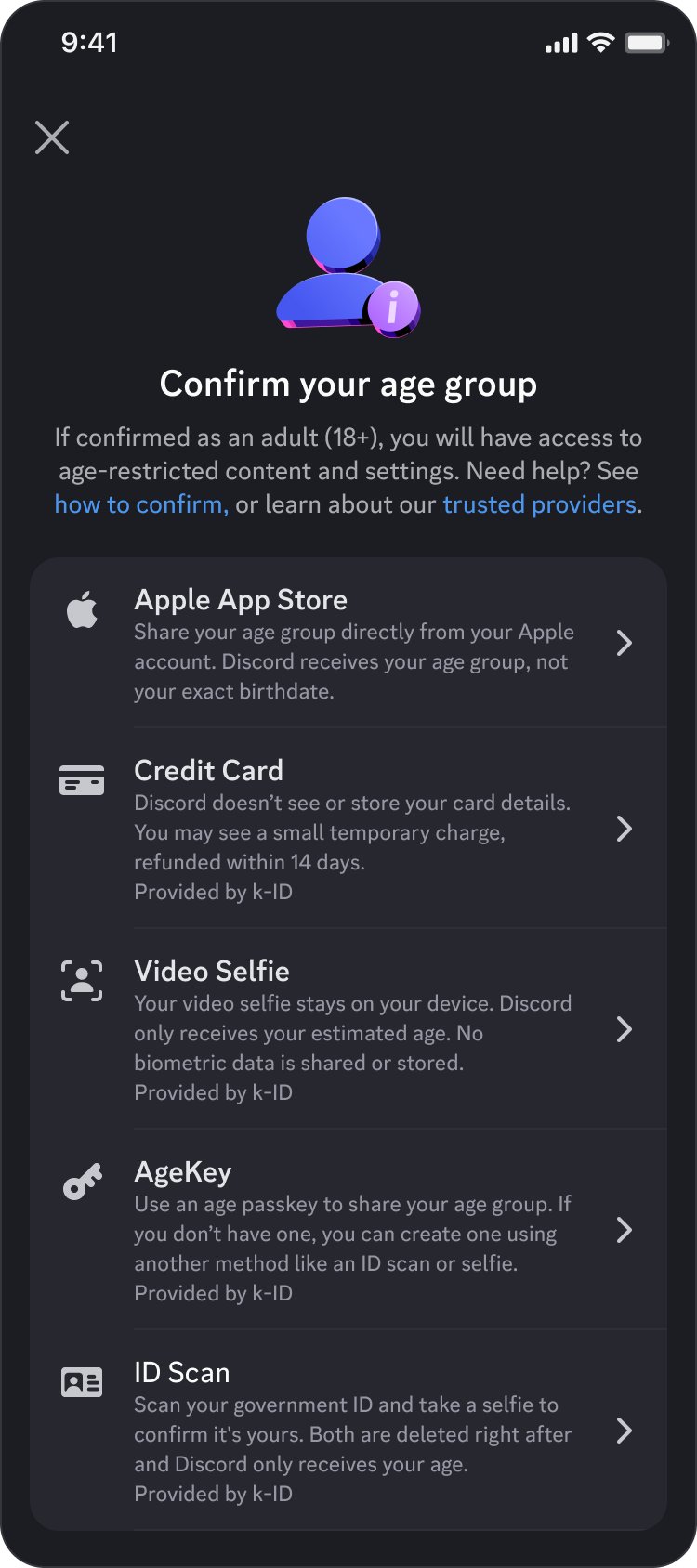
How to confirm your age group on Discord
- Open User Settings in Discord.
- Select Account Status.
- Choose the option to confirm your age group.
- Pick a method from the list your region and device offer.
- Complete the prompt for that method, such as the card form, the store authorisation or the video selfie.
- Return to Account Status and confirm the status now reads Adult Age Group.
If you confirmed your age before this launch, your age group carries over and you will not be asked again.
Discord's privacy promises rest on k-ID and retiring a breach-linked process
Discord says it has fully retired the manual review process run by a customer service vendor that was linked to the September 2025 data breach, and no longer works with that vendor. Manual reviews now run only through k-ID, the age assurance vendor that orchestrates the card, selfie, ID and AgeKey checks.
| Method | Who handles your data | What is kept afterwards |
|---|---|---|
| Credit card check | k-ID passes the card to Stripe | Stripe keeps the last four digits and a financial record; Discord gets only the result |
| Video selfie | Runs entirely on your device | The selfie is deleted from the device; Discord gets an estimated age |
| ID scan plus selfie | Veratad, a k-ID partner | ID data and selfie are deleted after verification; Discord gets your age |
| AgeKey | A passkey stored on your device | You can delete it in your passkey manager; Discord gets pass or fail |
| Apple App Store, Google Play, Google Wallet | Apple or Google | Discord gets an age range (and issuing country for Wallet) |
Vendors may use submitted data only for the age check, not for ads, profiles or model training. k-ID lists ISO 27566-1, ISO/IEC 27001:2022, ISO/IEC 27701:2019 and SOC 2 Type II among its certifications. Questions about vendor data go to k-ID's support site.
Update: additional details (September 24, 2026)
The age group status reached accounts gradually during launch week, so a blank Account Status page in the first days was expected rather than an error.
| Date | What happened |
|---|---|
| 24 February 2026 | Discord delays global age assurance to the second half of 2026 and lists conditions it would meet first |
| 17 March 2026 | Brazil's Digital ECA law takes effect; Discord applies age assurance there |
| May 2026 | First age assurance figures appear in Discord's 2026 Transparency Report, covering the UK and Australia |
| 22 September 2026 | Discord announces automatic age groups, new confirmation methods, the vendor list and the technical write-up |
| Week of 22 September 2026 | Age group status rolls out account by account; it may take a few days to appear |
| Ongoing | UK and Australian accounts still confirm age under local rules because the estimation model is not used there |
See your Discord age group after confirming
- Open User Settings > Account Status.
- Confirm the status reads Adult Age Group.
- Open an age-restricted channel in a server you belong to; it should now load instead of asking you to confirm your age.
Discord age group wrong or not showing
Account Status shows no age group
The status rolled out over several days and had not reached the account yet.
- Close and reopen Discord, then open User Settings > Account Status again.
- Check back after a few days if nothing appears.
You are an adult but Discord placed you in the Teen Age Group
The model estimates from behaviour patterns and makes some wrong calls.
- Open User Settings > Account Status.
- Choose to confirm your age group.
- Pick any method you are comfortable with, such as the credit card check or app store age range.
Your account stays Unconfirmed after launch week
The model lacks enough signal, which is normal for new accounts.
- Keep using Discord normally if you do not need age-restricted spaces.
- Confirm your age in Account Status if you do.
The age check failed or came back inconclusive
The chosen method could not confirm an adult, for example a declined card or an unclear selfie.
- Retry the same method, or choose a different one in Account Status.
- If every method fails, watch for an official Discord DM offering a manual review with a k-ID representative.
Banned for not meeting the minimum age
Discord requires every user to be at least 13.
- Go to Active Violations in Discord.
- Open the Minimum Age Requirements violation card.
- Use the manual review option there if your account is eligible.
Discord age groups FAQ
Do I need to confirm my age to keep using Discord?
No. Messaging friends, voice calls and servers that are not age-restricted work without any confirmation. You only need to confirm you are an adult if you are not in the Adult Age Group and want age-restricted content, spaces or settings.
How do I find my age group on Discord?
Open User Settings and select Account Status. The page shows Adult Age Group, Teen Age Group or Unconfirmed. During launch week the status could take a few days to appear on some accounts.
Does Discord read my messages to guess my age?
No. The model uses account signals such as account age, server and game connections and activity counts. It never reads message text, voice calls, usernames or profile bios.
Can other people see my Discord age group?
No. Your age group is not shown on your profile and other members of a server cannot see it. Your identity from any age check is also never linked to your Discord account.
What does Unconfirmed mean on Discord?
Unconfirmed means Discord does not yet have enough signal to place you in a group. You get the same protections as teens, except your full profile and activity stay visible to friends and people in all your shared servers.
Can I confirm my Discord age without an ID or selfie?
Yes. Depending on your region and device, you can use a credit card check, Apple App Store or Google Play age range sharing, a Google Wallet ID pass or an AgeKey instead of an ID scan or video selfie.
Does the Discord credit card age check charge me?
It may. A temporary charge of less than $0.50 USD can be placed to confirm the card is valid, and it is refunded within 14 business days. Discord and k-ID never see the card details.
Do I have to confirm again if I already verified my age on Discord?
No. An age group you confirmed earlier carries over, and Discord will not reset you to Unconfirmed or ask you to go through the process a second time.
Why does Discord age verification work differently in the UK and Australia?
Local laws there require approved methods such as facial age estimation or ID checks, so Discord's automatic age estimation model is not used for accounts in those countries.
Should you confirm your age on Discord?
Confirm your age only if you are an adult outside the Adult Age Group and need age-restricted servers, channels or settings; otherwise leave it. Core features work in every group, and the card, app store and Google Wallet methods confirm adulthood without a selfie or ID if you do need access.