The Sonos download for PC is a free desktop app for Windows 11, Windows 10 and Mac. Get it from the Sonos apps and downloads page, then use it to play music and group rooms on your Sonos speakers.
Sonos builds the desktop app for everyday listening. Setting up speakers takes the Sonos app on an iPhone, iPad or Android device, which is also free.
Below you will find the right download for each device, install steps, what the desktop app can and cannot do, requirements, and fixes for a missing system.
Which Sonos app download do you need?
Sonos ships a different app for each job. Match your device and what you want to do to a row.
| Your device or goal | Download | What it does |
|---|---|---|
| Windows 11 or Windows 10 PC | Sonos app for Windows | Play music, group rooms, manage your music library |
| Mac on macOS 10.12 or later | Sonos app for macOS | Same features as the Windows app |
| iPhone or iPad on iOS 18 or later | App Store | Full control, including speaker setup |
| Android 10 or later | Google Play | Full control, including speaker setup |
| Any computer with a browser | Sonos Web app | Basic playback and grouping, even away from home |
| System with Bridge, Play:5 (Gen 1) or ZonePlayer | S1 Controller downloads | Controls the oldest Sonos products |
Install the phone app even if you plan to listen from your computer. You need it the first time you set up a speaker.
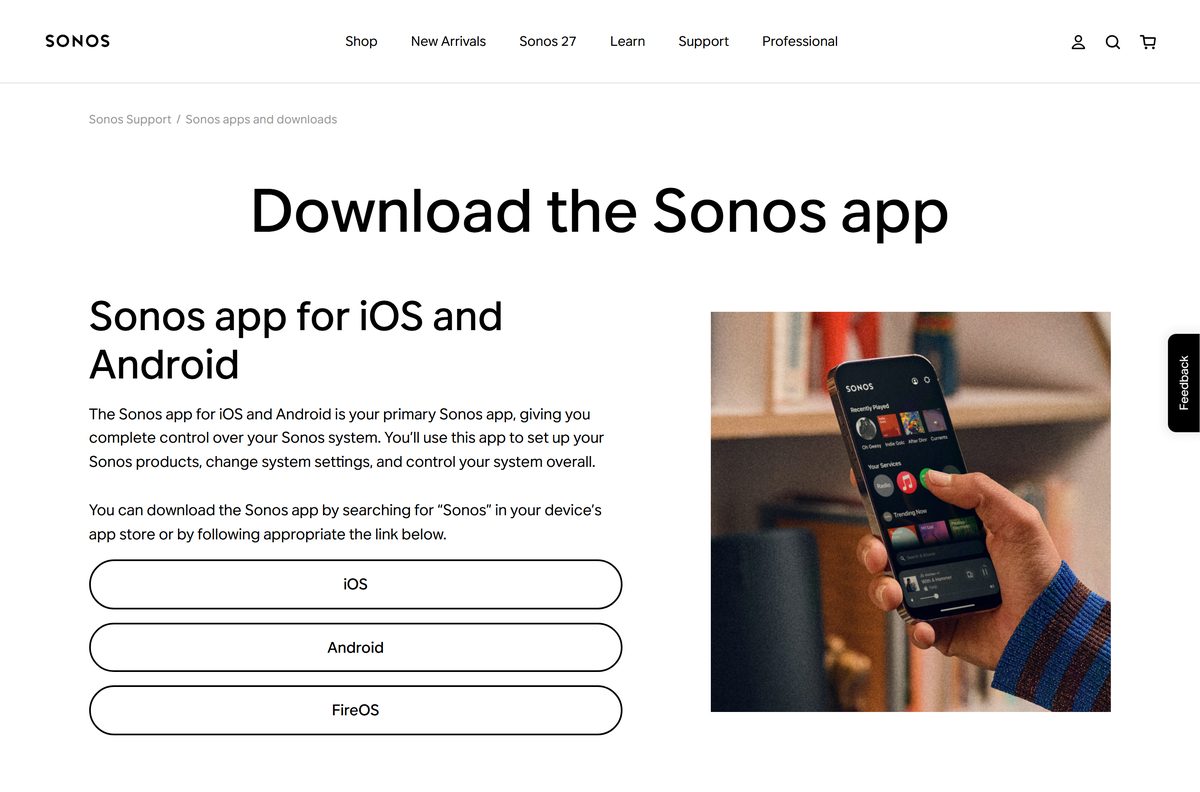
Download the Sonos app for Windows, Mac, iPhone and Android
Sonos, Inc. is the developer on every link below. The desktop links come from the Sonos apps and downloads page.
- Sonos apps and downloads page — Every official Sonos app in one place
- Sonos app for Windows — Windows 8 and higher, including Windows 11 and 10
- Sonos app for macOS — macOS 10.12 and higher
- Sonos on the App Store — iPhone and iPad, iOS 18 or later, version 89.0.2
- Sonos on Google Play — Android 10 or later, not Chromebooks
- Sonos Web app — Chrome, Firefox, Safari or Edge
Controller apps from other developers carry Sonos in their names on both app stores. Check that the developer reads Sonos, Inc. before you install.
How to install the Sonos app on Windows 11 and 10
Connect the PC to the same home network as your speakers before you start.
- Open the Sonos apps and downloads page in your browser.
- Under Sonos app for macOS and Windows, select Windows.
- Open the setup file your browser saved.
- Select Yes if Windows asks whether the installer can make changes.
- Follow the setup window until it finishes.
- Open the Sonos app from the Start menu.
- Choose to connect to your existing Sonos system and let the app find your speakers.
- If Windows Firewall asks about network access, allow it on private networks.
The app lists your rooms once it connects. Pick a room and start playing from any service you already added.
Which Sonos download do you need for your Mac?
Sonos lists one desktop app for macOS and a separate S1 Controller for older systems. Your speakers decide which one you install.
| Your Mac and system | Download | Requirement |
|---|---|---|
| Mac with current Sonos speakers | Sonos app for macOS | macOS 10.12 or higher |
| Mac with an S1-only system | S1 Controller for macOS | macOS 10.12 or higher |
| Mac, no install wanted | Sonos Web app | Safari, Chrome, Firefox or Edge |
Open the downloaded file and follow the installer, then launch the app from Applications. The iPhone and iPad app is not listed for Mac on the App Store, so it does not replace the desktop app.
What the Sonos desktop app can and cannot do
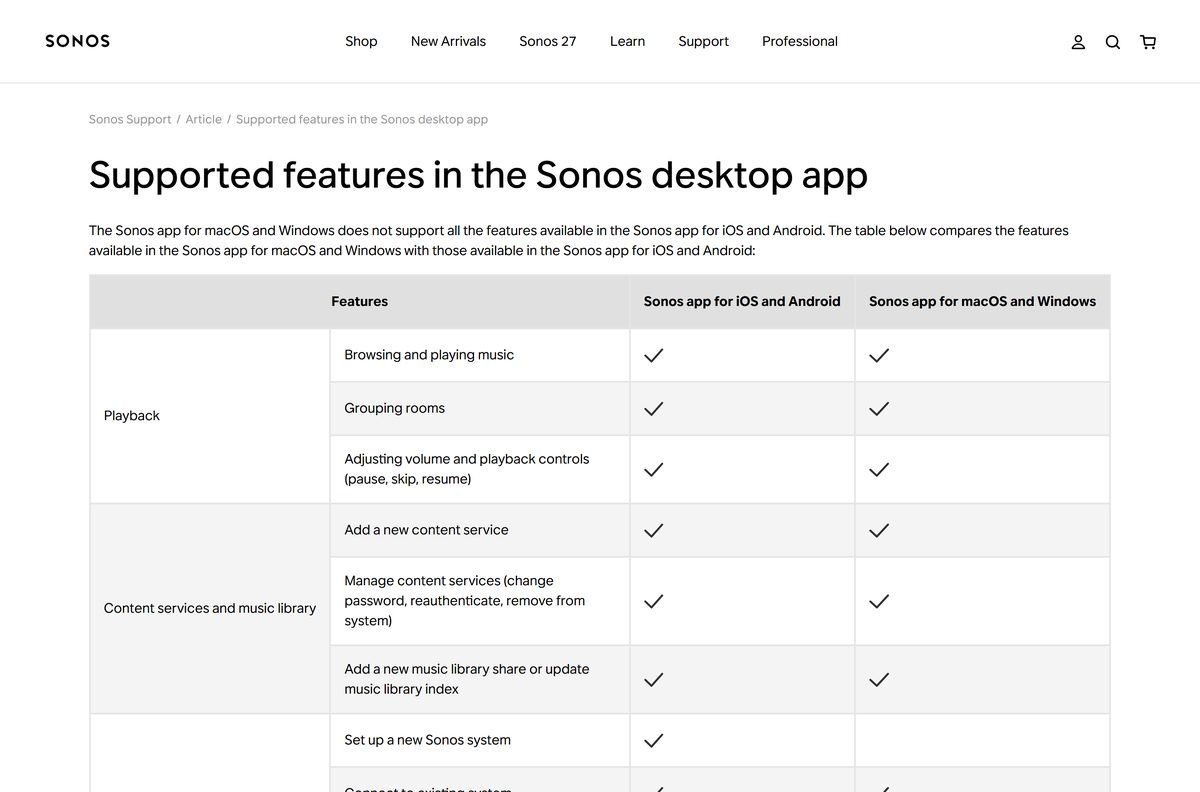
The Windows and macOS app covers listening. System management stays on the phone app.
| Feature | Desktop app (Windows, macOS) | Sonos app (iOS, Android) |
|---|---|---|
| Browse and play music, group rooms, adjust volume | Yes | Yes |
| Add and manage content services | Yes | Yes |
| Add a music library share or update the index | Yes | Yes |
| Connect to an existing system | Yes | Yes |
| Set up a new system or add products | No | Yes |
| Create a stereo pair or rename a room | No | Yes |
| Change WiFi settings or update from S1 to S2 | No | Yes |
| Transfer system ownership | No | Yes |
The desktop app is the one to use for a music library stored on your computer or a NAS drive. Sonos caps a library at 65,000 songs.
Should you install the Sonos app or the S1 Controller?
Sonos splits its products between the current app and the older S1 Controller. The products in your home settle it.
Install the Sonos app on your PC, Mac and phone. Every current speaker, including Era 100, Era 300, Arc Ultra, Move 2 and Sub 4, works only with the Sonos app. Install the S1 Controller only if your system has an S1-only product such as Bridge, Connect (Gen 1), CR200, Play:5 (Gen 1) or a ZonePlayer.
The Sonos app compatibility list shows which products work with both apps. Check the System section of your Sonos account page to see which generation you own.
Is the Sonos app free?
The app costs nothing on any platform. The cost of Sonos sits in the speakers.
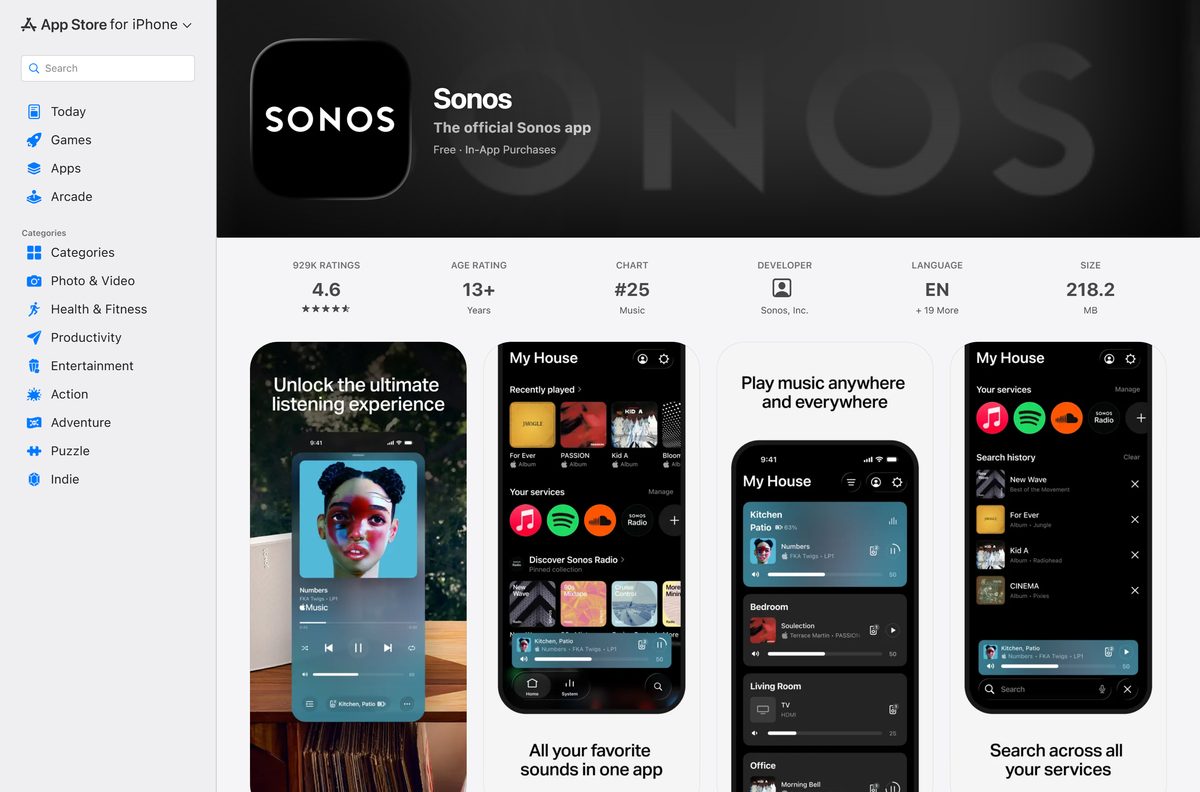
Yes. Download the Sonos app free on Windows, Mac, iPhone, iPad and Android. The App Store lists the Sonos app as free with one in-app purchase, Sonos Radio HD at $9.99 a month. Streaming services you add, such as Spotify or Apple Music, keep their own plans.
Nobody needs to pay for a Sonos controller. A site charging for the app, or bundling it in a download manager, is not an official source.
Check the Sonos app requirements before you download
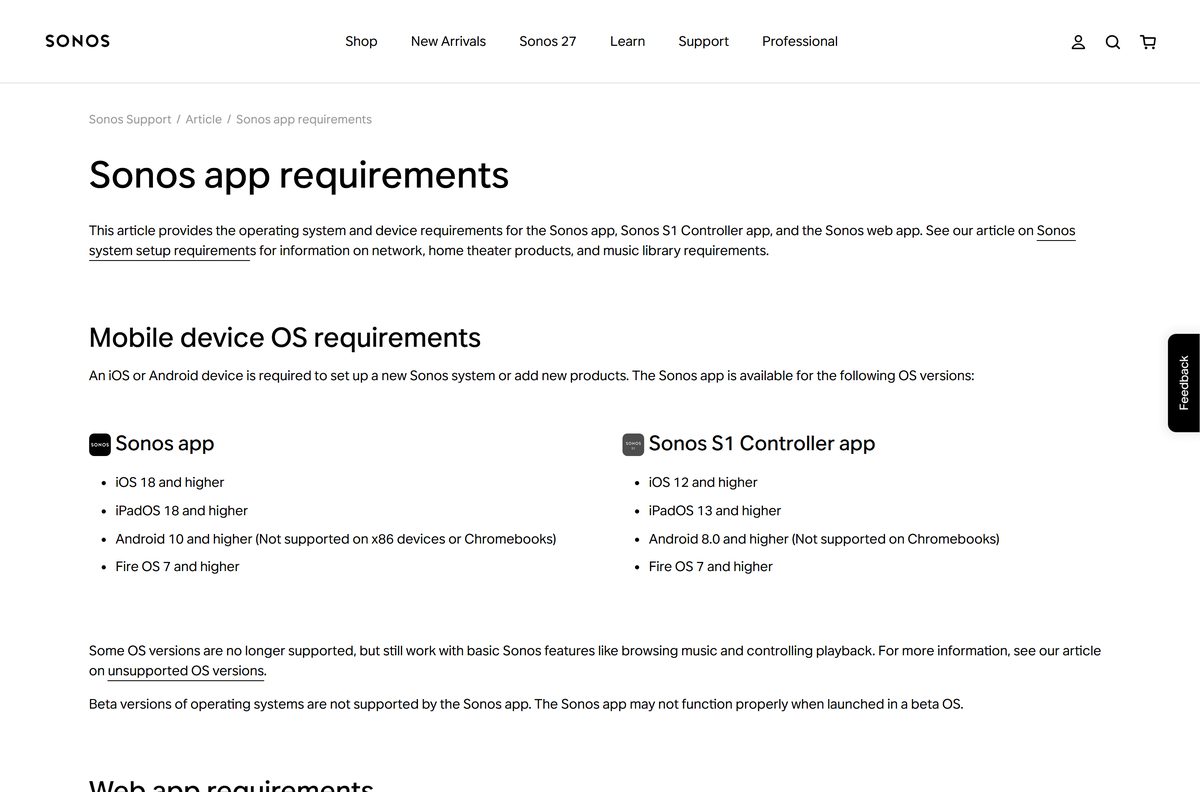
Sonos lists these operating systems for each app.
| Field | Value |
|---|---|
| App | Sonos app |
| Developer | Sonos, Inc. |
| Latest version | 89.0.2 on iPhone and iPad; no public desktop version number |
| Price | Free, optional Sonos Radio HD subscription |
| Windows | Windows 8 and higher, including Windows 11 and 10 |
| macOS | macOS 10.12 and higher |
| iPhone and iPad | iOS 18 and iPadOS 18 and higher |
| Android | Android 10 and higher, not x86 devices or Chromebooks |
| Web app | Chrome, Firefox, Safari, Edge |
| S1 Controller desktop app | Windows 7 and higher, macOS 10.12 and higher |
| Architecture | Not stated by Sonos; requirements go by OS version |
| Needs | Sonos speakers on the same network and subnet |
| Official source | support.sonos.com |
| Last verified | 2026-09-24 |
To check your Windows version, press Windows + R, type winver and press Enter. On a Mac, open the Apple menu and select About This Mac.
Fix the Sonos app not finding your system on Windows or Mac
Match what you see to a symptom and follow the fix under it.
The app cannot find your Sonos system
The computer is on a different network or subnet from the speakers.
- Connect the computer to your main home WiFi or router, not a guest network.
- Turn off any VPN that blocks local network access.
- Close the Sonos app and open it again.
There is no option to add a new speaker
The desktop app cannot set up systems or add products.
- Install the Sonos app on an iPhone, iPad or Android device.
- Add the speaker from the phone app.
- Reopen the desktop app to see the new room.
An older speaker does not show up
The product works only with the S1 Controller app.
- Look the product up on the Sonos app compatibility list.
- If it is S1-only, download the S1 Controller from the Sonos downloads page.
- Control that system from the S1 Controller instead.
Your music library stops indexing new songs
The library has hit the 65,000-song limit or its metadata memory limit.
- Remove folders you do not play from the library share.
- Update the music library index from the desktop app.
- Use Plex with Sonos for a larger collection.
How to uninstall the Sonos app
Removing the app does not change your speakers, rooms or services. Those settings live on the Sonos system.
- On Windows 11, open Settings, select Apps, then Installed apps.
- Find Sonos in the list, select the … menu, and choose Uninstall.
- On Windows 10, open Settings, select Apps, pick Sonos, and select Uninstall.
- On a Mac, quit the app, open Finder, then Applications.
- Drag the Sonos app to the Trash and empty it.
Reinstall from the Sonos downloads page at any time, and the app reconnects to the same system.
Which other official way to control Sonos should you use?
Each of these is an official Sonos option. Pick the one that fits how you listen.
| Option | Best for | Link |
|---|---|---|
| Sonos Web app | Quick control from any browser, with no install | Open the web app |
| Sonos app on iPhone or iPad | Setup, settings and full control | App Store |
| Sonos app on Android | Setup, settings and full control | Google Play |
| S1 Controller | Systems with the oldest Sonos products | S1 Controller on the App Store |
The web app works outside your home too, but it cannot set up products or change system settings.
Frequently asked questions
Is the Sonos app free to download?
Yes. The Sonos app is free on Windows, Mac, iPhone, iPad and Android. The only paid item in the app is the optional Sonos Radio HD subscription, listed at $9.99 a month on the App Store. You need Sonos speakers for the app to control anything.
Where is the official Sonos download for PC?
Open the Sonos apps and downloads page at support.sonos.com and select Windows under Sonos app for macOS and Windows. The same page links the Mac app, the web app, the phone apps and the older S1 Controller.
Does the Sonos app work on Windows 11?
Yes. Sonos supports its desktop app on Windows 8 and higher, which includes Windows 10 and Windows 11. The Windows app handles playback, grouping and your music library, but it cannot set up speakers.
Can you set up Sonos speakers from a PC or Mac?
No. Sonos requires an iPhone, iPad or Android device to set up a new system or add products. The desktop app also cannot create a stereo pair, rename a room or change WiFi settings.
Is there a Sonos app for Mac?
Yes. Sonos offers a free desktop app for macOS 10.12 and higher from its downloads page, with the same features as the Windows app. The iPhone and iPad app is not listed for Mac on the App Store.
How big is the Sonos desktop download?
Sonos does not publish a file size for its Windows or macOS installer. Both download links sit on the Sonos apps and downloads page at support.sonos.com, next to the phone and web app links.
Is there a Sonos offline installer?
The Windows and macOS links on the Sonos downloads page open a desktop installer directly, with no store account needed. The app still has to be on the same local network as your speakers to find and control them.
Does the Sonos desktop app support 64-bit or ARM64?
Sonos lists desktop requirements by operating system version only: Windows 8 and higher, and macOS 10.12 and higher. It publishes no separate 32-bit, 64-bit or ARM64 builds of the desktop app.
Is the Sonos app safe to install?
Yes, when you get it from support.sonos.com, the App Store or Google Play, where Sonos, Inc. is the listed developer. Skip third-party download sites and controller apps from other developers that use Sonos in their names.
What is the latest version of the Sonos app?
The iPhone and iPad app is at version 89.0.2, released September 15, 2026. Sonos gives no public version number for the Windows and macOS desktop app, which is a separate download from the phone app.
Why can’t the Sonos app find my speakers?
The computer or phone running the app must be on the same network and subnet as your Sonos products. Guest networks, VPNs that block local traffic and WiFi range extenders are common causes. Connect to your main home network and reopen the app.
Should I use the Sonos app or the S1 Controller?
Use the Sonos app unless your system includes products that only work with S1, such as Bridge, Connect (Gen 1), Play:5 (Gen 1) or a ZonePlayer. Those need the S1 Controller app, which also has Windows and Mac versions.