NTSC is the analog color television format used in the United States, Canada, Japan and much of the Americas: 525 scan lines, about 29.97 frames per second and a 4:3 picture.
On a DVD, tape or game box today, NTSC means the 480-line, 29.97 fps video those regions use, and this guide covers its specs, history, PAL and SECAM differences, playback and conversion.
What does NTSC mean on a DVD, TV or laptop?
The label means slightly different things depending on where you see it. Find your case in the table and you have the answer.
| Where you see NTSC | What it means | What to do |
|---|---|---|
| DVD case or disc label | The video is 720 x 480 (or a smaller allowed size) at 29.97 fps, the format sold in the US, Canada and Japan | Plays on US players and TVs if the region code also matches |
| VHS tape or VCR | The tape holds a 525-line, 29.97 fps analog signal | Use an NTSC VCR or a multi-system VCR and TV |
| Game box (NTSC-U, NTSC-J) | A release for the Americas (NTSC-U) or Japan (NTSC-J), built for 60 Hz displays | Match it to a console from the same region |
| Camera or video editor setting | A 29.97 fps (or 59.94) project at 480 lines for standard definition | Pick it when your output is for North American or Japanese playback |
| Laptop or monitor spec ("72% NTSC") | A color gamut figure measured against the 1953 NTSC color primaries, not a video format | Compare screens on the same gamut standard, such as sRGB or DCI-P3 |
| TV or capture card menu | The input expects an NTSC-M analog signal | Leave it on NTSC for US sources; choose PAL only for European sources |
What is NTSC?
NTSC stands for National Television System Committee, the group the US Federal Communications Commission set up in 1940 to agree on one analog TV system. The name now refers to the standard that committee produced.
Strictly, NTSC is the color encoding layered on the 525-line System M broadcast signal. Since DVDs arrived, the word is also used loosely for any digital video with 480 active lines at 29.97 or 30 fps.
| What NTSC defines | NTSC value |
|---|---|
| Lines per frame | 525 total, about 480 carrying picture |
| Frame rate | 30/1.001, about 29.97 fps (30 fps before color) |
| Fields | Two interlaced fields per frame, 262.5 lines each |
| Picture shape | 4:3 |
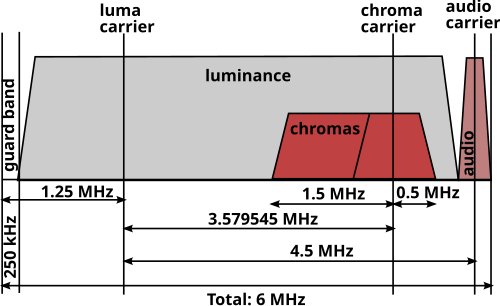
| Channel width | 6 MHz per broadcast channel |
| Color subcarrier | About 3.579545 MHz |
| Black level | 7.5 IRE in NTSC-M (US); 0 IRE in the Japanese NTSC-M variant |
The history and purpose of the NTSC standard
The committee existed to end a fight between manufacturers over incompatible TV systems, so every set in the country could receive every station.
The 1953 color standard had one hard requirement: existing black-and-white sets had to keep working. That compromise is why the frame rate dropped from 30 to 29.97 fps.
| Year | Milestone | Why it matters |
|---|---|---|
| 1940 | FCC forms the National Television System Committee | One national system instead of competing ones |
| 1941 | Black-and-white standard issued: 525 lines, 30 fps, 60 fields | The line count every later NTSC device keeps |
| 1953 | FCC approves the backward-compatible color standard in December | Frame rate becomes 29.97 fps so color fits beside the picture signal |
| 1987 | SMPTE C primaries (RP 145) replace the 1953 primaries in US practice | US color primaries change; Japan kept the 1953 primaries |
| June 12, 2009 | US full-power stations stop analog NTSC broadcasts | ATSC digital TV takes over |
| July 13, 2021 | Last US low-power analog stations shut down | End of NTSC on US airwaves |
Engineers joked that the letters stood for "Never The Same Color", a nod to how much color could vary between sets and stations.
Key technical specifications of NTSC video
Analog NTSC has no pixels, so its digital form is defined by sampling. ITU-R BT.601 sampling turns the 480 active lines into a 720 x 480 frame with a 704 x 480 display area.
| Spec | NTSC value | What it means for you |
|---|---|---|
| Resolution, digital | 720 x 480 (704 x 480 visible) | Standard definition; looks soft on an HD screen |
| Scanning | Interlaced, two fields per frame (480i) | Deinterlace when converting, or you see comb lines on motion |
| Frame rate | 29.97 fps (30000/1001); 59.94 fields per second | Use 29.97, not 30, when editing NTSC footage |
| Timecode | Drop-frame timecode for 29.97 fps | Clock time and timecode stay in step over long programs |
| Pixel aspect ratio | 10:11 for 4:3 content | Pixels are not square; players scale them to look right |
| Picture aspect ratio | 4:3 (16:9 allowed on DVD) | Widescreen DVDs store anamorphic 16:9 in the same 720 x 480 frame |
Drop-frame timecode skips the frame numbers 00 and 01 at the start of each minute, except every tenth minute. Only numbers are skipped; no video frames are lost.
Where NTSC was used around the world
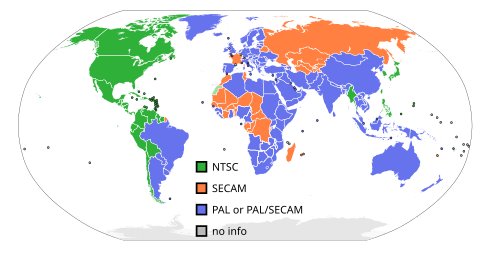
NTSC followed US influence: North America, Japan, South Korea, Taiwan, the Philippines and several Central and South American countries. Most of Europe, Africa and Asia chose PAL or SECAM instead.
| Country or region | Analog NTSC status | Digital replacement |
|---|---|---|
| United States | Full-power analog ended June 12, 2009 | ATSC |
| Canada | Major markets ended August 31, 2011 | ATSC |
| Mexico | Full-power analog ended December 31, 2015 | ATSC |
| Japan (NTSC-J) | Ended March 31, 2012 | ISDB-T |
| South Korea | Historical NTSC user | ATSC |
| Taiwan, Philippines, Colombia, Venezuela, Bolivia, Panama | NTSC users | Varies by country |
| Brazil | Not NTSC: used PAL-M, a 525-line, 60 Hz PAL variant | ISDB-Tb |
Argentina, Paraguay and Uruguay picked PAL-N, so South America is split between the two systems. Check the country before you buy a used tape or disc from there.
NTSC vs PAL and SECAM
PAL (Phase Alternating Line) started in the UK and West Germany in 1967. SECAM (séquentiel couleur à mémoire) started in France on 1 October 1967. Both use 625 lines at 25 fps, so neither is compatible with NTSC without conversion.
| Feature | NTSC | PAL | SECAM |
|---|---|---|---|
| Lines per frame | 525 | 625 | 625 |
| Visible lines | About 480 | 576 | 576 |
| Frame rate | 29.97 fps | 25 fps | 25 fps |
| Mains frequency it matched | 60 Hz | 50 Hz | 50 Hz |
| How color is sent | Quadrature amplitude modulation on a 3.58 MHz subcarrier | Phase alternates each line to cancel hue errors | Two color signals sent on alternate lines using FM |
| Main regions | US, Canada, Mexico, Japan, South Korea | Most of Europe, Australia, India, South Africa | France, former Soviet Union, parts of Africa and the Middle East |
| DVD frame size | 720 x 480 | 720 x 576 | Uses PAL DVDs (720 x 576) |
Neither is simply better. NTSC gives smoother motion at 30 frames a second; PAL and SECAM give about 20% more lines of detail at 25 frames a second.
How NTSC applies to DVDs, VHS, gaming, and modern digital video
Analog NTSC broadcasting is gone, but the format lives on in anything made for standard-definition playback in NTSC countries.
| Format | How NTSC shows up | Compatibility note |
|---|---|---|
| DVD-Video | MPEG-2 at 720 x 480, 704 x 480, 352 x 480 or 352 x 240, 29.97 fps | Region code is a separate lock; a disc can be NTSC and region 1, 2 or any other |
| VHS | Tapes record the 525-line, 29.97 fps signal of the country they were sold in | Needs an NTSC VCR or a multi-system VCR |
| Video games | Releases are labeled NTSC-U (Americas), NTSC-J (Japan and Asia) or PAL (Europe, Oceania) | Some PAL ports of older games ran about 17% slower than the NTSC version at 50 Hz |
| Video editing | SD presets at 720 x 480, 29.97 fps, drop-frame timecode | HD and 4K still use 29.97 and 59.94 fps in North America |
| Streaming and HDTV | No NTSC signal; the 29.97 and 59.94 fps rates remain | Any modern TV plays these files |
Most televisions sold in Europe and Australasia can display NTSC video from a DVD player or console. Broadcast NTSC through an antenna input is usually not supported there.
Does NTSC format play in the USA and on PAL TVs?
| Your source | Your player and TV | Will it play? |
|---|---|---|
| NTSC DVD, region 1 or region 0 (all) | US DVD player and any US TV | Yes |
| NTSC DVD, region 2 (Japan) | US DVD player | No: the region lock blocks it, even though the video format matches |
| NTSC DVD, any region | Computer with a DVD drive set to that region | Yes; most computer drives allow up to five region changes |
| PAL DVD | US DVD player | Not on most US players; convert the video or use a multi-system player |
| NTSC DVD or VHS | European player connected to a modern PAL TV by cable | Usually yes; most such TVs accept NTSC input |
| NTSC digital file (MP4, MKV) | Any computer, phone or smart TV | Yes; files are not tied to NTSC or PAL |
How to convert NTSC to other formats with HandBrake
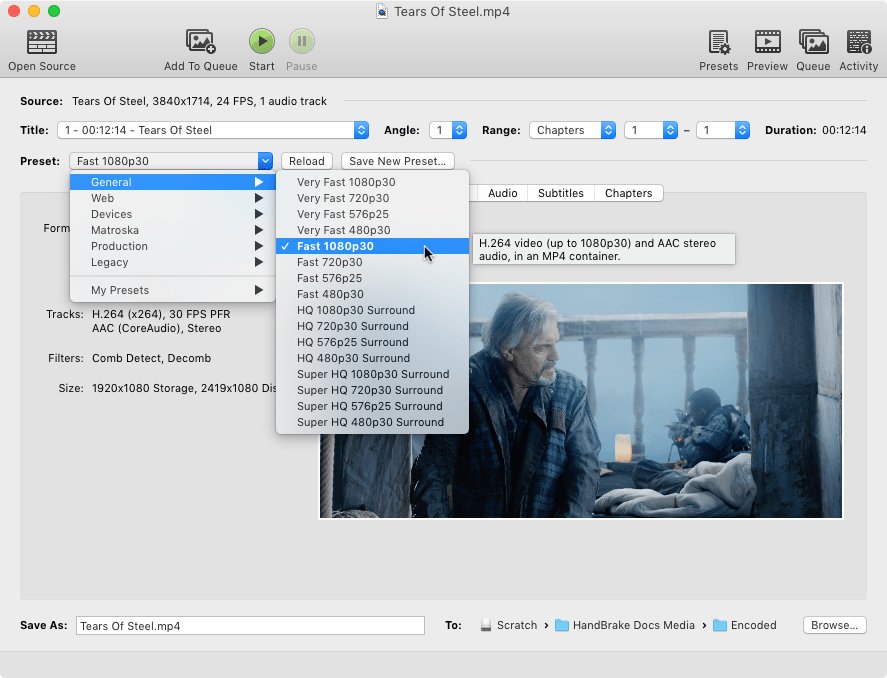
HandBrake converts NTSC video files to MP4 or MKV, and to 25 fps for PAL delivery. It does not remove copy protection, so it only works on your own unprotected discs and files.
For a VHS tape, digitize it first with a computer-based capture device that records to a common video format.
- Open HandBrake and select Open Source on the toolbar, then pick the video file or DVD folder.
- If the source has several titles, choose the main video in the Title list.
- Select a preset: Fast 1080p30 suits most devices, Fast 480p30 keeps NTSC standard definition, and Fast 576p25 targets PAL.
- To deliver for PAL, set the frame rate to 25 and select Constant Frame Rate; to keep NTSC timing, leave Same as Source.
- Type a file name in Save As and choose a folder with Browse.
- Select Start on the toolbar and wait for the encode to finish.
Converting 29.97 fps to 25 fps drops frames, so motion can look slightly less smooth. Keep the original file in case you need the NTSC version later.
How to check if a video is NTSC or PAL
Frame height and frame rate give the answer in seconds. On Windows, File Explorer reads both from most video files.
- Right-click the video file in File Explorer and select Properties.
- Open the Details tab and scroll to the Video section.
- Read Frame height: 480 points to NTSC; 576 points to PAL or SECAM.
- Read Frame rate: about 29.97 or 59.94 frames per second is NTSC timing; 25 or 50 is PAL timing.
- For a disc, check the case or label for NTSC or PAL and for the region number, usually printed inside a globe icon.
HD files at 1280 x 720 or 1920 x 1080 are not NTSC or PAL. Their frame rate only tells you which region they were made for.
NTSC DVD or VHS not playing: fixes
An NTSC DVD will not play in a US DVD player
The disc carries a region code other than 1 or 0; region coding is separate from the NTSC format.
- Look on the case for the region number in the globe icon.
- If it is not 1 or 0 (all regions), play it in a computer DVD drive set to that region.
- Remember most computer drives allow only five region changes, after which the last setting is permanent.
- If the case says PAL rather than NTSC, use a multi-system player or play it on a computer.
An NTSC DVD or VHS tape will not play on a PAL TV
The TV accepts NTSC through its video inputs but not through the antenna (RF) input, or it is an older PAL-only set.
- Connect the player with a video cable such as HDMI or composite instead of the RF antenna lead.
- Check the TV manual's specification table for NTSC support.
- On a multi-system VCR or DVD player, check its setup menu for a video output setting that matches the TV.
- If the TV lacks NTSC support, convert the digitized video to a 25 fps file and play that instead.
NTSC video format FAQ
What is NTSC format?
NTSC format is the analog color TV standard used in North America and Japan, with 525 lines, 29.97 frames per second and a 4:3 picture. In digital video the name means 720 x 480 standard definition at 29.97 fps, as used on NTSC DVDs.
What is NTSC in a laptop?
On a laptop spec sheet, NTSC with a percentage describes the screen's color gamut, measured against the color range defined by the 1953 NTSC primaries. It says nothing about video playback. A higher percentage means the screen shows a wider range of colors.
What is an NTSC format DVD?
An NTSC format DVD stores MPEG-2 video at 720 x 480 or another allowed NTSC size, at 29.97 frames per second. It is the DVD type sold in the US, Canada and Japan. Its region code is a separate setting printed on the case.
What does media format NTSC mean?
Media format NTSC on a disc, tape or listing means the video was mastered for NTSC playback: 480 lines at 29.97 frames per second. It plays natively on US and Japanese equipment and on most modern TVs elsewhere through a video cable.
Is NTSC format for the USA?
Yes. NTSC was created in the USA and is the format US TVs, DVD players and VCRs were built for. Canada, Mexico, Japan and South Korea also used it, while most of Europe used PAL or SECAM.
Does NTSC format play in the USA?
Yes, NTSC discs and tapes play on US players and TVs. A DVD must also match the player's region code, which is region 1 for the US, or be region 0. A Japanese NTSC DVD is region 2 and will not play on a standard US player.
Is NTSC the same as 480i?
Mostly yes. 480i is the digital name for standard-definition video with 480 visible lines, interlaced, at 29.97 frames per second, which is how NTSC is represented on DVDs and in editing software. Strictly, NTSC is the analog color system and 480i is its digital form.
Can I play an NTSC DVD or VHS tape on a PAL TV?
Usually yes on a modern TV. Most TVs sold in Europe and Australasia accept NTSC video from a DVD player or VCR connected by cable. Older PAL-only sets, and NTSC received through an antenna input, often show no usable picture.
Is NTSC lower quality than PAL?
NTSC has fewer lines than PAL, 480 visible against 576, so PAL shows a little more detail. NTSC runs at 29.97 frames per second against PAL's 25, so its motion is smoother. Neither is clearly better overall.
Does NTSC still matter if TVs are digital now?
NTSC broadcasting ended in the US in 2009, so it matters only for older media. It still decides whether DVDs, VHS tapes and retro games play on your equipment, and its 29.97 fps rate is still the North American standard for video.
What does NTSC mean on a DVD?
NTSC on a DVD means the disc's video is in the North American and Japanese standard-definition format, 720 x 480 at 29.97 fps. A disc marked PAL uses 720 x 576 at 25 fps instead. The region code is printed separately.
Bottom line: does NTSC format still matter?
Treat NTSC as a compatibility label: it matters when you play or convert DVDs, VHS tapes and older games, and not at all for streaming or HD files. Analog NTSC broadcasting has ended, but discs and tapes still carry its 480-line, 29.97 fps format, and the region code on a DVD decides playback just as often as the NTSC or PAL label does.

![Fix HDR certification not found on Windows 11 [fixes]](https://techdows.com/wp-content/uploads/2026/10/Advanced-display-information-listing-HDR-certification-as-Not-found-600x338.jpg)