Check your Verizon port status by opening the tracking link Verizon texts you after you start a number transfer, which shows the activation in real time.
This guide covers ports to and from Verizon, the details each port needs, normal timelines, and what to do when a port stalls or gets rejected.
How to check your Verizon port status
When you bring a number to Verizon, Verizon sends a text with a link that tracks your activation in real time.
Your number stays active with your old carrier until the switch finishes, so the old phone is a useful status signal too.
- Open the text Verizon sent after you submitted the number transfer.
- Tap the tracking link to see the live progress of the activation.
- Call your new Verizon phone from another phone: while the port is in progress, the new line can make calls but cannot receive them.
- Wait for the Verizon text that says the switch is done, then follow its setup instructions.
- Restart the phone if the text tells you to program or power cycle it.
- If no text arrives within 24 business hours of a mobile port, call Verizon support on 800-922-0204 or start a 24/7 chat.
Verizon support phone hours are 8AM to 7PM Monday to Saturday and 8AM to 5PM on Sunday. Chat is available around the clock. Dial *611 from a Verizon phone, or 800-922-0204 from any phone, to talk to a real person at Verizon in those hours.
Check Verizon port-out status when moving to another carrier
A port away from Verizon is run by your new carrier, so the new carrier holds the live status. Verizon's part is to confirm the request and release the number.
- Watch for the confirmation text Verizon sends to the number when a carrier requests to move it.
- If you did not authorise the move, call the phone number given in that text straight away.
- Ask your new carrier for the transfer status, since it submitted the port request.
- Keep your Verizon line active until the new carrier confirms the transfer is complete.
- Expect the Verizon account to stay open until your last line has moved and the final bill is issued.
Disconnecting the Verizon line early stops the port: the number must be reactivated before the new carrier can move it.
What Verizon port status means
Port status is the stage your number transfer has reached between the old carrier and the new one. Each stage has a visible sign on your phones.
| Stage | What you see | What to do |
|---|---|---|
| Submitted | Verizon texts a link to track the activation | Keep the old service active and do not cancel it |
| Pending (in progress) | Old phone still works; new Verizon line can call out but not receive calls | Wait out the normal timeline for your line type |
| Pending on a reseller number (Spectrum, Xfinity) | New Verizon phone does not work yet; the original device still does | Keep using the original device until the completion text |
| Completed | Verizon texts that the switch is done; the old line stops working | Program or restart the phone using the texted instructions |
| Error or rejected | No progress, or a request to correct your details | Check the account number, Number Transfer PIN and eligibility, then resubmit |
How Verizon number porting works
Porting moves a phone number between carriers without changing the number. Verizon handles ports in both directions, but who starts the request differs.
| Port type | Who starts it | What happens during the transfer | How it ends |
|---|---|---|---|
| Port to Verizon (port-in) | You, online, in a Verizon store or by calling 800-366-0227 | Old carrier service keeps working; new Verizon line can call out only | Old account disconnects automatically when the switch completes |
| Replace your Verizon number with one from another carrier | You, from the Change Mobile Number page in My Verizon | Both lines keep working | The other line stops working and you restart the phone |
| Port from Verizon (port-out) | Your new carrier, using your Verizon Number Transfer PIN | Verizon texts a confirmation to the number being moved | Verizon account closes after the last line moves and the final bill is issued |
Information you need before starting a port
Most rejected ports trace back to one wrong detail. Collect these from your current carrier before you submit the request.
| Detail | Where to find it | Note |
|---|---|---|
| The active phone number | Your phone or bill | The number must still be in service |
| Current carrier account number | Your billing statement | Not needed for a Tracfone to Verizon mobile port |
| Number Transfer PIN | Search "Number Transfer PIN" in your current carrier's app or website | Different from your account PIN; Tracfone customers text NTP to 611611 |
| Security code | Part of the port details Verizon requests | Have it ready with the PIN |
| A different contact number | Any other phone | Verizon uses it to reach you during the switch |
| Most recent bill | Your current carrier | Bring it instead of the PIN if you port in a Verizon store |
| Verizon SIM or eSIM number | Your Verizon SIM card or eSIM details | Have it ready before you start |
Confirm with your current carrier that the phone and number are unlocked and eligible to move. Make sure no orders are pending on the old account.
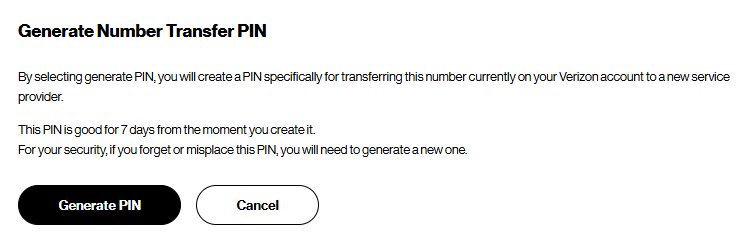
Get a Verizon Number Transfer PIN to port your number out
Moving a Verizon number to another carrier needs a Number Transfer PIN. You must sign in as the Account Owner or Account Manager on a standard monthly account.
- Sign in to the My Verizon app or website.
- Turn off Number Lock first: open the Security page, go to Number Lock, select Off for the number, enter the code Verizon sends, and select Save Changes.
- Open the Create Your Number Transfer PIN page.
- Select Generate PIN.
- Give the PIN and your Verizon account number to your new carrier, and tell it which lines to move.
- Submit the port with the new carrier within 7 days, before the PIN expires.
You can also dial #PORT from the phone you want to move and open the texted link, though this route is not always available. Customer service on 800-922-0204 and Verizon stores can issue the PIN too.
One PIN covers every line on the account. Business accounts with 10 or more lines call 1-800-922-0204.
Typical Verizon porting timelines
Verizon counts port time in business hours or business days, so a port started on Saturday evening can run into the next week.
| Number type | Usual time to port to Verizon | Port status is late after |
|---|---|---|
| Mobile number from another carrier | 4 to 24 business hours | 24 business hours |
| Landline number | 2 to 10 business days | 10 business days |
| Tracfone number | 0 minutes to 24 hours | 24 hours |
Verizon does not publish a timeline for ports away from Verizon. Ask the new carrier, which controls that request.
Verizon port status completed: how to confirm the switch
- Look for the Verizon text saying the switch is complete.
- Program or restart the new phone using the instructions in that text.
- Call the ported number from another phone and confirm the Verizon phone rings.
- Send yourself a text and confirm it arrives on the Verizon phone.
- Check that the old phone has lost service, which shows the old line has disconnected.
You do not need to cancel the old carrier. The old account disconnects automatically once the port completes.
Common reasons a Verizon port is delayed or rejected
Account information does not match
The account number, Number Transfer PIN or account holder details differ from the old carrier's records.
- Copy the account number exactly as it appears on your latest billing statement.
- Use the Number Transfer PIN, not the 4 to 6 digit account PIN.
- Generate a fresh Number Transfer PIN if the old one may have expired.
- Resubmit the details through the Verizon tracking link, chat or 800-922-0204.
Account status or carrier restrictions
The old line was cancelled, has a pending order, or has a port block such as Verizon Number Lock.
- Confirm the old line is still active; reactivate it if you cancelled it early.
- Clear or wait out any pending order on the old account.
- Turn off any number lock or port protection the old carrier offers.
- Ask the old carrier to confirm the phone and number are unlocked and eligible to move.
Number type, location or service conflicts
Some numbers cannot move because of geography, service area coverage, technology or line ownership.
- Check the number on the Verizon eligibility page at verizon.com/switch-to-verizon/check-status/.
- Confirm you own the line or are authorised on the account.
- Allow the longer landline window of 2 to 10 business days before treating the port as stuck.
- Contact Verizon support if the eligibility check fails, to see whether another option fits.
What to do if your Verizon port is stuck
Verizon port status pending past the normal window
A detail is missing or wrong, or the old carrier has not released the number.
- Count business hours, not clock hours, from when you submitted the port.
- Open the Verizon tracking link and check for a request to correct your details.
- Confirm the old service is still active and has no pending orders.
- Call 800-922-0204 or start a Verizon chat with your account number and PIN ready.
New Verizon phone makes calls but cannot receive them
This is normal while the port is in progress; incoming calls still reach the old carrier.
- Keep the old phone on so you do not miss calls.
- Wait for the Verizon completion text.
- Program or restart the phone using the texted instructions.
New Verizon phone does not work at all after porting from Spectrum or Xfinity
Numbers from Verizon resellers stay on the original device until the switch completes.
- Use the original device until Verizon texts that the switch is done.
- Program or power cycle the Verizon phone using the texted instructions.
- Contact Verizon support if the phone still has no service after the restart.
Port out to another carrier will not go through
Number Lock is on, the PIN expired, or the Verizon line was disconnected early.
- Turn off Number Lock on the Security page in My Verizon, or dial *611.
- Generate a new Number Transfer PIN if 7 days have passed.
- Reactivate the Verizon number if you disconnected it, then ask the new carrier to resubmit.
Verizon port status FAQ
How do I check my Verizon port status?
Open the tracking link Verizon texts after you start a transfer to Verizon. It shows the activation in real time. For a port away from Verizon, ask the new carrier, which submitted the request and holds its status.
How long does a Verizon number port usually take?
A mobile number usually ports to Verizon in 4 to 24 business hours. A landline takes 2 to 10 business days, and a Tracfone number takes from 0 minutes to 24 hours. Business hours exclude evenings and weekends.
Can I use my phone while my number is being ported to Verizon?
Yes. Your number stays active with your old carrier until the switch completes. The new Verizon line can make calls during the port but cannot receive them until the transfer is final.
What information do I need to port my number to Verizon?
You need the active number, your current carrier account number, a Number Transfer PIN, a security code and a different contact number. In a Verizon store, your most recent bill can replace the PIN.
Why is my Verizon port status pending?
A pending status means the transfer is still in progress between carriers. It is normal for up to 24 business hours on a mobile number. Past that, check your account number, PIN and that the old line is still active.
What should I do if my Verizon port is stuck or rejected?
Confirm the account number and Number Transfer PIN match the old carrier's records, and that the old line is active. Then contact Verizon on 800-922-0204 or through 24/7 chat to resubmit the details.
Does Verizon charge to port a number?
No. Verizon charges no fee to bring a number or to move one away. Your old carrier may still bill an early termination fee or a remaining device balance, and Verizon may recover promotional discounts.
How long is a Verizon Number Transfer PIN valid?
A Verizon Number Transfer PIN expires after 7 days. One PIN covers every line on the account, so tell the new carrier which lines to move. Generate a new PIN if the port is not submitted in time.
Bottom line: tracking a Verizon port status
Use the tracking link in Verizon's text to follow a port to Verizon, and keep the old line active until the completion text arrives. Most stuck ports come from a wrong account number, an expired or wrong PIN, or an old line cancelled too early, and all three are avoidable before you submit.





What is 5G? Everything you need to know about the next-generation network - Techdows
[…] you change carriers to get better 5G, you can port your existing number instead of starting […]