Facebook Watch Party was a shared viewing feature, and Facebook's Help Center no longer documents it: a search of the Help Center for "watch party" returns 50 articles, and none of them covers Watch Party.
For watching together today, Facebook's help pages describe Facebook Live in a group or event. This page explains what Watch Party was and how it worked, then shows how to run the same kind of shared viewing with Facebook Live on the web and in the app, including scheduling, requirements and fixes.
Is Facebook Watch Party still available?
Facebook does not document it any more. Its Help Center has no Watch Party article, and its current help on groups, videos and Live describes Facebook Live as the way to watch something together in real time.
To host a shared viewing in a group with the Facebook app for Android or iPhone, follow these steps.
- Open the Facebook app and go to your group.
- Tap Write something….
- Tap Live video.
- Tap Go live to start the broadcast for group members.
- Tap Finish when you want to end the live video.
Who can join depends on the group's privacy setting, so a private group keeps the session to its members.
Facebook watch party alternatives: which one to use
| Your situation | Use this | Why |
|---|---|---|
| Friends already share a Facebook group | Go live in the group | Only group members see it, and comments stay in one thread |
| You are organising a one-off viewing night | Go live from a Facebook event | Guests who responded to the event find the live video there |
| You want people to plan around a start time | Schedule the live video from a computer | Scheduling posts an announcement before the broadcast starts |
| You run a Page and want to reach one group | Go live as your Page and broadcast to a group | The Page appears as host while the audience is limited to the group |
| You want to show your screen or use a camera setup | Go live with streaming software such as OBS | Encoding software broadcasts your computer screen or external equipment |
| You only want Facebook videos on a TV | Cast reels from Facebook on a computer, or use the Facebook app | Facebook says service for the Facebook Watch TV app has ended |
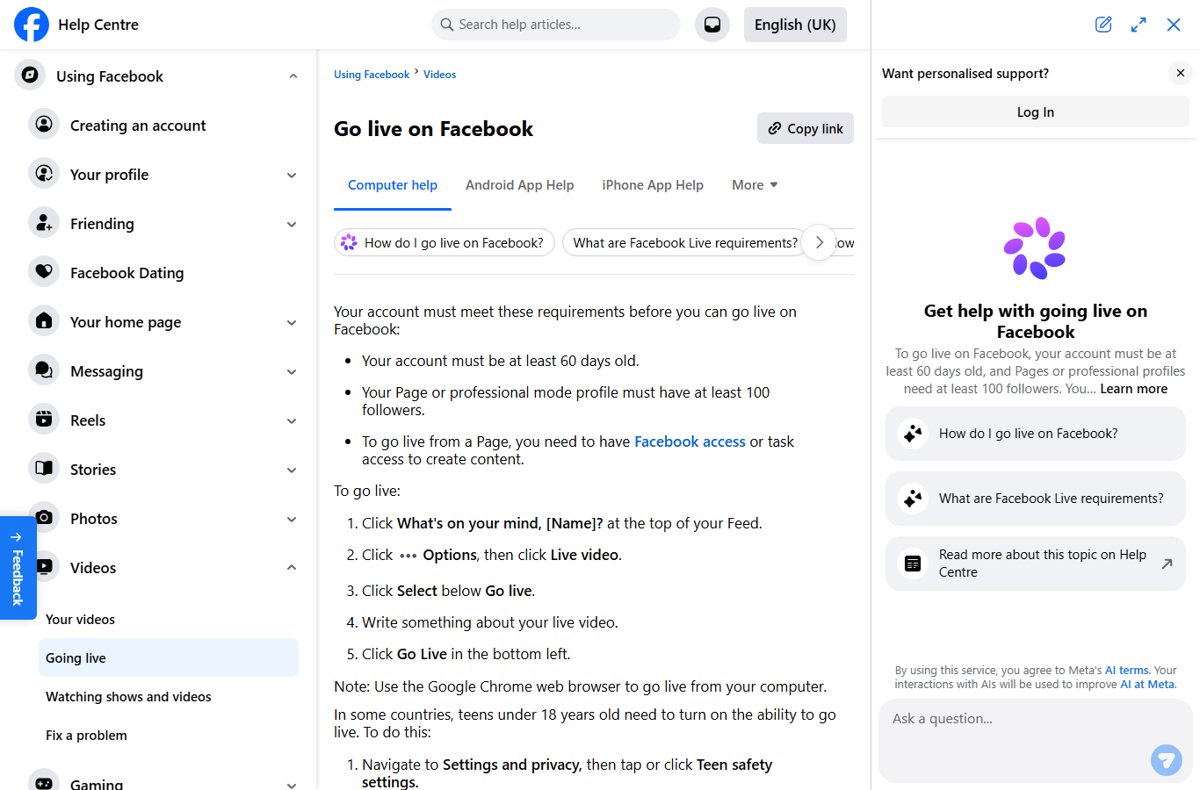
Facebook Live requirements for hosting a watch party
| Requirement | What Meta states |
|---|---|
| Account age | Your account must be at least 60 days old |
| Followers | A Page or professional mode profile needs at least 100 followers |
| Page role | Going live from a Page needs Facebook access or task access to create content |
| Browser | Use Google Chrome to go live from a computer |
| Teen accounts | In some countries, users under 18 must turn on Allow live video broadcasting; 13-15 year olds need a parent or guardian's permission |
| Length | A live video can run for up to eight hours |
| Policies | Every broadcast must follow Facebook's policies for Live |
Facebook watch party – web
On a computer, the live video starts from the same composer you use for posts. Open the group first if you want only its members to watch.
- Open facebook.com in Google Chrome and sign in.
- Click What's on your mind, [Name]? at the top of your Feed, or Write something… inside your group.
- Click Options, then click Live video.
- Click Select below Go live.
- Write a description so viewers know what you are watching together.
- Click Go Live in the bottom left.
Facebook watch party – app
The Android and iPhone apps let you go live from your Feed, a group or an event.
- In a group, tap Write something…, then tap Live video.
- In an event on Android, tap Write a post, then tap Go Live; on iPhone, tap Say something…, then tap Live video.
- From your own Feed, tap What's on your mind?, then tap Live video.
- Tap Menu in the bottom right to add features such as bring a friend, or tap Effects to add an effect.
- Tap Go live.
- Tap Finish to end the broadcast.
Schedule a Facebook Live watch party with streaming software
Scheduling a live video works from a computer. The Live Producer page also lets you broadcast your screen through encoding software such as Open Broadcaster Software or Streamlabs OBS.
- Go to facebook.com/live/create.
- In the left menu, click Choose where to post and pick your profile, Page or group.
- Click Go live, then choose Streaming software under Select a video source.
- Copy the Server URL and Stream key into your software's custom RTMP server settings.
- Add a title and description in Add post details.
- Use the Later scheduling option to set the date and time, or click Go Live Now to start immediately.
Never share your stream key. Anyone who has it can stream to your post.
How to check your Facebook Live watch party is working
- Look for the live preview on Facebook before you click Go Live; with streaming software, the preview appears once your software starts sending video.
- Open the group or event from a second account or device and confirm the live video shows at the top of the posts.
- Post a test comment and check that it appears in the live chat for viewers.
- After you end the broadcast, confirm the video remains as a post where it was shared so latecomers can replay it.
What is Facebook Watch Party?
| Question | Answer |
|---|---|
| What it was | A Facebook feature that let a host play videos for a group of people at the same time while they talked in a shared comment thread |
| Where it ran | Groups, Pages and personal profiles, on the web and in the Facebook app |
| Status today | Not documented: Facebook's Help Center has no Watch Party article, and a Help Center search for "watch party" returns none |
| Documented alternative | Facebook Live in a group, event, profile or Page |
| Related change | Separately, Facebook says service for the Facebook Watch app for TVs has ended |
Meta has not published a Help Center notice about Watch Party itself, so the feature descriptions on this page describe how it worked while it was offered rather than anything Facebook documents today.
How a Facebook Watch Party worked
Watch Party synced video that already existed on Facebook. Facebook Live, the option Facebook documents today, is a broadcast you create yourself.
| Stage | Watch Party (as it worked) | Facebook Live today |
|---|---|---|
| Starting | The host created a watch party post in a group or on a profile | The host taps Live video in a group, event, Page or profile |
| What viewers see | Videos already on Facebook, played in sync | Whatever the host's camera or streaming software sends |
| Talking | A shared comment thread beside the video | Live comments and reactions during the broadcast |
| Scheduling | Planned with a post or event | Scheduled from a computer, which posts an announcement in advance |
| Afterwards | The party ended with the host | The video stays as a post; Meta keeps live replays available for up to 30 days |
Features of a Facebook Watch Party
| Watch Party feature | Closest Facebook Live equivalent |
|---|---|
| Add multiple public, saved or live videos to one queue | No playlist; show content through streaming software or restart the broadcast for each segment |
| Invite multiple friends to join | Go live in a group or event so members and guests are notified where the video appears |
| Leave comments and reactions | Viewers react and comment during the live video, and the host can reply in chat |
| Share hosting with another person | Use bring a friend from the app's live Menu to add someone to your live video |
| Watch with a group | Choose the group in Choose where to post, or go live as your Page and broadcast to a group |
Fix Facebook Live watch party problems
Locked out of hosting: no Live video option
The account does not meet Facebook's Live requirements, or a teen account has live broadcasting turned off.
- Check that the account is at least 60 days old.
- For a Page or professional mode profile, confirm it has at least 100 followers.
- For a teen account, go to Settings and privacy > Teen safety settings > Who can interact with you and turn on Allow live video broadcasting.
Cannot go live from a computer
Facebook supports going live from a computer in Google Chrome.
- Open facebook.com in Google Chrome.
- Start the live video again from Options > Live video.
The watch party stopped after several hours
Facebook ends a live video when it reaches the eight-hour limit, with no grace period.
- Plan a break before the limit and end the broadcast.
- Tell viewers in the comments that you are restarting.
- Start a new live video in the same group or event.
Friends cannot find where to watch the watch party
Live videos appear where they were posted, so viewers outside that group or event do not see them.
- Confirm which group, event or Page you picked in Choose where to post.
- Ask viewers to join the group or respond to the event.
- After the broadcast, click or tap Share below the post to share the replay.
Facebook watch party FAQ
What is a watch party on Facebook?
A Facebook watch party was a shared viewing session where a host played videos for a group at the same time while everyone commented together. Facebook's Help Center no longer documents it; its help pages describe Facebook Live in a group or event for watching together.
How does a Facebook watch party work now?
It now works as a Facebook Live broadcast. The host goes live in a group, event, Page or profile, and viewers watch in real time while reacting and commenting. When it ends, the video stays as a post for replay.
How do I do a watch party on Facebook?
Open your group in the Facebook app, tap Write something…, tap Live video, then tap Go live. On a computer, use Google Chrome, click Write something… in the group, click Options, then Live video, and click Go Live.
Where can I watch the watch party?
Watch it in the group, event, Page or profile where the host posted the live video. Members of a private group must join the group first. After the broadcast, the video remains as a post in the same place.
Can I watch Facebook watch party replays?
Yes, for a broadcast made with Facebook Live. The video stays as a post where it was shared, and Meta says live videos are available for replay for up to 30 days. The host can download the video within that window to keep it.
Can I schedule a Facebook watch party?
Yes, by scheduling a live video from a computer. At facebook.com/live/create, choose where to post, set up the stream, then use the Later option to pick a date and time. Scheduling posts an announcement before the broadcast.
Can two people host a Facebook watch party together?
Facebook Live lets you add someone to your live video using the Facebook app. Start a live video, tap Menu in the bottom right, and use the bring a friend option to invite a co-host.
Can Facebook groups still hold watch parties?
Facebook's Help Center has no Watch Party article for groups, but members can go live in the group. Tap Write something…, then Live video, then Go live. The group's privacy setting decides who can join and watch.
Why am I locked from using watch party on Facebook?
Facebook no longer documents a way to start a Watch Party, so the option may not appear at all. If you cannot start a live video instead, check that your account is at least 60 days old and, for a Page or professional mode profile, has at least 100 followers.
Bottom line: what replaced Facebook Watch Party?
Use Facebook Live inside a group or event to host a watch party today, and schedule it from a computer when guests need a fixed start time. Facebook's Help Center no longer documents Watch Party, and Live is the Meta-documented way to gather people around one video with real-time comments and reactions on Facebook.