Techdows

Windows how-to guides, fixes and software downloads

  • Home
  • Settings and hardware

    • Printers
    • Sound and microphone
    • Wi-Fi and network
    • Bluetooth
    • Display and monitors
    • Drivers
    • Keyboard shortcuts and symbols

    Using Windows

    • File Explorer
    • Storage and disk space
    • Taskbar, Start and desktop
    • Apps and default programs
    • Accounts and sign-in
    • Copilot in Windows
    • Command Prompt and PowerShell

    Updates and fixes

    • Windows Update
    • Windows 11 26H2
    • Error codes and BSOD
    • Boot, BIOS and recovery
    • Security and Defender
    • Task Manager and performance
    • DLL and runtime errors

    Popular fixes

    • Get help in Windows 11
    • Connect a wireless printer
    • Re-pair Bluetooth earbuds for stereo sound
    • Cancel a stuck print job
    • Change default programs

    All Windows guides →

  • Browse by type

    • Web browsers
    • Office and productivity apps
    • PC games and launchers
    • Phone and media apps
    • Developer tools
    • Creative apps
    • CAD software
    • System utilities and drivers

    Popular downloads

    • GTA V for PC
    • YouTube app for PC
    • Google Meet for PC
    • Cisco Packet Tracer
    • TikTok for PC

    Windows tools

    • PC Health Check app
    • HEVC Video Extension
    • DirectX 12
    • Cinebench R23

    All download guides →

  • Browser guides

    • Microsoft Edge
    • Google Chrome
    • Firefox
    • Web browsers for PC

    Microsoft Edge

    • Fix WebView2 using too much memory
    • Internet Explorer mode in Edge
    • Manage Edge favorites
    • Set or remove Edge as default

    Chrome and Firefox

    • Make Chrome the default browser
    • Restore closed tabs
    • Change the default web browser

    All browser guides →

  • Office guides

    • Outlook
    • Excel
    • Word and PowerPoint
    • OneDrive
    • Install Microsoft 365

    Meetings and other tools

    • Teams, Zoom and Google Meet
    • Google Docs and Sheets
    • PDF tools

    Office apps

    • Office product key
    • Office Deployment Tool
    • What is OneDrive?
    • Turn off OneDrive in Windows 11

    Outlook and Teams

    • Outlook inbox view changed
    • Schedule an email in Outlook
    • Outlook dark mode
    • Teams breakout rooms

    All Office and productivity guides →

  • PHP security

    • PHP2Shell patch download
    • PHP critical RCE security update
    • CVE-2026-109618 fix
    • CVE-2026-109619 explained
    • Mitigations if you can't update

    Update PHP

    • Update PHP to the latest version
    • Check your PHP version
    • Update PHP on Ubuntu and Debian
    • Restart PHP-FPM

    Hosting and local servers

    • Update PHP in XAMPP
    • Change PHP version in cPanel
    • Update PHP in Laragon and WampServer
    • Update PHP Docker images
    • WordPress PHP version check

    PHP downloads

    • PHP 8.5.12 download
    • PHP 8.4.27 download
    • PHP 8.3.36 and 8.2.35 download
    • Download PHP for Windows

    PHP2Shell by platform

    • PHP 8.3 fix on Ubuntu 24.04
    • PHP 8.1 fix on Ubuntu 22.04
    • PHP 8.2 and 8.4 fix on Debian
    • Update PHP on IIS
    • Cloudflare PHP2Shell WAF rule

    All PHP guides →

  • Sections

    • Gaming
    • Apple
    • Android
    • Apps and services
    • Developer and IT

    Apple

    • iPhone tips and fixes
    • Reset and restore iPhone
    • iPad
    • Mac and macOS
    • Apple Account and iCloud
    • Apple devices on Windows

    Apps, Android and gaming

    • Gmail and Google account
    • YouTube
    • Social media accounts
    • Streaming TV
    • Android and Samsung Galaxy
    • PC gaming and Xbox
    • Roblox and Minecraft on PC

    Developer and IT

    • WSL and developer setup
    • Virtual machines
    • Group Policy and Intune
    • Windows Server
    • Website error codes
  • News
Home›Opera

Opera

202 articles

Opera browser coverage from Techdows: what is new in each Opera release, built-in features like the free VPN, workspaces and sidebar, customization tips, and fixes for common Opera issues on Windows and Mac.

News

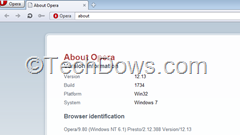
Opera 12.14 Coming to Fix 12.13 Crashes, RC Already Available

February 1, 2013 by Venkat Eswarlu Leave a Comment

Opera 12.14 RC has been released to fix endless crashes which happens when checking for updates in Opera 12.13, if you’re experiencing these install this RC version to stop them, expect  for Opera 12.14 final to come soon. When Opera
Posted in: News, Opera
News
Opera 12.13 stable

Opera 12.13 Security and Stability update released

January 1, 2013 by Venkat Eswarlu Leave a Comment
Opera 12.13 stable

Final version of Opera 12.13 has been released for Windows, Mac and Linux with stability improvements and security enhancements and is available for download from Opera website. Opera highlights two bug fixes as significant ones:one, Opera not able to load

Posted in: News, Opera
News

Opera 12.13 First Snapshot with Search Settings Protection and New Auto-Update Checker

January 1, 2013 by Venkat Eswarlu Leave a Comment

Opera software has released first snapshot version 12.13 of browser for the new year 2013 which prevents hijack of its search settings and applies new-auto update method. Opera team has done  optimization of preference and web storage file saves” which

Posted in: News, Opera
Opera

Try Opera Extensions for Context Menu and Screenshots

October 13, 2012 by Venkat Eswarlu

Few days back Opera 12.10 beta has been released with support for new standards, Operating Systems and Opera software has also released three new … [Read more…]

Posted in: Opera Tagged: context menu, Opera 12.10, Opera extensions
Opera
Opera theme creator: custom browser theme on a laptop screen

Make Your Own Theme for Opera with Opera Theme Creator

June 8, 2012 by Venkat Eswarlu
Opera theme creator: custom browser theme on a laptop screen

A few months back with Opera 12 alpha launch, Opera added support for themes, yes! You guessed right, they renamed Skins to Themes. You … [Read more…]

Posted in: Opera Tagged: Opera extensions
How to

How to Enable WebGL in Opera 44+ [Updated]

June 8, 2012 by Venkat Eswarlu

Today Opera has released first release candidate of Opera 12 and we’re assuming final to land soon by tomorrow or on Monday, we came … [Read more…]

Posted in: How to, Opera, Tips and Tricks Tagged: enable, hardware acceleration, Opera 12, WebGL
How to
Opera theme creator: custom browser theme on a laptop screen

How to disable hardware acceleration and WebGL in Opera 12

October 15, 2011 by Venkat Eswarlu
Opera theme creator: custom browser theme on a laptop screen

Opera 12 alpha arrived on October 13, 2011 with what Opera called a major technical milestone: full hardware acceleration with WebGL. It makes animations … [Read more…]

Posted in: How to, Opera, Tips and Tricks
Opera

Re-enable Disabled WebSockets in Opera 11

December 10, 2010 by Venkat Eswarlu

If you don’t know WebSockets are disabled by Opera and Firefox for their Opera 11 and Firefox 4 major releases as vulnerabilities found in … [Read more…]

Posted in: Opera, Tips and Tricks Tagged: Beta, disable, enable, Opera 11, WebSockets
Google Chrome

Tab Stack for Chrome moves tabs from left to right in Most Recently Used Order

November 23, 2010 by Venkat Eswarlu

We’ve just covered that Opera 11 beta got Stack tabs feature, I am looking for something similar for Google Chrome and found Tab Stack … [Read more…]

Posted in: Google Chrome, Opera Tagged: Chrome Extensions, Stack Tabs, Tab Stack, Tab Stack for Chrome, tabs
How to

How to disable Visual Mouse Gestures in Opera 11

November 23, 2010 by Venkat Eswarlu

Opera support mouse gestures, Opera 11 beta even better offers UI for these mouse gestures aka Visual mouse gestures, highlights mouse paths and helps … [Read more…]

Posted in: How to, Opera, Tips and Tricks Tagged: disable, disable visual mouse gestures, Opera 11, Opera 11 Beta, Visual mouse gestures
« Previous 1 … 16 17

More from Techdows

Change default printer in Windows - home printer with paper in the tray
Windows won't allow me to change Default printer
How to · 5 hours ago
iPhone USB tethering - iPhone connected to a USB cable
iPhone USB tethering not working on a Windows ARM PC? How to fix it
How to · 5 hours ago
iPhone Lightning or regular charger - iPhone with charging cable and adapter
iPhone Lightning or regular charger: which charger and cable your iPhone needs
How to · 5 hours ago
Vcruntime140_1.dll was not found in Microsoft Office - HP Windows laptop keyboard
Vcruntime140_1.dll was not found Microsoft Office
How to · 5 hours ago
Chromebook Recovery Utility recovery media - USB flash drive held in an open hand
How to use the Chromebook Recovery Utility to create recovery media
How to · 5 hours ago
That Microsoft account doesn't exist fix - Surface tablet on the Windows lock screen
That Microsoft account doesn’t exist [Fix]
How to · 4 hours ago
Change default sign-in option in Windows 11 - typing on a Windows laptop
How to change default sign in option Windows 11
How to · 4 hours ago
Dark mode in Google Sheets - screens glowing in a dark room
How to enable dark mode in Google Sheets
How to · 4 hours ago

© 2009–2026 Techdows · About · Contact · Privacy Policy

Copyright © 2026 Techdows.

Techdows WordPress Theme by Techdows