Data can be recovered after a factory reset from a backup or cloud account, but data erased from an iPhone, a modern Android phone or a Mac generally has no official way back.
A Windows PC is the exception worth trying, because a reset without Clean data can leave recoverable files on the drive. This guide covers each device, the recovery tools vendors document, and how to reset so nobody else can recover your data.
Can data be recovered after factory reset?
Find your device and reset type. The last column tells you where to go next.
| Device and reset | Can data on the device come back? | Where to go next |
|---|---|---|
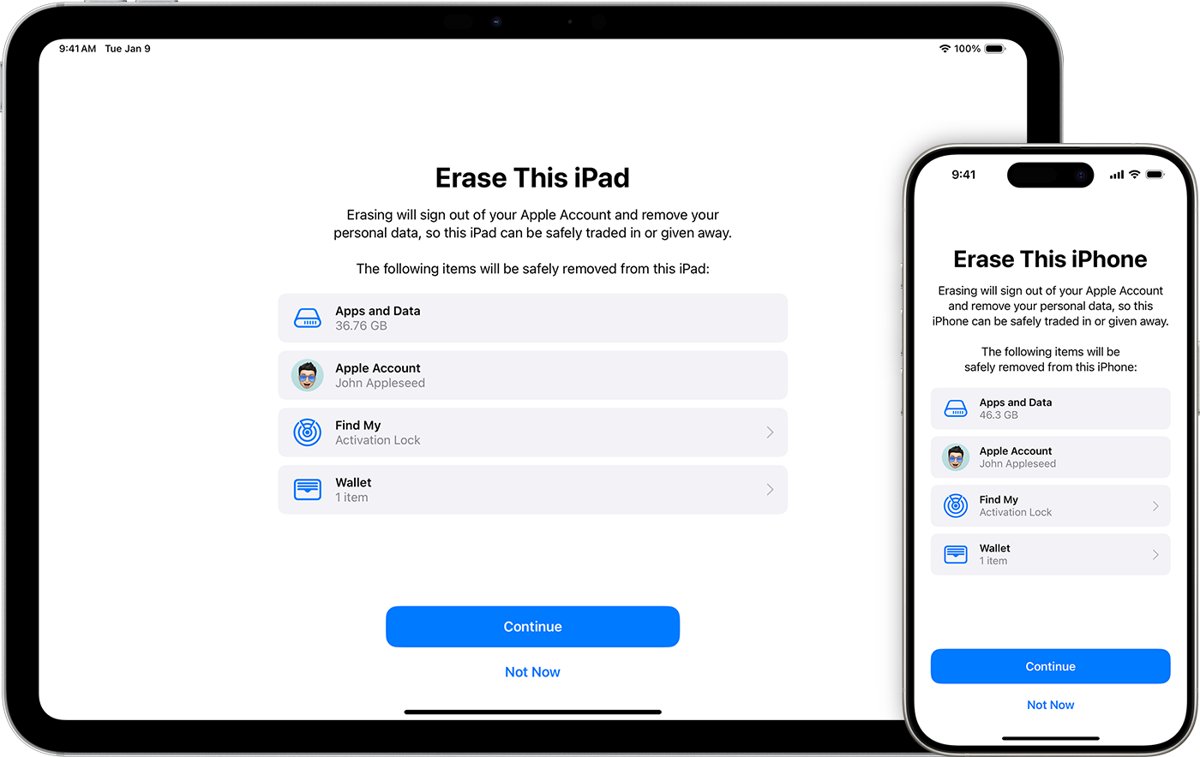
| iPhone or iPad, Erase All Content and Settings | No documented route. Apple says the device is completely erased. | Restore an iCloud or computer backup |
| Android phone, factory reset | No documented route. Google says the reset erases all your data. | Restore from your Google Account |
| Mac, Erase All Content and Settings | No documented route. Apple describes this erase as secure. | Restore a Time Machine backup |
| Windows PC, Keep my files | Personal files stay. Apps and settings are removed. | Check your folders, then reinstall apps |
| Windows PC, Remove everything without Clean data | Possibly, in part. Reinstalling Windows and later use can overwrite old data. | Try Windows Backup or File History first, then Windows File Recovery |
| Windows PC, Remove everything with Clean data | Far less likely. Microsoft says this makes recovery harder for other people. | Restore a backup |
What data survives a factory reset?
A reset clears the device, not your accounts. Check these places before you assume anything is lost.
| Data | What the reset does to it | How long it stays available |
|---|---|---|
| iCloud content | Apple says your content is not deleted from iCloud when you erase a device | Until you delete it |
| iCloud backups | Stay in iCloud after an erase | Kept 180 days after you turn off iCloud Backup for that device |
| Items deleted from iCloud Photos | Sit in Recently Deleted | 30 days |
| Files deleted from iCloud Drive | Sit in Recently Deleted, or on icloud.com/recovery | 30 days |
| Google Account data | Google says it can be restored after a reset | Depends on your account and backup |
| Google Photos | Already in the cloud, so no separate restore is needed | Depends on your account |
| OneDrive folders from Windows Backup | Remain in OneDrive under your Microsoft account | Available when you sign in |
How to recover factory reset data from a backup
A backup is the only recovery route that every vendor documents. Match what you have to a row.
| What you have | Use this | What you get back |
|---|---|---|
| iCloud Backup was on | From iCloud Backup during iPhone setup | Your device as of the backup date |
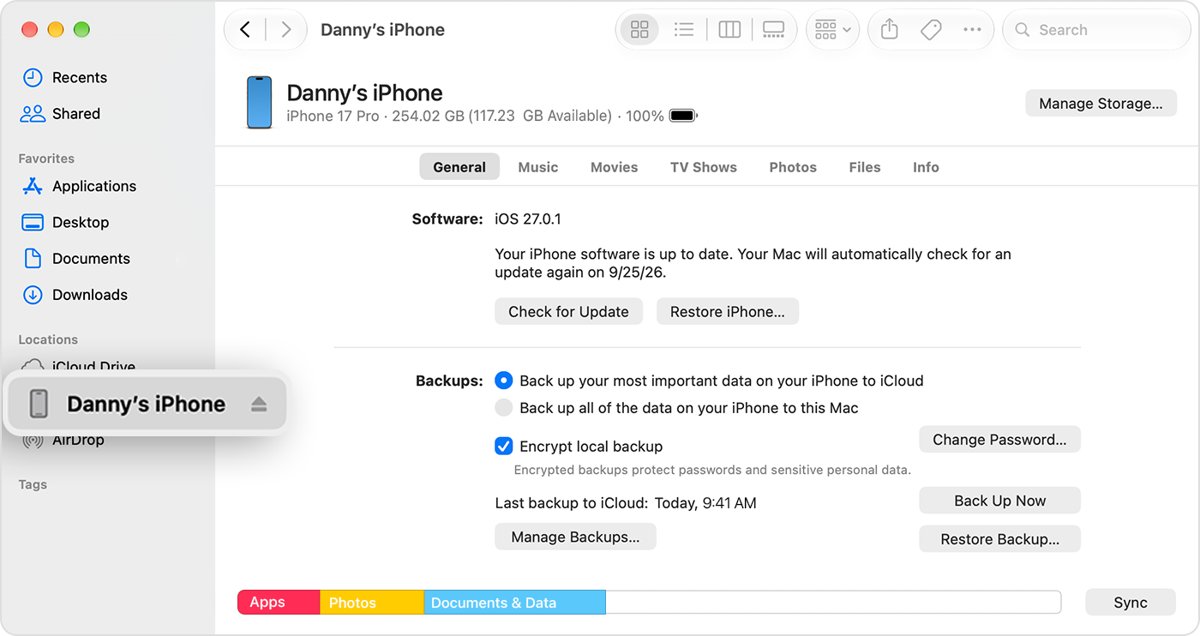
| A backup on your computer | Finder on a Mac, or the Apple Devices app on Windows | Your device as of the backup date |
| Android backup in your Google Account | The on-screen restore during phone setup | Apps, call history, contacts, settings and messages |
| Windows Backup on a Microsoft account | The restore offer during Windows setup, plus OneDrive | Folders, settings and app pins |
| File History on an external drive | Restore previous versions in File Explorer | Earlier versions of your files |
| Time Machine disk | Migration Assistant on the Mac | Files, accounts and apps you select |
| No backup, Windows PC | Windows File Recovery | Whatever has not been overwritten |
How to restore data after factory reset on iPhone
Pick your restore point before you start. If you already finished setup, you need to factory reset the iPhone again to reach the restore screen.
- Turn on the iPhone and wait for the Hello screen.
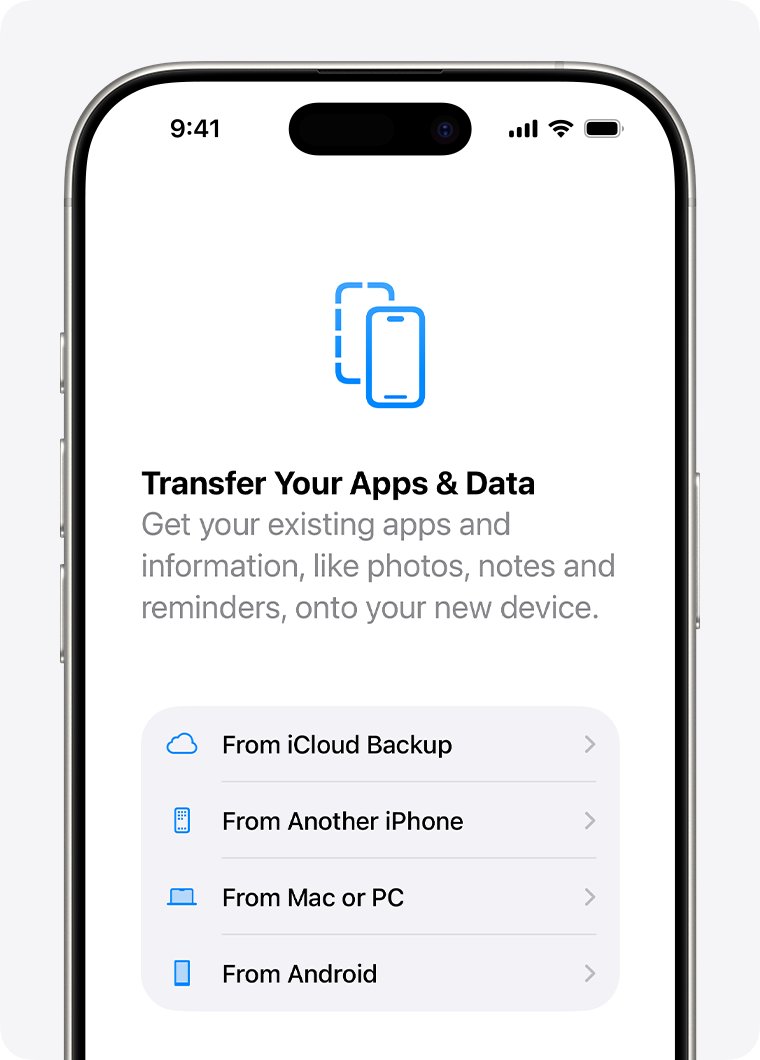
- Follow the onscreen setup until you reach Transfer Your Apps & Data.
- Tap From iCloud Backup.
- Sign in with your Apple Account.
- Compare the date and size of each backup, then choose the most recent one.
- Sign in again if asked, so your apps and purchases can restore.
- Stay on Wi-Fi and power until the progress bar finishes, then complete setup.
Anything created after the backup date does not return. Photos deleted before the reset may still be in iCloud, and you can recover deleted iPhone photos from Recently Deleted within 30 days.
How to restore iCloud data after factory reset
Files you deleted from iCloud in the last 30 days can come back without a device backup. Use a browser on any computer.
- Go to icloud.com/iclouddrive and sign in with your Apple Account.
- Select Recently Deleted in the sidebar.
- Select the files you want, then choose Recover or Recover All.
- For files from other apps, go to icloud.com/recovery and select Restore Files.
- Select the files, then select Restore Files again.
Recovered files return to their original folders. Avoid editing or deleting iCloud Drive files until the recovery finishes, because that can interrupt it.
Phone data recovery after factory reset on Android
Android restores from your Google Account during setup. Google says apps and their data are uninstalled by the reset, so the backup is what brings them back.
- Connect the phone to Wi-Fi or mobile data when setup starts.
- Sign in with the Google Account that held the backup.
- Enter your old screen lock when asked, because the restore requires that security info.
- Follow the on-screen restore steps and choose the backup.
- Open Google Photos to check your photos and videos, which need no separate restore.
- Leave the phone connected, because a full restore can take up to 24 hours.
Contacts saved only on the phone or SIM card do not sync on their own. Not every app backs up all its settings and data, so ask the app's developer about anything missing.
How to recover files after factory reset on Windows
Try your backups before any recovery tool. A backup returns complete files, while a recovery tool only finds what has not been overwritten.
- During Windows setup, sign in with the same personal Microsoft account you used for the backup.
- Accept the restore offer when Windows detects your backup, or select More options to pick another PC's backup.
- Sign in to OneDrive with that account to get your Desktop, Documents, Pictures, Videos and Music folders.
- If you used File History, connect its external drive or network location.
- In File Explorer, right-click the folder that held the file and select Restore previous versions.
- Select an earlier version, expand Restore, and choose Restore to… to avoid overwriting anything.
Work or school Microsoft accounts cannot use Windows Backup. Make a backup with one of these tools before you reset Windows 10 to factory settings again.
Recover data after factory reset with Windows File Recovery
Stop using the PC as soon as you notice the loss. Microsoft warns that freed space can be overwritten by any activity, especially on an SSD.
Install Windows File Recovery from the Microsoft Store, press the Windows key, search for it, and select Yes at the prompt. You can set up Windows File Recovery with more search filters once this first scan has run.
winfr C: E: /extensive /n *invoice*Scans drive C: in Extensive mode for files with invoice in the name and copies matches to drive E:. Replace invoice with a word from your file name. Enter Y when asked to continue, or press Ctrl + C to stop.
You should see: A folder named Recovery_<date and time> appears on drive E: with the files it found.
The source and destination drives must be different, so use a USB or external drive if the PC has one drive. Cloud storage and network shares are not supported.
How to retrieve data after factory reset on a Mac
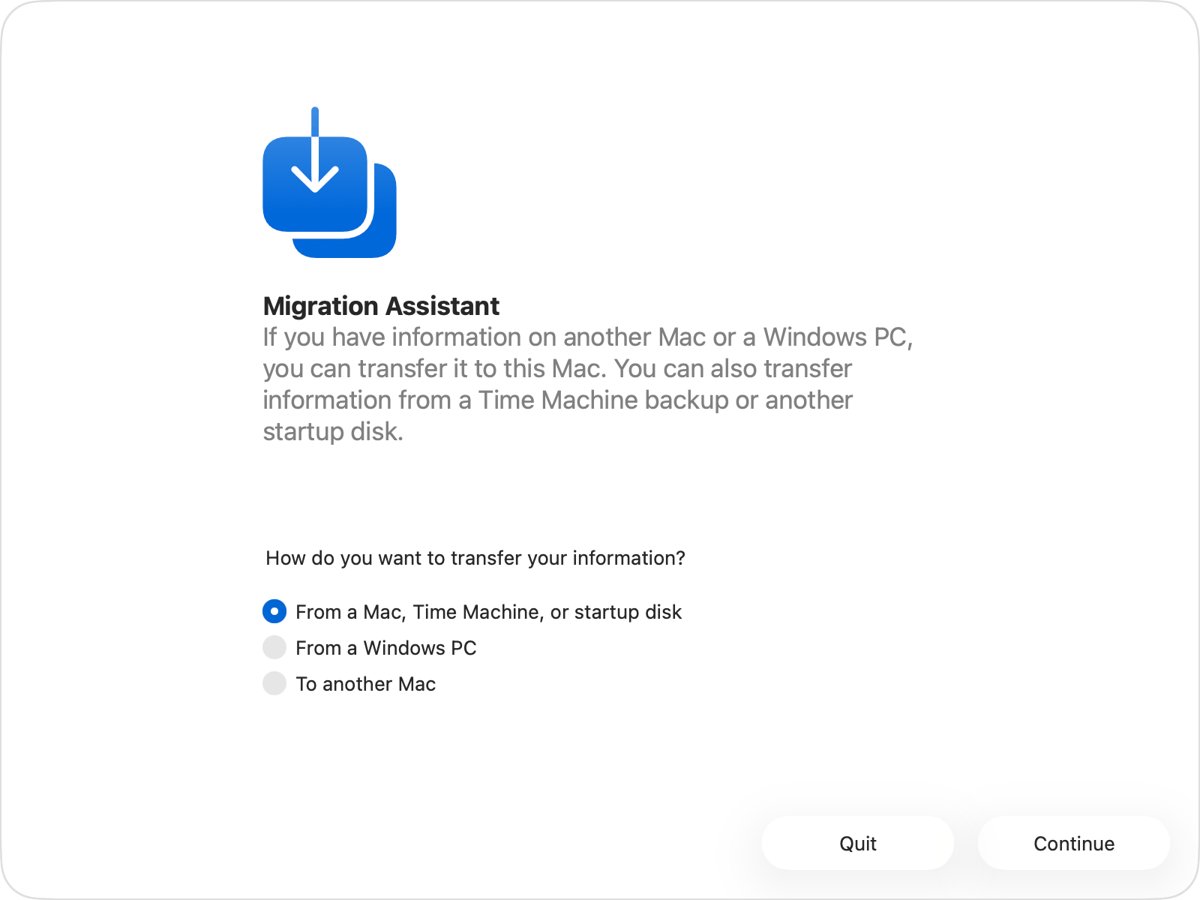
After you factory reset a Mac, it restores through Migration Assistant, either during setup or afterward from Applications > Utilities.
- Connect your Time Machine disk and turn it on.
- Open Migration Assistant and enter your administrator password if asked.
- Select the option to transfer from a Mac, Time Machine backup or startup disk, then click Continue.
- Select the backup disk, click Continue, and choose a backup.
- Wait for the size calculation, select what to transfer, and click Continue.
- Set a password for each administrator account you move, and note the temporary password for any standard account.
- When the transfer ends, quit Migration Assistant and log in to the migrated account.
Large transfers can take hours. If an account with the same name already exists, you can replace it or rename the old one to keep both.
How data recovery works
Recovery depends on whether the old data still exists on the drive and can still be read.
| What happened | What it means for the data | Effect on recovery |
|---|---|---|
| A file is deleted on a Windows drive | Its space is marked as free, and the data stays until reused | A recovery tool can find it until the space is reused |
| You keep using the PC | Normal activity creates files that reuse free space | Each session lowers the odds |
| The drive is an SSD | Microsoft flags SSDs as the case where overwriting is more likely | Run the scan as soon as possible, because the odds are lower |
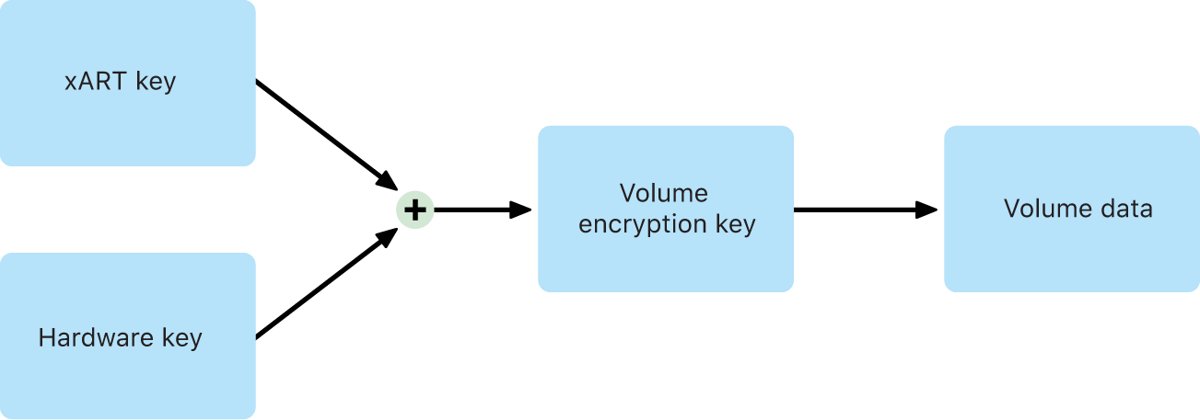
| An Android phone launched with Android 10 or later | File-based encryption is required, and user data is encrypted before it is written | Old data is unreadable without its keys |
| A Mac with Apple silicon or a T2 chip | Erasing a volume's media key makes it cryptographically inaccessible | Leftover data cannot be decrypted |
Can data be recovered after formatting?
Yes, in some cases. Microsoft lists formatting as a supported scenario for Windows File Recovery on NTFS drives.
| File system | Situation | Mode to use |
|---|---|---|
| NTFS | Deleted recently | Regular |
| NTFS | Deleted a while ago | Extensive |
| NTFS | After formatting a disk | Extensive |
| NTFS | Corrupted disk | Extensive |
| FAT or exFAT | Any | Extensive |
Start in Regular mode if you are unsure. Check the file system by right-clicking the drive in File Explorer and selecting Properties.
Can data be recovered from HDD or SSD after a reset?
The drive type decides which file system and mode apply. It also changes how soon old data is likely to be overwritten.
| Drive | Typical file system | What to expect |
|---|---|---|
| Internal HDD | NTFS | Regular or Extensive mode, until the space is reused |
| Internal SSD | NTFS | Same modes, with a higher chance the space has been overwritten |
| External hard drive | NTFS | Regular or Extensive mode, until the space is reused |
| USB drive over 4 GB | NTFS | Regular or Extensive mode |
| SD card or USB drive under 4 GB | FAT or exFAT | Extensive mode only |
| Cloud storage or network share | Not applicable | Not supported by Windows File Recovery |
How to factory reset so data cannot be recovered
Use the strongest erase each vendor offers before you sell or give away a device. Back up first, because these options are the ones hardest to undo.
| Device | Route | What Apple, Google or Microsoft says |
|---|---|---|
| Windows 11 | Settings > System > Recovery > Reset PC, then Remove everything with Clean data on | Makes recovery harder, but does not meet government and industry erasure standards |
| Windows 10 | Settings > Update & Security > Recovery > Get started, then Remove everything with Clean data on | Same as Windows 11 |
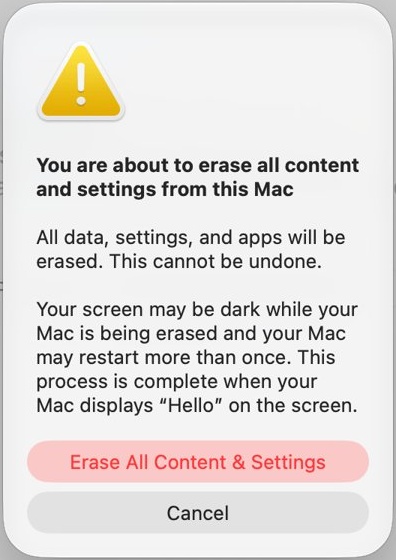
| iPhone or iPad | Settings > General > Transfer or Reset [device] > Erase All Content and Settings | The device is completely erased, and Activation Lock turns off |
| Android | The Settings app on most phones, with the exact path listed on your manufacturer's support site | Erases all your data, and the process can take up to an hour |
| Mac with Apple silicon or T2 | System Settings > General > Transfer or Reset > Erase All Content and Settings | Quickly and securely erases data, settings and apps. Needs macOS Monterey or later |
A reset does not clear your cloud accounts. Sign out of them first, and delete any cloud data you also want gone.
Where are recovered files stored?
Windows File Recovery never writes back to the drive it scans. Your results are on the destination drive you named in the command.
- Open File Explorer and select the destination drive.
- Open the folder named
Recovery_followed by the date and time of the scan. - Open a few recovered files to check they are intact.
- Copy the good files to their permanent location.
- Run the command again with a different file name filter if something is missing.
iPhone, Android and Mac restores put data back in its original apps and folders, so check those apps instead.
Data recovery after factory reset not working
No backup appears during iPhone setup
The backup is on a computer or another Apple Account, or iCloud Backup was off.
- On another Apple device, open Settings > your name > iCloud > iCloud Backup and look for the phone.
- On a Windows PC, open iCloud for Windows, click Storage, then select Backups.
- Check for a computer backup in
%USERPROFILE%\Apple\MobileSync\Backup. - Return to the From iCloud Backup screen and sign in with the Apple Account that owns the backup.
Android restore is missing or incomplete
The backup came from a newer Android version, or some apps do not support backup.
- Check that the phone runs the same Android version as the backup, or a later one.
- Allow up to 24 hours on Wi-Fi for the restore to finish.
- Open Settings > Google services > Backup and review Backup details.
- Ask the app's developer about data that was not restored.
Windows does not offer to restore a backup
Windows Backup is tied to the personal Microsoft account that made it.
- Sign in with the same Microsoft account you used for the backup.
- Select More options if the PC offers a different backup.
- Sign in to OneDrive to retrieve the backed-up folders directly.
Windows File Recovery finds nothing
The free space has been overwritten, or the wrong mode was used.
- Run the scan again in Extensive mode if you used Regular mode.
- Use a wider filter, such as part of a file name.
- Avoid using the PC between attempts, so no more space gets reused.
Factory reset data recovery FAQ
Can we recover data after factory reset without a backup?
Only on some Windows PCs, and only for files that have not been overwritten. Apple and Google document no way to recover erased on-device data without a backup, so a phone with no backup usually stays empty.
After reset, can phone data be recovered by someone else?
It is very unlikely on current phones. Apple says an erased iPhone is completely erased, and Android devices launched with Android 10 or later must use file-based encryption, so leftover data is unreadable without its keys.
Can data be retrieved after factory reset if iCloud Backup was on?
Yes. Erase does not delete your iCloud content, so choose From iCloud Backup during setup. If you turned off iCloud Backup for that device, Apple keeps the stored backup for 180 days before deleting it.
Can data be recovered after formatting a USB drive?
Yes, if nothing new has overwritten the data. Windows File Recovery supports USB drives, and it recommends Extensive mode after formatting an NTFS disk and for every FAT or exFAT drive. Save results to a different drive.
How do I recover data after factory reset on a laptop?
Restore Windows Backup during setup with the same Microsoft account, sign in to OneDrive, then check File History on an external drive. If none of those exist, run Windows File Recovery in Extensive mode and save to a USB drive.
Can data be recovered from HDD after Remove everything?
Possibly, if Clean data was off and the space has not been reused. Microsoft says Clean data makes recovery harder for other people. Windows File Recovery supports NTFS internal drives in Regular and Extensive modes.
Where are recovered files stored by Windows File Recovery?
They go to a folder named Recovery_ plus the date and time on the destination drive. The destination must be a different drive from the source, so a USB or external drive works if your PC has one drive.
Does factory reset delete my Google Account data?
No. A factory reset erases the data on the phone, but data stored in your Google Account can be restored. Apps and their data are uninstalled, so they return only if they were included in your backup.