Sign each Roblox account in on its own device to run multiple accounts at once, because Roblox publishes no supported way to run two game clients on one PC.
The one-PC routes below are browsers, the Roblox app, virtual machines, Windows Sandbox and Roblox Studio, each with the limit Roblox or Microsoft documents for it. You also get Account Switcher steps, Error Code 264 fixes and the rules that can put an account at risk.
How to play two Roblox accounts at the same time
A second device is the simplest setup. It needs no extra tools, and Roblox's documented block applies to one account on two devices, not two accounts on two devices.
- Choose a second device that Roblox supports: a computer, an iPhone or iPad on iOS or iPadOS 14 or later, or an Android device on Android 8.0 or later.
- Install Roblox on the second computer, or get the Roblox app from the phone's app store.
- Sign in to your first account on the first device.
- Sign in to your second account on the second device.
- Open the experience you want on each device and select the green Play button.
Keep one account on each device. If the same account joins the same experience from two devices at once, Roblox shows Error Code 264.
Best way to run multiple Roblox accounts on one PC
| Your situation | Use this | The limit |
|---|---|---|
| You own a second device | One account per device | Each device needs a different account |
| You only need to change accounts quickly | Account Switcher | Up to five accounts, one device, age 13 or older |
| You want two accounts signed in on the website | Method 1 or Method 2 | Play opens the Roblox client, and Roblox does not document a second client |
| You have the Microsoft Store app and a browser | Method 3 | Roblox does not document the pair running together |
| You are testing your own experience | Method 7 | Simulated clients inside Studio, up to eight |
| You want a separate copy of Windows | Method 5 or Method 6 | Roblox says it is not supported on virtual machines |
| You found a third-party launcher | Read Method 4 first | Roblox does not publish it, and your login data is at stake |
Why run multiple Roblox accounts?
Most reasons are ordinary, and Roblox's Community Standards set no general limit on how many accounts one person holds. The last two rows are the reasons Roblox prohibits.
| Reason | Setup that fits | Roblox rule to know |
|---|---|---|
| Two people at home want to play together | One account per device | Every player signs in to their own account |
| You keep a personal account and a creator account | Account Switcher | Accounts with parent privileges cannot use it |
| You want to see your own experience with several players | Roblox Studio Server & Clients test | Runs on your own Studio session |
| You want to avoid a ban on another account | None | Prohibited by the Community Standards |
| You want a referral reward from yourself | None | Self-referral through multiple accounts is prohibited, and Roblox can suspend the accounts |
Requirements before you start
These are Roblox's published minimums for one copy of the client. Treat them as a floor when you plan to run a second one.
| Item | What Roblox asks for |
|---|---|
| Accounts | A separate Roblox account for each player, with its own password |
| Windows | 64-bit Windows 10 or Windows 11 |
| Mac | macOS 10.13 (High Sierra) or later |
| Linux | Not supported |
| Mobile | iOS or iPadOS 14 or later, Android 8.0 or later |
| Browsers on Windows | Chrome, Firefox, Microsoft Edge |
| Browsers on Mac | Chrome, Firefox, Safari |
| Hardware | DirectX 10 feature level, a 2005 or newer CPU at 1.6 GHz or better, at least 1 GB of memory, 300 MB of storage |
| Internet | At least 4-8 Mb/s for a single-use household |
You can set up Roblox on PC, including the install and account settings, before you add a second account.
How to switch Roblox accounts with Account Switcher
Account Switcher is the multi-account tool Roblox documents in its help center. It swaps accounts on the web rather than running them side by side, and it is the safest choice when you do not need both online at once.
- Sign in to roblox.com and open the Home page.
- Select the gear icon at the top right.
- Select Switch Account.
- Follow the prompts to add another account, up to five in total.
- Select the account you want to use.
Roblox limits this feature to users 13 or older and to accounts without parent privileges. The list stays on your device, so it does not show on your other devices or to other users.
If you break the Terms of Use, Roblox says it may act on multiple accounts it determines belong to the same user.
Method 1: Use different browsers (easiest method)
Each browser keeps its own sign-in, so Chrome can hold one account and Microsoft Edge another. Games still launch in the Roblox client, not in the browser tab, so this method settles the website session and leaves the second game window to the client.
- Open your first browser and sign in to roblox.com with your first account.
- Open a different supported browser and sign in with your second account.
- In the first browser, open an experience and select the green Play button.
- Select Roblox if a pop-up asks you to choose a program.
- Repeat the Play step in the second browser.
- Check that a second game window opened, and move the account to a second device if it did not.
Roblox does not document running two client windows on one PC. Treat a second window as unsupported behavior that an update can change.
Method 2: Browser Incognito + normal mode
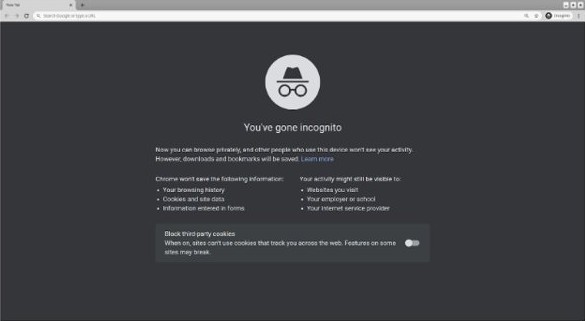
An Incognito window gives you a second sign-in inside the same browser, with no second browser to install. Chrome shares one session across all open Incognito windows, so this adds one extra account, not several.
- Sign in to roblox.com with your first account in a normal Chrome window.
- Press Ctrl + Shift + N on Windows or Command + Shift + N on Mac to open an Incognito window.
- Go to roblox.com in that window and sign in with your second account.
- Open an experience in each window and select Play.
- Close every Incognito window when you finish, which ends that session and removes its cookies.
Chrome removes the Incognito session's cookies when it ends, so you sign in again next time. The same client limit from Method 1 applies once you select Play.
Method 3: Roblox app + browser (recommended)
This route needs no virtual machine and no third-party software, which is why it is the one to try first on a single Windows PC. It pairs the Roblox – Windows app from the Microsoft Store with a browser session.
- Open the Microsoft Store and install Roblox – Windows, which has a blue icon.
- Open the app and sign in with your first account.
- Join your experience in the app.
- Open a supported browser, go to roblox.com and sign in with your second account.
- Open the experience in the browser and select the green Play button.
- Check that both game windows stay open, and use a second device if one of them closes.
Roblox says the Store app replaces the older download and that the older app will eventually stop working. Roblox does not state that the app and a browser launch can run together, so this can change with an update. Keep Roblox updated either way.
Method 4: Use Roblox Account Manager (advanced users)
Roblox Account Manager is a third-party tool, not a Roblox product, and no Roblox help page documents it. Account Switcher is the account manager Roblox ships itself, so start there. Check any outside launcher against these rules before you trust it with an account.
| Check | What Roblox says | What to do |
|---|---|---|
| It asks for your password or browser cookie | Never give out your password, browser cookies, 2SV security codes or backup codes | Do not enter them |
| It automates play or actions | Bots or automation programmed to run disruptive tasks are prohibited | Do not run it on an account you care about |
| It changes the Roblox client | The Terms of Use bar altering, modifying or circumventing any part of the service | Do not use it |
| It comes as a downloaded program | Only get software from trusted company sources | Skip it if the publisher is not one you can verify |
| You want to stop using one | Roblox lets you review sessions under Security in Settings | Select Log Out of All Other Sessions and change your password |
Method 5: Use virtual machines (most powerful method)
A virtual machine gives the second account a full, separate copy of an operating system, which makes it the most isolated option here. It is also unsupported: Roblox's help center states that Roblox is not supported on virtual machines or cloud-based computers.
Hyper-V is included in Windows 11 Pro, Enterprise and Education, and VirtualBox is a separate option. The steps below use VirtualBox.
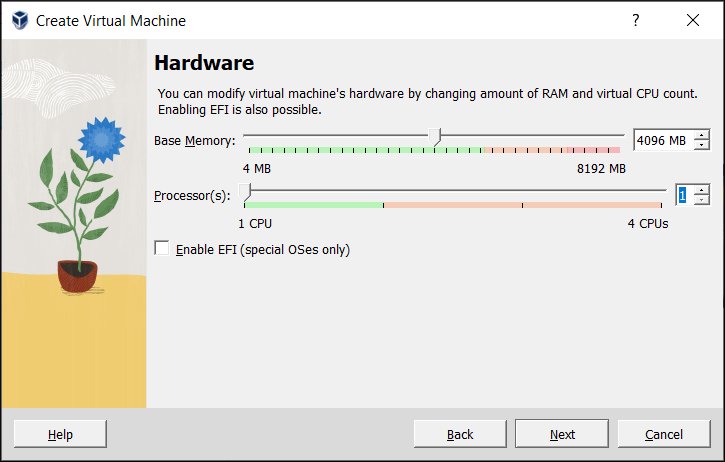
- Select New in VirtualBox Manager to open the Create Virtual Machine wizard.
- On the Name and Operating System page, enter a name, choose the OS type and version, and select your ISO image.
- On the Hardware page, set the base memory and number of processors.
- On the Virtual Hard Disk page, create a new disk.
- Review the Summary page and select Finish.
- Start the virtual machine and follow the onscreen instructions to install the operating system.
- Inside it, sign in to roblox.com with your second account and select Play.
If Roblox refuses to start inside the virtual machine, Roblox offers no supported fix. Move that account to a physical device instead.
Method 6: Windows Sandbox (Windows 11 Pro only)
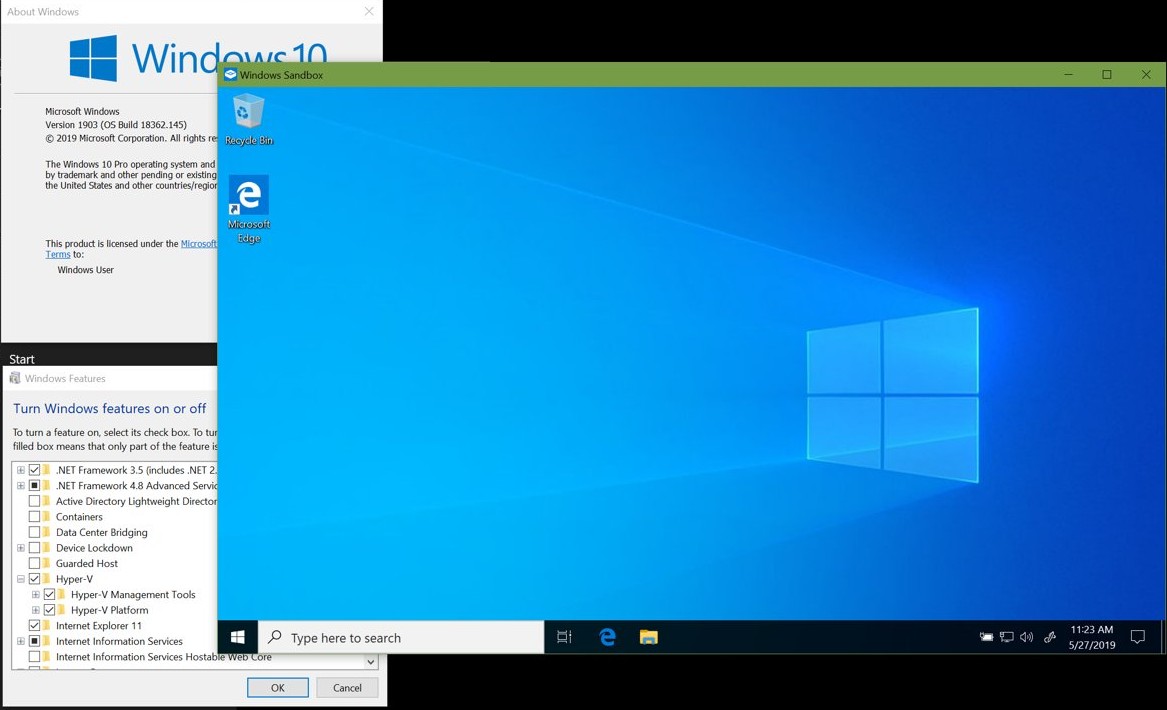
Windows Sandbox is a disposable virtual machine built into Windows, so the Roblox limit from Method 5 applies here too. Microsoft lists support on Pro, Enterprise, Pro Education/SE and Education editions, including Windows 10 version 1903 or later, and not on Windows Home.
It needs virtualization enabled in BIOS, at least 4 GB of RAM (8 GB recommended), 1 GB of free disk space and two CPU cores.
- Type Turn Windows Features on or off in the taskbar search bar and open it.
- Select Windows Sandbox, then select OK.
- Restart the computer if Windows prompts you.
- Select Windows Sandbox on the Start menu.
- Open a browser inside the sandbox, sign in to roblox.com with your second account and select Play.
Host-installed software is not available inside the sandbox, so Roblox has to install there each time. Closing the window deletes all software, files and state, and Windows Sandbox does not allow multiple instances at once.
Method 7: Roblox Studio Play Test (for developers)
Use this to see how players interact in an experience you are building. It opens simulated sessions inside Studio, so it tests your project and does not put your other accounts into a live game.
Roblox Studio is free on Windows and Mac. It needs at least Windows 10 or macOS 10.14 and 3 GB of RAM, with 8 GB recommended.
- Open your experience in Roblox Studio.
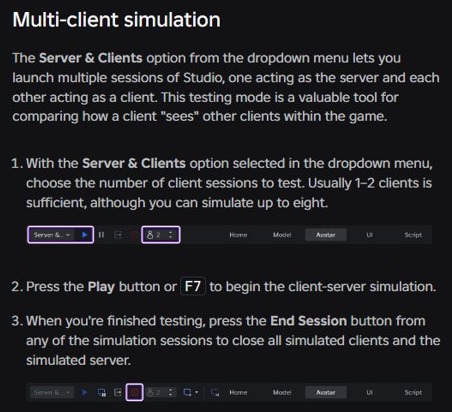
- Select Server & Clients in the testing modes dropdown.
- Choose the number of client sessions, up to eight.
- Press Play or F7 to start the simulation.
- Press End Session in any session to close all simulated clients and the simulated server.
Roblox says one or two clients are usually enough. Each client opens as its own Studio session, so compare what one client sees of another side by side.
How to see where your Roblox account is logged in
This list shows which devices hold a live session for an account, so you can spot a device that should not be there.
- Sign in to the account you want to check.
- Select the gear icon at the upper right in a browser, or the three-dot More icon in the mobile app, and open Settings.
- Open the Security tab.
- Scroll to Where you're logged in.
- Select a session to see its device, location and last active time.
- Select Log out of session to end one, or Log Out of All Other Sessions to end the rest.
Sessions marked Unknown are usually older, inactive ones. Repeat these steps for each account you run.
Roblox multiple accounts not working
Roblox Error Code 264: same account launched experience from different devices
One account is trying to join the same experience from two devices at the same time.
- Close Roblox on the device you are not using, or end that session under Where you're logged in.
- Force close the app and restart the device.
- Check that the device's date and time are correct.
- Try a different internet connection.
- Reinstall Roblox if the error returns. On Windows, Roblox also tells you to delete the leftover Roblox folder in
AppData\Localafter uninstalling.
Second Roblox window does not open on one PC
Roblox documents no supported way to run two clients on one PC, and an update can change what the client allows.
- Close both game windows and start again with Method 3.
- Move the second account to a phone, tablet or second computer if the window still does not open.
Roblox will not run in a virtual machine or Windows Sandbox
Roblox lists virtual machines and cloud-based computers as unsupported.
- Stop troubleshooting inside the virtual machine, since Roblox offers no fix for an unsupported setup.
- Run the account on a physical computer or mobile device instead.
Switch Account is missing from Roblox settings
Account Switcher works on the web, for users 13 or older, and not for accounts with parent privileges.
- Sign in at roblox.com in a browser and select the gear icon at the top right on Home.
- Sign in to the other account directly in a second browser if the option is still missing.
Roblox website will not sign in to the second account
A captcha that fails to load or an inaccurate computer clock can stop a browser login, according to Roblox's sign-in help.
- Check the computer's date and time.
- Allow
.arkoselabs.comand.funcaptcha.comin any browser blocker you use. - Reset the Roblox password if you no longer know it.
Performance & safety tips
Running more than one account multiplies both the load on your connection and the number of logins you have to protect.
| Tip | Why it matters |
|---|---|
| Use a wired connection | Roblox suggests this to rule out wireless problems, and two clients share one link |
| Remove ad blockers from the browser you launch from | Roblox says they can stop experiences from loading |
| Allow Roblox through your firewall and router | Roblox needs UDP ports 49152-65535 open |
| Give every account a unique password and 2-Step Verification | Roblox recommends both, and an authenticator app is its preferred 2SV option |
| Log out on shared computers | An open session on a shared PC gives the next user your account |
| Never use a second account to dodge a ban | The Community Standards prohibit it, so check your Roblox ban history and appeal instead |
| Avoid exploits and disruptive bots | Both are prohibited, and severe violations can end an account without warning |
Roblox multiple accounts FAQ
Is running multiple Roblox accounts allowed?
Yes, holding more than one account is allowed. Roblox offers Account Switcher for people with several accounts, and its Community Standards set no general limit. What Roblox prohibits is using an account to avoid enforcement, exploiting, disruptive automation and self-referral.
Can I run more than 3 accounts?
Yes, but the route sets the limit. Account Switcher holds up to five accounts on one device, one at a time. Running them at once takes one device per account, and Roblox Studio simulates up to eight clients for testing only.
Will Roblox ban me?
Having several accounts is not on the list of prohibited behavior, so that alone is not the risk. Breaking the Terms of Use is. Roblox says it may then act on multiple accounts it determines belong to the same user.
Can you use the same Roblox account on two devices at once?
Not in the same experience. Roblox shows Error Code 264 when one account tries to join the same game from different devices at the same time. Close Roblox on one device, or use a different account there.
Does Roblox work on a virtual machine?
No, not officially. Roblox's help center says Roblox is not supported on virtual machines or cloud-based computers. Roblox offers no supported fix if it fails there, so a physical device is the reliable choice for a second account.
Does Windows Sandbox work on Windows 11 Home?
No. Microsoft says Windows Sandbox is not supported on Windows Home. It runs on Pro, Enterprise, Pro Education/SE and Education editions, and it deletes everything when you close it, so you reinstall Roblox on every launch.
Is Roblox Account Manager safe?
Roblox does not publish or document it, so no Roblox page vouches for it. Roblox tells users never to give out passwords or browser cookies, and warns against software from unknown sources. Account Switcher is the built-in alternative for changing accounts.
How many clients can Roblox Studio test at once?
Up to eight. Select Server & Clients in Studio's testing modes dropdown, choose the number of clients and press Play or F7. Roblox says one or two clients are usually enough, and these sessions are simulated tests, not live play.